1. Introducció
This manual provides detailed instructions for the installation, operation, and maintenance of your UCOCARE 2.5K Baby Monitor, Model OB-2K01. This device is designed to provide reliable indoor surveillance for monitoring babies, pets, or elderly family members, offering advanced features such as high-resolution video, motion tracking, and environmental sensing.
2. Informació de seguretat
Si us plau, llegiu i comprengui totes les instruccions de seguretat abans d'utilitzar aquest producte. Si no segueix aquestes instruccions, es poden produir descàrregues elèctriques, incendis o altres perills.
- Seguretat elèctrica: Use only the provided power adapter. Do not expose the device to water or moisture. Ensure the power cable is not damaged or pinched.
- Col·locació: Keep the camera and its power cord out of reach of children and pets to prevent strangulation hazards. Do not place the camera near heat sources or in direct sunlight.
- Ventilació: Ensure adequate ventilation around the camera to prevent overheating. Do not cover the device.
- Neteja: Desconnecteu l'alimentació abans de netejar. Feu servir un drap sec i suau. No utilitzeu netejadors líquids ni en aerosol.
3. Contingut del paquet
Verifiqueu que tots els elements siguin presents al vostre paquet:
- 1 x UCOCARE Baby Camera
- 1 x adaptador de corrent
- 1 x Set of Screws and Installation Tools
- 1 x Manual d'usuari
- 1 x 32GB Micro SD Card (pre-installed or included separately)
4. Producte acabatview
The UCOCARE 2.5K Baby Monitor is equipped with advanced features for comprehensive monitoring. Key components include the camera lens, microphone, speaker, temperature/humidity sensor, and a Micro SD card slot.

Image: UCOCARE 2.5K Baby Monitor, highlighting 5G connectivity, 2.5K resolution, and included 32GB SD card.
Característiques principals:
- 2.5K Super HD Resolution: Ofereix vídeo clar i detallat.
- WiFi de doble banda: Supports both 2.4GHz and 5GHz networks for flexible connectivity.
- Panoràmica/Inclinació/Zoom: 355° horizontal rotation, 120° vertical tilt, and 4x digital zoom for full room coverage.
- Visió nocturna: Delivers clear images in low-light conditions.
- Àudio bidireccional: Allows real-time communication through the camera.
- Cry and Sound Detection: Sends instant alerts upon detecting specific sounds.
- Human Detection & Auto-Tracking: Identifies human presence and follows movement.
- Sensor de temperatura i humitat: Monitors the environment for optimal comfort.
- Cançons de bressol: 14 pre-programmed lullabies to soothe.
- Emmagatzematge local: Includes a 32GB Micro SD card for video recording without subscription.
- Emmagatzematge al núvol: Optional cloud service for backup.
- Integració de la llar intel·ligent: Compatible amb Google Assistant i Amazon Alexa.
5. Configuració
5.1 Engegar el dispositiu
- Connecteu l'adaptador de corrent al port d'entrada d'alimentació de la càmera.
- Plug the adapter into a standard electrical outlet. The camera will power on and initiate its startup sequence.
5.2 Instal·lació de l'aplicació i creació del compte
- Download the UCOCARE mobile application from your device's app store (iOS or Android).
- Obre l'aplicació i segueix les instruccions que apareixen a la pantalla per crear un compte nou o iniciar la sessió si ja en tens un.
5.3 Connexió a Wi-Fi
The camera supports dual-band Wi-Fi (2.4GHz and 5GHz) for flexible network integration.
- In the UCOCARE app, tap 'Add Device' or the '+' icon.
- Seleccioneu el model de la càmera de la llista.
- Follow the app's instructions to connect the camera to your Wi-Fi network. This typically involves scanning a QR code displayed on your phone with the camera, or entering your Wi-Fi credentials.
- Ensure your smartphone is connected to the same Wi-Fi network you intend to connect the camera to during the setup process.

Image: Illustration of the camera's dual-band WiFi capability, supporting both 5GHz and 2.4GHz networks.
5.4 Muntatge de la càmera
The camera can be mounted in various ways to suit your monitoring needs:
- Muntatge en superfície: Col·loqueu la càmera sobre una superfície plana com una taula o prestatge.
- Muntatge en paret: Use the included screws and tools to secure the camera to a wall.
- Muntatge al sostre: Use the included screws and tools to secure the camera to the ceiling.
Ensure the mounting location provides a clear view of the area you wish to monitor and is within range of your Wi-Fi signal.

Image: Demonstrates different installation methods for the camera, including table, wall, and ceiling mounts.
6. Instruccions de funcionament
6.1 Viu View i control de càmera
Once connected, open the UCOCARE app to access the live video feed. You can:
- Panorama/inclinació: Fes lliscar el dit en directe view screen to remotely adjust the camera's horizontal (355°) and vertical (120°) angles.
- Zoom: Pinch to zoom in on the live feed (4x digital zoom).
- Àudio bidireccional: Toca la icona del micròfon per parlar a través de l'altaveu de la càmera. Toca la icona de l'altaveu per escoltar l'àudio del micròfon de la càmera.
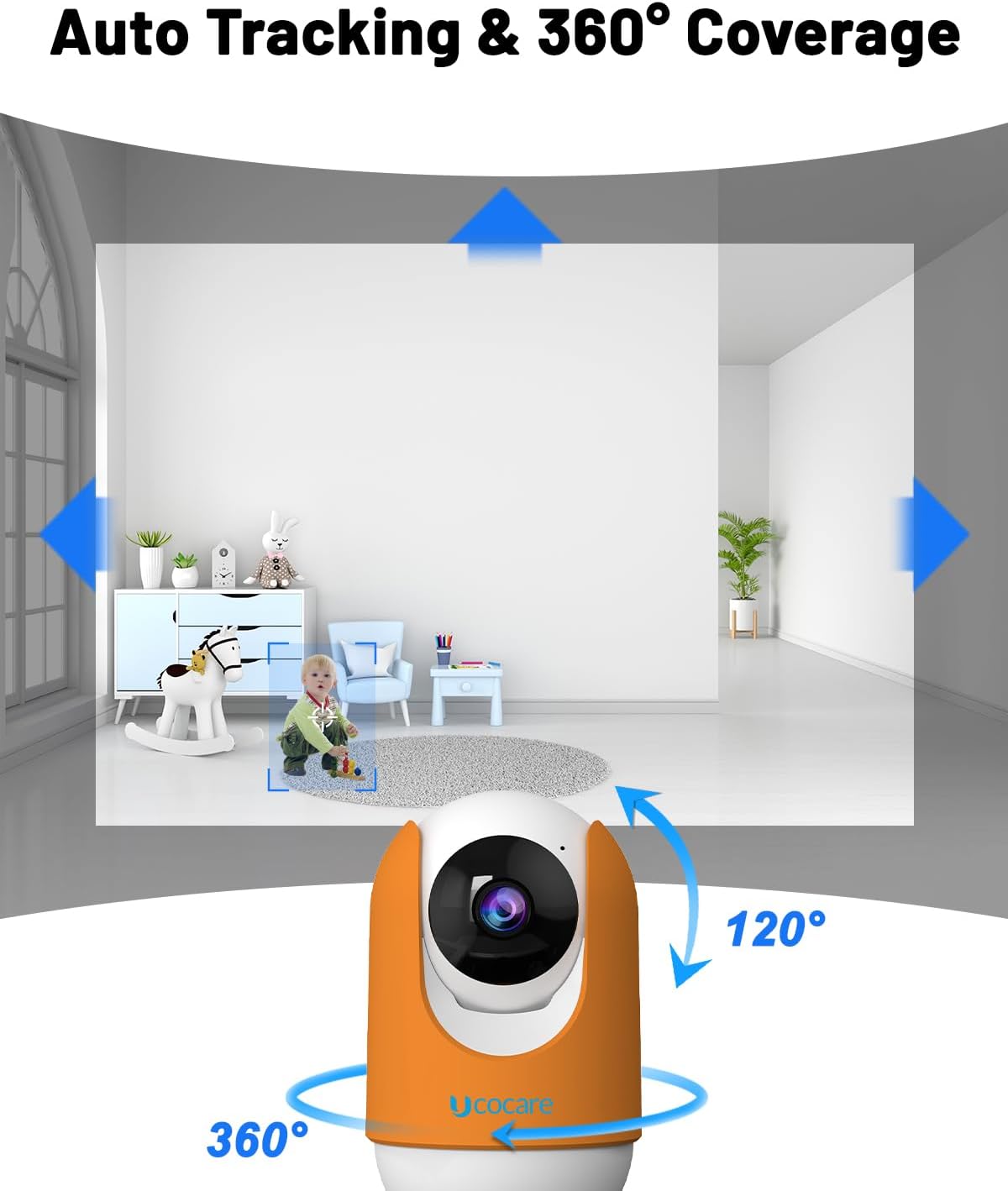
Image: Illustrates the camera's 360° pan and 120° tilt capabilities, along with its auto-tracking function.

Image: Depicts the two-way audio feature, allowing interaction with individuals near the camera.
6.2 Enregistrament i emmagatzematge
The camera supports multiple recording options:
- Targeta micro SD: The included 32GB Micro SD card allows for local storage of video recordings. The camera supports both event-triggered and continuous recording modes.
- Emmagatzematge al núvol: An optional cloud storage service is available for secure off-site backup of your recordings. Refer to the app for subscription details.
- NVR (Enregistrador de vídeo en xarxa): The camera can integrate with compatible NVR systems for 24/7 video recording.

Imatge: Més deview of available storage options: 32GB SD card (included), NVR for 24/7 recording, and cloud storage.
6.3 Detection and Alerts
Configure detection settings in the app to receive timely notifications:
- Cry and Sound Detection: The camera detects baby crying or other significant noises and sends instant alerts to your smartphone.
- Detecció humana: Advanced algorithms identify human presence, reducing false alarms.
- Seguiment de moviments: When motion is detected, the camera automatically tracks the moving object within its field of view.

Image: Demonstrates the cry detection feature, showing an alert notification on a smartphone when a baby cries.

Image: Illustrates human and pet detection with instant alerts sent to a smartphone.
6.4 Environmental Monitoring and Lullabies
- Temperatura i humitat: Monitor the room's temperature and humidity levels directly from the app to ensure a comfortable environment.
- Cançons de bressol: Access 14 pre-recorded lullabies through the app to play for your baby.

Image: Shows the camera playing lullabies to a sleeping child, indicating the soothing feature.
6.5 Integració de la llar intel·ligent
The UCOCARE 2.5K Baby Monitor is compatible with:
- Assistent de Google: Utilitzeu ordres de veu per view the camera feed on compatible smart displays.
- Amazon Alexa: Utilitzeu ordres de veu per view the camera feed on compatible Echo Show devices.

Image: Demonstrates compatibility with Google Assistant and Amazon Alexa for viewing the camera feed on smart displays.
6.6 Protecció de privadesa
Manage your privacy settings within the app:
- Lens On/Off: Manually turn the camera lens on or off for real-time monitoring and recording.
- Privacy Schedule: Set specific times for the camera to automatically turn off or on.

Image: Illustrates the privacy protection features available in the app, including lens control and scheduling.
6.7 Compartir en família
The UCOCARE app supports family-sharing functionality, allowing multiple authorized users within your household to access and monitor the camera feed simultaneously. This feature can be configured within the app's settings.

Image: Depicts the family sharing feature, enabling multiple users to view el feed de la càmera simultàniament.
7. Manteniment
7.1 Neteja de la càmera
To maintain optimal performance, regularly clean the camera lens and exterior:
- Assegureu-vos que la càmera estigui apagada i desendollada abans de netejar-la.
- Use a soft, dry, lint-free cloth to gently wipe the lens and camera body.
- Do not use harsh chemicals, abrasive cleaners, or solvents, as these can damage the device.
7.2 actualitzacions de microprogramari
Periodically check the UCOCARE app for available firmware updates. Updates often include performance improvements, new features, and security enhancements. Follow the in-app instructions to perform any necessary updates.
8. Solució De Problemes
If you encounter issues with your UCOCARE 2.5K Baby Monitor, refer to the following common problems and solutions:
- La càmera no es connecta a la Wi-Fi:
- Ensure your Wi-Fi network is active and the password is correct.
- Verify the camera is within range of your Wi-Fi router.
- Prova de reiniciar el router i la càmera.
- Confirm you are selecting the correct Wi-Fi band (2.4GHz or 5GHz) if your router supports both.
- Poca qualitat de vídeo:
- Check your internet connection speed. A stable and fast connection is required for 2.5K streaming.
- Assegureu-vos que la lent de la càmera estigui neta i lliure d'obstruccions.
- Adjust the camera's position to optimize lighting conditions.
- No s'han rebut alertes:
- Verify that detection settings (cry, sound, human detection) are enabled in the app.
- Check your phone's notification settings to ensure the UCOCARE app is permitted to send notifications.
- Assegureu-vos que la càmera tingui una connexió a Internet estable.
- L'àudio bidireccional no funciona:
- Comproveu la configuració del volum al telèfon intel·ligent i dins de l'aplicació.
- Ensure the microphone and speaker icons are enabled in the live view.
- Test the feature in a quiet environment to rule out background noise interference.
- La càmera no respon:
- Unplug the camera from the power source, wait 10 seconds, and plug it back in.
- If the issue persists, perform a factory reset (refer to the app or product support for specific instructions).
9. Especificacions
| Característica | Especificació |
|---|---|
| Número de model | OB-2K01 |
| Resolució de captura de vídeo | 2.5K |
| Tecnologia de comunicació sense fils | Wi-Fi (2.4 GHz i 5 GHz) |
| Interval de panoràmica/inclinació | 355° horitzontal, 120° vertical |
| Zoom digital | 4x |
| Velocitat de fotogrames | 30 fps |
| Emmagatzematge | 32GB Micro SD Card (Included), Cloud Storage, NVR |
| Característiques especials | Night Vision, Cry/Sound Detection, Human Detection, Auto-Tracking, Temperature/Humidity Sensor, Lullabies, Two-Way Audio |
| Compatibilitat | Google Assistant, Amazon Alexa, Smartphone, Tablet |
| Font d'alimentació | Elèctric amb cable (5 volts) |
| Tipus de muntatge | Surface Mount, Wall Mount, Ceiling Mount |
| Dimensions (L x A x A) | 14 x 13 x 8 cm |
| Pes de l'article | 390 g |
| Ús interior/exterior | Interior |
10. Garantia i Suport
10.1 Informació de la garantia
Your UCOCARE 2.5K Baby Monitor is covered by a Garantia del fabricant de 3 anysAquesta garantia cobreix els defectes de materials i de fabricació en condicions d'ús normal. Si us plau, conserveu el comprovant de compra per a reclamacions de garantia.
10.2 Atenció al client
For technical assistance, troubleshooting, or any questions regarding your product, please contact UCOCARE customer support:
- Correu electrònic: support@ucocare.net
Our dedicated support team is available to assist you.


