1. Introducció
The Grandstream GWN7002 is a multi-WAN Gigabit VPN router designed to provide robust and secure network solutions for businesses. It features a built-in firewall and supports comprehensive wired, wireless, and VPN networks across single or multiple locations. This manual provides essential information for setting up, operating, and maintaining your GWN7002 router.
2. Producte acabatview
The GWN7002 router offers a versatile set of ports and features to meet diverse networking requirements.
2.1 Tauler frontal
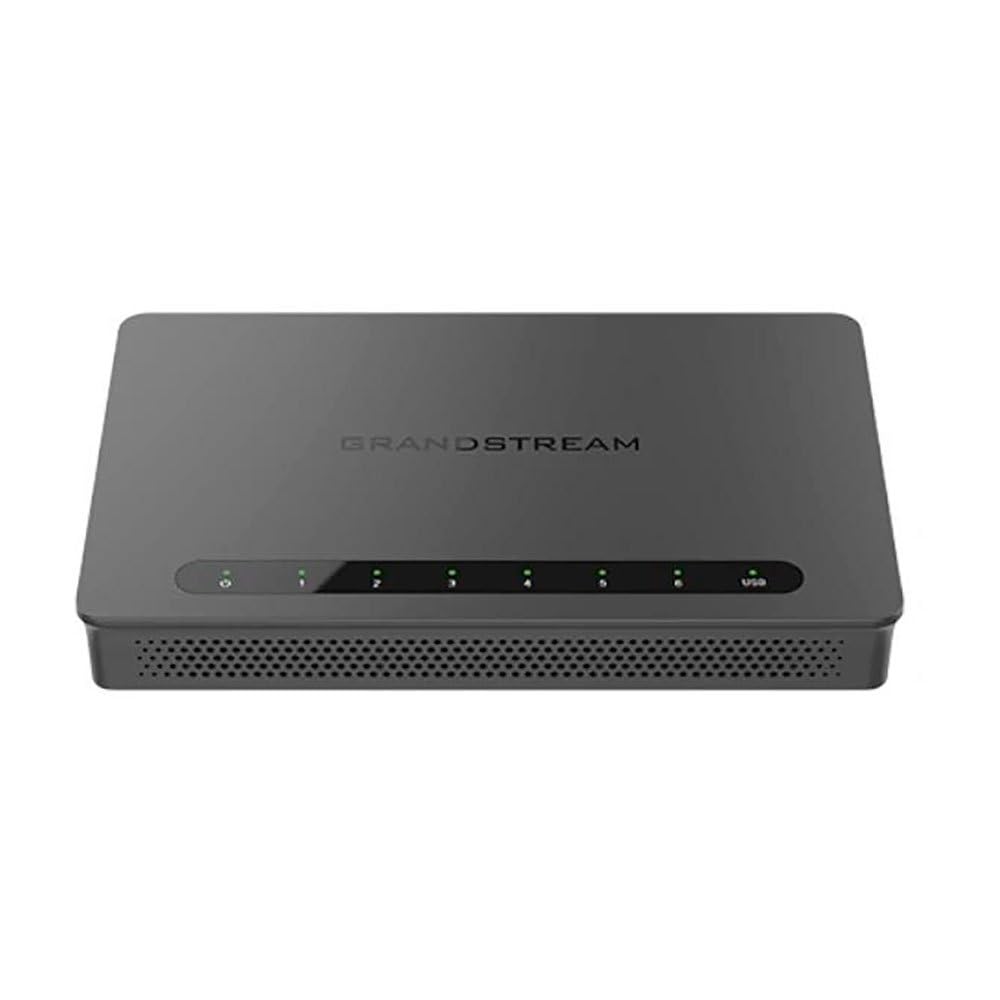
The front panel of the GWN7002 features LED indicators for power, system status, and port activity, providing a quick visual status of the device's operation.
2.2 Panell posterior i ports
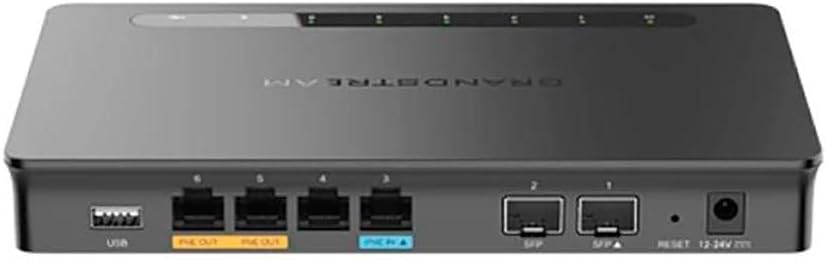
El panell posterior inclou diversos ports per a la connectivitat:
- Ports WAN/LAN: Multiple Gigabit RJ45 ports for flexible WAN/LAN configuration.
- Entrada PoE: One GbE RJ45 port with IEEE 802.3af/at PoE Input, allowing the router to be powered via Ethernet.
- Sortida PoE: Two GbE RJ45 ports with 48V Passive PoE output or IEEE 802.3af, capable of powering compatible devices.
- Ports SFP: Gigabit SFP ports for fiber optic connectivity.
- Port USB: Per connectar emmagatzematge extern o altres dispositius USB.
- Botó de restabliment: S'utilitza per restablir el dispositiu als valors predeterminats de fàbrica.
- Entrada d'alimentació: DC power input (12-24V) for standard power adapter connection.
3. Configuració
Follow these steps for initial setup of your Grandstream GWN7002 router.
3.1 Contingut del paquet
Comproveu que el vostre paquet contingui els elements següents:
- GWN7002 Router Unit
- Adaptador d'alimentació
- Guia d'inici ràpid (o documentació similar)
3.2 Instal·lació de maquinari
- Connectar l'alimentació: Connect the provided power adapter to the router's DC power input. Alternatively, if using PoE, connect an Ethernet cable from a PoE switch or injector to the PoE Input port.
- Connecta a la WAN: Connect your internet service provider's modem or main network line to one of the configurable WAN ports using an Ethernet cable.
- Connecta els dispositius LAN: Connect your local network devices (computers, switches, access points) to the LAN ports using Ethernet cables.
- Encès: Ensure all connections are secure, then power on the router. Wait for the system LED indicators to stabilize.
3.3 Configuració inicial
Accedir al router web-based configuration interface for initial setup:
- Connexió a la LAN: Ensure your computer is connected to a LAN port of the GWN7002.
- Accés Web IU: Obre a web navegador i introduïu l'adreça IP predeterminada (normalment
192.168.1.1or check the Quick Start Guide) in the address bar. - Inici de sessió: Enter the default username and password (typically 'admin' for both, or as specified in the guide).
- Follow Wizard: The router may present an initial setup wizard. Follow the on-screen prompts to configure basic network settings, including WAN connection type, LAN IP address, and Wi-Fi settings (if applicable).
4. Funcionament
This section covers key operational aspects of the GWN7002 router.
4.1 Configuració de la xarxa
- Servidor DHCP: Configure the DHCP server to automatically assign IP addresses to devices on your local network.
- IP estàtica: Assign static IP addresses to specific devices if needed.
- VLAN: Create and manage Virtual Local Area Networks (VLANs) for network segmentation and improved security.
4.2 Multi-WAN Configuration
The GWN7002 supports multiple WAN connections for enhanced reliability and bandwidth.
- Equilibri de càrrega: Distribute internet traffic across multiple WAN links to optimize bandwidth utilization.
- Failover: Configure a backup WAN connection to automatically take over if the primary connection fails, ensuring continuous internet access.
4.3 Suport VPN
Utilize the built-in VPN capabilities for secure remote access and site-to-site connections.
- Servidor VPN: Set up the router as a VPN server to allow remote users to securely connect to your local network.
- Client VPN: Configure the router to connect to an external VPN server.
- Protocols admesos: The router supports various VPN protocols, including IPsec, L2TP, and OpenVPN.
4.4 Tallafocs i seguretat
- Packet Filtering: Configure rules to filter incoming and outgoing network packets based on various criteria.
- Control d'accés: Manage network access for specific devices or users.
- QoS (Qualitat de servei): Prioritize network traffic for critical applications to ensure optimal performance.
5. Manteniment
Regular maintenance ensures the optimal performance and security of your router.
5.1 Actualització del firmware
Keep your router's firmware updated to benefit from the latest features, security patches, and performance improvements. Download the latest firmware from the Grandstream website and follow the instructions in the web UI to perform the upgrade.
5.2 Configuració de còpia de seguretat i restauració
Regularly back up your router's configuration settings. This allows you to quickly restore your settings in case of a factory reset or device replacement.
5.3 Restabliment de fàbrica
To restore the router to its factory default settings, press and hold the Reset button on the rear panel for approximately 10 seconds while the device is powered on. Release the button when the system LEDs begin to flash. The router will reboot with default settings.
6. Solució De Problemes
This section addresses common issues you might encounter with your GWN7002 router.
6.1 Sense connexió a Internet
- Verifiqueu que el mòdem funciona correctament i que té una connexió a Internet activa.
- Check the Ethernet cable connection between the modem and the router's WAN port.
- Ensure the WAN settings in the router's web UI are correctly configured (e.g., DHCP, Static IP, PPPoE).
6.2 Velocitats de xarxa lentes
- Comproveu la velocitat del vostre proveïdor de serveis d'Internet.
- Ensure all Ethernet cables are Cat5e or higher for Gigabit speeds.
- Monitor network traffic in the router's web UI to identify any bandwidth-intensive applications or devices.
- Adjust QoS settings to prioritize critical traffic.
6.3 VPN Connection Issues
- Verify VPN server/client settings, including IP addresses, authentication methods, and encryption.
- Check firewall rules to ensure VPN traffic is not being blocked.
- Ensure the remote network is reachable.
7. Especificacions
| Dimensions del producte | 9.25 x 9.84 x 2.17 polzades |
| Pes de l'article | 1.11 lliures |
| Número de model de l'article | GWN7002 |
| Fabricant | Grandstream |
| Tecnologia de connectivitat | Wi-Fi (Note: This is a wired router, Wi-Fi connectivity refers to its ability to manage Wi-Fi access points) |
| Característica especial | QoS |
| Ports | Multiple Gigabit RJ45 ports (1x PoE Input, 2x PoE Output), Gigabit SFP ports, USB port |
| Suport VPN | Built-in VPN support for secure access |
| Multi-WAN | Supports multiple WAN connections for load balancing and failover |
| Color | Negre |
8. Informació de seguretat
Si us plau, observeu les següents precaucions de seguretat per evitar danys al dispositiu o lesions personals:
- No exposeu el dispositiu a l'aigua ni a la humitat.
- No col·loqueu el dispositiu a prop de fonts de calor o sota la llum solar directa.
- Utilitzeu només l'adaptador d'alimentació subministrat amb el dispositiu.
- Assegureu-vos una ventilació adequada al voltant del dispositiu per evitar el sobreescalfament.
- No intenteu obrir ni reparar el dispositiu vosaltres mateixos. Demaneu ajuda a personal de servei qualificat.
9. Garantia i Suport
For warranty information and technical support, please refer to the documentation included with your product or visit the official Grandstream weblloc. Conserveu el rebut de compra per a reclamacions de garantia.