Introducció
This manual provides detailed instructions for the setup, operation, and maintenance of your Mesqool CR1008iR Vibrating Alarm Clock. Please read this manual thoroughly before using the product to ensure proper function and longevity.
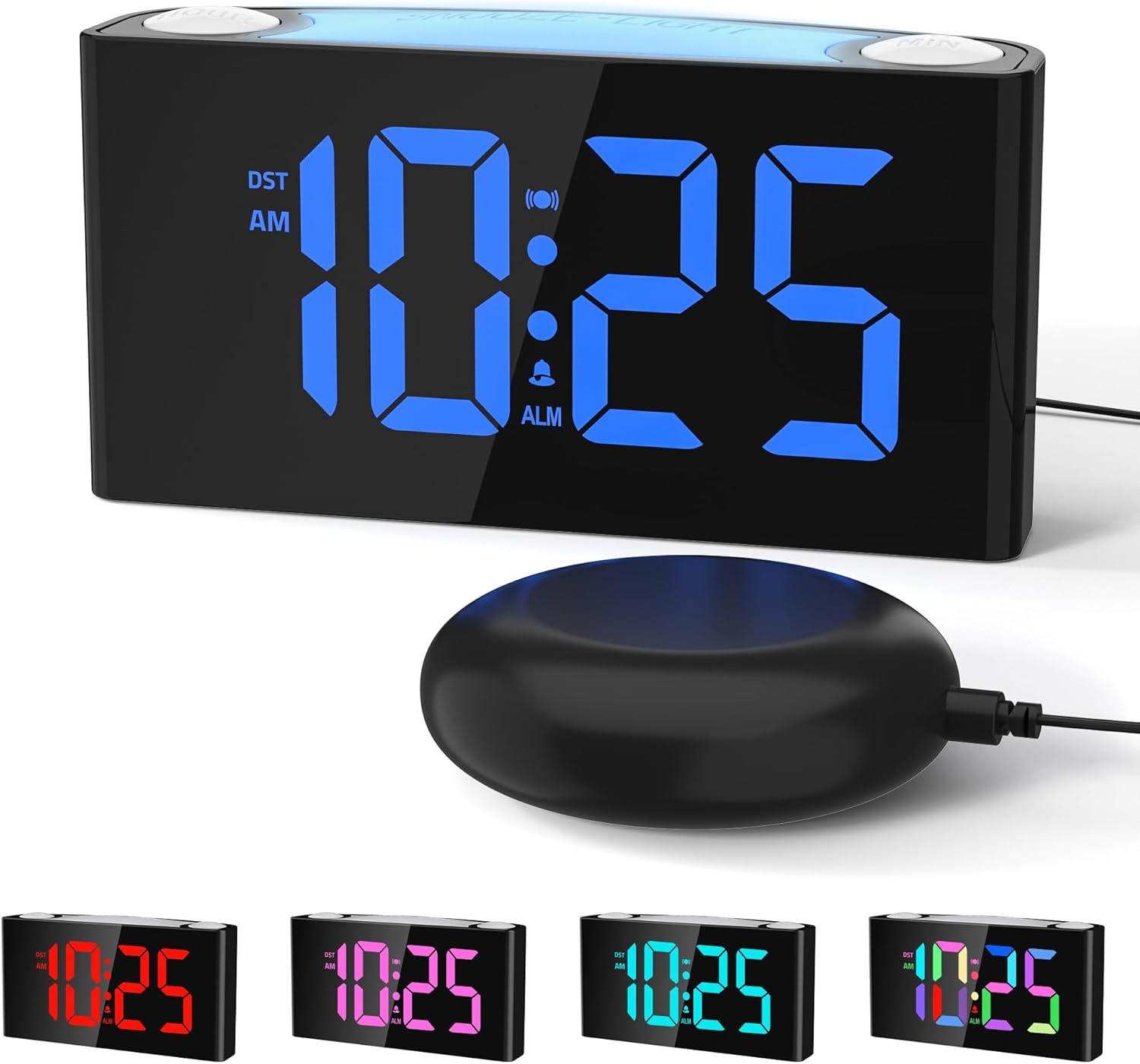
Image: The Mesqool CR1008iR Vibrating Alarm Clock, featuring a large digital display and an external bed shaker.
Producte acabatview
The Mesqool CR1008iR is a versatile alarm clock designed for various users, including heavy sleepers, seniors, and the hearing impaired. Key features include:
- Multiple Wake-Up Modes: Choose from loud buzzer, powerful bed shaker, or a combination of both.
- Customizable RGB Display: Large LED screen with 8-color options and dynamic display modes.
- Llum nocturna de 8 colors: Soft bottom glow with adjustable brightness.
- Ports de càrrega USB duals: Includes USB-A and USB-C ports for convenient device charging.
- Còpia de seguretat de la bateria: Maintains time and alarm settings during power outages (requires 2x AAA batteries, not included).
- Funció de posposar: Up to 81 minutes of extra rest with 9-minute snooze intervals.
- Format de 12/24 hores i horari d'estiu: Easy switching between time formats and Daylight Saving Time activation.
Configuració
- Connexió d'alimentació: Connect the provided power adapter to the DC 5V port on the back of the alarm clock and plug it into a standard wall outlet. The display will illuminate.
- Instal·lació de bateria de seguretat: Open the battery compartment on the bottom of the clock. Insert two (2) AAA batteries (not included), ensuring correct polarity (+/-). These batteries will preserve your time and alarm settings during a power interruption but will not power the display or night light.
- Bed Shaker Connection: Plug the bed shaker cable into the designated shaker port on the back of the alarm clock. Place the bed shaker under your pillow or mattress for optimal vibration.

Image: The back of the Mesqool alarm clock, illustrating the battery compartment for backup AAA batteries.
Instruccions de funcionament
1. Configuració de l'hora
- Manteniu premut el botó HORA CONFIGURADA button (located on the back) until the hour digits flash.
- Utilitza el HORA button (top right) to adjust the hour.
- Utilitza el MIN button (top left) to adjust the minute.
- Premeu HORA CONFIGURADA de nou per confirmar i sortir del mode de configuració de l'hora.
2. Configuració de l'alarma
- Manteniu premut el botó CONJUNT D'ALARMES button (located on the back) until the alarm hour digits flash.
- Utilitza el HORA per ajustar l’hora de l’alarma.
- Utilitza el MIN botó per ajustar el minut de l'alarma.
- Premeu CONJUNT D'ALARMES de nou per confirmar l'hora de l'alarma.
- Immediately after setting the alarm time, press the MODE D'ALARMA button (on the back) repeatedly to cycle through the alarm modes: Buzzer only, Vibration only, or Buzzer + Vibration. The corresponding icon will appear on the display.
- Premeu CONJUNT D'ALARMES una vegada més per sortir del mode de configuració de l'alarma.

Image: Visual representation of the three available wake-up modes: audible buzzer, physical bed shaker, and a combination of both.
3. Funció de posposició
Quan soni l'alarma, premeu el botó gran SNOOZE / LIGHT button on top of the clock to activate the snooze function. The alarm will pause for 9 minutes and then sound again. This can be repeated up to 9 times for a maximum of 81 minutes of snooze time.

Image: A hand pressing the large snooze button on the alarm clock, illustrating the snooze function and adjustable volume settings.
4. Ajust de la brillantor de la pantalla
Premeu el botó DIMMER button (on the back) repeatedly to cycle through the 7 levels of display brightness, from brightest to off.
5. Funció de llum nocturna
Premeu el botó SNOOZE / LIGHT button (on top) to turn the night light on/off. Press and hold the SNOOZE / LIGHT button to cycle through the 8 available colors or activate the RGB breathing light mode. The night light has 3 adjustable brightness levels.

Image: The Mesqool alarm clock showcasing its 8-color dimmable night light feature, providing ambient illumination.
6. Ports de càrrega USB
The alarm clock features one USB-A and one USB-C charging port on the back. These ports can be used to charge compatible electronic devices such as smartphones, smartwatches, or earbuds. Ensure your device's charging cable is properly connected.

Image: The back of the Mesqool alarm clock with a smartphone and earbuds charging via its integrated USB-A and USB-C ports.
7. 12/24-Hour Format and Daylight Saving Time (DST)
- To switch between 12-hour and 24-hour time formats, press the 12/24H button (on the back).
- To activate or deactivate Daylight Saving Time, press the DST button (on the back). The time will adjust by one hour, and the DST indicator will appear/disappear on the display.

Image: The Mesqool alarm clock showing examples of its 12-hour, 24-hour, and Daylight Saving Time (DST) display options.
Manteniment
- Neteja: Netegeu el rellotge amb un drap suau i sec. No utilitzeu productes de neteja abrasius ni dissolvents.
- Emmagatzematge: Si guardeu el rellotge durant un període prolongat, traieu les piles de reserva AAA per evitar fuites.
- Medi ambient: Mantingueu el rellotge allunyat de la llum solar directa, de temperatures extremes i d'alta humitat.
Resolució de problemes
| Problema | Solució |
|---|---|
| La pantalla del rellotge està apagada o parpelleja. | Ensure the power adapter is securely plugged into both the clock and the wall outlet. Check if the power outlet is functional. |
| L'alarma no sona/vibra. | Verify that the alarm is set and activated (alarm icon visible on display). Check the alarm mode (buzzer, vibration, or both). Ensure the bed shaker is properly connected. |
| Time/alarm settings reset after power outage. | Install two (2) fresh AAA batteries for backup. The backup batteries only save settings, they do not power the display. |
| USB charging ports not working. | Ensure the clock is powered by the AC adapter. The USB ports require main power to function. Check the charging cable and device compatibility. |
| La pantalla és massa brillant/tenua. | Premeu el botó DIMMER button on the back to adjust the display brightness through its 7 levels. |
Especificacions
- Marca: Mesqool
- Model: CR1008iR
- Tipus de visualització: LED digital
- Font d'alimentació: Plug-in (AC adapter)
- Còpia de seguretat de la bateria: 2 x AAA batteries (not included) for settings retention
- Dimensions del producte: 3.39 cm d'amplada x 1.93 cm d'alçada
- Pes de l'article: 15.5 unces
- Material: Acrilonitril butadiè estirè (ABS)
- Característiques especials: Vibrating Alarm, Loud Buzzer, 8-Color Night Light, Dual USB Charging (Type-A & Type-C), Dimmable Display, Snooze Function, 12/24H & DST.
Informació de la garantia
This Mesqool CR1008iR Vibrating Alarm Clock comes with a Garantia limitada. For specific details regarding warranty coverage, duration, and claims process, please refer to the warranty card included in your product packaging or contact Mesqool customer support.
Atenció al client
If you encounter any issues or have questions not covered in this manual, please contact Mesqool customer support for assistance. You can typically find contact information on the product packaging, the official Mesqool weblloc web o a través de la vostra plataforma de compra.
Per a recursos addicionals, podeu visitar el Botiga Mesqool a Amazon.