1. Introducció
This manual provides comprehensive instructions for the installation, operation, and maintenance of your Syble XB-8602 2D Desktop Barcode Scanner. Please read this manual thoroughly before using the device to ensure optimal performance and longevity.
2. Producte acabatview
The Syble XB-8602 is a high-performance 2D desktop barcode scanner designed for efficient and accurate barcode reading in various commercial and industrial environments. It is capable of scanning both 1D and 2D barcodes from printed labels, paper, and digital screens such as mobile phones. Its automatic sensing feature and high scan rate make it ideal for point-of-sale (POS) systems, libraries, warehouses, and other applications requiring rapid data capture.

Figura 1: Frontal view of the Syble XB-8602 2D Desktop Barcode Scanner, showing the scanning window and the Syble logo.
3. Característiques
- Alta eficiència: Equipped with an automatic sensor for quick and hands-free scanning.
- Fast Scan Rate: Achieves up to 1500 scans per second for rapid data processing.
- Compatibilitat versàtil: Reads both 1D and 2D barcodes (e.g., QR Code, Data Matrix, PDF417).
- Multi-Surface Scanning: Capable of scanning barcodes from printed materials, labels, and digital screens (smartphones, tablets).
- Connectivitat Plug-and-Play: Simple USB connection requires no additional software or driver installation.
- Aplicació àmplia: Suitable for retail stores, libraries, warehouses, parking systems, and various commercial settings.
- Disseny durador: Built for reliable performance in demanding environments.
4. Configuració
The Syble XB-8602 barcode scanner is designed for easy setup and immediate use. Follow these steps to get started:
- Desempaquetar l'escàner: Carefully remove the scanner and its USB cable from the packaging.
- Connecta't al dispositiu amfitrió: Locate an available USB port on your computer (desktop, laptop) or POS system.
- Connectar: Insert the USB cable from the scanner into the USB port of your host device.
- Reconeixement automàtic: The operating system (Windows, macOS, Linux) will automatically detect and install the necessary drivers. No manual driver installation is required.
- A punt per al seu ús: Once the installation is complete (usually indicated by a system notification), the scanner is ready to begin scanning barcodes.

Figura 2: Esquena view of the scanner, highlighting the USB connection port.
5. Instruccions de funcionament
The XB-8602 scanner operates with an intuitive automatic sensing mechanism.
- Posicionament: Place the item with the barcode in front of the scanner's reading window.
- Escaneig automàtic: The scanner will automatically detect the barcode and illuminate to read it.
- Lectura correcta: Upon a successful scan, the scanner will typically emit an audible beep and/or a visual indicator (e.g., a green light flash). The barcode data will then be transmitted to your connected computer or POS system, appearing as if typed via a keyboard.
- Posició d'ajust: If a barcode is not read immediately, slightly adjust the distance or angle of the item relative to the scanner window. Ensure the barcode is flat and not excessively creased or damaged.
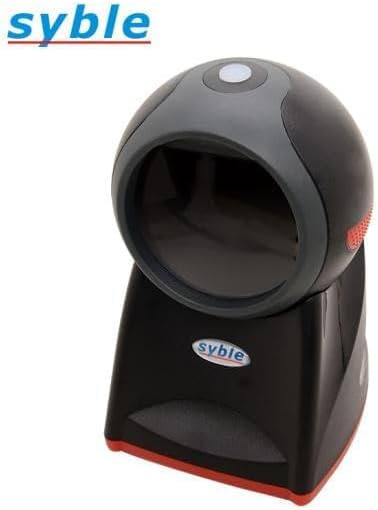
Figura 3: superior view of the scanner, illustrating the optimal area for barcode presentation.
6. Manteniment
Un manteniment adequat garanteix la longevitat i el rendiment òptim del vostre escàner de codis de barres.
- Neteja de la finestra d'escaneig: Regularly clean the scanning window with a soft, lint-free cloth. For stubborn smudges, slightly dampen the cloth with water or a mild, non-abrasive glass cleaner. Avoid harsh chemicals or abrasive materials that could scratch the window.
- Neteja general: Netegeu l'exterior de l'escàner amb un drap sec o lleugerament humit.amp drap per eliminar la pols i la brutícia.
- Eviteu líquids: Do not immerse the scanner in water or expose it to excessive moisture.
- Emmagatzematge: When not in use for extended periods, store the scanner in a clean, dry environment away from direct sunlight and extreme temperatures.
- Cura del cable: Eviteu doblegar o torçar excessivament el cable USB, ja que això pot danyar els cables interns.
7. Solució De Problemes
If you encounter issues with your scanner, refer to the following common problems and solutions:
| Problema | Causa possible | Solució |
|---|---|---|
| Scanner not powering on/no light. | El cable USB no està connectat correctament o el port USB està defectuós. | Ensure the USB cable is securely plugged into both the scanner and the computer. Try a different USB port on your computer. |
| L'escàner no llegeix codis de barres. | Barcode damaged, poor print quality, or scanner window is dirty. Incorrect barcode type. | Clean the scanning window. Ensure the barcode is clear and undamaged. Verify the barcode type is supported (1D/2D). Adjust distance and angle. |
| Barcode data not appearing on screen. | Application not in focus, or scanner not recognized by the system. | Ensure the cursor is in the desired text field of your application (e.g., Notepad, Word, POS software). Reconnect the USB cable. Restart the computer if necessary. |
| Scanner beeps but no data output. | Output mode misconfiguration (less likely for plug-and-play). | This model is typically plug-and-play. If this occurs, try reconnecting the USB cable. Ensure your application is ready to receive input. |
8. Especificacions
| Característica | Detall |
|---|---|
| Model | XB-8602 |
| Tipus d'il·luminació | Red LED, 630 nm wavelength |
| Reading Accuracy (1D Barcode) | 3 mil |
| Reading Accuracy (2D Data Matrix) | 7.5 mil |
| Reading Accuracy (2D PDF 417) | 4 mil |
| Camp de View (Horitzontal) | 46.1 graus |
| Camp de View (Vertical) | 30.4 graus |
| Interfícies | USB HID / USB-COM / RS-232 |
| Temperatura de funcionament | De 0 °C a 50 °C (32 °F a 122 °F) |
| Dispositius compatibles | Smartphone, Laptop, Desktop Computer |
| Font d'alimentació | Elèctric amb cable (via USB) |
| Taxa d'escaneig | 1500 fotogrames per segon (fps) |
| Dimensions (L x A x A) | 18.8 x 13.9 x 11.2 cm (7.4 x 5.5 x 4.4 polzades) |
| Pes | 500 grams (1.1 lliures) |
| Fabricant | Syble-e |
| País d'origen | Xina |
9. Garantia i Suport
For warranty information and technical support, please refer to the documentation provided at the time of purchase or contact your vendor. Keep your proof of purchase for any warranty claims.
For general inquiries or further assistance, please visit the manufacturer's official weblloc o poseu-vos en contacte amb el seu departament d'atenció al client.


