1. Introducció
The SMARTGEN HEM8500 Engine CAN Monitoring Controller is an advanced instrument designed for intelligent engine management. It integrates microelectronic, electric measurement, digital-analog hybrid signal processing, CAN communication, and engine electronic control techniques. This controller is ideal for engineering vehicles requiring robust CAN communication and electric device control, offering high integration and powerful CAN gateway functions. It can serve as a comprehensive replacement for traditional Murphy displays.
2. Característiques clau
- Microprocessador avançat: Equipped with a 32-bit ARM microprocessor for efficient performance.
- Interfície d'usuari: Features a 4.3-inch LCD display with touch buttons. Supports both English and Chinese languages.
- Dual CANBUS Ports: Includes two CANBUS ports; one for connecting to the engine ECU and another for standby use.
- Comunicació RS485: An RS485 communication port allows data exchange via MODBUS protocol, enabling PC monitoring software integration.
- Sortida analògica: Provides a 4-20mA output for connecting to speed tachometers and torque indicators.
- Monitorització de dades en temps real: Through the CANBUS port, the controller can read real-time engine data such as speed, torque, water temperature, oil pressure, oil temperature, total fuel consumption, and instant fuel consumption.
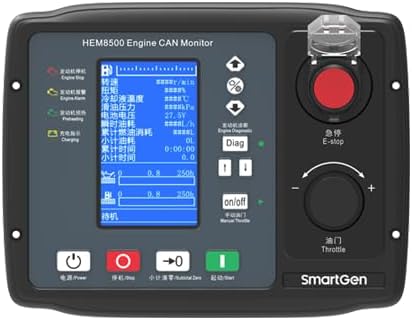
Figure 2.1: Front panel of the HEM8500 controller, showing the LCD screen, power button, E-stop, throttle knob, and navigation buttons.
3. Configuració i instal·lació
3.1 Instal·lació física
The HEM8500 controller is designed for panel mounting. Ensure adequate space for ventilation and access to wiring terminals. Secure the unit using appropriate fasteners through the mounting holes provided on the bezel.

Figura 3.1: Pro lateralfile of the HEM8500, illustrating its compact design for panel integration.
3.2 Connexions de cablejat
All electrical connections are made via the terminals on the rear of the unit. Refer to the wiring diagram for precise connections. Ensure all power connections are made with the system de-energized to prevent damage.
- Font d'alimentació: Connect the main power supply to the designated terminals. Observe correct polarity.
- CANBUS: Connect the primary CANBUS port to the engine ECU. The second CANBUS port can be used for additional CAN devices or as a backup.
- RS485: Connect the RS485 port for communication with a PC or other MODBUS-compatible devices.
- Entrades/sortides: Connect various sensors (e.g., fuel level, water temperature, oil pressure) to the analog inputs and control outputs as required by your application.

Figure 3.2: Rear panel of the HEM8500, detailing the various input/output terminals, CANBUS ports, and RS485 interface.

Figure 3.3: Comprehensive wiring diagram for a typical HEM8500 application, showing connections for power, CAN, RS485, and various engine sensors and controls.
4. Instruccions de funcionament
4.1 Engegada/apagada
To power on the controller, press the Poder button located on the bottom left of the front panel. To power off, press and hold the same button until the display shuts down.
4.2 Emergency Stop (E-stop)
El vermell Parada electrònica button is for immediate engine shutdown in emergency situations. Pressing this button will halt engine operation. To reset, twist the button clockwise to release it.

Figura 4.1: Angle view of the HEM8500, showing the prominent E-stop button and the manual throttle control.
4.3 Engine Start/Stop
- Inici: Premeu el botó Comença button (green) to initiate the engine starting sequence.
- Atura: Premeu el botó Atureu-vos button (red, next to power) to stop the engine under normal operating conditions.
4.4 Manual Throttle Control
The rotary knob labeled Acelerador allows for manual adjustment of engine speed. Rotate clockwise to increase throttle and counter-clockwise to decrease. Ensure the controller is in manual mode for this function to be active.
4.5 Display Navigation and Diagnostics
Use the up/down arrow buttons to navigate through different display screens and menus. The Diag button provides access to diagnostic information and fault codes from the engine ECU.
5. Manteniment
Regular maintenance ensures the longevity and reliable operation of your HEM8500 controller.
- Neteja: Periodically clean the display and housing with a soft, dry cloth. Avoid abrasive cleaners or solvents.
- Comprovacions de connexió: Annually inspect all wiring connections for tightness and signs of corrosion. Ensure all cables are securely fastened.
- Actualitzacions de programari: Check the SMARTGEN-America weblloc web per a qualsevol actualització de firmware disponible per a un millor rendiment o noves funcions.
6. Solució De Problemes
If you encounter issues with your HEM8500 controller, consider the following steps:
- Sense energia: Verify the power supply connections and check for blown fuses in the power circuit.
- La pantalla no respon: Ensure the unit is powered on. If the screen is blank, try cycling the power.
- El motor no arrenca: Check the E-stop button is released. Verify all engine safety interlocks and fuel supply. Consult the diagnostic screen for error codes.
- Errors de comunicació CANBUS: Inspect CANBUS wiring for proper termination and continuity. Ensure the engine ECU is powered and functioning correctly.
- Lectures incorrectes del sensor: Check sensor wiring and calibration. Ensure the correct sensor type is configured in the controller settings (if applicable).
For persistent issues, refer to the detailed troubleshooting guide available on the SMARTGEN-America weblloc o contacteu amb l'assistència tècnica.
7. Especificacions tècniques
| Especificació | Valor |
|---|---|
| Marca | SMARTGEN |
| Model | HEM8500 |
| Mostra | LCD de 4.3 polzades |
| Processador | 32-bit ARM Microprocessor |
| CANBUS Ports | 2 |
| Interfície de comunicació | RS485 (MODBUS protocol) |
| Sortida analògica | 4-20 mA |
| Material | coure |
| Pes de l'article | 0.9 quilograms (1.98 lliures) |
8. Garantia i Suport
For warranty information, please refer to the documentation provided with your purchase or contact the seller, SmartGen-America, directly. Technical support and additional resources, including detailed manuals and software downloads, may be available on the official SMARTGEN-America weblloc.
Informació de contacte: Please refer to your purchase invoice or the SMARTGEN-America website for the most current contact details for support.