1. Introducció
Gràcies per la compraasing the ATTOP X-PACK 18 Drone. This manual provides essential information for the safe operation and maintenance of your drone. Please read it thoroughly before use and retain it for future reference.
2. Què hi ha a la caixa
The ATTOP X-PACK 18 package includes the following components:
- ATTOP X-PACK 18 Drone
- Control remot
- 2 x 3.7V/1100mAh Rechargeable Batteries
- Cable de càrrega USB
- Hélices de recanvi
- Tornavís
- Maleta de transport
- Manual d'usuari (aquest document)
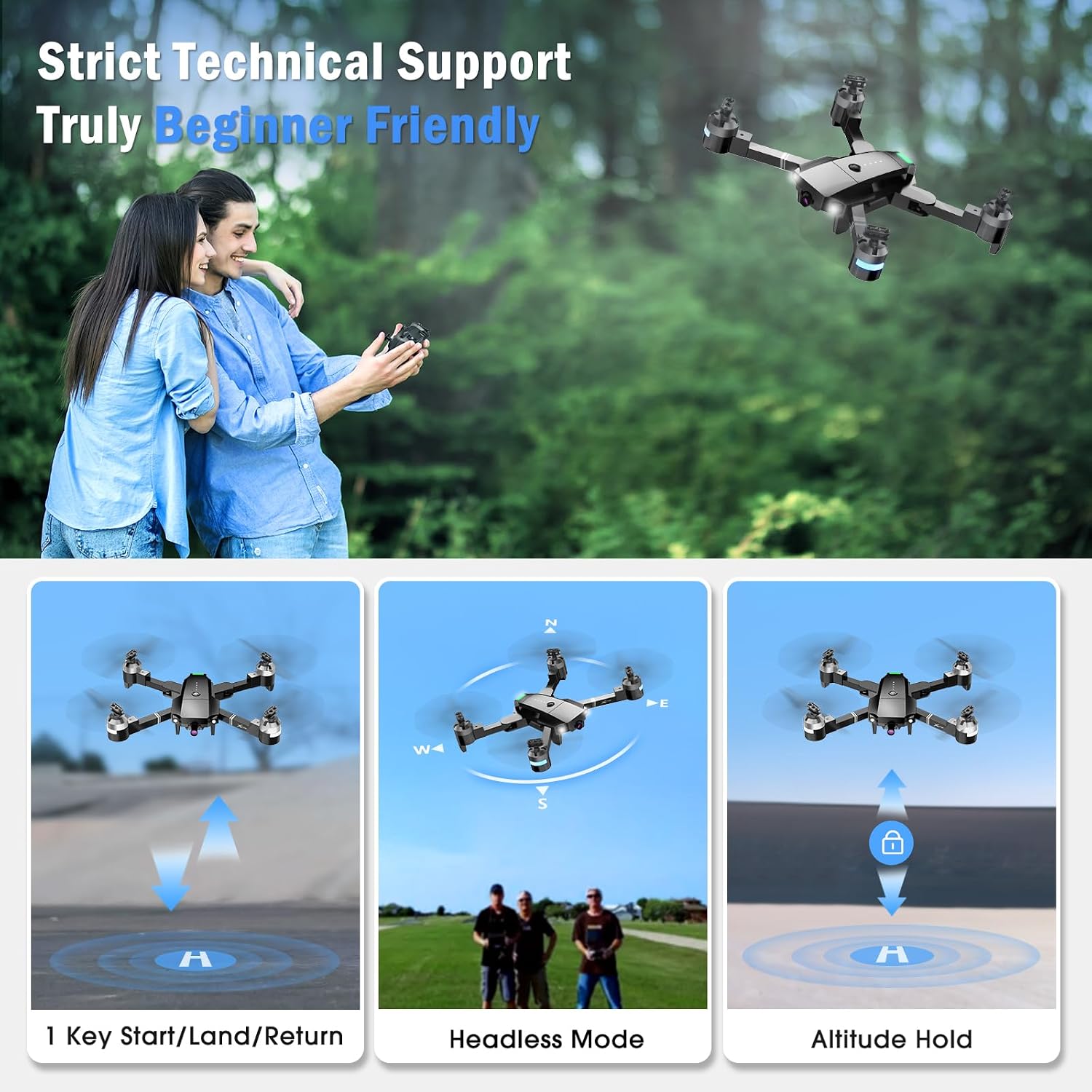
Image: The ATTOP X-PACK 18 drone, remote control, and various accessories neatly packed in its dedicated carrying case.
3. Guia de configuració
3.1 Desplegament del dron
- Carefully remove the drone from its carrying case.
- Unfold the drone arms one by one until they are fully extended. Ensure they click into place.
Video: This video demonstrates the unboxing, unfolding, battery installation, and phone clamp setup for the ATTOP X-PACK 18 drone and its controller.
3.2 Instal·lació i càrrega de la bateria
- Insert the fully charged 3.7V/1100mAh battery into the drone's battery compartment. Ensure it is securely latched.
- To charge the battery, connect it to the USB charging cable and plug the cable into a suitable USB power source (e.g., computer, USB wall adapter). The charging indicator will show the charging status.
3.3 Configuració del control remot
- Instal·leu el telèfon clamp onto the remote control.
- Place your smartphone securely into the phone clamp.
- Ensure the remote control has sufficient power.
3.4 Descàrrega i connexió de l'aplicació
- Download the "ATTOP CLUB" app from your device's app store (available on App Store and Google Play). You can scan the QR code provided in the app operation guide video or search for "ATTOP CLUB".
- Enceneu el drone i el comandament a distància.
- On your smartphone, go to Wi-Fi settings and connect to the drone's Wi-Fi network (e.g., "X-PACK 18-XXXXXX").
- Open the "ATTOP CLUB" app and select the drone model "X-PACK 18".
- Tap "Go To Connect" or "Go To Fly" to enter the control interface.
Video: This video provides a detailed guide on how to download the ATTOP CLUB app, connect to the drone's Wi-Fi, and navigate the app's interface for flight control.
4. Instruccions de funcionament
4.1 Controls bàsics de vol
- Encès: Press the power button on the drone. Wait for 2 seconds until the lights stop flashing.
- Maridatge: Turn on the remote control. Push the left joystick up and then down to pair with the drone.
- Calibració: If flying for the first time, press the calibration button on the app interface or remote.
- Desbloquejar: Push both joysticks on the remote control diagonally outwards to unlock the motors.
- One Key Take Off: Press the one-key take-off button on the remote or app, or push the left control stick up slowly.
- Pujar/Descens: Feu servir el joystick esquerre per controlar l'altitud.
- Endavant/Enrere: Feu servir el joystick dret per moure el dron endavant o enrere.
- Gireu a l'esquerra/dreta: Feu servir el joystick esquerre per girar el dron cap a l'esquerra o la dreta.
- Left/Right Side Flight: Use the right joystick to move the drone sideways.
- Un aterratge clau: Press the one-key landing button on the remote or app, or push the left control stick down directly.

Image: The drone performing 1-key start/land/return, flying in headless mode, and maintaining altitude hold, illustrating beginner-friendly features.
Video: This video demonstrates the simple one-button take-off and landing, pairing, calibration, and basic flight maneuvers of the ATTOP X-PACK 18 drone.
4.2 Advanced Flight Functions
- Volteig de 360°: Press the 360° flip button on the remote or app to perform aerial stunts.
- Mode sense cap: Activate headless mode for easier control, where the drone's orientation is relative to the pilot.
- Ajust de velocitat: Switch between 3 speed settings (30%, 60%, 100%) for different flying experiences.
- Manteniment d'altitud: The drone maintains a stable hover at a set altitude, ideal for photography and stable flight.
- Retorn d'una clau: Press the one-key return button to automatically bring the drone back to its take-off point.
- Parada d'emergència: In case of an emergency, press the emergency stop button to immediately halt the drone's motors and land it.

Image: The drone illustrating advanced flight functions including drawing a custom flight path, switching between three speed modes, and performing a 360-degree flip.
4.3 Smart App Control Features
- Control de gestos: Make specific hand gestures to trigger automatic picture-taking or video recording.
- Control de veu: Control the drone's direction using voice commands (e.g., "Take off", "Forward").
- Control de gravetat: Wave your phone to control the drone's movement, utilizing the phone's gravity sensor.
- Mode VR: Compatible with VR glasses for an immersive 3D flight experience, syncing with your phone or iPad.
- Flight Path Mode: Draw a custom flight path on the app, and the drone will follow it automatically.

Image: This image highlights the various control methods for the drone, including traditional remote control, voice commands, gesture recognition, and gravity-sensing phone control.
4.4 Funcionament de la càmera
The ATTOP X-PACK 18 features a 120° wide-angle 1080P FPV camera for real-time video transmission and high-definition photos.
- En temps real View: Connect your phone or iPad to the drone's Wi-Fi to view live aerial footage through the "ATTOP CLUB" app.
- Fer fotos: Press the photo button on the remote control or within the app interface.
- Grava vídeos: Press the video button on the remote control or within the app interface to start/stop recording.
- Review Mitjans de comunicació: Photos and videos can be reviewed directly from the media folder within the "ATTOP CLUB" app.

Imatge: Un primer pla view of the drone's 120-degree wide-angle 1080P FPV camera, emphasizing its capability for real-time transmission and high-definition capture.
5. Manteniment
5.1 Cura de la bateria
- Always use the provided charging cable and follow charging instructions.
- No sobrecarregueu ni descarregueu excessivament les bateries.
- Emmagatzemeu les bateries en un lloc fresc i sec, lluny de la llum solar directa i de temperatures extremes.
- If the drone indicates a low battery warning, land it immediately to prevent damage.
5.2 Cura de l'hèlix
- Inspeccioneu regularment les hèlixs per detectar qualsevol dany (esquerdes, doblecs).
- Replace damaged propellers with spare ones using the provided screwdriver. Ensure correct orientation when replacing.
5.3 Neteja
- Feu servir un drap suau i sec per netejar el cos del dron i la lent de la càmera.
- Eviteu utilitzar productes químics o dissolvents aggressivs.
6. Solució De Problemes
| Problema | Causa possible | Solució |
|---|---|---|
| El dron no s'encén | La bateria no està carregada o està mal instal·lada. | Assegureu-vos que la bateria estigui completament carregada i inserida correctament. |
| Drone not pairing with remote/app | Incorrect pairing sequence; Wi-Fi not connected. | Follow pairing steps (Section 4.1); ensure phone is connected to drone's Wi-Fi. |
| Vol inestable/Deriva | Drone not calibrated; damaged propellers; strong wind. | Perform calibration (Section 4.1); replace damaged propellers; fly in calm conditions. |
| Poor camera feed/No image | Weak Wi-Fi signal; app not connected to drone. | Ensure strong Wi-Fi connection; restart app and reconnect to drone. |
| Temps de vol curt | Bateria no completament carregada; bateria antiga. | Fully charge batteries before each flight; consider replacing old batteries. |
7. Especificacions
| Característica | Detall |
|---|---|
| Marca | SOBRE |
| Nom del model | X-PACK 18 |
| Característiques especials | 360 Degree Flip, Auto-Landing, First Person View (FPV), Foldable, Speed Adjustment, Headless Mode, One Key Return, Emergency Stop, Gesture Control, Voice Control, Gravity Control, VR Mode, Flight Path Mode, Altitude Hold |
| Franja d'edat | 8 years and up (96 months) |
| Color | Negre |
| Resolució de captura de vídeo | 1080p |
| Resolució de fixes efectius | 2.07 Megapixels (2073600 Pixels) |
| Tecnologia de connectivitat | Wi-Fi |
| Components inclosos | Drone, Remote Control, 2 Batteries, Camera, Carrying Case, Propellers, USB Charging Cable, Screwdriver |
| Nivell d'habilitat | Tots |
| Capacitat de la bateria | 1100 milionsamp Hours (3.7V) |
| Format de captura de vídeo | MP4 |
| Tecnologia de control remot | Wi-Fi |
| Tipus de control | Control remot, control d'aplicacions |
| Material | Plàstic |
| Tecnologia de comunicació sense fils | Wi-Fi |
| Composició de les cèl·lules de la bateria | Lithium-Cobalt |
| S'inclouen les piles | Sí (2 bateries de polímer de liti) |
| Format d'imatge compatible | JPEG |
| Resolució de sortida de vídeo | 1920 x 1080 píxels |
| Control remot inclòs? | Sí |
| Tecnologia de sensors òptics | CMOS o CCD |
| Bateria recarregable inclosa | Sí |
| Dimensions del producte | 13.8 cm de llargada x 12.6 cm d'amplada x 2.76 cm d'alçada |
| Fabricant | Guangdong Attop Technology Co Ltd |
| Pes de l'article | 1.83 lliures |
| Data de llançament | 9 de novembre de 2023 |
8. Garantia i assistència
For technical support, customer service, or to inquire about an extended warranty, please contact ATTOP directly:
- Correu electrònic: support@attoptoys.com
- You can also scan the QR code within the "ATTOP CLUB" app's Help section for customer service and warranty information.

Image: The ATTOP X-PACK 18 drone showcasing its main features including 1080P camera, 360° flip, gesture control, voice control, gravity control, VR mode, 3 speed mode, flight path mode, altitude hold, and emergency stop.


