
1. Introducció
This manual provides essential information for the safe and effective use of your LIORQUE Muscle Stimulator, Model KTR-2610. This device combines TENS, EMS, and FITNESS functions to offer a versatile solution for muscle stimulation. Please read this manual thoroughly before first use and retain it for future reference.
2. Informació important de seguretat
Always consult with a healthcare professional before using this device, especially if you have pre-existing medical conditions. Do not use this device if you have a pacemaker, implanted defibrillator, or other metallic or electronic implanted devices. Do not use on pregnant women, individuals with epilepsy, or those with heart conditions. Avoid placing electrode pads on the head, face, neck, or across the chest. Keep out of reach of children. Discontinue use if you experience any discomfort or adverse reactions.
3. Contingut del paquet
Verifiqueu que tots els elements siguin presents al paquet:
- 1 x LIORQUE Muscle Stimulator Main Unit
- 10 x Electrode Pads (50x50mm)
- 2 x Electrode Cables
- 1 x cable de càrrega USB-C
- 1 x Protective Storage Box
- 1 x Manual d'usuari
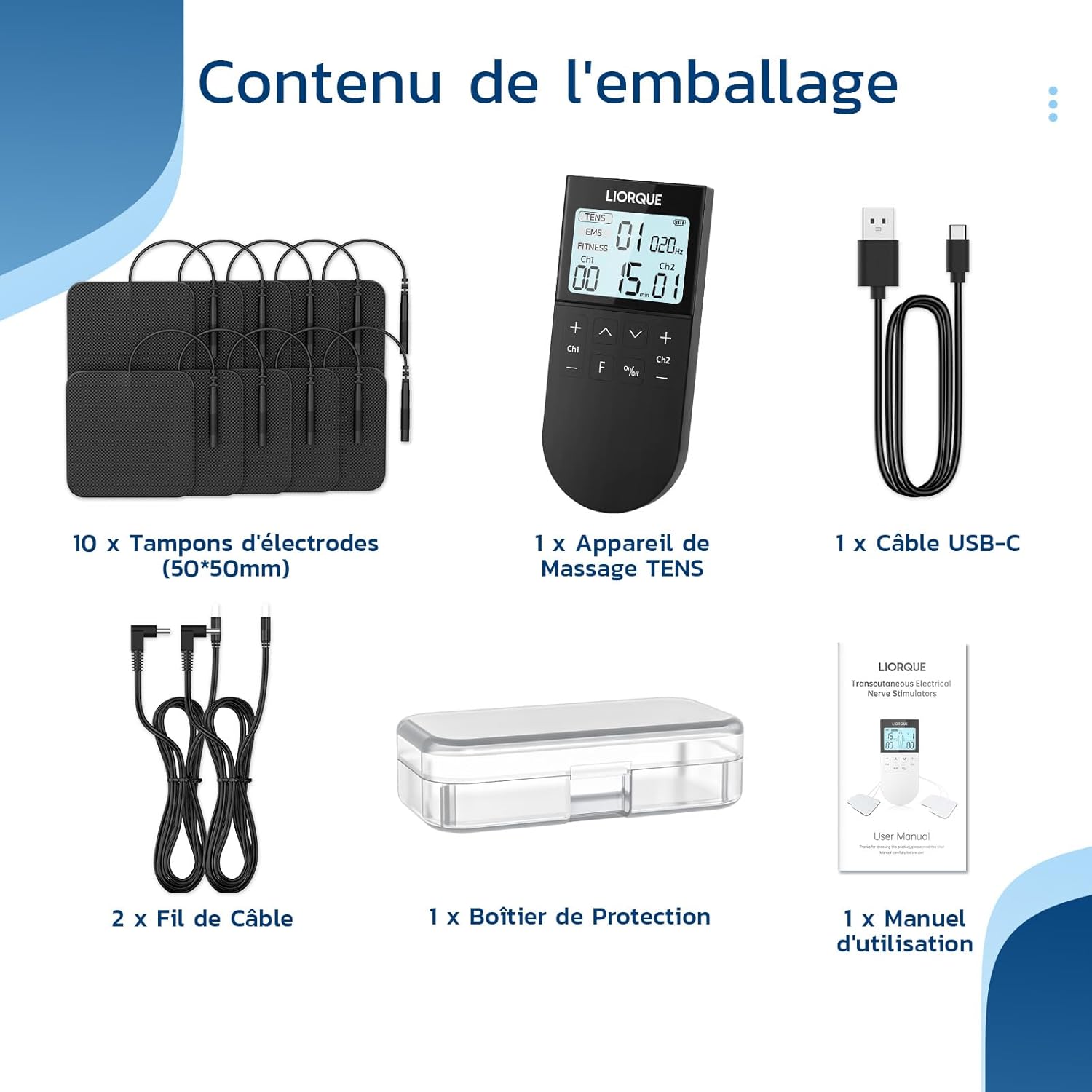
Image: Contents of the LIORQUE Muscle Stimulator package, including the device, electrode pads, cables, USB-C cable, storage box, and user manual.
4. Dispositiu acabatview
The LIORQUE Muscle Stimulator features a clear display and intuitive controls for easy operation.

Imatge: Detallada view of the LIORQUE Muscle Stimulator's screen and control buttons, indicating program, frequency, intensity levels for Channel 1 and Channel 2, timer, and power/mode buttons.
Components clau:
- Pantalla de visualització: Shows current mode (TENS, EMS, FITNESS), program number, frequency, intensity levels for Channel 1 (Ch1) and Channel 2 (Ch2), and remaining time.
- Botó ON/OFF: Encén o apaga el dispositiu.
- 'F' Button: Switches between TENS, EMS, and FITNESS modes. Long press to adjust the timer.
- Channel 1 (Ch1) Intensity Buttons (+/-): Adjusts the intensity for Channel 1.
- Channel 2 (Ch2) Intensity Buttons (+/-): Adjusts the intensity for Channel 2.
- Program Selection Buttons (Up/Down arrows): Navigates through the available programs within the selected mode.
5. Configuració
5.1 Càrrega del dispositiu
- Connect the USB-C charging cable to the charging port on the bottom of the device.
- Connecteu l'altre extrem del cable a un adaptador de corrent USB (no inclòs) o a un port USB de l'ordinador.
- The battery indicator on the display will show charging status. A full charge takes approximately 2 hours.

Image: Illustration of the LIORQUE Muscle Stimulator's long battery life, showing 250mAh rechargeable battery, 2 hours charging time, and 12 days of use (30 minutes per day).
5.2 Attaching Electrode Pads and Cables
- Assegureu-vos que el dispositiu estigui apagat.
- Connect the electrode cables to the output ports (Ch1 and Ch2) on the top of the device.
- Attach the electrode pads to the ends of the cables. Ensure a secure connection.
- Peel the protective film from the electrode pads.

Image: Diagram illustrating the dual independent channels of the LIORQUE Muscle Stimulator, showing separate intensity controls for Channel 1 and Channel 2, and pads placed on a user's back.
6. Instruccions de funcionament
6.1 Engegada/apagada
- Per encendre: premeu i manteniu premut el botó ON/OFF botó fins que la pantalla s'il·lumini.
- Per apagar: premeu i manteniu premut el botó ON/OFF botó fins que la pantalla s'apagui.
6.2 Applying Electrode Pads
Clean and dry the skin area where the pads will be applied. Place the electrode pads firmly on the desired body part. Ensure good contact with the skin for effective stimulation.

Image: Diagram showing various body parts suitable for electrode pad placement, including shoulder, back, waist, abdomen, legs, and arms.
6.3 Selecting a Mode (TENS, EMS, FITNESS)
Premeu el botó 'F' button to cycle through the three main modes:
- TENS (Estimulació nerviosa elèctrica transcutània): Modes 1-20. Used for pain relief by blocking pain signals.
- EMS (estimulació muscular elèctrica): Modes 21-40. Used for muscle relaxation and reducing muscle spasms.
- APTITUD: Modes 41-50. Specifically designed for abdominal muscle training.

Image: A woman sitting on a couch, using the LIORQUE Muscle Stimulator with electrode pads placed on her legs, demonstrating the device's application.
6.4 Selecció d'un programa
Once a mode (TENS, EMS, or FITNESS) is selected, use the Fletxa amunt/avall buttons to choose from the available programs within that mode. The program number will be displayed on the screen.
6.5 Ajust de la intensitat
The device has two independent channels (Ch1 and Ch2). You can set different intensity levels for each channel:
- Utilitza el Ch1 + / - buttons to adjust the intensity for Channel 1.
- Utilitza el Ch2 + / - buttons to adjust the intensity for Channel 2.
- Start with the lowest intensity and gradually increase until you feel a comfortable, yet effective, stimulation. There are 16 intensity levels.
6.6 Configuració del temporitzador
Premeu llargament el botó 'F' button to enter timer adjustment mode. Use the Fletxa amunt/avall buttons to set the desired treatment duration. The timer can typically be set from 5 to 60 minutes.
7. Manteniment
7.1 Neteja del dispositiu
- Apagueu el dispositiu i desconnecteu tots els cables.
- Netegeu el dispositiu amb un damp tela. No utilitzeu netejadors abrasius ni submergiu el dispositiu en aigua.
- Ensure the device is completely dry before storing or next use.
7.2 Caring for Electrode Pads
The electrode pads are reusable up to 100 times or more with proper care.
- After each use, gently place the protective film back onto the adhesive side of the pads.
- Store the pads in the provided protective box in a cool, dry place.
- If the pads lose their adhesiveness, clean the adhesive surface with a drop of water and let it air dry. If adhesiveness is not restored, replace the pads.

Imatge: Explosió view of an electrode pad, showing its layers: Non-Woven Fabric, Conductive Layer Terminals, Conductive Carbon Film, and Superior Quality Gel.
7.3 Emmagatzematge
Store the device and all accessories in the protective box in a cool, dry place, away from direct sunlight and extreme temperatures.
8. Solució De Problemes
- El dispositiu no s'encén:
Assegureu-vos que el dispositiu estigui completament carregat. Si la bateria és baixa, connecteu-lo a una font d'alimentació amb el cable USB-C. - No or weak stimulation:
Check that the electrode pads are firmly attached to the skin and the cables are securely connected to both the device and the pads. Increase the intensity level gradually. Ensure the pads are not worn out and have sufficient adhesiveness. - Pads not sticking:
Clean the skin area before application. If pads are dirty or old, clean them with a drop of water or replace them with new ones. - La pantalla està en blanc o congelada:
Try turning the device off and then on again. If the issue persists, contact customer support.
9. Especificacions
| Característica | Especificació |
|---|---|
| Número de model | KTR-2610 |
| Modes | TENS (1-20), EMS (21-40), FITNESS (41-50) |
| Total Programs | 50 |
| Nivells d'intensitat | 16 |
| Canals | 2 canals independents |
| Tipus de bateria | 1 bateria de liti-ió (inclosa) |
| Temps de càrrega | Aprox. 2 hores |
| Usage Duration (per charge) | Up to 12 days (30 minutes/day) |
| Electrode Pad Reusability | 100+ times (with proper care) |
| Dimensions | 16.6 x 8.7 x 5.2 cm |
| Pes | 290 grams |
| Fabricant | LIORQUE |
10. Garantia i Suport
LIORQUE products are designed for quality and reliability. For warranty information or technical support, please refer to the contact details provided with your purchase or visit the official LIORQUE weblloc web. Conserveu el rebut de compra com a comprovant de compra.
Per a més informació, podeu visitar el LIORQUE Brand Store.


