1. Introducció
The Radtel RT-470 is a versatile 10-watt tri-band handheld radio designed for various communication needs, including amateur radio, NOAA weather reception, and FM radio. It features a 1.77-inch TFT color screen, 256 memory channels, and advanced functions like One-Key Frequency Match, DTMF, VOX, and more. This manual provides detailed instructions for setting up, operating, and maintaining your RT-470 radio.
2. Què hi ha a la caixa
- Radtel RT-470 10W Radio (x1)
- Micròfon d'altaveu (x1)
- Original Dual Band Antenna (x1)
- Air Band Antenna (x1)
- Bateria recarregable de 2800 mAh (x1)
- Cable de programació (x1)
- Carregador d'escriptori (x1)
- Clip de cinturó (x1)
- Manual d'usuari (x1)

Image: All components included with the Radtel RT-470 radio.
3. Característiques del producte
- Funcionament multibanda: Built-in bands for VHF (144-148MHz), VHF2 (222-225MHz), UHF (420-450MHz) for transmit/receive, and AM Air Band (108-136MHz) for receive only.
- Receptor meteorològic de la NOAA: Supports NOAA weather alerts for enhanced safety.
- Càrrega USB-C: Convenient and modern charging capability.
- Salt de freqüència i codificació: Millora la privadesa de les trucades.
- One-Key Frequency Match: Simplifies pairing and grouping with other radios (within 1 meter by air).
- Sortida d'alta potència: Up to 10 watts for extended range.
- Gran capacitat de la bateria: 2800mAh for prolonged use.
- Pantalla gran TFT d'1.77 polzades: Pantalla clara i vibrant.
- 256 canals de memòria: Ampemmagatzematge per a les teves freqüències preferides.
- Funcions addicionals: DTMF, VOX, Alarm, LED flashlight, Squelch, Battery save, Repeater, CTCSS and DCS, Scan, TOT, BCL function, Power-on logo display, Firmware Update, Roger beep Frog Sound.
4. Especificacions del producte
| Especificació | Valor |
|---|---|
| Pes de l'article | 1.54 lliures |
| Dimensions del paquet | 8.82 x 6.46 x 3.39 polzades |
| Número de model de l'article | RT 47070 |
| Bateries | Necessites 1 piles de ions de liti (incloses) |
| Marca | radtel |
| Nombre de canals | 256 |
| Característica especial | 10W Power, USB-C, Air Band RX |
| Interval de freqüència | 144-148/420-450/222 Mhz TX/RX |
| Interval de conversa màxim | 10 quilòmetre |
| Tecnologia del sintonitzador | AM/FM |
| Voltage | 7.4 Volts |
| Nivell de resistència a l'aigua | No resistent a l'aigua |
5. Guia de configuració
5.1 Instal·lació de la bateria
- Alineeu el paquet de bateries amb les ranures de la part posterior de la ràdio.
- Feu lliscar la bateria cap amunt fins que encaixi fermament al seu lloc.
- Per treure-la, premeu el pestell d'alliberament a la part inferior de la bateria i feu-la lliscar cap avall.
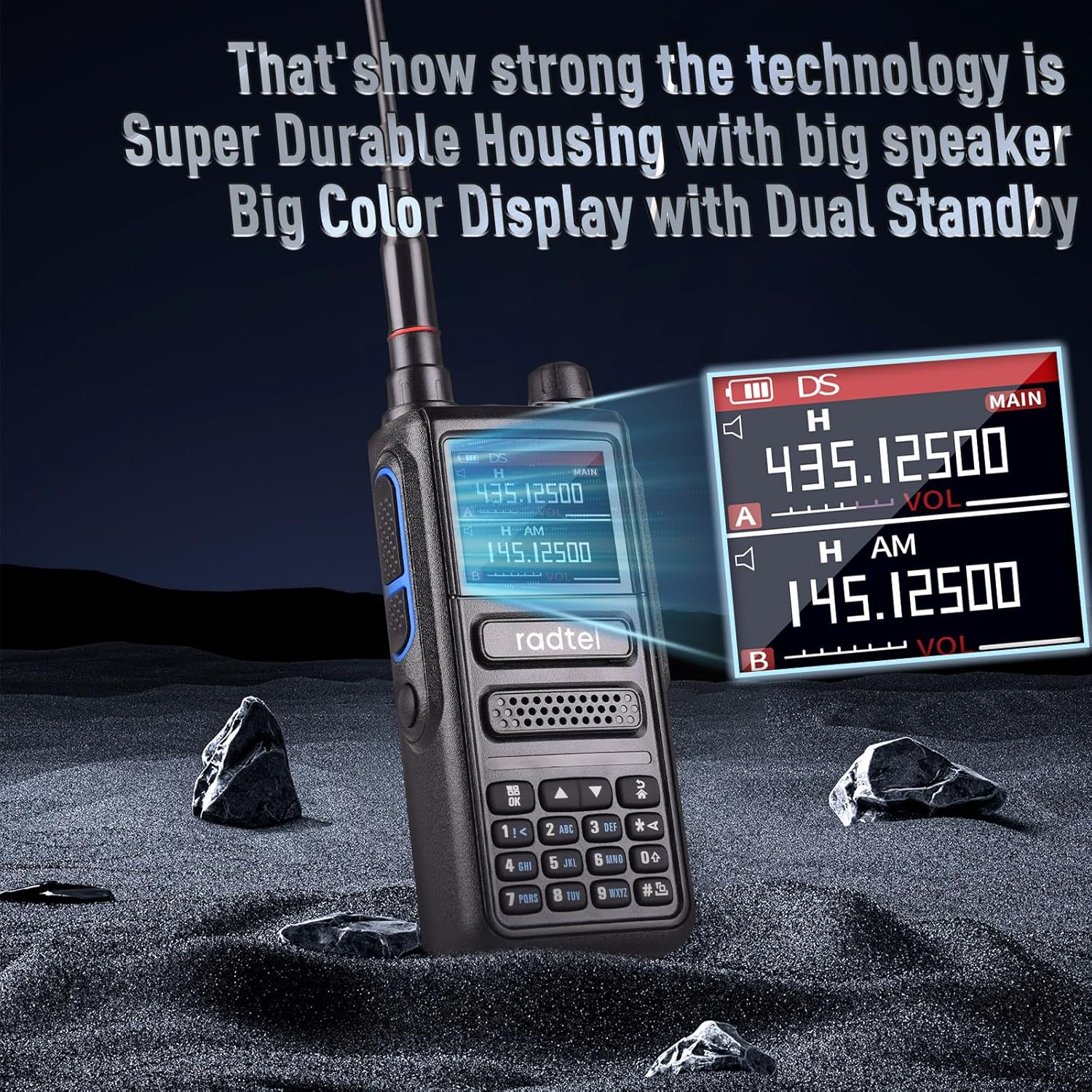
Image: The radio body and its detachable battery pack.
5.2 Instal·lació de l'antena
- Select the appropriate antenna for your desired frequency band (dual band or air band).
- Cargoleu l'antena en sentit horari al connector de l'antena a la part superior de la ràdio fins que quedi ajustada amb els dits. No l'estrengueu massa.
Image: The radio with its antenna connection point.
5.3 Càrrega de la bateria
The RT-470 radio can be charged using either the included desktop charger or directly via its USB-C port.
Carregador d'escriptori:
- Connect the desktop charger to a power outlet using the provided adapter. The charger's indicator light will turn green.
- Place the radio (with battery installed) into the charging slot. The indicator light will turn red, indicating charging is in progress.
- Un cop estigui completament carregat, el llum indicador es tornarà verd.
Càrrega USB-C:
- Locate the USB-C port on the side of the radio, usually protected by a rubber flap.
- Open the flap and insert the USB-C charging cable.
- Connect the other end of the cable to a compatible USB power source (e.g., wall adapter, power bank, computer USB port). The radio's screen or an indicator light will show charging status.

Image: The USB-C charging port on the Radtel RT-470.
6. Instruccions de funcionament
6.1 Engegada/Apagada i control de volum
Per encendre la ràdio, gireu el botó superior en sentit horari. Continueu girant per augmentar el volum. Gireu en sentit antihorari per disminuir el volum i apagar-la.
6.2 Frequency Mode (VFO) vs. Channel Mode (MR)
The RT-470 supports both VFO (Variable Frequency Oscillator) mode for direct frequency input and MR (Memory Recall) mode for accessing stored channels. Use the appropriate button (often labeled VFO/MR or similar) to switch between modes.
6.3 Entering Frequencies
In VFO mode, use the numeric keypad to directly enter the desired frequency. Press the OK or ENTRAR botó per confirmar l'entrada.
6.4 Coincidència de freqüència d'una sola clau
This feature allows for quick pairing with another compatible radio. Activate the One-Key Frequency Match function on both radios. Ensure they are within 1 meter of each other for successful pairing. This will copy the channel settings between the devices.

Image: Demonstrating the One-Key Frequency Match function.
6.5 Ràdio meteorològica de la NOAA
The RT-470 can receive NOAA weather broadcasts. Refer to your local NOAA frequencies and input them into the radio to receive weather alerts.
Recepció de ràdio FM 6.6
The radio can receive standard FM broadcast radio. Activate the FM radio function (often via a dedicated button or menu option) and tune to your desired station.
6.7 Air Band Reception
The RT-470 can receive AM Air Band frequencies (108-136MHz), allowing you to listen to aviation communication. Tune to the specific air band frequencies as needed.

Image: The radio's ability to receive AM Airband frequencies.
6.8 Llanterna
The radio includes a built-in LED flashlight. Activate it via a dedicated button or menu option for illumination in low-light conditions.
6.9 Roger Beep
The Roger Beep function provides an audible tone at the end of your transmission, signaling to the receiving party that you have finished speaking. This can be enabled or disabled in the menu settings.

Image: Visual representation of the Roger Beep feature.
6.10 Other Key Functions
- VOX (Transmissió Operada per Veu): Allows hands-free transmission when your voice is detected.
- DTMF (multifreqüència de doble to): S'utilitza per a funcions de senyalització i control.
- Suprimir: Adjusts the receiver's sensitivity to block out weak signals and background noise.
- TOT (temporitzador de temps mort): Limits the duration of a single transmission to prevent accidental continuous transmission.
- BCL (Bloqueig de canal ocupat): Impedeix la transmissió en un canal ocupat.
- Dual Standby: Allows the radio to monitor two different frequencies simultaneously.
- Alarma d'emergència SOS: Activa un senyal d'alarma en situacions d'emergència.
6.11 Basic Operation Demonstration
Watch this video for a demonstration of the RT-470's basic functions, including power on, frequency input, and feature activation.
Video: A visual guide to the RT-470's display and basic operational features.
7. Programming the Radio (CPS Software)
The Radtel RT-470 can be programmed using Computer Programming Software (CPS) for advanced customization of frequencies, channels, and various settings. A programming cable is required to connect the radio to your computer.
7.1 Connecting to PC and Driver Installation
- Connect the programming cable to the radio's side port (usually under a rubber flap) and to a USB port on your computer.
- Your computer may automatically install the necessary drivers. If not, you may need to manually install drivers for the USB-to-serial chip (e.g., CH340) from the manufacturer's weblloc web o el CD proporcionat.
- Verify the COM port number assigned to the programming cable in your computer's Device Manager.
7.2 Using the CPS Software
- Launch the Radtel RT-470 CPS software on your computer.
- In the software, navigate to the 'Settings' or 'Port' menu and select the correct COM port identified in Device Manager.
- To read the current settings from your radio, click the 'Read' button (often represented by a radio-to-computer icon). This will populate the software with your radio's existing channel and feature configurations.
- Modify frequencies, CTCSS/DCS tones, power levels, and other parameters as desired within the software interface.
- To write the new settings to your radio, click the 'Write' button (often represented by a computer-to-radio icon). Ensure the radio remains connected and powered on during the writing process.
7.3 Instruccions d'actualització del firmware
This video demonstrates the process of updating the firmware on your RT-470 radio using the Bootloader Pro software.
Video: Step-by-step guide on how to update the RT-470 radio firmware.
7.4 CPS Programming Guide
This video provides a detailed guide on how to use the CPS software to program your RT-470 radio, including reading and writing channel information.
Video: Comprehensive tutorial on programming the RT-470 using CPS software.
8. Manteniment
- Neteja: Utilitzeu un suau, damp drap per netejar l'exterior de la ràdio. No utilitzeu productes químics agressius ni netejadors abrasius.
- Cura de la bateria: Per allargar la durada de la bateria, eviteu sobrecarregar-la o esgotar-la completament. Guardeu la ràdio i la bateria en un lloc fresc i sec quan no les utilitzeu durant períodes prolongats.
- Antena: Ensure the antenna is securely attached. Avoid bending or stressing the antenna, as this can damage the connector.
- Emmagatzematge: Si guardeu la ràdio durant molt de temps, traieu-ne la bateria.
9. Solució De Problemes
- La ràdio no s'encén: Check battery charge, ensure battery is properly installed, or try charging the radio.
- Sense recepció/transmissió: Verify antenna is connected, check frequency/channel settings, ensure you are within range of other radios or repeaters.
- Mala qualitat d'àudio: Adjust squelch level, check antenna connection, ensure clear line of sight.
- Problemes de programació: Ensure correct programming cable drivers are installed, verify COM port selection in CPS, ensure radio is powered on and connected during read/write operations.
- El teclat no respon: Comproveu si el bloqueig del teclat està activat.
For persistent issues, consult the official Radtel support resources or contact customer service.
10. Informació de seguretat
- No feu servir la ràdio en atmosferes explosives (per exemple, a prop de gasos inflamables, partícules de pols o pols metàl·lica).
- No exposeu la ràdio a temperatures extremes, llum solar directa ni humitat excessiva.
- Feu servir només bateries i carregadors homologats per evitar danys o lesions.
- No desmunteu ni modifiqueu la ràdio. Les reparacions només les han de fer tècnics qualificats.
- Mantingueu la ràdio fora de l'abast dels nens.
- Eviteu l'exposició prolongada a nivells de volum alts quan feu servir auriculars per evitar danys auditius.
11. Garantia i Suport
Radtel products typically come with a limited warranty. Please refer to the warranty card included with your product or visit the official Radtel website for detailed warranty terms and conditions. For technical support, troubleshooting assistance, or inquiries about replacement parts, please contact Radtel customer service directly.


