1. Producte acabatview
The EBTOOLS 4-Inch SPI TFT LCD Display Module is a compact and versatile display solution featuring a 480x320 HD resolution. It is driven by the ILI9488 controller and utilizes a 14-pin Serial Peripheral Interface (SPI) for efficient communication. Designed for various DIY projects and embedded systems, this module includes a memory card slot for expanded functionality and operates with low energy consumption.

Figura 1: Frontal view of the EBTOOLS 4-Inch SPI TFT LCD Display Module.
2. Característiques clau
- Pantalla d'alta definició: Features a 480x320 HD resolution with an ILI9488 driver for clear visuals.
- Efficient SPI Interface: Utilizes a Serial Peripheral Interface (SPI) bus, requiring minimal I/O pins for operation.
- Integrated Memory Card Slot: Equipped with a memory card slot for easy expansion of experiments and data storage.
- Aplicació versàtil: Suitable for various display functions in DIY projects and embedded applications.
- Eficient energètic: Compatible with 3.3V to 5V working voltage, ensuring low energy consumption.
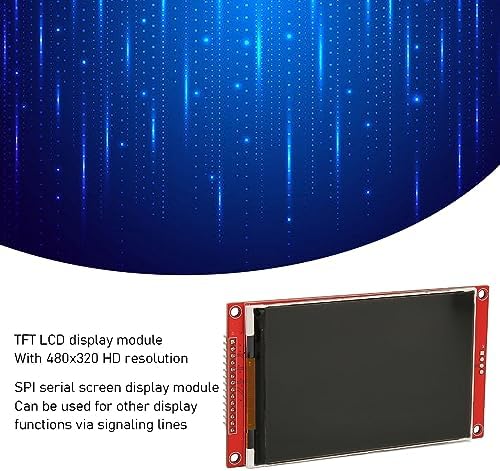
Figure 2: Display module illustrating its 480x320 HD resolution and SPI serial screen functionality.
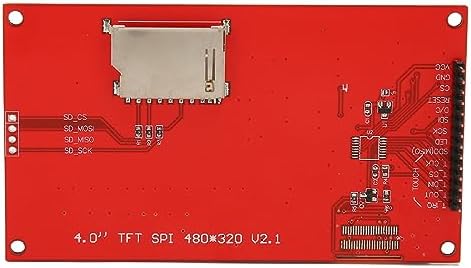
Figura 3: posterior view of the display module, showing the integrated SD card slot and connection points.
3. Configuració i connexions
This section details the pin definitions and recommended connections for integrating the EBTOOLS 4-Inch SPI TFT LCD Display Module into your project. Ensure proper voltage and signal connections to prevent damage.
3.1 Definicions de pins
The module features a 14-pin interface. Refer to the table below for a detailed description of each pin:
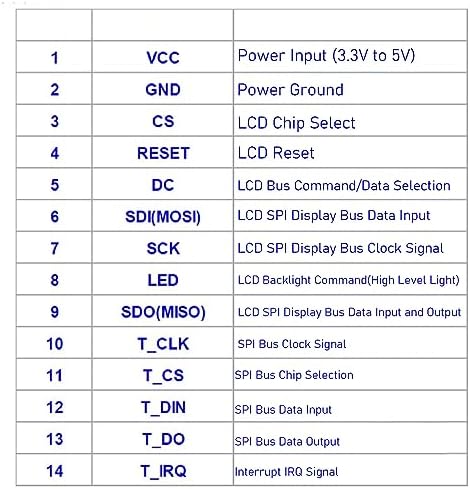
Figure 4: Pinout diagram and definitions for the display module.
| Pin núm. | Marcador | Descripció |
|---|---|---|
| 1 | VCC | Entrada d'alimentació (3.3 V a 5 V) |
| 2 | GND | Terra de potència |
| 3 | CS | Selecció de xips LCD |
| 4 | RESET | Restabliment de la pantalla LCD |
| 5 | DC | Selecció de comandaments/dades del bus LCD |
| 6 | SDI (MOSI) | Entrada de dades del bus de pantalla LCD SPI |
| 7 | SCK | LCD SPI Display Bus Clock |
| 8 | LED | LCD Backlight Command (HighLight) |
| 9 | SDO (MISO) | Entrada i sortida de dades del bus de visualització LCD SPI |
| 10 | T_CLK | TSPI Bus Clock |
| 11 | T_CS | Selecció de xips de bus SPI |
| 12 | T_DIN | Entrada de dades del bus SPI |
| 13 | T_DO | Sortida de dades del bus SPI |
| 14 | T_IRQ | Interrupció del senyal IRQ |
3.2 Pautes de connexió
To connect the display module to your microcontroller or development board, follow these general guidelines:
- Font d'alimentació: Connect VCC to a 3.3V or 5V power source and GND to the ground of your system.
- SPI Bus: Connect SDI (MOSI), SCK, CS, and DC pins to the corresponding SPI pins on your microcontroller.
- Reset Pin: Connect the RESET pin to a digital I/O pin on your microcontroller, or to a reset circuit.
- Control de la llum de fons: The LED pin controls the backlight. Connect it to a digital I/O pin for software control, or directly to VCC for constant illumination.
- Interfície de targeta SD: If using the memory card slot, connect the T_CLK, T_CS, T_DIN, T_DO, and T_IRQ pins to a separate SPI interface or dedicated I/O pins on your microcontroller.
Always consult your microcontroller's documentation for specific SPI pin assignments and voltage compatibilitat.
4. Instruccions de funcionament
Operating the EBTOOLS 4-Inch SPI TFT LCD Display Module primarily involves programming your microcontroller to send display commands and data via the SPI interface. This module is designed for integration into custom electronic projects.
4.1 Initialization Sequence
Before displaying any content, the ILI9488 driver needs to be initialized. This typically involves a sequence of commands sent over the SPI bus, including:
- Software reset command.
- Power control settings.
- Display orientation and pixel format settings.
- Gamma curve settings.
- Display ON command.
Refer to the ILI9488 datasheet or available open-source libraries (e.g., Adafruit GFX library, TFT_eSPI library) for specific initialization routines compatible with your development environment (e.g., Arduino, Raspberry Pi).
4.2 Displaying Graphics and Text
Once initialized, you can send commands to draw pixels, lines, shapes, and text. The SPI interface allows for high-speed data transfer to update the display efficiently. Libraries often provide functions for:
- Setting individual pixel colors.
- Drawing lines, rectangles, and circles.
- Displaying characters and strings using various fonts.
- Loading images from the integrated memory card (if utilized).
Ensure your code correctly manages the DC (Command/Data) pin to differentiate between commands and display data sent over the SPI bus.
5. Especificacions
- Mida de la pantalla: 4.0 polzades
- Resolució: 480 x 320 píxels
- IC del controlador: ILI9488
- Interfície: 14-pin SPI (Serial Peripheral Interface)
- Voltage: 3.3V a 5V
- Memòria: Integrated memory card slot (for external storage)
- Dimensions: Aproximadament 5.51 x 3.54 x 1.18 polzades (dimensions del paquet)
- Pes: Aproximadament 2.47 unces (pes de l'article)
6. Solució De Problemes
If you encounter issues with your EBTOOLS 4-Inch SPI TFT LCD Display Module, consider the following troubleshooting steps:
- Sense pantalla/pantalla en blanc:
- Verify power connections (VCC and GND) are correct and within the 3.3V-5V range.
- Check all SPI connections (SDI, SCK, CS, DC) for proper wiring and continuity.
- Ensure the backlight (LED pin) is correctly powered or controlled.
- Confirm the initialization sequence in your code matches the ILI9488 driver requirements.
- Check if the RESET pin is correctly toggled or held high after power-up.
- Visualització il·legible o incorrecta:
- Double-check your SPI communication protocol, including clock polarity and phase.
- Ensure the correct display orientation and pixel format are set in the initialization code.
- Verify that data is being sent to the correct memory addresses on the display controller.
- Targeta SD no detectada:
- Ensure the SD card is properly inserted into the slot.
- Check the connections for the SD card SPI interface (T_CLK, T_CS, T_DIN, T_DO, T_IRQ).
- Verify your code includes the necessary libraries and initialization for SD card communication.
If problems persist, consult online forums, community resources, or the manufacturer's support channels for further assistance.
7. Garantia i Suport
For warranty information and technical support regarding your EBTOOLS 4-Inch SPI TFT LCD Display Module, please refer to the documentation provided at the point of purchase or visit the official EBTOOLS weblloc. Els recursos d'assistència poden incloure preguntes freqüents, descàrregues de controladors i informació de contacte per al servei d'atenció al client.