Introducció
Welcome to the user manual for your new Apple Watch SE (2nd Generation) GPS 40mm Smartwatch. This guide provides essential information to help you set up, operate, maintain, and troubleshoot your device. The Apple Watch SE is designed to help you stay motivated, connected, track your health, and ensure your safety with features like Fall Detection, Crash Detection, and advanced workout metrics.
Què hi ha a la caixa
Your Apple Watch SE package includes the following components:
- Apple Watch SE (2nd Gen) 40mm Smartwatch
- Sport Band (Starlight)
- Cable de càrrega magnètic d'1 m

Image: The Apple Watch SE, its Starlight Sport Band, and the USB-C Magnetic Charging Cable, as packaged in the box.
Configuració
Càrrega inicial
Before first use, fully charge your Apple Watch SE. Connect the 1m Magnetic Charging Cable to a USB power adapter (sold separately) and then attach the magnetic end to the back of your Apple Watch. The watch will display a charging indicator.
Vinculació amb iPhone
To begin using your Apple Watch SE, you must pair it with an iPhone (iPhone 8 or later with the latest iOS version). Follow these steps:
- Turn on your Apple Watch by pressing and holding the side button until you see the Apple logo.
- Apropa l'iPhone a l'Apple Watch. Apareixerà una pantalla d'emparellament a l'iPhone. Toca "Continua".
- Col·loca l'iPhone de manera que l'Apple Watch aparegui a la viewcercador de l'aplicació Apple Watch.
- Follow the on-screen instructions on both your iPhone and Apple Watch to complete the pairing process, including setting up a passcode and choosing your preferred settings.

Image: The Apple Watch SE (2nd Gen) in Starlight, showcasing its display and band.
Funcionament del teu Apple Watch SE
Navegació bàsica
- Corona digital: Rotate to scroll, zoom, or adjust values. Press to go to the watch face or Home Screen. Double-press to switch between your last used apps. Press and hold for Siri.
- Botó lateral: Press to open the Dock (recently used apps), access Apple Pay, or use Emergency SOS. Double-press for Apple Pay. Press and hold for power options or Emergency SOS.
- Pantalla tàctil: Tap to select, swipe to navigate, force touch for additional options (on supported apps).

Image: A close-up of the Apple Watch SE display, highlighting the watch face with large numerals.
Característiques clau
- Mantingueu-vos connectat: Send texts, take calls, listen to music and podcasts, use Siri, and call for help with Emergency SOS. The GPS model works with your iPhone or Wi-Fi to keep you connected.
- Seguretat i salut: Monitor your heart health with notifications for irregular heart rhythms or unusually high/low heart rates. Utilize Fall Detection, Crash Detection, and Emergency SOS for critical situations. The Check In feature automatically notifies loved ones upon your arrival at a destination.
- Compatibilitat perfecta: Works effortlessly with your Apple devices and services. Unlock your Mac automatically, easily find your devices, and make secure payments with Apple Pay.
- Swimproof Design: The Apple Watch SE is water resistant up to 50 meters, making it suitable for swimming and water activities.
- Personalització: Personalize your watch with a wide range of watch bands in various styles, materials, and colors. Fully customizable watch faces allow you to match your mood or the occasion.
- Fitness Partner: The Workout app offers diverse training options and advanced metrics for deeper insights into your performance. New users can enjoy three months of Apple Fitness+ free.
- Configuració familiar: Set up an Apple Watch for family members who don't have an iPhone, allowing everyone to stay connected, active, healthy, and safe.
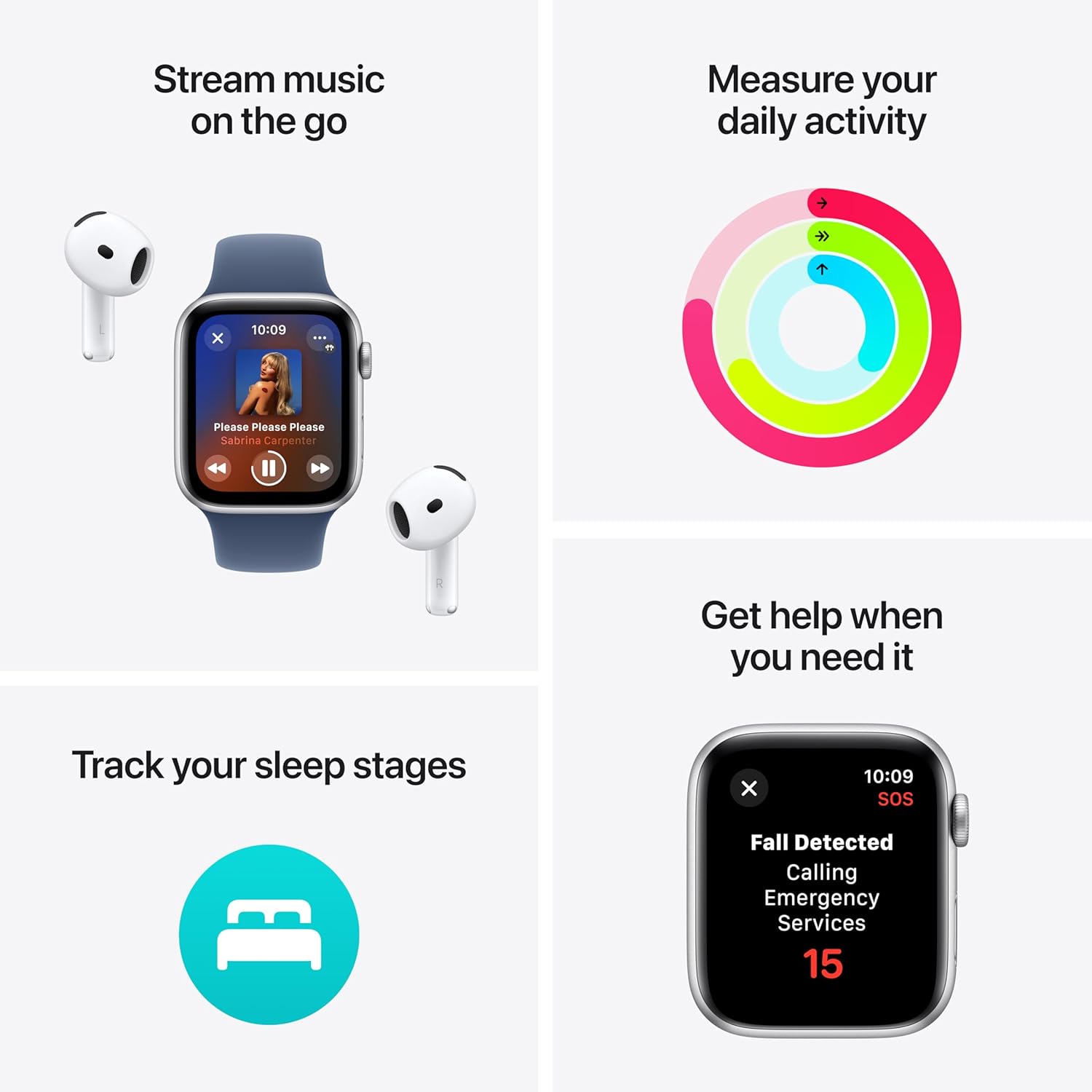
Image: A collage illustrating key features: streaming music with AirPods, tracking daily activity with activity rings, the Fall Detected emergency call screen, and tracking sleep stages.

Image: Two Apple Watch SE displays side-by-side, one showing current heart rate (68 BPM) and the other showing detailed sleep stages (Awake, REM, Core, Deep).

Image: Two Apple Watch SE displays side-by-side, one showing workout options like Pool Swim and Open Water Swim, and the other showing workout metrics including active calories, total calories, average pace, and distance.
Vídeos oficials de productes
Segons la informació proporcionada, no hi ha vídeos oficials de productes del venedor disponibles per incrustar en aquest manual.
Manteniment
Neteja del teu Apple Watch
To keep your Apple Watch SE in optimal condition, clean it regularly:
- Apaga el teu Apple Watch i desconnecta'l del carregador.
- Wipe the watch with a nonabrasive, lint-free cloth. If necessary, lightly dampen el drap amb aigua fresca.
- For the band, refer to Apple's official cleaning guidelines for the specific material of your band.
- Dry the watch and band thoroughly before wearing or charging.
Resistència a l'aigua
The Apple Watch SE is water resistant to 50 meters. This means it can be used for shallow-water activities like swimming in a pool or ocean. However, it should not be used for scuba diving, waterskiing, or other activities involving high-velocity water or submersion below shallow depth. Water resistance is not a permanent condition and may diminish over time.
Cura de la bateria
To maximize battery lifespan, avoid exposing your Apple Watch to extreme temperatures. For long-term storage, charge the battery to around 50% and store it in a cool, dry place.
Resolució de problemes
If you encounter issues with your Apple Watch SE, try the following common troubleshooting steps:
- Reinicia el rellotge: Press and hold the side button until the power off slider appears, then drag the slider. To turn it back on, press and hold the side button again until you see the Apple logo.
- Comproveu les connexions: Assegura't que el teu Apple Watch estigui correctament emparellat amb el teu iPhone i que el Bluetooth i el Wi-Fi estiguin activats al teu iPhone.
- Actualització del programari: Make sure both your Apple Watch (watchOS) and iPhone (iOS) are running the latest software versions. Updates often include bug fixes and performance improvements.
- Problemes de càrrega: If your watch isn't charging, ensure the charging cable is securely connected to both the watch and the power adapter. Try a different power outlet or USB port.
- Pantalla que no respon: If the screen is unresponsive, try a force restart: press and hold both the side button and the Digital Crown for at least 10 seconds, until you see the Apple logo.
- Drenatge de la bateria: If you experience unusually fast battery drain, check for apps running in the background, disable unnecessary notifications, or reduce screen brightness.
Per a una resolució de problemes més detallada o per a problemes persistents, visiteu el servei d'assistència oficial d'Apple. weblloc web o poseu-vos en contacte amb el servei d'atenció al client d'Apple.
Especificacions
| Característica | Detall |
|---|---|
| Nom del model | Apple Watch SE (2nd Generation, GPS) |
| Número de model | MR9U3LL/A |
| Mida de la pantalla | 40 mil·límetres |
| Color | Caixa d'alumini Starlight amb banda esportiva Starlight |
| Tecnologia de connectivitat | Wi-Fi, GPS |
| Resistència a l'aigua | 50 m |
| Tipus de bateria | Ió de liti (inclòs) |
| Pes de l'article | 9.1 unces |
| Dimensions del producte | 9.25 x 3 x 1.25 polzades |
| Primera data disponible | 1 d'octubre de 2023 |
Garantia i Suport
For detailed warranty information, terms, and conditions, please refer to the official Apple website or the documentation included with your purchase. Apple provides comprehensive support resources, including online guides, community forums, and direct customer service.
Apple is committed to environmental responsibility. The Apple Watch SE (2nd generation) is carbon neutral when paired with select bands. Learn more about Apple's environmental initiatives at apple.com/2030.


