1. Introducció
The Leotec SENIOR SMART BAND 4G GPS is a smart bracelet designed for monitoring and communication, particularly for seniors. It features 4G connectivity, real-time GPS tracking, heart rate monitoring, a pedometer, and call functionality. This manual provides instructions for setting up, operating, and maintaining your device.
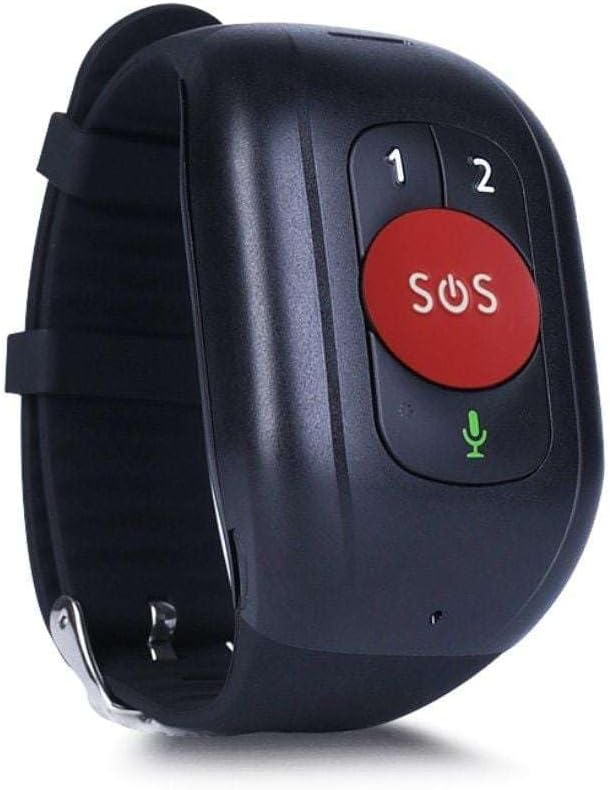
Figura 1: Leotec SENIOR SMART BAND 4G GPS RED. The device features a large red SOS button, two smaller call buttons labeled '1' and '2', and a microphone icon.
2. Guia de configuració
2.1. Contingut del paquet
- Leotec SENIOR SMART BAND 4G GPS
- Manual d'usuari
- Charging Cable/Connector
2.2. Instal·lació de la targeta SIM
The device requires a nanoSIM card for 4G LTE and 2G GSM connectivity. Ensure the SIM card is from any mobile phone operator on the market.
- Localitzeu la ranura de la targeta SIM al dispositiu.
- Carefully insert the nanoSIM card into the slot, ensuring correct orientation.
- Close the SIM card slot cover securely to protect against dust and moisture.
2.3. Càrrega del dispositiu
Before first use, fully charge the smart band.
- Connect the charging cable to the charging port on the smart band.
- Connecteu l'altre extrem del cable a un adaptador de corrent USB (no inclòs) o a un port USB de l'ordinador.
- The device will indicate charging status. A full charge typically takes approximately 2 hours.
2.4. Application Download and Pairing
To utilize all features, download the recommended application on your smartphone.
- The application is available for both Google Android and Apple iOS devices.
- Cerca "Leotec Senior" or the specified app name in your device's app store.
- Install the application and follow the on-screen instructions to create an account and pair your smart band.
- A web-based interface is also available for greater convenience.
3. Instruccions de funcionament
3.1. Encendre/apagar
- Encès: Press and hold the power button (if available, otherwise assume automatic power on after charging/SIM insertion) until the device vibrates or the screen illuminates.
- Apagar: Access the power off option through the device menu or the companion app, or press and hold the power button for several seconds.
3.2. Real-time Geolocation
The smart band incorporates a real GPS chip, 4G LTE, 2G GSM, WiFi, and LBS networks for accurate location tracking.
- Location can be viewed in real-time via the companion application or the web interfície.
- The margin of error for GPS location is approximately 5 meters.
3.3. Fer i rebre trucades
With an installed nanoSIM card, the device supports two-way communication.
- Fer trucades: Use the pre-configured buttons (labeled '1' and '2' on the device) to call authorized contacts. These contacts are set up through the companion application.
- Recepció de trucades: The device will ring for incoming calls from authorized numbers. Answer calls directly from the smart band.
3.4. Funció SOS
The large red SOS button is for emergency situations.
- Press and hold the SOS button for a few seconds to activate the emergency protocol.
- The device will automatically call pre-authorized emergency contacts and send location alerts.
3.5. Seguiment d'activitat
The smart band monitors various health and activity metrics.
- Podòmetre: Tracks steps taken throughout the day.
- Monitor de freqüència cardíaca: Measures heart rate. Consult the app for detailed readings and historical data.
- View all activity data and trends within the companion application.
4. Manteniment
4.1. Neteja
- Netegeu el dispositiu regularment amb un drap suau iamp tela.
- Avoid using harsh chemicals or abrasive cleaners, as these can damage the device.
- Ensure the charging port and SIM card slot are free from debris.
4.2. Cura de la bateria
- Charge the device regularly to maintain optimal battery health.
- Avoid extreme temperatures, as these can affect battery performance and lifespan.
- Si no heu d'utilitzar el dispositiu durant un període prolongat, carregueu-lo al 50% aproximadament abans de guardar-lo.
4.3. Emmagatzematge
Store the smart band in a cool, dry place away from direct sunlight and extreme temperatures.
5. Solució De Problemes
5.1. El dispositiu no s'encén
- Assegureu-vos que el dispositiu estigui completament carregat. Connecteu-lo al carregador i espereu uns minuts abans d'intentar tornar-lo a encendre.
- Comproveu si el cable de càrrega i l'adaptador estan danyats.
5.2. No Network Connectivity (4G/2G)
- Verify that the nanoSIM card is correctly inserted and activated with a mobile network plan.
- Comproveu la cobertura de xarxa a la vostra ubicació actual.
- Reinicieu el dispositiu.
- Ensure the SIM card has sufficient credit or data allowance.
5.3. Inaccurate GPS Location
- Assegureu-vos que el dispositiu té una imatge clara view del cel per a una recepció òptima del senyal GPS.
- Location accuracy can be affected by dense urban areas, indoor environments, or adverse weather conditions.
- The device also uses WiFi and LBS for location, which may be less precise than GPS.
5.4. Calls Not Working
- Confirm that the SIM card is active and has calling capabilities.
- Ensure that the contact numbers are correctly configured as authorized contacts in the companion application.
- Check the device's volume settings.
5.5. Problemes de connexió de l'aplicació
- Assegureu-vos que el vostre telèfon intel·ligent tingui una connexió a Internet activa.
- Verify that Bluetooth (if applicable for initial pairing) is enabled on your smartphone.
- Restart both the smart band and your smartphone.
- Update the companion application to the latest version.
6. Especificacions
| Nom del model | LESB01R |
| Tecnologia de connectivitat | 4G LTE, 2G GSM, GPS, WiFi, LBS, USB |
| Location Accuracy (GPS) | Aproximadament 5 metres |
| Tipus de bateria | 1 AAAA batteries required. (included) |
| Durada de la bateria | Fins a 12 hores |
| Tipus de muntatge | Muntatge al canell |
| Components inclosos | Manual d'usuari, cable o connector |
| Fabricant | Leotec |
| ASIN | B0CHYCX55N |
7. Informació de la garantia
This Leotec product comes with a garantia de tres anys against manufacturing defects. Please retain your proof of purchase for warranty claims. The warranty does not cover damage caused by misuse, accidents, unauthorized modifications, or normal wear and tear.
8. Atenció al client
For technical assistance, troubleshooting beyond this manual, or warranty inquiries, please contact Leotec customer support. Refer to the official Leotec weblloc web o l'embalatge del producte per obtenir la informació de contacte més actualitzada.
Recursos en línia: Visit the official Leotec weblloc web per a preguntes freqüents, actualitzacions de programari i materials de suport addicionals.


