Introducció
Gràcies per la compraasing the iJoy Disney Minnie Mouse Ears Bluetooth Shower Speaker. This manual provides essential information for the safe and efficient operation of your device. Please read it thoroughly before use and retain it for future reference.

Image: The iJoy Disney Minnie Mouse Ears Bluetooth Shower Speaker, showcasing el seu disseny.
Informació de seguretat
- No exposeu l'altaveu a temperatures extremes ni a la llum solar directa durant períodes prolongats.
- Tot i que l'altaveu és resistent a les esquitxades d'aigua IPX4, no el submergiu a l'aigua.
- Keep the speaker away from sharp objects and abrasive materials.
- Feu servir només el cable de càrrega proporcionat o un equivalent certificat.
- No intenteu desmuntar ni reparar l'altaveu vosaltres mateixos. Poseu-vos en contacte amb personal de servei qualificat.
- Desfeu-vos de la bateria i l'altaveu d'acord amb la normativa local.
Contingut del paquet
- iJoy Disney Minnie Mouse Ears Bluetooth Shower Speaker
- Cable de càrrega USB
- Manual d'usuari

Image: The retail packaging of the Minnie Mouse Shower Speaker, showing the product and key features.
Producte acabatview
Familiaritzeu-vos amb els components i els controls de l'altaveu.
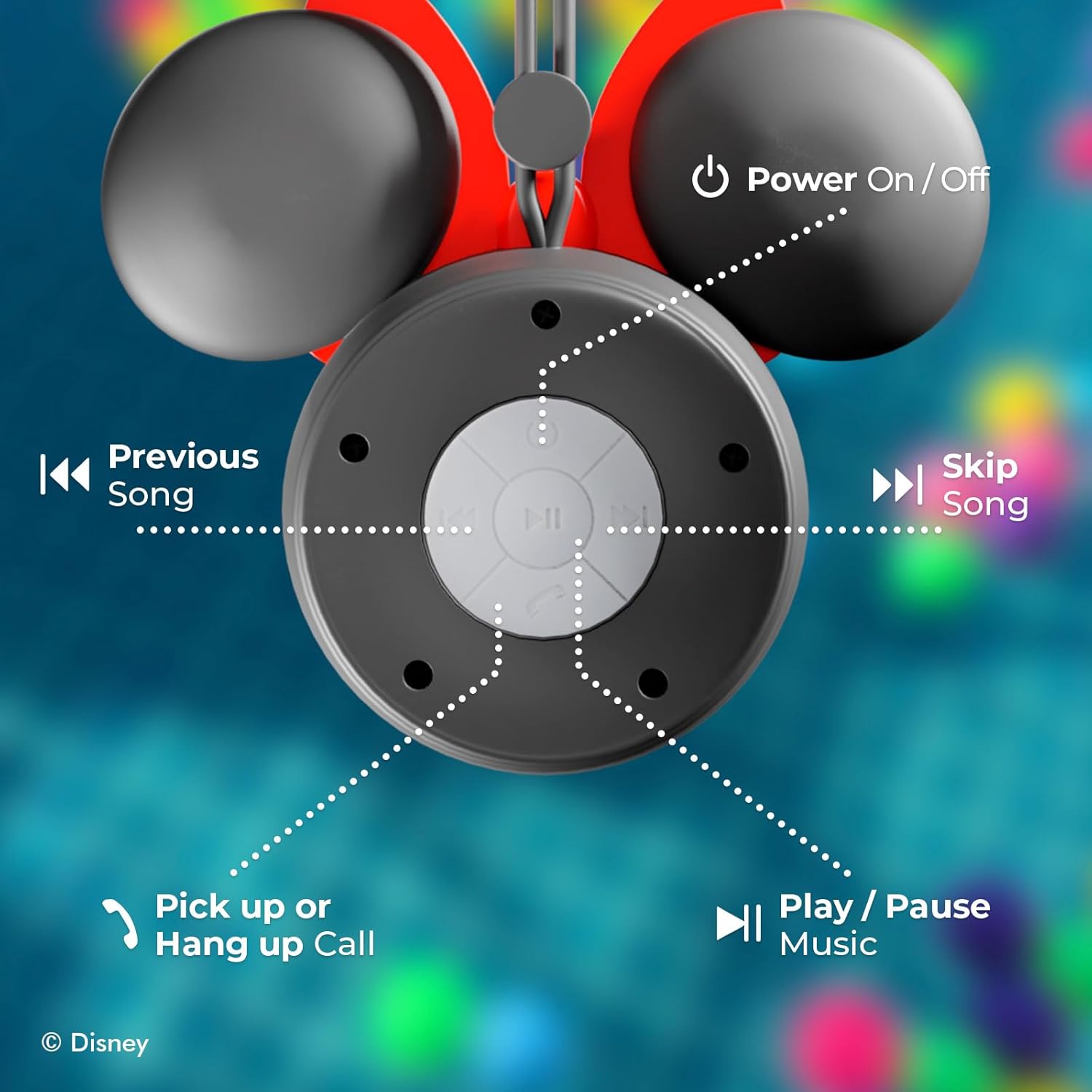
Imatge: Detallada view of the speaker's control panel, indicating the functions of each button: Power On/Off, Previous Song, Skip Song, Pick up or Hang up Call, and Play/Pause Music.
- Botó d'encesa: Activa o desactiva l'altaveu.
- Botó Reproduir/Pausa: Plays or pauses music.
- Botó de pista anterior: Salta a la cançó anterior.
- Botó de pista següent: Salta a la següent cançó.
- Pujar/baixar el volum: Ajusta el volum de reproducció.
- Botó de trucada: Answers or ends phone calls.
- Micròfon: Per a trucades amb mans lliures.
- Ventosa: For mounting on smooth surfaces.
Configuració
1. Carregant l’altaveu
- Connecteu l'extrem petit del cable de càrrega USB al port de càrrega de l'altaveu.
- Connecteu l'extrem més gran del cable de càrrega USB a un adaptador de corrent USB (no inclòs) o al port USB d'un ordinador.
- L'indicador LED s'il·luminarà durant la càrrega i s'apagarà quan estigui completament carregat.
- Una càrrega completa sol trigar aproximadament 2-3 hores.
2. Muntatge de l'altaveu
The speaker features a strong suction cup for easy attachment to smooth, non-porous surfaces.
- Ensure the desired surface (e.g., shower wall, tile) is clean, dry, and smooth.
- Press the suction cup firmly against the surface, ensuring no air is trapped underneath.
- Verify the speaker is securely attached before releasing això.

Image: The Minnie Mouse Shower Speaker mounted on a tiled shower wall using its suction cup, demonstrating secure placement.

Image: A close-up illustrating the waterproof suction grip feature of the speaker.
Instruccions de funcionament
1. Encès / apagat
- Per encendre, premeu i manteniu premut Botó d'engegada until the LED indicator lights up and you hear an audible prompt.
- Per apagar-lo, manteniu premut el botó Botó d'engegada again until the LED indicator turns off and you hear an audible prompt.
2. Emparellament Bluetooth
- Ensure the speaker is powered on and in pairing mode (LED indicator will flash, indicating it's discoverable).
- Al dispositiu amb Bluetooth (telèfon intel·ligent, tauleta, etc.), aneu a la configuració de Bluetooth.
- Cerca available devices and select "iJoy Minnie Speaker" (or similar name).
- Once paired, the LED indicator will stop flashing and remain solid, and you will hear a confirmation tone.
- L'altaveu intentarà tornar a connectar-se automàticament amb l'últim dispositiu emparellat quan s'engegui.

Image: Illustration of the speaker's effortless Bluetooth 5.0 connection with a mobile device.

Image: The Minnie Mouse Shower Speaker displayed alongside a laptop, tablet, and smartphone, highlighting its wide compatibility with Bluetooth-enabled devices.
3. Reproducció de música
- Reproduir/pausa: Premeu el botó Botó Reproduir/Pausa una vegada per reproduir o posar en pausa la música.
- Pista següent: Premeu el botó Botó Seguiment següent once to skip to the next song.
- Pista anterior: Premeu el botó Botó de pista anterior una vegada per anar a la cançó anterior.
- Ajust de volum: Utilitza el Pujar/Bajar el volum controls on your connected device or the speaker's buttons (if applicable, often integrated with track skip buttons by holding them).
4. Trucades mans lliures
- Respon a la trucada: Quan arribi una trucada, premeu el botó Botó de trucada una vegada per respondre.
- Finalitzar la trucada: Durant una trucada, premeu el botó Botó de trucada once to end the conversation.
- Rebutja la trucada: Manteniu premut el botó Botó de trucada per rebutjar una trucada entrant.
Manteniment
- Neteja: Netegeu l'altaveu amb un suau, damp drap. No utilitzeu productes químics agressius ni netejadors abrasius. Assegureu-vos que la tapa del port de càrrega estigui ben tancada abans de netejar-la.
- Emmagatzematge: Store the speaker in a cool, dry place when not in use. Avoid storing it in areas with extreme temperatures or high humidity.
- Cura de la bateria: To prolong battery life, fully charge the speaker before first use and recharge it at least once every three months if not used regularly.

Image: The Minnie Mouse Shower Speaker being splashed with water, illustrating its IPX4 splash-proof rating and resistance to water droplets.
Resolució de problemes
| Problema | Solució |
|---|---|
| L'altaveu no s'encén. | Ensure the speaker is fully charged. Connect it to a power source using the USB cable. |
| No es pot emparellar amb un dispositiu Bluetooth. |
|
| Sense so o amb un volum baix. |
|
| La ventosa no s'agafa. | Ensure the surface is clean, dry, and smooth. Avoid porous or textured surfaces. Re-apply firmly. |
Especificacions
| Característica | Detall |
|---|---|
| Nom del model | Disney Shower Speaker |
| Número de model | RM |
| Marca | iJoy |
| Tecnologia de connectivitat | Bluetooth |
| Tecnologia de comunicació sense fils | Bluetooth |
| Interval Bluetooth | Fins a 33 peus (10 metres) |
| Classificació de resistència a l'aigua | IPX4 (a prova d'esquitxades) |
| Font d'alimentació | Funciona amb bateria |
| Tipus de bateria | Product Specific (included) |
| Capacitat de la bateria | 300 mAh |
| Hora de joc | Fins a 5 hores |
| Mètode de control | Touch / Button Controls |
| Característiques especials | Built-in Microphone, Suction Cup, Waterproof |
| Mode de sortida d'àudio | Mono o estèreo |
| Dimensions del producte | 2 "P x 5.5" W x 4.5" H |
| Pes de l'article | 4 unces |
| UPC | 810116713875 |
Informació de la garantia
This product is covered by a limited manufacturer's warranty. Please refer to the warranty card included in your package or visit the manufacturer's website for detailed terms and conditions. The warranty typically covers defects in materials and workmanship under normal use.
Atenció al client
For technical assistance, troubleshooting, or warranty inquiries, please contact iJoy customer support:
- Weblloc: iJoy Official Store
- Correu electrònic: Refer to product packaging or manufacturer's weblloc.
- Telèfon: Refer to product packaging or manufacturer's weblloc.


