Introducció
This manual provides instructions for the installation, configuration, operation, and maintenance of the Cisco Catalyst 1200-8P-E-2G Smart Switch. This device is designed to deliver reliable network performance and security for small business environments.
Contingut del paquet
Comproveu que el vostre paquet contingui els elements següents:
- Cisco Catalyst 1200-8P-E-2G Smart Switch
- Cable d'alimentació o adaptador
- Cable USB tipus C
- Maquinari de muntatge
Nota: If any items are missing or damaged, contact your vendor or Cisco support immediately.
Configuració i instal·lació
Follow these steps to set up your Cisco Catalyst 1200-8P-E-2G Smart Switch.
1. Col·locació física
Place the switch on a stable, flat surface or mount it using the provided hardware. Ensure adequate ventilation around the device to prevent overheating. Avoid placing the switch in direct sunlight or near heat sources. The operating temperature should not exceed 55 degrees Celsius.
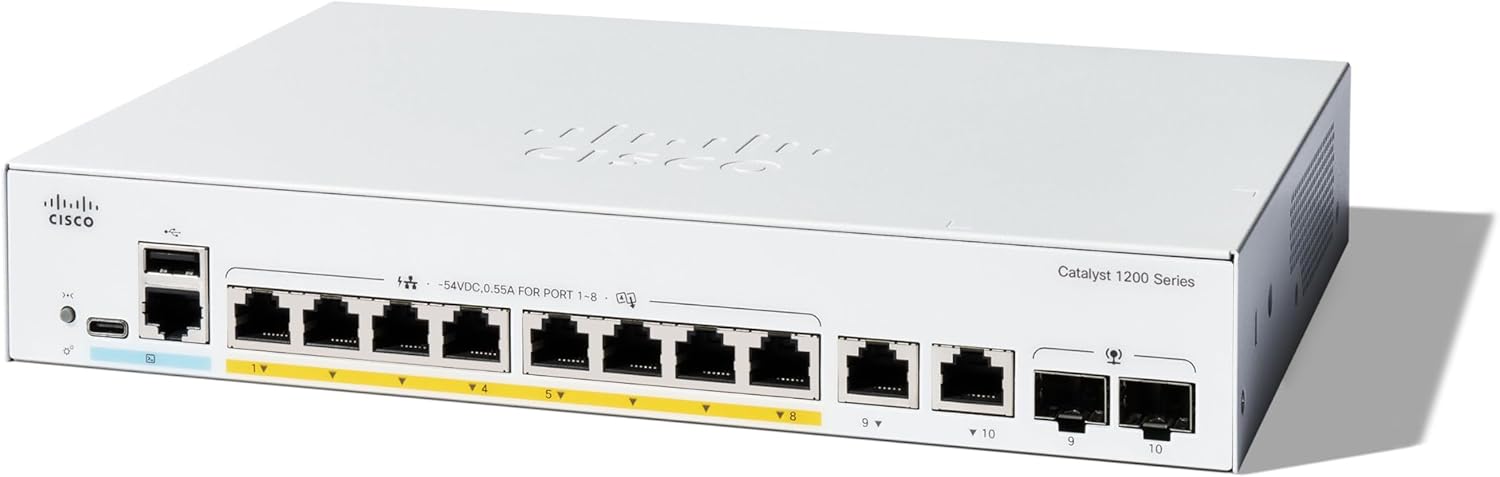
Imatge 1: Davant view of the Cisco Catalyst 1200-8P-E-2G Smart Switch, showing 8 Gigabit Ethernet ports with PoE+ capability and 2 1GE copper/SFP combo uplink ports.
2. Connexió d'alimentació
- Connect the power cord or adapter to the switch's power input.
- Connecteu l'altre extrem del cable d'alimentació a una presa de corrent adequada.
- Verify that the power indicator LED on the switch illuminates, indicating power is supplied.
Important: Use only the power supply provided with the switch. Ensure the power source is stable to prevent intermittent operation.
3. Connexions de xarxa
Connect your network devices (computers, servers, access points, IP cameras) to the 8 Gigabit Ethernet ports (RJ45). These ports support Power over Ethernet (PoE+) with a total power budget of 67W. Use the 2x 1GE copper/SFP combo ports for uplink connections to your core network or other switches.

Imatge 2: posterior view of the Cisco Catalyst 1200-8P-E-2G Smart Switch, highlighting the power input, console port, and network ports.
4. Configuració Inicial
The Cisco Catalyst 1200-8P-E-2G Smart Switch can be configured using the intuitive Cisco Business mobile app, the local web interface, or the Cisco Business Dashboard.
- Cisco Business Mobile App: Download the app from your device's app store. Follow the in-app instructions for discovery and initial setup.
- Local Web Interfície: Connect a computer directly to one of the switch's Ethernet ports. Configure your computer's IP address to be in the same subnet as the switch's default IP (refer to the Quick Start Guide for default IP). Open a web browser and navigate to the switch's IP address.
- Cisco Business Dashboard: For centralized management of multiple Cisco Business devices, integrate the switch with the Cisco Business Dashboard.

Imatge 3: Visual representation of the Cisco Business Dashboard (left) and Cisco Business Mobile App (right) for network management.
Funcionament de l'interruptor
Network Performance and Features
The Cisco Catalyst 1200-8P-E-2G provides 8 Gigabit Ethernet ports and 2 1GE copper/SFP combo uplink ports. It supports Power over Ethernet Plus (PoE+) on its 8 ports, delivering up to 67W total power for connected devices such as IP phones, wireless access points, and IP cameras.
Les característiques clau inclouen:
- Suport VLAN: Segmenta la teva xarxa per millorar la seguretat i el rendiment.
- Qualitat de servei (QoS): Prioritzar el trànsit de xarxa per a aplicacions crítiques.
- Característiques de seguretat: Integrated IEEE 802.1X port security, Denial-of-Service (DoS) attack prevention, and Access Control Lists (ACLs) protect your network.
- Eficiència energètica: Compliant with IEEE 802.3az Energy Efficient Ethernet, optimizing power usage.
Manteniment
Un manteniment regular garanteix un rendiment òptim i una llarga vida útil del vostre interruptor.
- Actualitzacions de firmware: Consulteu periòdicament el suport tècnic de Cisco website for the latest firmware updates. Applying updates can improve performance, add features, and address security vulnerabilities.
- Condicions ambientals: Ensure the switch operates within recommended temperature and humidity ranges. Keep ventilation openings clear of obstructions.
- Gestió de cables: Ensure all network cables are securely connected and properly routed to prevent accidental disconnections or damage.
- Còpia de seguretat de la configuració: Regularly back up your switch configuration to an external device or network location. This allows for quick restoration in case of a device reset or failure.
Resolució de problemes
This section addresses common issues you might encounter with your Cisco Catalyst 1200-8P-E-2G Smart Switch.
- No Power / Intermittent Power:
- Verifiqueu que el cable d'alimentació estigui connectat correctament tant a l'interruptor com a la presa de corrent.
- Assegureu-vos que la presa de corrent funcioni.
- If using an external power supply, ensure it is the original unit provided with the switch. Intermittent power issues can sometimes be related to faulty power supplies.
- No es pot accedir Web Interface / Configuration Not Saving:
- Ensure your computer's IP address is in the same subnet as the switch.
- Esborra la memòria cau del navegador o prova un altre navegador.
- If settings are not saving, ensure you are properly applying and saving changes within the web interface or mobile app. A firmware issue could prevent saving; consider updating firmware if possible.
- If locked out due to a forgotten password, refer to the official Cisco documentation for password recovery procedures.
- Problemes de connectivitat de xarxa:
- Check cable connections for all devices.
- Verify port status LEDs on the switch.
- Ensure correct VLAN configurations if your network uses them.
For more advanced troubleshooting or persistent issues, consult the comprehensive Cisco documentation or contact Cisco technical support.
Especificacions
| Característica | Detall |
|---|---|
| Número de model | C1200-8P-E-2G |
| Ports | 8x 10/100/1000 Gigabit Ethernet (PoE+), 2x 1GE Copper/SFP Combo Uplinks |
| Pressupost d'energia PoE | 67W |
| Dimensions (LxWxH) | 10.56" x 7.28" x 1.73" |
| Pes de l'article | 3.98 lliures (1.81 quilograms) |
| Material de la caixa | Metall |
| Consum màxim d'energia | 67 watts |
| Classificació de temperatura superior | 55 graus centígrads |
| Tipus d'interfície | RJ45, SFP, PoE, PoE+ |
| Velocitat de transferència de dades | 1000 megabits per segon |
| UPC | 889728521796 |
| Plataforma de maquinari | No Operating System (Embedded) |
| Sistema operatiu | Standard (Cisco IOS/firmware) |
| Color | Blanc |
Garantia i Suport
The Cisco Catalyst 1200-8P-E-2G Smart Switch comes with a limited lifetime hardware warranty. This warranty covers defects in materials and workmanship under normal use.
Additionally, complimentary 1-year technical support is included to assist with initial setup and configuration.
For warranty claims, technical assistance, or to access additional resources, please visit the official Cisco support weblloc web o poseu-vos en contacte amb el vostre distribuïdor autoritzat de Cisco.
Recursos addicionals
For more detailed information, advanced configurations, or to download the latest software and drivers, please visit the official Cisco weblloc:


