1. Introducció
The AGJ Restaurant Pager System is a wireless beeper buzzer system designed to streamline customer flow and improve operational efficiency in various service environments such as restaurants, food trucks, churches, nurseries, clinics, and coffee shops. This system includes a wireless touch keyboard transmitter and 20 durable coaster pagers, ensuring customers do not have to wait in physical lines.

Image: The complete AGJ Restaurant Pager System, showing the keypad transmitter and two stacks of 10 coaster pagers on their charging bases.
2. Components del sistema
The AGJ Restaurant Pager System typically includes the following components:
- Transmissor de teclat: One wireless touch keyboard unit for calling pagers.
- Cercapersones Coaster: Twenty (20) individual coaster pagers for customers.
- Charging Bases: Two (2) charging bases, each accommodating 10 pagers.
- Adaptadors de corrent: Necessary power adapters for the keypad and charging bases.
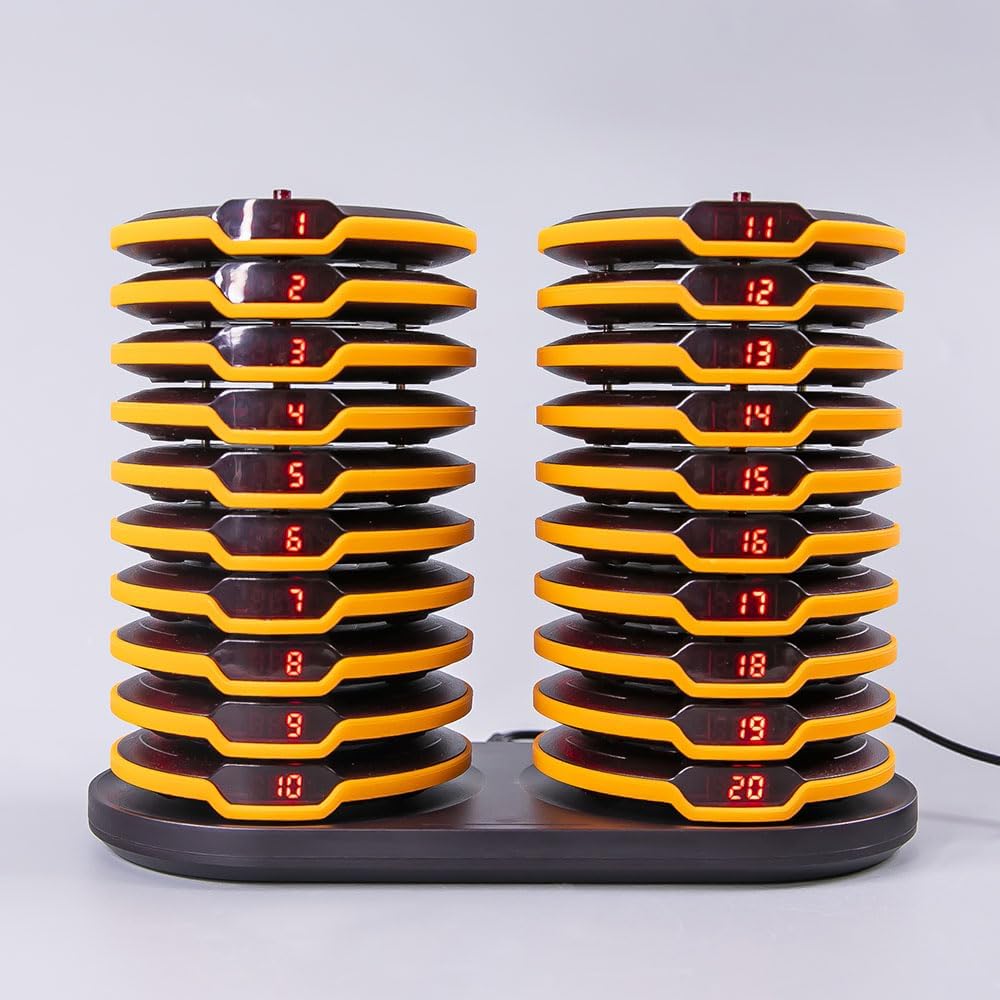
Imatge: Un tancador view of the 20 coaster pagers neatly stacked on their two charging bases, displaying their individual numbers.
3. Guia de configuració
- Càrrega inicial: Place all 20 coaster pagers onto the charging bases. Connect the power adapters to the charging bases and a power outlet. Ensure all pagers are properly seated and charging indicators are active.
- Connexió del teclat: Connect the power adapter to the keypad transmitter and a power outlet. The keypad display should illuminate.
- System Pairing (Optional/Re-pairing): If pagers are not responding or you need to change their numbers, they may need to be paired or re-paired with the keypad. This process involves specific steps using the keypad's setup functions. Refer to the video below for a detailed demonstration of pairing and changing pager numbers.
3.1. Video: Pager Pairing and Number Change
Video: This instructional video demonstrates how to pair pagers with the AGJ system, how to change individual pager numbers, and how to adjust beep settings.
4. Funcionament
4.1. Trucada a un cercapersones
- Ensure the keypad transmitter is powered on.
- Enter the desired pager number (e.g., 01-20) on the touch keyboard.
- Press the 'Call' button (often indicated by a bell or checkmark icon) to send the signal to the pager.
4.2. Calling Modes
The system supports two primary calling modes:
- Flash + Beep + Shake: The pager will flash its lights, emit an audible beep, and vibrate.
- Flash + Shake: The pager will flash its lights and vibrate, without an audible beep.
4.3. Adjusting Pager Settings (Beep/Flash Time)
The pager settings, such as turning off the beep or changing the beep duration, can be adjusted through the keypad's setup menu. Refer to the instructional video in Section 3.1 for detailed steps on accessing and modifying these settings (functions F3 and F4).
4.4. Customizing Pagers
Each pager features a transparent plastic cover, allowing for easy customization. You can place custom images, names, or advertisements behind this cover. The cover can be secured with screws to prevent unauthorized removal.
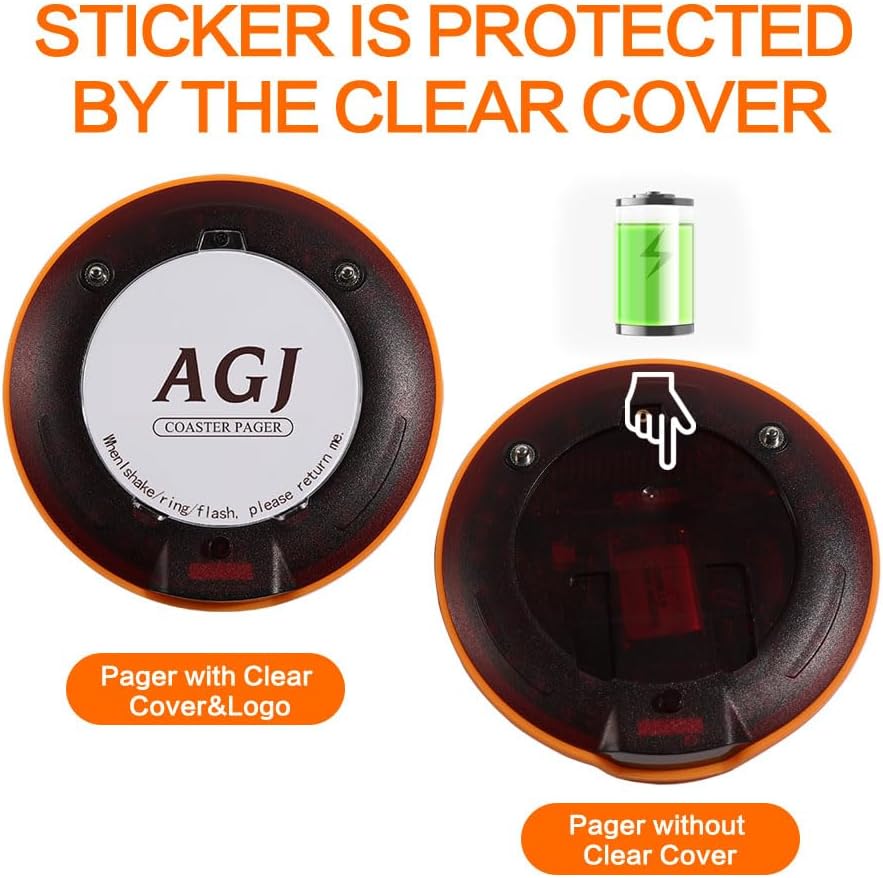
Image: An AGJ coaster pager showing its clear plastic cover, which can be removed to insert custom logos or information.
5. Manteniment
5.1. Durada de la bateria
Each wireless pager is equipped with a built-in 3.7V and 300mAh rechargeable battery. A full charge provides approximately 24 hours of continuous working time. The pagers feature a low battery warning to indicate when recharging is needed.
5.2. Durabilitat
The pagers are designed with durability in mind, featuring rubber rims to prevent breakage from accidental drops or impacts. This breakproof design ensures longevity in busy environments.

Image: An AGJ coaster pager demonstrating its robust construction with a protective rubber rim, designed to withstand impacts.
5.3. Neteja
To maintain optimal performance and hygiene, regularly wipe down the keypad and pagers with a soft, damp tela. Eviteu utilitzar productes químics aggressivs o netejadors abrasius.
6. Solució De Problemes
- Els cercapersones no es carreguen: Ensure pagers are correctly seated on the charging base and that the power adapter is securely connected to both the base and a working power outlet. Check for any debris obstructing the charging contacts.
- Pagers Not Responding to Calls: Verify the keypad transmitter is powered on and within the effective paging range (300-400 yards). If issues persist, try re-pairing the pagers as demonstrated in the setup video (Section 3.1).
- Keypad Display Issues: Ensure the keypad's power adapter is securely connected. If the display is blank or unresponsive, try disconnecting and reconnecting the power.
- Interference/Reduced Range: Large metal structures, thick walls, or other wireless devices can interfere with the signal. Try repositioning the keypad transmitter to a more central location or away from potential interference sources.
7. Especificacions
| Característica | Detall |
|---|---|
| Dimensions del producte | 8 x 5.5 x 1 polzades |
| Pes de l'article | 3 lliures |
| Fabricant | Wirelesslinkx |
| ASIN | B0CJ5HFH34 |
| País d'origen | Xina |
| Número de model de l'article | BCT-6850 |
| Bateries | Necessites 1 piles de ions de liti (incloses) |
| Data de primera disponibilitat | 1 de juny de 2023 |
8. Garantia i Suport
For warranty information or technical support, please refer to the product packaging or contact AGJ customer service directly. Keep your purchase receipt for any warranty claims.


