Introducció
Welcome to the user manual for your new Altice F2 GSM Mobile Phone. This guide provides comprehensive instructions to help you set up, operate, maintain, and troubleshoot your device. Please read this manual carefully to ensure proper use and to maximize the performance of your phone.
Producte acabatview
The Altice F2 is a practical and user-friendly mobile phone designed for essential communication. It features dual SIM capability, a compact design, and a long-lasting battery.
Característiques principals:
- Dual SIM functionality for convenient usage.
- 0.08 MP rear camera for basic photography.
- Bluetooth 3.0 for wireless document and music sharing.
- Integrated FM Radio.
- Llanterna incorporada.
- Micro-SD card slot, expandable up to 32 GB (memory card not included).
- 1000 mAh Lithium-ion battery providing up to 10 days standby or 10 hours talk time.
- Supported languages: French, English, Spanish, Portuguese.
Contingut del paquet:
En desembalar, comproveu que hi hagi tots els elements que s'enumeren a continuació:
- 1x Altice F2 Mobile Phone
- 1x bateria
- 1x Pair of Earphones
- 1x Carregador
- 1x Guia de l'usuari
- 1x Notice (Additional documentation)

Imatge 1: Davant i darrere view of the Altice F2 GSM Mobile Phone. The phone is black with a physical keypad and a small display screen. The back shows the camera lens.
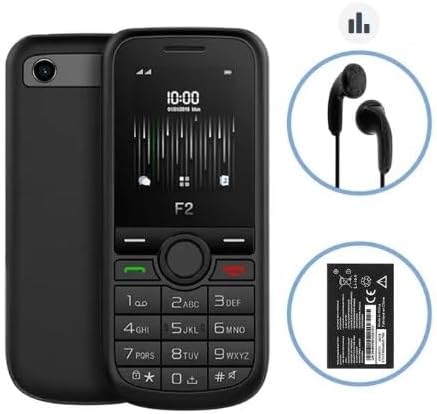
Image 2: The Altice F2 Mobile Phone displayed alongside its included accessories: a pair of black wired earphones and the removable Lithium-ion battery.
Configuració
1. Instal·lació de la bateria:
- Gently remove the back cover of the phone by prying it from the notch usually located at the bottom or side.
- Alineeu els contactes de la bateria amb els terminals de l'interior del compartiment de la bateria.
- Press the battery down firmly until it is securely in place.
- Torneu a col·locar la coberta posterior, assegurant-vos que encaixi al seu lloc amb un clic.
2. SIM Card(s) Installation:
The Altice F2 supports dual SIM cards.
- With the back cover and battery removed, locate the SIM card slots. There are typically two slots labeled SIM1 and SIM2.
- Insert your SIM card(s) into the respective slots with the gold contacts facing down and the cut corner aligned as indicated.
- Ensure the SIM cards are fully inserted.
3. Micro-SD Card Installation (Optional):
To expand storage, you can install a Micro-SD card (up to 32 GB).
- Locate the Micro-SD card slot, usually adjacent to the SIM card slots.
- Insert the Micro-SD card with the gold contacts facing down until it clicks into place.
4. Càrrega inicial:
Abans del primer ús, carregueu completament la bateria del telèfon.
- Connecteu el carregador al port de càrrega del telèfon.
- Connecteu el carregador a una presa de corrent.
- Allow the phone to charge until the battery indicator shows full. This may take several hours for the first charge.
5. Encendre/apagar:
- Per encendre: Press and hold the Power/End Call button (usually red or marked with a power symbol) until the screen lights up.
- Per apagar: Press and hold the Power/End Call button until a power-off menu appears, then select "Power Off" or similar option.
Instruccions de funcionament
Fer trucades:
- Des de la pantalla d'inici, introduïu el número de telèfon amb el teclat numèric.
- Press the Call button (usually green or marked with a phone symbol) to initiate the call.
- To end a call, press the End Call button (usually red).
Enviament de missatges:
- Navigate to the "Messages" or "SMS" menu from the main menu.
- Seleccioneu "Nou missatge" o "Crea un missatge".
- Introduïu el número de telèfon del destinatari o seleccioneu-lo dels contactes.
- Escriviu el vostre missatge amb el teclat.
- Premeu "Enviar".
Ús de la càmera:
- Access the "Camera" application from the main menu.
- Enquadra la teva foto utilitzant la pantalla com a viewcercador.
- Press the designated camera button or the center navigation key to capture the photo.
Ràdio FM:
To use the FM Radio, ensure the earphones are plugged into the 3.5mm audio jack, as they act as the antenna.
- Plug in the earphones.
- Go to the "FM Radio" application in the menu.
- Feu servir les tecles de navegació per cercar emissores o sintonitzar-les manualment.
Connectivitat Bluetooth:
- Navegueu a "Configuració" > "Bluetooth".
- Turn Bluetooth "On".
- Selecciona "Cerca devices" or "Pair new device".
- Choose the desired device from the list and follow the on-screen prompts to pair.
Llanterna:
The flashlight can usually be activated quickly from the home screen or through a dedicated menu option.
- Check your phone's specific shortcut (e.g., long-press a key) or find "Flashlight" in the Tools/Utilities menu.
Manteniment
Neteja:
- Use a soft, lint-free cloth to clean the phone's screen and body.
- Eviteu utilitzar productes químics agressius, esprais de neteja o materials abrasius.
Cura de la bateria:
- No exposeu la bateria a temperatures extremes.
- Use only the original or approved charger.
- Eviteu esgotar completament la bateria amb freqüència per allargar-ne la vida útil.
Emmagatzematge:
- Guardeu el telèfon en un lloc fresc i sec, allunyat de la llum solar directa i de la humitat.
- Si l'emmagatzemeu durant un període prolongat, assegureu-vos que la bateria estigui parcialment carregada (al voltant del 50%).
Resolució de problemes
If you encounter issues with your Altice F2 phone, refer to the common problems and solutions below:
Phone Does Not Turn On:
- Assegureu-vos que la bateria estigui instal·lada correctament i completament carregada.
- Try connecting the charger and attempting to power on while connected.
- Verify the charger and charging cable are not damaged.
Sense senyal de xarxa:
- Comproveu si la targeta SIM està inserida correctament.
- Assegureu-vos que esteu en una zona amb cobertura de xarxa.
- Reinicieu el telèfon.
- Verify with your service provider if there are any network issues in your area or with your SIM card.
La bateria s'esgota ràpidament:
- Redueix la brillantor de la pantalla.
- Tanca les aplicacions que no fas servir.
- Turn off Bluetooth when not in use.
- Si el problema persisteix, és possible que la bateria hagi de ser substituïda.
Cannot Connect to Bluetooth Device:
- Assegureu-vos que el Bluetooth estigui habilitat als dos dispositius.
- Make sure both devices are within the effective Bluetooth range (typically 10 meters).
- Prova de desvincular i tornar a vincular els dispositius.
Especificacions
| Característica | Detall |
|---|---|
| Model | F2 |
| Dimensions (L x A x A) | 11.00 x 4.80 x 1.40 cm |
| Pes brut | 77 g |
| Mida de la pantalla | 1.7 inches (4.5 cm) / 1.77 inches |
| Versió Bluetooth | 3.0 |
| Tipus de xarxa | 2G |
| Freqüències GSM | 900/1800 Mhz |
| Jack d'àudio | 3.5 mm |
| Tipus de bateria | Ió de liti |
| Capacitat de la bateria | 1000 mAh |
| Emmagatzematge ampliable | Micro-SD up to 32 GB (card not included) |
| Fabricant | SFR / Mobiwire SAS |
| Color | Negre |
| Sistema operatiu | Android 10.0 |
| Capacitat d'emmagatzematge de memòria | 32 GB |
| Resolució | 1548 x 862 |
Nota: les especificacions estan subjectes a canvis sense previ avís.
Garantia i Suport
For warranty information, please refer to the warranty card included in your product packaging or visit the manufacturer's official weblloc web. Els termes i condicions de la garantia poden variar segons la regió i el distribuïdor.
For technical support, troubleshooting assistance beyond this manual, or service inquiries, please contact the retailer or the manufacturer's customer service department. Contact details are typically available on the product packaging or the official brand weblloc.
- Fabricant: SFR / Mobiwire SAS
- Model: Altice F2


