1. Introducció
This manual provides detailed instructions for the installation, operation, and maintenance of your Shanrya 12.3-inch Car Stereo Radio Navigation GPS Player. Please read this manual thoroughly before using the product to ensure proper function and to prevent damage. This device is designed to enhance your driving experience with advanced navigation, entertainment, and connectivity features.
2. Informació de seguretat
- Instal·lació professional recomanada: Due to the complexity of car electrical systems, professional installation is strongly advised to avoid damage to the unit or your vehicle.
- Seguretat de conducció: No feu servir el dispositiu de manera que us distregui de la conducció. Prioritzeu sempre la seguretat viària.
- Font d'alimentació: Assegureu-vos que la unitat estigui connectada a la font d'alimentació correcta del vehicle (12 V CC). Volum incorrectetage pot causar danys.
- Temperatura: Eviteu exposar la unitat a temperatures extremes o a la llum solar directa durant períodes prolongats.
- Humitat: Mantingueu la unitat allunyada de l'aigua i de la humitat excessiva.
- Neteja: Utilitzeu un drap suau i sec per netejar. No utilitzeu netejadors abrasius ni dissolvents.
3. Contingut del paquet
Verifiqueu que tots els elements siguin presents al paquet:
- 1 x Main Head Unit (12.3-inch display)
- 1 x Air Vent Assembly
- 1 x Antena GPS
- 1 x Power Harness
- 2 x cables USB
- 1 x micròfon extern
- 1 x Joc de cables RCA
- 1 x Manual d'usuari (aquest document)
- Other necessary installation accessories (brackets, trim tools, etc.)
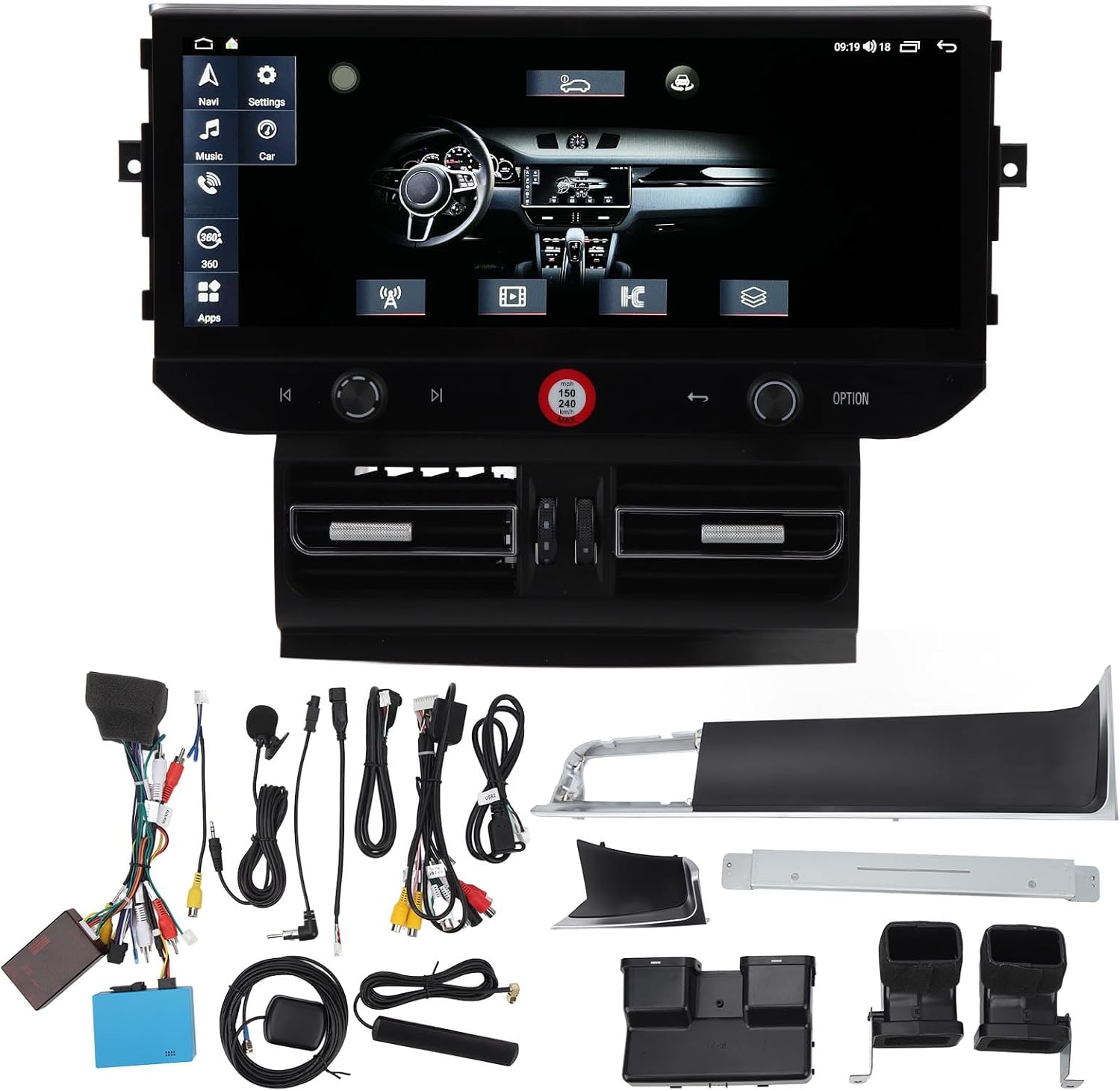
Imatge 3.1: All components of the Shanrya car stereo system, including the main head unit, wiring harnesses, GPS antenna, USB cables, and other accessories.
4. Producte acabatview
Familiarize yourself with the main components and their functions.
4.1 Main Head Unit

Imatge 4.1.1: Davant view of the Shanrya 12.3-inch car stereo head unit, showing the large display and integrated controls.
- Pantalla tàctil de 12.3 polzades: High-resolution display for navigation, media, and applications.
- Perilles de control: Located on the lower bezel for volume, tuning, and menu navigation.
- Botons físics: For quick access to functions like navigation, music, car settings, and apps.
4.2 Air Vent Assembly

Imatge 4.2.1: Close-up of the integrated air vents and controls located directly below the main screen.
- Integrated Air Vents: Designed to seamlessly replace the original vehicle air vents.
- Controls climàtics: May include integrated controls for vehicle climate functions, depending on the specific vehicle model.
5. Guia d'instal·lació (Configuració)
Aquesta secció ofereix una descripció generalview of the installation process. Due to variations in vehicle models and electrical systems, professional installation is highly recommended.
5.1 Comprovacions prèvies a la instal·lació
- Assegureu-vos que el contacte del vehicle estigui apagat i que la bateria estigui desconnectada.
- Confirm compatibility with your vehicle model (Macan LHD 2014-2016).
- Gather all necessary tools (trim removal tools, screwdrivers, wire cutters, etc.).
5.2 Removal of Original Unit
- Carefully remove the existing car stereo and air vent assembly using appropriate trim removal tools.
- Disconnect all wiring harnesses from the original unit.
5.3 Connexions de cablejat
- Connect the provided power harness to the vehicle's wiring. Ensure all connections are secure.
- Connect the GPS antenna and route it to a location with a clear view del cel (per exemple, el quadre de comandament).
- Connect USB cables and route them to a convenient location for external devices.
- Connecteu el micròfon extern per a trucades de mans lliures.
- Connect any other auxiliary inputs/outputs as required (e.g., reverse camera, external ampmés viu).
5.4 Mounting the New Unit
- Integrate the new air vent assembly and main head unit into the dashboard opening.
- Fixeu la unitat amb els suports i els cargols de muntatge proporcionats.
- Ensure all cables are neatly tucked away and not pinched.

Imatge 5.4.1: The Shanrya car stereo unit seamlessly installed in a Macan dashboard, demonstrating its fit and appearance.
5.5 Postinstal·lació
- Torneu a connectar la bateria del vehicle.
- Turn on the ignition and test all functions of the unit (power, audio, navigation, Bluetooth, etc.).
- Ajusteu la configuració segons calgui.
6. Instruccions de funcionament
6.1 Engegada/Apagada i Volum
- Encès: The unit typically powers on automatically with the vehicle's ignition.
- Apagar: The unit powers off with the vehicle's ignition. A long press on the power button (if available) may put it into standby.
- Control de volum: Use the dedicated knob or touchscreen controls to adjust the audio volume.
6.2 Navegació
- Tap the 'Navi' icon on the main screen to access the navigation application.
- Enter your destination using the on-screen keyboard.
- Follow the voice prompts and visual directions for your route.
Connectivitat Bluetooth 6.3 5.0
- Aneu a "Configuració" > "Bluetooth".
- Activeu el Bluetooth al vostre dispositiu mòbil i cerqueu els dispositius disponibles.
- Select the car stereo from the list and pair. Confirm the pairing code if prompted.
- Un cop connectat, podeu fer/rebre trucades i reproduir àudio en temps real.

Imatge 6.3.1: A user interacting with the car stereo's touchscreen, demonstrating the on-screen dialer for Bluetooth calls.
CarPlay sense fil 6.4 / Android Auto
- Ensure your iPhone or Android device has CarPlay/Android Auto enabled.
- Connect your device via Bluetooth or USB (for initial setup or wired connection).
- The unit should automatically detect and launch CarPlay/Android Auto.
- Access phone contacts, navigation, music, and voice assistants directly from the car stereo screen.

Imatge 6.4.1: The car stereo display showing the CarPlay interface, allowing access to mobile phone features.
6.5 Radio and Media Playback
- Ràdio: Select the 'Radio' application to access FM/AM stations. Use the scan function or manual tuning.
- Music/Video: Play media from USB drives, Bluetooth streaming, or internal storage via the 'Music' or 'Video' applications.
7. Característiques i funcions
- 12.3-inch High-Definition Display: Provides a clear and expansive view per a totes les funcions.
- Integrated GPS Navigation: Supports various navigation apps for accurate routing.
- Bluetooth 5.0: For stable and fast wireless connection to mobile devices for calls and audio streaming.
- CarPlay sense fil i Android Auto: Seamless integration with smartphones for enhanced functionality.
- Panoramic Image Support: May refer to support for 360-degree camera systems (if installed separately).
- Reproducció multimèdia: Supports various audio and video formats from multiple sources.
- Integració del control del volant: Compatible with existing steering wheel controls for convenience.
8. Manteniment
- Neteja de pantalla: Use a soft, lint-free cloth specifically designed for electronics screens. Do not spray cleaners directly onto the screen.
- Actualitzacions de programari: Periodically check for software updates from the manufacturer or seller to ensure optimal performance and access to new features. Updates are typically performed via USB.
- Atenció general: Avoid placing heavy objects on the unit or exposing it to sharp objects that could scratch the screen.
9. Solució De Problemes
Si teniu problemes, consulteu els següents problemes i solucions habituals:
| Problema | Causa possible | Solució |
|---|---|---|
| Sense poder | Loose wiring, blown fuse, vehicle battery issue. | Check all power connections. Inspect vehicle fuses. Ensure vehicle battery is charged. |
| Sense so | Volum massa baix, font d'àudio incorrecta, problema de cablejat de l'altaveu. | Augmenta el volum. Selecciona la font d'àudio correcta. Comprova les connexions dels altaveus. |
| El GPS no funciona | GPS antenna not connected or poorly positioned, no satellite signal. | Assegureu-vos que l'antena GPS estigui connectada correctament i que tingui una visió clara view del cel. |
| Problemes d'aparellament de Bluetooth | Bluetooth not enabled, device not discoverable, incorrect pairing code. | Ensure Bluetooth is on for both devices. Make device discoverable. Re-enter pairing code. |
| La pantalla tàctil no respon | Error de programari, danys a la pantalla. | Restart the unit (if possible). If issue persists, contact support. |
Si aquestes solucions no resolen el problema, poseu-vos en contacte amb l'atenció al client.
10. Especificacions
- Mida de la pantalla: 12.3 polzades
- Tipus de visualització: Pantalla tàctil
- Connectivitat: Bluetooth 5.0, USB
- Navegació: GPS integrat
- Integració del telèfon intel·ligent: Wireless CarPlay, Android Auto
- Compatibilitat: Macan LHD 2014-2016
- Font d'alimentació: 12V DC (Vehicle specific)
- Memòria/emmagatzematge: (6+128G) - 6GB RAM, 128GB Internal Storage
11. Garantia i Suport
For warranty information and technical support, please refer to the documentation provided at the time of purchase or contact your seller directly. Keep your purchase receipt as proof of purchase.


