Introducció
Thank you for choosing the SUNOL GM20 True Wireless Earbuds. This manual provides detailed instructions on how to set up, operate, and maintain your earbuds to ensure optimal performance and longevity. Please read this manual thoroughly before using the product.
Producte acabatview

Image: The GM20 True Wireless Earbuds in orange, shown with their matching charging case. The charging case features an LED display indicating battery percentage.
The GM20 True Wireless Earbuds are designed for a superior audio experience with advanced features:
- Tecnologia Bluetooth 5.3: Ensures faster pairing, more stable connection, and lower power consumption with an effective range of up to 10 meters.
- Micròfon integrat: High-quality microphone with environmental noise reduction for clear hands-free calls.
- Reproducció ampliada: Up to 48 hours of total playback time with the 600mAh charging case, which can recharge the earbuds four times.
- Pantalla LED: The charging case features an LED display to show the power levels of both the earbuds and the charging case.
- Disseny impermeable: IPX8 waterproof nano-coating makes the earbuds suitable for various activities, including sports.
- Ajust còmode: Ergonomic in-ear design with multiple ear tip sizes for prolonged comfortable wear.
Què hi ha a la caixa
Upon opening your GM20 True Wireless Earbuds package, you should find the following items:
- GM20 True Wireless Earbuds (Left and Right)
- Estoig de càrrega
- Cable de càrrega
- Múltiples mides de puntes per a les orelles
- Manual d'usuari (aquest document)
Configuració
1. Càrrega dels auriculars i l'estoig
Abans del primer ús, assegureu-vos que tant els auriculars com l'estoig de càrrega estiguin completament carregats.
- Place the earbuds into the charging case. Ensure they are correctly seated; the LED display on the case will show charging status.
- Connect the charging cable to the charging port on the case and to a USB power source. The LED display will indicate the charging progress of the case.
- A full charge for the case typically takes a few hours. The earbuds will charge automatically when placed inside the powered case.

Image: The GM20 charging case displaying "100" on its LED screen, indicating a full charge. An earbud is shown next to it, ready for use.
2. Emparellament amb el dispositiu (emparellament en un sol pas)
The GM20 earbuds feature automatic pairing for convenience.
- Maridatge inicial:
- Obre l'estoig de càrrega i treu els dos auriculars. S'encendran automàticament i entraran en mode d'emparellament.
- Al dispositiu (telèfon intel·ligent, tauleta, etc.), activeu el Bluetooth.
- Cerca Bluetooth devices and select "GM20 TWS" from the list.
- Un cop connectats, sentireu un to de confirmació i els auriculars estaran a punt per al seu ús.
- Torna a emparellar: The earbuds will automatically connect to the last paired device when taken out of the charging case.
- If the earbuds do not connect automatically, ensure Bluetooth is enabled on your device and select "GM20 TWS" from your Bluetooth settings.
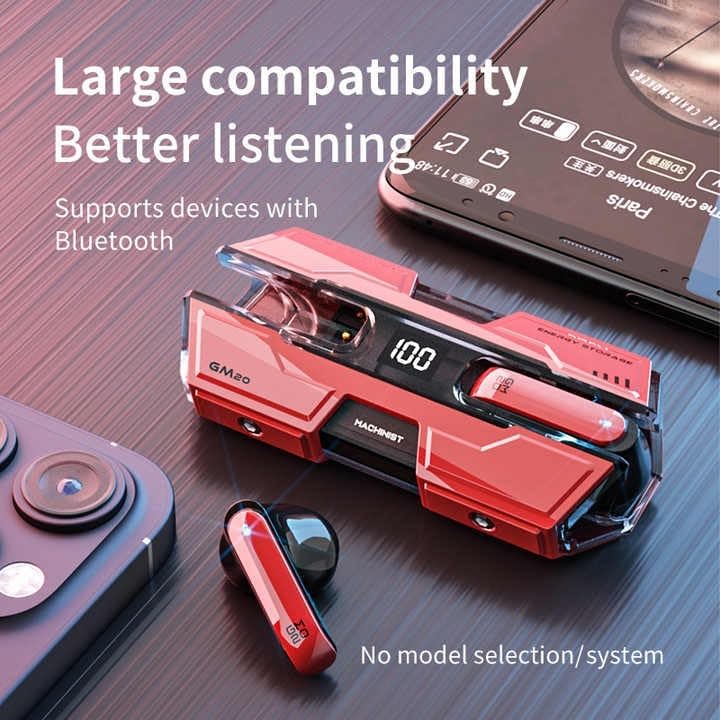
Image: The GM20 earbuds and charging case positioned near a smartphone, emphasizing their broad compatibility with Bluetooth-enabled devices.
Instruccions de funcionament
Controls dels auriculars
The GM20 earbuds feature a multifunction button on each earbud for easy control of audio playback and calls.
| Acció | Funció |
|---|---|
| Single Press (Left/Right Earbud) | Reproduir/Pausar música, Respondre/Finalitzar trucada |
| Premsa doble (auricular esquerre) | Cançó anterior |
| Premsa doble (auricular dret) | Següent Cançó |
| Premsa llarga (2 segons) | Rebutja la trucada, activa l'assistent de veu |
| Premsa llarga (5 segons) | Encès/Apagat |
Portant els auriculars
For optimal sound quality and comfort, ensure the earbuds are properly seated in your ears. Experiment with the different sizes of ear tips provided to find the best fit for your ears.

Imatge: Una explosió view diagram of an earbud, illustrating its internal components such as the 13mm moving coil and composite diaphragm, which contribute to high-resolution sound.
Manteniment
Proper maintenance will extend the life of your GM20 earbuds.
- Neteja: Netegeu regularment els auriculars i l'estoig de càrrega amb un drap suau, sec i sense borrissol. No utilitzeu netejadors abrasius ni dissolvents.
- Resistència a l'aigua: The earbuds are IPX8 waterproof, meaning they are protected against prolonged immersion in water. However, the charging case is not waterproof. Avoid exposing the charging case to liquids. Always ensure earbuds are dry before placing them back in the charging case.
- Emmagatzematge: Quan no els utilitzeu, guardeu els auriculars a la seva funda de càrrega per protegir-los i mantenir-los carregats. Guardeu-los en un lloc fresc i sec, allunyat de temperatures extremes.
- Cura de la bateria: Per allargar la durada de la bateria, evita descarregar completament els auriculars i l'estoig de càrrega amb freqüència. Carrega'ls regularment, fins i tot si no els fas servir constantment.
Resolució de problemes
If you encounter issues with your GM20 earbuds, try the following solutions:
- Auriculars que no s'emparellan:
- Assegureu-vos que els dos auriculars estiguin completament carregats.
- Desactiva el Bluetooth al dispositiu i torna'l a activar.
- Forget "GM20 TWS" from your device's Bluetooth settings and attempt to re-pair.
- Torneu a col·locar els auriculars a l'estoig, tanqueu la tapa, espereu uns segons i, a continuació, obriu-los i torneu-ho a provar.
- Sense so o volum baix:
- Comprova el nivell de volum tant del dispositiu com dels auriculars.
- Assegureu-vos que els auriculars estiguin connectats correctament al dispositiu.
- Netegeu qualsevol residu de la malla de l'altaveu dels auriculars.
- Sound distortion or crackling:
- Assegureu-vos que els auriculars estiguin dins de l'abast de Bluetooth de 10 metres del vostre dispositiu.
- Reduce interference by moving away from other wireless devices or strong electromagnetic fields.
- Prova de tornar a emparellar els auriculars.
- Auriculars que no es carreguen:
- Assegureu-vos que el cable de càrrega estigui connectat correctament tant a la carcassa com a la font d'alimentació.
- Comproveu si el port de càrrega de la carcassa està net i lliure de residus.
- Prova un cable de càrrega o un adaptador de corrent diferent.
Especificacions
| Característica | Detall |
|---|---|
| Nom del model | K8 |
| Versió Bluetooth | 5.3 |
| Interval Bluetooth | 10 metres |
| Durada de la bateria (auriculars) | Approx. 8-10 hours (single charge) |
| Durada de la bateria (amb estoig de càrrega) | Fins a 48 hores |
| Caixa de càrrega Capacitat de la bateria | 600 mAh |
| Nivell de resistència a l'aigua | IPX8 (només auriculars) |
| Resposta de freqüència | 20 Hz - 20 kHz |
| Impedància | 32 ohms |
| Mètode de control | Tàctil/Botó |
| Material | Acrilonitril butadiè estirè (ABS) |
| Pes de l'article | 14.4 unces (paquet total) |
Garantia i Suport
For warranty information and customer support, please refer to the documentation included with your purchase or visit the official SUNOL website. If you experience any issues not covered in this manual, please contact SUNOL customer service for assistance.
Conserveu el vostre comprovant de compra per a reclamacions de garantia.


