Introducció
This manual provides detailed instructions for the safe and efficient operation of your boAt Partypal 390 Bluetooth Speaker. Please read this manual thoroughly before using the product and retain it for future reference. The Partypal 390 is a powerful portable speaker designed for various audio needs, featuring 160W boAt Signature Sound, multiple connectivity options, and integrated LED lighting.
Informació de seguretat
- No exposeu l'altaveu a temperatures extremes, llum solar directa ni humitat elevada.
- Eviteu deixar caure o sotmetre l'altaveu a forts impactes.
- Do not attempt to disassemble, repair, or modify the speaker yourself. Contact qualified service personnel for assistance.
- Keep the speaker away from water and other liquids. Although it is waterproof, prolonged submersion or exposure to high-pressure water jets should be avoided.
- Feu servir només el cable de càrrega inclòs o un equivalent certificat.
- Assegureu-vos que hi hagi una ventilació adequada quan feu servir l'altaveu.
- Netegeu l'altaveu amb un drap suau i sec. No utilitzeu productes de neteja abrasius ni dissolvents.
Contingut del paquet
Verifiqueu que tots els elements que s'enumeren a continuació siguin presents al vostre paquet:
- boAt Partypal 390 Speaker
- Cable de càrrega
- Manual d'usuari
- Targeta de garantia
Producte acabatview
The boAt Partypal 390 is a versatile Bluetooth speaker featuring powerful audio output and dynamic LED lighting. Below are key visual references and descriptions of its components.
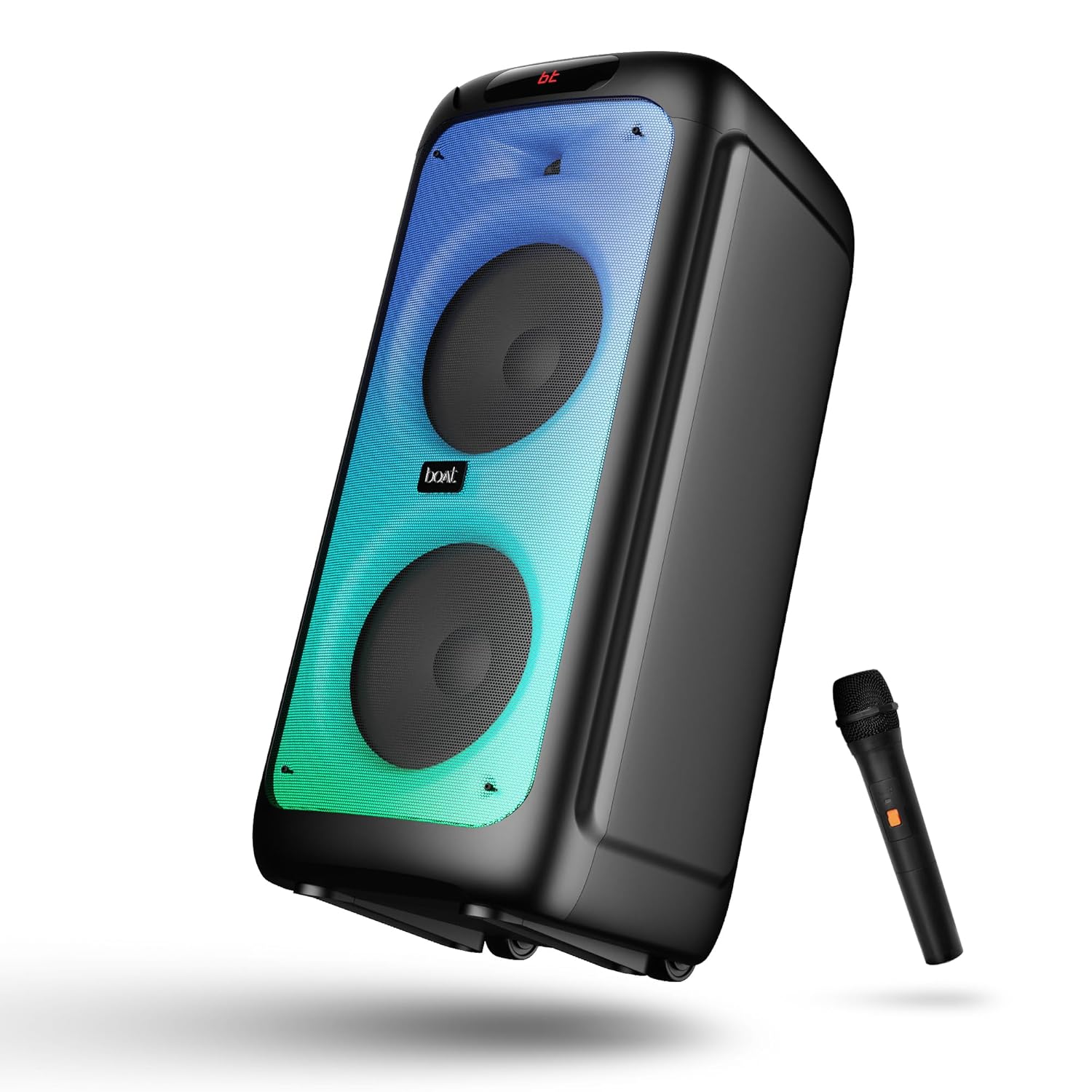
Figura 1: Davant view of the boAt Partypal 390 speaker, showcasing its dual speaker design, integrated flame LEDs, and the included wired microphone.

Figura 2: Top panel of the speaker displaying the control buttons and various input ports including USB, AUX, Guitar In, Mic 1, Mic 2, and the USB Type-C charging port. Also shown are dedicated controls for Bass/Treble, LED modes, and volume.
Característiques principals:
- So característic de 160 W: Ofereix un àudio potent i clar.
- Flame LEDs: Dynamic lighting effects to enhance the listening experience.
- Connectivitat múltiple: Bluetooth v5.3, AUX, USB, and TF card support.
- Funcionalitat de karaoke: Two microphone input ports for vocal performances.
- Entrada de guitarra: Dedicated port for connecting a guitar.
- Modes d'equalització: Pre-set sound modes (Normal, Party, Pop, Rock, Jazz) for different audio preferences.
- Mode TWS: Allows wireless connection of two Partypal speakers for stereo sound.
- Controls de graves i aguts: Adjustable audio settings for personalized sound.
- Reproducció llarga: Fins a 6 hores de durada de la bateria.
Configuració
1. Carregant l’altaveu
Before first use, fully charge the speaker. Connect the provided USB Type-C charging cable to the speaker's charging port and the other end to a compatible USB power adapter (not included). The charging indicator will show the charging status. A full charge provides up to 6 hours of playback.

Figura 3: The speaker in an outdoor setting, illustrating its portability and battery life.
2. Encendre/apagar
- To power on, press and hold the Power button located on the control panel until the display illuminates.
- To power off, press and hold the Power button again until the display turns off.
3. Emparellament inicial de Bluetooth
- Ensure the speaker is powered on and in Bluetooth mode. The display will show "bt" and the Bluetooth indicator will flash, indicating it's ready for pairing.
- Al dispositiu mòbil, activeu el Bluetooth i cerqueu els dispositius disponibles.
- Select "boAt Partypal 390" from the list of devices.
- Un cop emparellat, l'altaveu emetrà un so de confirmació i l'indicador Bluetooth deixarà de parpellejar.
Instruccions de funcionament
1. Selecció de mode
Press the "Mode" button on the control panel to cycle through available input modes: Bluetooth, AUX, USB, and TF Card.
2. Mode Bluetooth
- After successful pairing, audio from your connected device will play through the speaker.
- Use the volume knob on the speaker or your connected device to adjust the volume.
- Feu servir els botons Anterior/Següent per saltar pistes.
- Premeu el botó Reprodueix/Pausa per controlar la reproducció.
3. Mode AUX
- Connect an audio device to the AUX input port using a 3.5mm audio cable.
- Switch the speaker to AUX mode using the "Mode" button.
- Controla la reproducció i el volum des del dispositiu connectat.
4. Mode de targeta USB/TF
- Insert a USB flash drive into the USB port or a TF card into the TF card slot.
- L'altaveu canviarà automàticament al mode USB o targeta TF i començarà a reproduir àudio files. If not, switch manually using the "Mode" button.
- Use the Previous/Next buttons to navigate tracks and Play/Pause for playback control.
5. Karaoke Function (Microphone Input)
- Connect up to two wired microphones to the "MIC 1" and "MIC 2" input ports.
- Adjust microphone volume using the dedicated MIC VOL knob.
- Adjust microphone echo effect using the ECHO knob.
6. Entrada de guitarra
- Connect a guitar to the "GUITAR IN" port.
- Adjust guitar volume using the dedicated GUITAR VOL knob.
7. Modes d'equalització
The speaker offers several pre-set equalizer modes to optimize audio for different content types. Press the "EQ" button to cycle through:
- Normal
- festa
- Pop
- Roca
- Jazz

Figura 4: Visual representation of the available EQ modes for sound customization.
8. TWS (True Wireless Stereo) Mode
To connect two Partypal 390 speakers for a stereo audio experience:
- Ensure both speakers are powered on and in Bluetooth mode, but not yet paired to any device.
- On one speaker (this will be the primary speaker), press and hold the TWS button. The speaker will emit a sound indicating it's searching for another speaker.
- Els dos altaveus es connectaran automàticament entre si. Un so de confirmació indicarà que l'emparellament TWS s'ha dut a terme correctament.
- Now, pair your mobile device to the primary speaker via Bluetooth as described in the "Initial Bluetooth Pairing" section. Audio will play in stereo through both speakers.

Figura 5: Two Partypal 390 speakers wirelessly connected, demonstrating the TWS feature.
9. Control LED
Press the "LED Mode" button to cycle through different flame LED lighting effects or to turn them off.
10. Bass and Treble Controls
Use the dedicated Bass and Treble knobs on the control panel to adjust the low and high frequencies of the audio output according to your preference.
Manteniment
- Neteja: Use a soft, dry, lint-free cloth to clean the speaker's exterior. Do not use liquid cleaners, aerosols, or solvents.
- Emmagatzematge: Quan no l'utilitzeu durant períodes prolongats, guardeu l'altaveu en un lloc fresc i sec, allunyat de la llum solar directa i de temperatures extremes.
- Cura de la bateria: Per allargar la durada de la bateria, eviteu descarregar completament l'altaveu amb freqüència. Carregueu-lo regularment, fins i tot si no l'esteu fent servir.
Resolució de problemes
| Problema | Causa possible | Solució |
|---|---|---|
| L'altaveu no s'encén. | Bateria baixa; botó d'engegada no premut correctament. | Charge the speaker fully. Press and hold the Power button for a few seconds. |
| Sense so. | Volum massa baix; Mode d'entrada incorrecte; Dispositiu no connectat. | Increase speaker and device volume. Ensure correct mode is selected (Bluetooth, AUX, USB, TF). Re-pair Bluetooth device or check cable connections. |
| L'aparellament de Bluetooth falla. | Altaveu no en mode d'emparellament; Dispositiu massa lluny; Interferències. | Ensure speaker is in Bluetooth pairing mode (flashing "bt"). Move device closer to speaker. Turn off other Bluetooth devices. Forget "boAt Partypal 390" on your device and try pairing again. |
| El micròfon no funciona. | Microphone not connected properly; MIC VOL too low. | Ensure microphone is securely plugged into MIC 1 or MIC 2 port. Increase the MIC VOL knob. |
| La connexió TWS falla. | Speakers already paired to a device; Speakers too far apart. | Ensure both speakers are not connected to any Bluetooth device. Place speakers within close proximity. Repeat TWS pairing steps. |
Especificacions
Below are the technical specifications for the boAt Partypal 390 speaker:
| Nom del model | Partypal 390 |
| Tipus d'altaveu | Multimèdia, De peu |
| Potència de sortida d'àudio | 160 watts |
| Tecnologia de connectivitat | Bluetooth v5.3, AUX, USB, targeta TF |
| Interval Bluetooth | Fins a 10 metres |
| Durada de la bateria | Fins a 6 hores |
| Capacitat de la bateria | 7500 mAh (Lead Acid) |
| Dimensions del producte (P x A x A) | 70P x 32A x 32H centímetres |
| Pes de l'article | 10.8 kg |
| Nivell de resistència a l'aigua | Impermeable |
| Components inclosos | Speaker, Charging Cable, User Manual, Warranty Card |

Figura 6: Diagram illustrating the physical dimensions of the Partypal 390 speaker.
Garantia i Suport
Your boAt Partypal 390 speaker comes with a limited warranty. Please refer to the included Warranty Card for specific terms and conditions, including the warranty period and coverage details. For technical support, service, or warranty claims, please contact boAt customer service through their official weblloc web o la informació de contacte que apareix a la targeta de garantia.
For more information, visit the official boAt store: Botiga boAt a Amazon


