1. Producte acabatview
The InWin MR24 ARGB Close-Loop AIO CPU Liquid Cooler is designed to provide efficient and quiet cooling for your computer's central processing unit. Featuring a 240mm radiator and double 120mm ARGB PWM fans, this all-in-one liquid cooler is engineered to combat high temperatures and minimize noise through its radiator-mounted pump design. The rotatable CPU blockhead allows for flexible installation and aesthetic alignment within your PC build.

Image: The InWin MR24 ARGB liquid cooler showcasing its 240mm radiator, two 120mm ARGB fans, and the rotatable CPU blockhead with vibrant illumination.
Característiques principals:
- Suports universals: Supports Intel and AMD’s latest CPUs, including AM5.
- High-Performance ARGB Fans: Equipped with Neptune AN120 fans for efficient cooling and customizable lighting.
- Radiator-Mounted Pump: Innovative design minimizes vibrations and suppresses noise for a quieter system.
- Adjustable ARGB CPU Block: Features a rotatable blockhead with ARGB lighting for aesthetic customization.
- Tubs resistents: Nylon mesh sleeves with strengthened rubber tubing to prevent leakage and ensure longevity.
2. Informació de seguretat
Please read and understand all safety instructions before installing or operating the InWin MR24 ARGB Liquid Cooler. Failure to follow these instructions may result in damage to the product, personal injury, or voiding of the warranty.
- Assegureu-vos que el sistema estigui apagat i desendollat de la presa de corrent abans de la instal·lació.
- Handle components with care to avoid damage to sensitive electronic parts.
- Wear anti-static gloves or use an anti-static wrist strap to prevent electrostatic discharge (ESD).
- Do not attempt to open or modify the sealed liquid cooling loop.
- Keep the product away from liquids and excessive humidity.
- Ensure proper ventilation within your PC chassis to maintain optimal performance and prevent overheating.
3. Contingut del paquet
Verify that all components listed below are present in your InWin MR24 ARGB Liquid Cooler package:
- MR24 Radiator with Integrated Pump and Tubing
- 2 x Neptune AN120 ARGB PWM Fans
- Intel Mounting Bracket (LGA 1700/1200/115x/20xx)
- AMD Mounting Bracket (AM5/AM4/AMX/FMX)
- Standoff Screws for Intel and AMD Sockets
- Cargols de ventilador
- Cargols del radiador
- Thermal Paste Syringe
- Cable d'extensió del ventilador PWM
- Cable de bloqueig d'aigua ARGB
- Manual d'usuari (aquest document)

Imatge: Una completa view of all parts and accessories included in the InWin MR24 ARGB Liquid Cooler package, laid out for identification.
4. Configuració i instal·lació
Follow these steps carefully to install your InWin MR24 ARGB Liquid Cooler. For a visual guide, please refer to the installation video provided below.
Video: Official InWin MR24/36 Installation Guide, demonstrating the step-by-step process for mounting the cooler and connecting its components.
4.1. Instal·lació del ventilador
- Attach the Neptune AN120 fans to the radiator using the provided fan screws. Ensure the airflow direction is as desired (typically pushing air through the radiator).
- Connect the PWM cables from the fans to the PWM Fan Extension Cable.
- Connect the ARGB cables from the fans to the ARGB Water Block Cable.

Image: The 240mm radiator with two Neptune AN120 ARGB fans securely mounted, ready for chassis installation.
4.2. Instal·lació del radiador
- Determine the optimal mounting location for the radiator within your PC chassis (e.g., top, front, or rear).
- Secure the radiator and fan assembly to the chassis using the appropriate radiator screws.
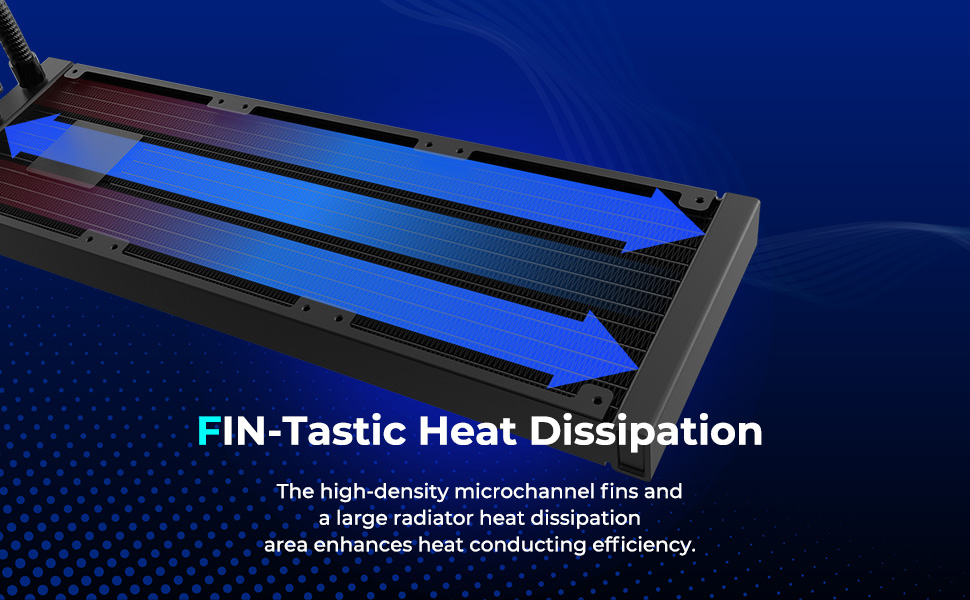
Image: A diagram illustrating the high-density microchannel fins of the radiator, designed for efficient heat dissipation from the liquid coolant.
4.3. Pump Unit Installation
- Select the correct mounting bracket (Intel or AMD) for your CPU socket type.
- Attach the Intel backplate to the bottom of the motherboard if installing on an Intel system.
- Install the standoff screws onto your motherboard, ensuring they are tightened securely.
- Apliqueu una petita quantitat de pasta tèrmica al centre del difusor de calor integrat (IHS) de la CPU.
- Carefully place the CPU blockhead onto the CPU, aligning the mounting holes with the standoff screws.
- Secure the CPU blockhead by tightening the spring-loaded screws in a diagonal pattern until firm.

Imatge: Una imatge detallada view of the InWin MR24 CPU blockhead, highlighting its rotatable design and ARGB lighting ring.
4.4. Connexió per cable
- Connect the ARGB Water Block Cable to a 5V, 3-pin ARGB header on your motherboard (usually labeled M_B 3-Pin or ARGB_Header).
- Connect the PWM Fan Extension Cable to a 12V, 4-pin PWM fan header on your motherboard (usually labeled M_B 4-Pin or CPU_FAN).
- Connect the Pump Cable (from the radiator) to a dedicated AIO_PUMP or CPU_OPT header on your motherboard.

Image: A visual representation of the various cable connections required for the InWin MR24 liquid cooler, including ARGB and PWM headers.
5. Instruccions de funcionament
Once installation is complete and verified, power on your system. The InWin MR24 ARGB Liquid Cooler will begin operating automatically.
- Control del ventilador: The PWM fans will adjust their speed based on CPU temperature, controlled by your motherboard's fan curves. These can typically be configured in your motherboard's BIOS/UEFI settings or through manufacturer-provided software.
- Control d'il·luminació ARGB: The ARGB lighting on the fans and CPU blockhead can be controlled via your motherboard's ARGB software (e.g., ASUS Aura Sync, MSI Mystic Light Sync, GIGABYTE RGB Fusion, ASRock Polychrome Sync). Ensure your motherboard supports 5V, 3-pin ARGB.
- Funcionament de la bomba: The pump operates continuously to circulate coolant. Ensure the pump header in your BIOS is set to full speed or 'PWM' mode to ensure consistent flow.
6. Manteniment
Un manteniment regular ajuda a garantir la longevitat i el rendiment òptim del vostre refrigerador de líquid.
- Eliminació de pols: Periodically clean dust from the radiator fins and fan blades using compressed air or a soft brush. Dust accumulation can impede airflow and reduce cooling efficiency.
- Comprovació de la canonada: Visually inspect the tubing and connections for any signs of leaks, kinks, or damage.
- Soroll del ventilador: If fans become excessively noisy, check for dust buildup or loose mounting screws.
- Nivell de refrigerant: As this is a closed-loop system, no coolant refilling is typically required.
7. Solució De Problemes
If you encounter issues with your InWin MR24 ARGB Liquid Cooler, refer to the following common problems and solutions:
| Problema | Causa possible | Solució |
|---|---|---|
| Temperatures altes de la CPU | Insufficient thermal paste, poor contact with CPU, dust buildup on radiator, incorrect fan orientation, pump not running. | Reapply thermal paste, ensure secure mounting, clean radiator/fans, verify fan direction, check pump connection and BIOS settings. |
| Fans Not Spinning / No ARGB Lighting | Loose cable connections, incorrect header connection, motherboard software issues. | Check all PWM and ARGB cable connections, ensure connected to correct headers (12V 4-pin for PWM, 5V 3-pin for ARGB), update/reinstall motherboard ARGB software. |
| Soroll inusual del refrigerador | Air bubbles in pump, fan bearing noise, loose fan/radiator screws. | Gently shake chassis to dislodge air bubbles (with system off), check fan screws, consider fan replacement if noise persists. |
8. Especificacions
Detailed technical specifications for the InWin MR24 ARGB Liquid Cooler:
| Especificació | Valor |
|---|---|
| Marca | EN GUANYA |
| Model | MR24 |
| Mètode de refrigeració | Aigua |
| Mida del radiador | 240 mm |
| Mida del ventilador | 120 mm (x2) |
| Tipus de ventilador | ARGB PWM Fans (Neptune AN120) |
| Velocitat de rotació màxima | 2500 RPM |
| Nivell de soroll | 20.5 dB |
| Tipus de connector d'alimentació | 4-Pin (PWM) |
| Voltage | 12 Volts |
| Dispositius compatibles | Desktop (AMD Ryzen AM5/AM4; Intel LGA 1700/1200) |
| Dimensions del producte (LxWxH) | 94.49 x 9.45 x 9.45 polzades |
| Pes de l'article | 4.22 lliures |
| Data de primera disponibilitat | 23 de setembre de 2023 |
9. Garantia i assistència
InWin products are manufactured to the highest quality standards. For specific warranty terms and conditions, please refer to the warranty card included with your product or visit the official InWin website. If you require technical assistance or have questions regarding your InWin MR24 ARGB Liquid Cooler, please contact InWin customer support through their official channels.
For the latest drivers, software, and support resources, please visit the official InWin weblloc: www.in-win.com


