1. Introducció
This manual provides detailed instructions for the installation, operation, and maintenance of your GEONFINO S1pro Smart Door Lock with Handle. Please read this manual thoroughly before installation and use to ensure proper functionality and security.

Figure 1: GEONFINO S1pro Smart Door Lock with Handle
2. Producte acabatview
2.1 Característiques clau
- Múltiples mètodes de desbloqueig: Fingerprint recognition, TT Lock App control, passcodes, physical keys, and IC cards.
- TT Lock App Integration: Manage access logs, generate temporary or custom codes, and share access with guests.
- Seguretat millorada: Features anti-peeping password technology and an automatic lock function.
- Llarga vida útil de la bateria: Up to 18 months of operation on a single charge, with a USB-A emergency charging port.
- Disseny durador: Constructed from zinc material, suitable for residential and commercial use.
2.2 Components
The GEONFINO S1pro Smart Door Lock package typically includes:
- Front Panel with Handle
- Rear Panel with Handle
- Cos de tancament
- Placa i caixa de cop
- Mounting Hardware (screws, spindles)
- Claus físiques (2)
- IC Cards (2)
- Manual d'usuari
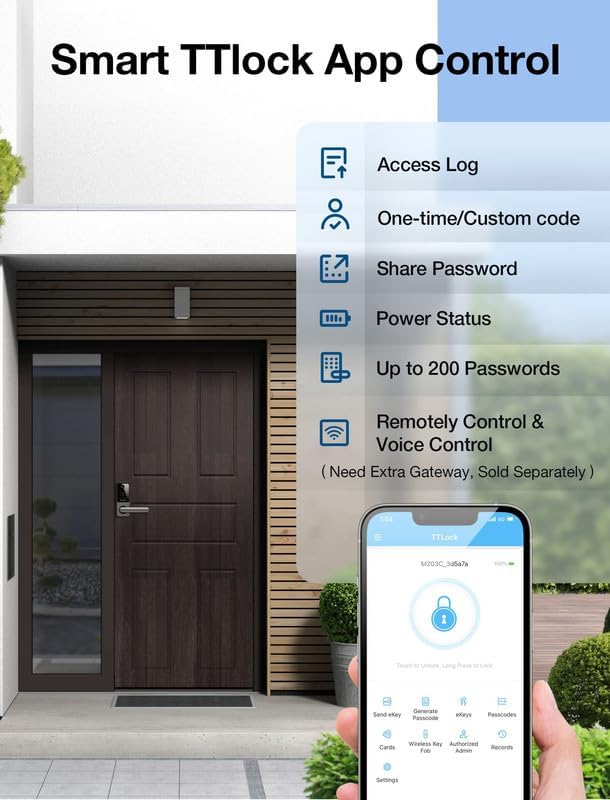
Figure 2: Five Keyless Entry Methods
3. Instal·lació
Before installation, confirm your door's handedness (left or right-handed). The reversible door handle allows adjustment to match your door's configuration. Follow the steps below for a smooth installation process.
3.1 Preparació de la porta
Assegureu-vos que la vostra porta compleixi les especificacions següents:
- Part posterior: 2-3/8 inches or 2-3/4 inches (60mm-70mm)
- Diàmetre del forat: ≥ 54mm (2-1/8 inches)
- Gruix de la porta: 1-3/5 inches to 2 inches (40mm-50mm)

Figure 3: Door Measurement Guide
3.2 Passos d'instal·lació
- Install the Mortise Lock: Insert the mortise lock into the door edge and secure it with screws.
- Instal·leu el panell frontal: Route the cable through the door hole and attach the front panel.
- Install the Rear Panel: Connect the cable to the rear panel, then attach the rear panel to the door, ensuring the handle is correctly oriented.
- Funcionalitat de prova: After installation, test all unlocking methods and the auto-lock feature.
Note: A new password must be set immediately after installation. The lock will not function without an initial password setup.
No official installation videos were provided in the product data. Please refer to the included paper manual for detailed visual instructions.
4. Funcionament
4.1 Mètodes de desbloqueig
- Empremta digital: Place your registered finger on the sensor. The lock will unlock in approximately 1 second. The lock supports up to 100 fingerprints.
- Contrasenya: Enter your registered passcode on the keypad. The lock features anti-peeping technology, allowing you to enter random digits before and after your actual code to obscure it.
- Targeta IC: Tap a registered IC card on the designated area of the lock.
- Clau física: Use the provided physical keys as a backup unlocking method.
- TT Lock App: Use the TT Lock application on your smartphone via Bluetooth.

Figure 4: Fingerprint Unlocking

Figure 5: Anti-Peeping Passcode Feature
4.2 TT Lock App Control
The TT Lock app provides comprehensive control over your smart lock:
- Registres d'accés: View una història de qui hi va entrar i quan.
- Generate Passcodes: Create one-time, timed, or permanent passcodes for guests or service providers.
- Accés compartit: Easily share eKeys or passcodes with others.
- Estat de l'alimentació: Monitor the lock's battery level.
- Comandament a distància: With an optional Gateway (sold separately), you can remotely control the lock and integrate with voice assistants like Alexa or Google Assistant.

Figure 6: TT Lock App Interface
4.3 Bloqueig automàtic
The lock features an adjustable auto-lock function. After the door closes, the lock will automatically engage after a set period, enhancing security and convenience.

Figure 7: Auto-Lock Functionality
5. Manteniment
5.1 Gestió de la bateria
The GEONFINO S1pro Smart Door Lock is powered by 4 AAA batteries (not included). It offers an 18-month battery life under normal usage conditions.
- Alarma de bateria baixa: The lock will provide an audible and visual alert when the battery level is low.
- Càrrega d'emergència: If the batteries completely drain, use a power bank with a USB-A cable to temporarily power the lock via the emergency charging port located on the front panel.
- Substitució de la bateria: Replace all four AAA batteries when the low battery warning appears.

Figure 8: Battery Life and Weather Protection
5.2 Neteja
Netegeu l'exterior del pany amb un drap suau i sec. Eviteu utilitzar netejadors o dissolvents abrasius, ja que poden danyar l'acabat i els components electrònics.
6. Solució De Problemes
If you encounter issues with your GEONFINO S1pro Smart Door Lock, please refer to the following common problems and solutions:
- El pany no respon: Check battery levels. If low, replace batteries or use emergency charging.
- Empremta digital no reconeguda: Assegura't que el dit estigui net i sec. Torna a registrar la teva empremta digital si el problema persisteix.
- El codi d'accés no funciona: Verify the correct passcode is entered. Ensure anti-peeping digits are not interfering with the actual code.
- El bloqueig automàtic no s'activa: Check the auto-lock settings in the TT Lock app. Ensure the door sensor is properly aligned.
- Problemes de connectivitat de l'aplicació: Ensure Bluetooth is enabled on your phone and you are within range of the lock. Restart the app or your phone if necessary.
For more complex issues or if the problem persists, please contact GEONFINO customer support.
7. Especificacions
| Característica | Especificació |
|---|---|
| Marca | GEONFINO |
| Nom del model | S1pro |
| Tipus de bloqueig | Biomètric |
| Característiques especials | Contrasenya antiespionatge, bloqueig automàtic, empremta digital, bloqueig d'un sol toc, desbloqueig amb codi |
| Material | Zinc |
| Color | Sliver Smart Lock with Handle |
| Dimensions de l'article (L x A x A) | 1 x 1 x 1 polzades |
| Pes de l'article | 4.13 lliures |
| Usos recomanats | Residential and commercial door security and access control |
| Tipus de controlador | Android, Hand Control, Mechanical knob |
| Mètode de control | App |
| Protocol de connectivitat | Bluetooth |
| Piles necessàries | Sí (4x AAA, no incloses) |
| Fabricant | Zhongshan City Geonfino Co., Ltd |
8. Garantia i assistència
8.1 Informació de la garantia
For specific warranty details, please refer to the warranty card included with your product packaging or visit the official GEONFINO weblloc. Els termes de la garantia solen cobrir els defectes de fabricació durant un període especificat a partir de la data de compra.
8.2 Atenció al client
If you require assistance with installation, operation, or troubleshooting, please contact GEONFINO customer support through the following channels:
- Correu electrònic: Refer to your product packaging or the official GEONFINO weblloc web per al correu electrònic de contacte.
- Weblloc: Visit the GEONFINO Store on Amazon