1. Introducció
This manual provides detailed instructions for the Alacrity 3-in-1 Bluetooth Pet Microchip Reader (Model MJ-Q30). This device is designed for reading animal microchips, supporting ISO11784, ISO11785, FDX-B, and EMID standards. It features a 1.44-inch TFT screen, an 800mAh rechargeable battery, and offers versatile connectivity options including 2.4GHz wireless, Bluetooth, and USB wired connections. The reader can store up to 240 pieces of data and supports both hexadecimal and decimal data output.

Image: The Alacrity 3-in-1 Bluetooth Pet Microchip Reader, showcasinpel seu disseny compacte i la pantalla integrada.
2. Contingut del paquet
Si us plau, verifiqueu que tots els elements que s'enumeren a continuació siguin presents al vostre paquet:
- 1 x Pet Microchip Scanner (Alacrity MJ-Q30)
- 1 x manual d'usuari en anglès
- 1 x cable USB
- 1 adaptador sense fil de 2.4 GHz

Image: Contents of the product package, including the scanner, user manual, USB cable, and 2.4GHz wireless dongle.
3. Característiques del producte
- Suport multiestàndard: Compatible with ISO11784 / ISO11785 / FDX-B and EMID microchips. (Note: Does not read AVID microchips.)
- Sortida de dades dual: Supports both hexadecimal and decimal data output, selectable by the user.
- 1.44" TFT Screen: Displays battery level, working mode, connection status, and microchip data clearly.
- Connectivitat 3 en 1: Offers USB wired, 2.4GHz wireless, and Bluetooth connections for versatile use. Plug and play, no driver installation required.
- Dos modes de treball:
- Upload Instantly Mode: Data is transmitted immediately upon scanning.
- Mode d'emmagatzematge: Stores up to 240 pieces of data internally for later upload.
- Llarga vida útil de la bateria: Equipped with an 800mAh rechargeable battery, providing up to 16 hours of continuous working time and 3 days of standby time.
- Disseny portàtil: Compact and lightweight for easy carrying and use in various environments.

Image: Illustration of the upgraded RFID technology, demonstrating effective reading distances for 2-12mm glass tube labels (>8mm) and 30mm animal ear marks (>20mm).

Image: Visual representation of the 800mAh battery capacity, indicating 15 hours of continuous working time and 3 days of standby time.
4. Producte acabatview
Familiarize yourself with the components of your Alacrity Pet Microchip Reader:

Image: A detailed diagram of the microchip reader with the following labeled parts: (1) Scan Position, (2) Page Up button, (3) TFT Display Screen, (4) Scan Button, (5) Page Down button, and (6) Type-C Interface.
- Scan Position: The area where the microchip is read.
- Botó Amunt pàgina: Used to navigate up through menus or stored data.
- Pantalla de visualització TFT: Shows device status, menu options, and scanned data.
- Botó d'escaneig: Initiates the microchip scanning process.
- Botó de pàgina avall: Used to navigate down through menus or stored data.
- Interfície tipus C: For charging the device and connecting via USB.
5. Configuració
5.1 Càrrega inicial
Before first use, fully charge the device. Connect the provided USB cable to the Type-C interface (6) on the reader and the other end to a USB power adapter (not included) or a computer's USB port. The screen will indicate charging status.
5.2 Engegada/apagada
To power on the device, press and hold the Scan Button (4) for a few seconds until the TFT Display Screen (3) illuminates. To power off, press and hold the Scan Button (4) again until the screen turns off.
6. Instruccions de funcionament
6.1 Connecting the Reader
The Alacrity Pet Microchip Reader offers three connection methods:
- Connexió sense fil de 2.4 GHz:
Insert the 2.4GHz wireless dongle into a USB port on your computer. The reader will automatically connect to the dongle. This connection is ideal for stable, short-range wireless data transfer to a PC.

Image: Demonstrates the 2.4GHz wireless connection by plugging the USB dongle into a laptop, with the scanner displaying connection status.
- Connexió sense fil Bluetooth:
On the reader's TFT screen, navigate to the Bluetooth option using the Page Up/Down buttons (2, 5) and select it with the Scan Button (4). On your smartphone or computer, enable Bluetooth and search for "Alacrity Reader" or similar. Pair with the device. This connection is suitable for mobile devices.

Image: Shows the three connection methods: 2.4GHz wireless via dongle, Bluetooth wireless connecting to a smartphone, and USB wired connection to a laptop.
- Connexió per cable USB:
Connect the reader directly to your computer using the provided USB cable via the Type-C interface (6). The device will function as a standard USB input device, allowing direct data transfer.
6.2 Escaneig de microxips
Per escanejar un microxip:
- Assegureu-vos que el lector estigui encès.
- Position the Scan Position (1) of the reader close to the animal's microchip implant site.
- Press the Scan Button (4). The reader will emit a beep and display the microchip ID on the TFT Display Screen (3) if a chip is detected. The reading time is typically less than 100ms.
- The displayed ID can be in hexadecimal or decimal format, depending on your selected setting.

Image: A user scanning a pet's microchip with the Alacrity reader, showing the device's screen displaying the scanned barcode content.
6.3 Data Storage and Upload
The reader supports two data handling modes:
- Upload Instantly Mode: In this mode, each scanned microchip ID is immediately transmitted to the connected device (computer or smartphone). This is the default mode for real-time data capture.
- Mode d'emmagatzematge: To use this mode, select "Storage Mode" from the reader's menu. Scanned microchip IDs will be saved internally. The device can store up to 240 pieces of data. To upload stored data, connect the reader to a computer via USB or 2.4GHz wireless dongle, navigate to "Upload Data" on the reader's screen, and confirm the upload. The data will be transferred to your computer.
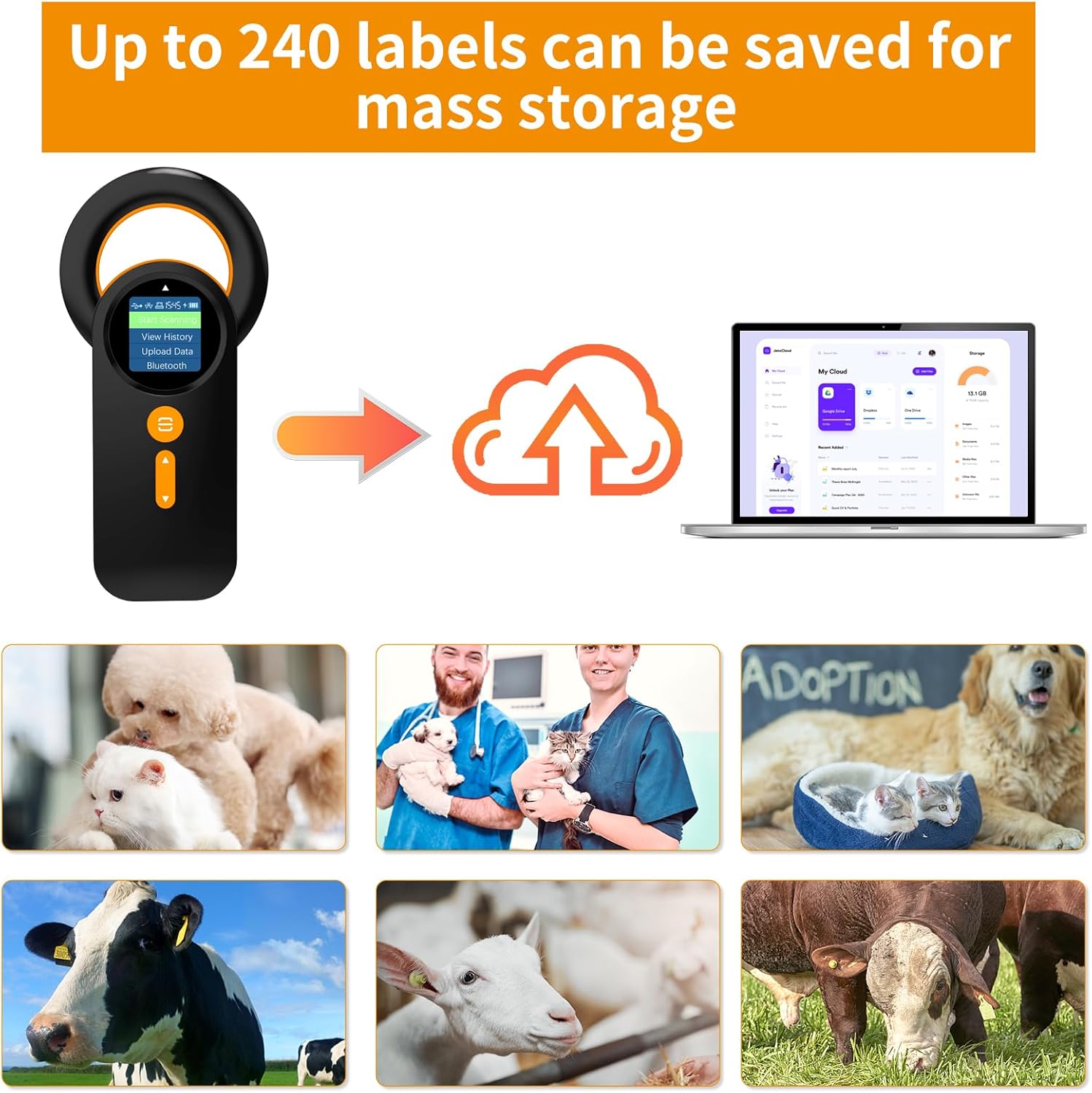
Image: Illustrates the data storage capability, showing the scanner saving up to 240 labels and the process of uploading data to a computer, suitable for various animal types.
7. Manteniment
- Mantingueu el dispositiu net netejant-lo amb un drap suau i sec. Eviteu utilitzar productes de neteja o dissolvents abrasius.
- Guardeu el lector en un lloc fresc i sec, allunyat de la llum solar directa i de temperatures extremes.
- Protect the TFT display screen from scratches.
- No intenteu desmuntar ni reparar el dispositiu vosaltres mateixos, ja que això anul·larà la garantia.
- Ensure the Type-C port is free of dust and debris.
8. Solució De Problemes
| Problema | Causa possible | Solució |
|---|---|---|
| El dispositiu no s'encén. | Bateria baixa o sense càrrega. | Carregueu el dispositiu completament mitjançant el cable USB proporcionat. |
| Cannot read microchip. |
|
|
| 2.4GHz/Bluetooth connection fails. |
|
|
| Data not uploading. |
|
|
9. Especificacions
| Característica | Detall |
|---|---|
| Model | MJ-Q30 |
| Microxips compatibles | ISO11784 / ISO11785 / FDX-B, EMID (Does not read AVID) |
| Pantalla de visualització | Pantalla TFT de 1.44 polzades |
| Connectivitat | 2.4GHz Wireless, Bluetooth, USB Wired |
| Capacitat de la bateria | Bateria de polímer de liti recarregable de 800 mAh |
| Temps de treball continu | Fins a 16 hores |
| Temps d'espera | Fins a 3 dies |
| Capacitat d’emmagatzematge de dades | 240 pieces of data |
| Format de sortida de dades | Hexadecimal & Decimal |
| Pes de l'article | 4.2 unces (aproximadament 119 grams) |
| Dimensions del paquet | 6.57 x 4.61 x 1.06 polzades |
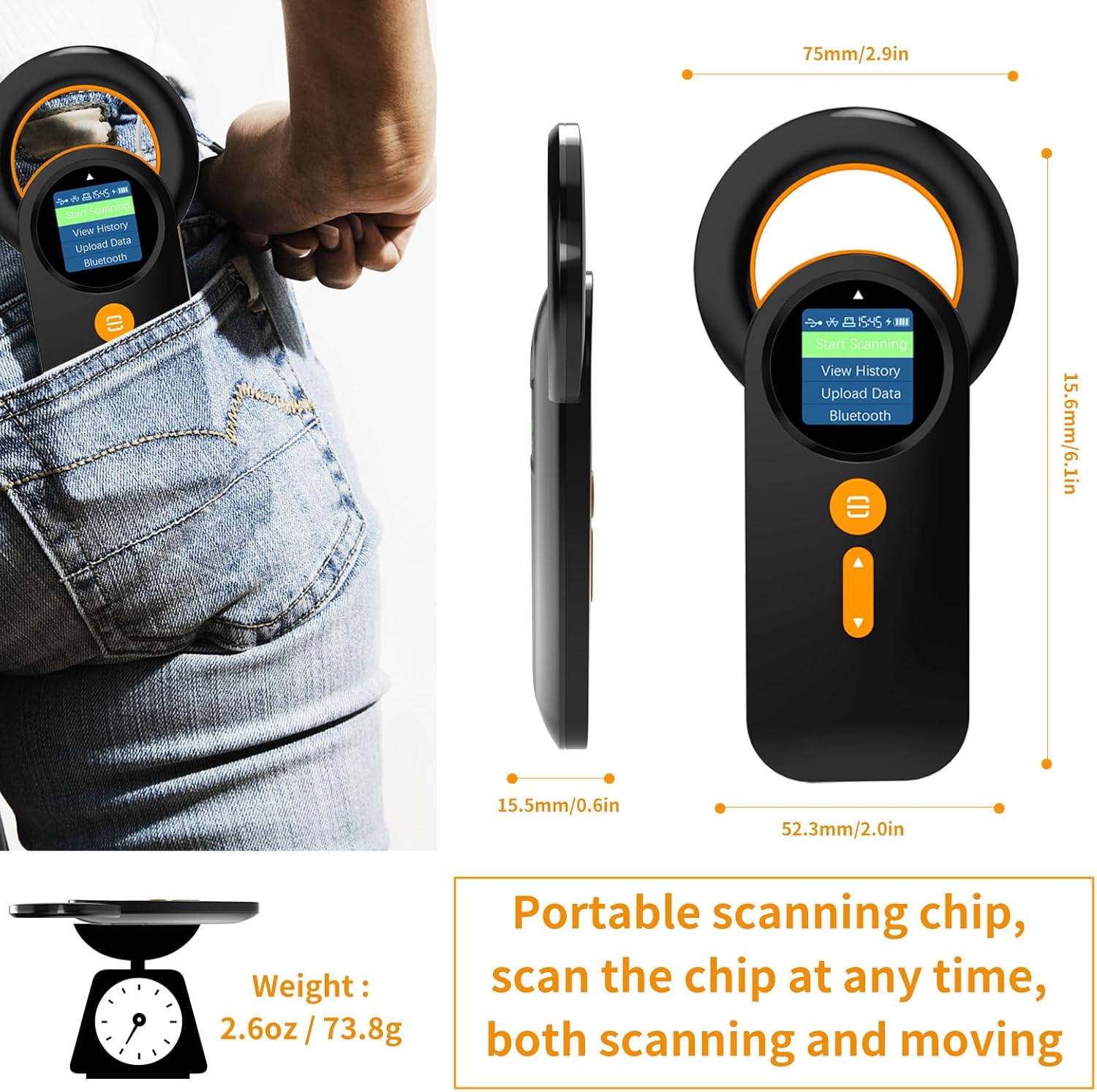
Image: Technical drawing showing the dimensions of the Alacrity Pet Microchip Reader (15.8mm/6.1in height, 52.3mm/2.0in width, 15.5mm/0.6in thickness) and its weight (2.6oz / 73.8g), highlighting its portability.
10. Garantia i Suport
For warranty information and technical support, please refer to the contact details provided with your purchase or visit the official Alacrity weblloc web. Conserveu el rebut de compra com a comprovant de compra per a reclamacions de garantia.
Fabricant: atesa
Data de primera disponibilitat: 23 de setembre de 2023


