Producte acabatview
The 1Mii SafeFly Pro is a versatile Bluetooth 5.3 audio transmitter and receiver designed to provide wireless audio connectivity for a wide range of devices. It features an OLED screen for clear status display, dual-link functionality for connecting two devices simultaneously, and a long-lasting battery, making it an ideal companion for travel and home use.
This device can transmit audio wirelessly from sources like airplane entertainment systems, gym equipment, PCs, and TVs to your Bluetooth headphones or earbuds. It can also receive audio wirelessly from your mobile phone or tablet to upgrade wired speakers or car audio systems with Bluetooth capability.
Què hi ha a la caixa
- 1Mii SafeFly Pro 2-in-1 Bluetooth Transmitter Receiver
- Cable de càrrega USB-C
- 3.5mm Female to Female Audio Adapter
- Adjunt de clauer
- Manual d'usuari

Image: All components included in the 1Mii SafeFly Pro package.
Característiques del producte
- Premium OLED Screen: Displays battery status, volume level, paired device names, and decoding format (SBC, AAC, aptX/LL/HD).
- Bluetooth 5.3 Dual Function: Operates as both a transmitter (TX) and receiver (RX). Ensures stable and faster connections.
- Connectivitat de llarga distància: Up to 100ft (30m) in RX mode and 50ft (15m) in TX mode without obstacles. Reduced range with obstacles.
- Share Audio (Dual Link): In TX mode, connect two Bluetooth headsets or speakers. In RX mode, connect two mobile phones simultaneously. Note: aptX Low Latency is not supported when two devices are connected.
- Llarga vida útil de la bateria: Integrated 250mAh battery provides up to 30 hours of use and fully charges in 1.5 hours.
Guia visual de les funcions

Image: Labeled diagram of the 1Mii SafeFly Pro highlighting its components and controls.
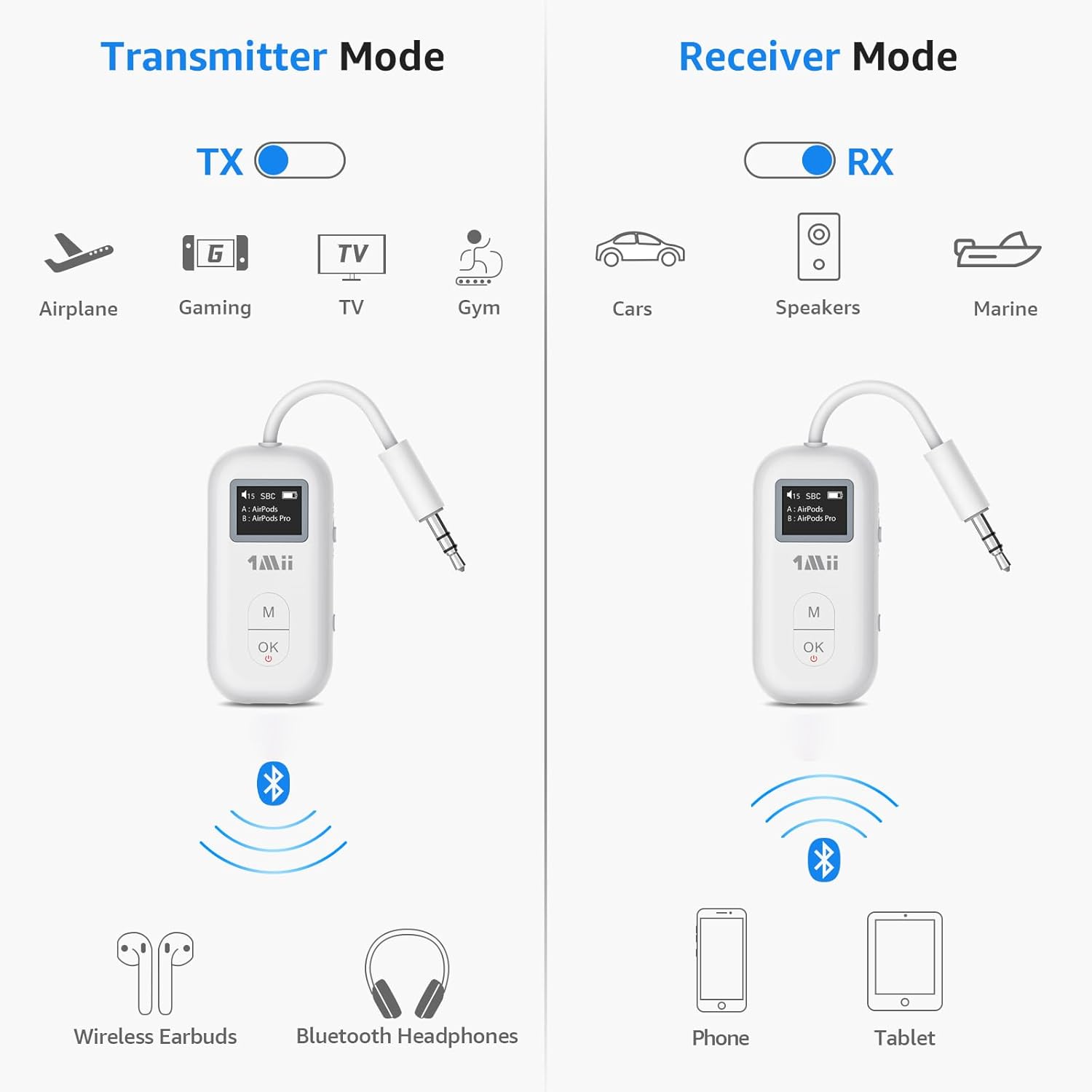
Image: Illustration of the 1Mii SafeFly Pro's dual functionality as a transmitter (TX) and receiver (RX) for various use cases.

Image: The Dual Connection feature in action, allowing two Bluetooth headphones to connect to a single audio source.

Image: Demonstrating how the 1Mii SafeFly Pro can upgrade wired speakers with Bluetooth capability.
Vídeo oficial del producte
Video: An official product video from 1Mii showcasing the Bluetooth 5.3 Transmitter Receiver for Airplane/TV use.
Guia de configuració
- Carregueu el dispositiu: Before first use, fully charge the SafeFly Pro using the provided USB-C charging cable. The OLED screen will indicate charging status.
- Encès/apagat: Press the "OK" button for 2 seconds to power on or off the device.
- Select Mode (TX/RX): Use the TX/RX sliding switch on the side of the device to select the desired mode.
- Mode TX (transmissor): To send audio from a non-Bluetooth device (e.g., airplane entertainment, TV) to your Bluetooth headphones.
- Mode RX (receptor): To receive audio from a Bluetooth device (e.g., smartphone) to a non-Bluetooth audio system (e.g., wired speakers, car stereo).
Instruccions de funcionament
Funcionament en mode TX (transmissor)
- Connecteu-vos a la font d'àudio: Plug the 3.5mm audio jack of the SafeFly Pro into the audio output port of your desired device (e.g., airplane seat, TV, gym equipment).
- Introduïu el mode de vinculació: Long press the "OK" button for 2 seconds. The screen will display "Pairing..."
- Pair with Headphones: Put your Bluetooth headphones or earbuds into pairing mode. The SafeFly Pro will search for nearby devices and display them on the OLED screen.
- Seleccioneu el dispositiu: Press the "M" button to cycle through available devices on the screen. Once your device is highlighted, press "OK" to confirm and connect.
- Dual Link Connection (TX Mode): After connecting the first device, long press the "M" button for 2 seconds to enter pairing mode again for the second device. Repeat the pairing steps.
- Ajustar el volum: Use the volume controls on your connected headphones or the SafeFly Pro (if available) to adjust audio levels.
- Change Decoding Format: In transmission mode, press the "M" button twice to switch the Bluetooth decoding format (e.g., SBC, aptX LL, aptX HD).

Image: Connecting the 1Mii SafeFly Pro to an airplane's audio jack for wireless transmission.
Funcionament en mode RX (receptor)
- Connect to Audio Output: Plug the 3.5mm audio jack of the SafeFly Pro into the audio input port of your non-Bluetooth speaker, car stereo, or wired headphones.
- Introduïu el mode de vinculació: Long press the "OK" button for 2 seconds. The screen will display "Pairing..."
- Vincula amb telèfon/tauleta: On your smartphone or tablet, enable Bluetooth and search for "1Mii SafeFly Pro" in the list of available devices. Select it to connect.
- Dual Link Connection (RX Mode): After connecting the first phone, long press the "M" button for 2 seconds to enter pairing mode again for the second phone. Repeat the pairing steps.
- Reproduir àudio: Once connected, play audio from your phone/tablet. The sound will be transmitted wirelessly to the SafeFly Pro and then output through your connected speaker/headphones.
Manteniment
- Neteja: Feu servir un drap suau i sec per netejar el dispositiu. No utilitzeu netejadors líquids ni aerosols.
- Emmagatzematge: Guardeu el dispositiu en un lloc fresc i sec, allunyat de la llum solar directa i de temperatures extremes.
- Cura de la bateria: Fully charge the device before long periods of inactivity. Avoid charging while using the device, as this can damage the battery and affect playtime.
- Restablir el dispositiu: If you encounter issues, you can perform a factory reset. Refer to the troubleshooting section for instructions.
Resolució de problemes
| Problema | Solució |
|---|---|
| Sense àudio / Mala qualitat d'àudio |
|
| Cannot pair devices |
|
| Device not holding a charge / Short battery life |
|
| Restabliment de fàbrica | To perform a factory reset, long press the "OK" button for 5 seconds while the device is powered on. This will clear all pairing records. |
Note: If you encounter any usage problems not covered here, please do not hesitate to inform us. 1Mii's after-sales team will always be by your side to serve you.
Especificacions
| Característica | Valor |
|---|---|
| Dimensions del producte | 2.16 x 0.39 x 1.1 polzades (5.49 x 0.99 x 2.79 cm) |
| Pes de l'article | 0.64 unces (18.14 grams) |
| Número de model | SafeFly Pro |
| Bateries | 1 bateria de metall de liti (inclosa) |
| Tecnologia de connectivitat | Bluetooth 5.3 |
| Font d'alimentació | Funciona amb bateria |
| Característica especial | OLED Screen, 2-in-1 Bluetooth Transmitter Receiver, AptX Adaptive/Low Latency/HD |
| Durada de la bateria | Fins a 30 hores |
| Temps de càrrega | Aprox. 1.5 hores |
| Bluetooth Range (RX) | Fins a 100 m sense obstacles |
| Bluetooth Range (TX) | Fins a 50 m sense obstacles |
Garantia i Suport
For warranty information and customer support, please refer to the official 1Mii website or contact their customer service team directly. The user manual included in the box may also contain specific warranty details and contact information.
You can typically find support resources, FAQs, and contact options on the 1Mii brand's official weblloc: 1Mii Official Store.


