Introducció
Thank you for choosing the HyperGear Stealth2 ANC Wireless Headphones. This manual provides detailed instructions for setting up, operating, and maintaining your headphones to ensure optimal performance and longevity. Please read this manual thoroughly before use.

Image: HyperGear Stealth2 ANC Wireless Headphones, Bone color, showcasing key features like Active Noise Cancelling, 40mm Neodymium Drivers, Deep HD Stereo Sound, up to 24-hour playing time, rapid charge, and lightweight foldable design.
Contingut del paquet
Verifiqueu que tots els elements siguin presents al paquet:
- HyperGear Stealth2 ANC Wireless Headphones
- Cable de càrrega USB-C
- Manual d'usuari (aquest document)
Producte acabatview
Familiarize yourself with the various components and controls of your headphones.

Image: Detailed diagram of the HyperGear Stealth2 ANC Wireless Headphones, highlighting the on-ear controls. Labels include Power On/Off, Enter Pairing Mode, Volume Up/Next Track, Play/Pause/Answer/End Call, Reject Call, Activate Voice Assistant, Gaming Mode On/Off, Volume Down/Previous Track, and Active Noise Cancellation On/Off. Also shows Quick Pairing and Auto Reconnection features.
Controls supraaurals:
- Botó d'encesa: Press and hold to power on/off. Press and hold to enter pairing mode.
- Botó Pujar volum / Pista següent: Premeu per augmentar el volum. Mantingueu premut per saltar a la pista següent.
- Botó multifunció (Reproduir/Pausa): Press to play/pause audio. Press to answer/end calls. Press and hold to reject calls. Double-press to activate voice assistant. Triple-press to toggle Gaming Mode.
- Botó per baixar el volum / pista anterior: Premeu per baixar el volum. Mantingueu premut per anar a la pista anterior.
- Botó ANC: Press to toggle Active Noise Cancellation on/off.
Configuració
1. Càrrega dels auriculars
Abans del primer ús, carregueu completament els auriculars.
- Connecteu el cable de càrrega USB-C proporcionat al port de càrrega dels auriculars.
- Connecteu l'altre extrem del cable a una font d'alimentació USB (per exemple, un adaptador de paret, un port USB de l'ordinador).
- The LED indicator will show charging status. It typically takes about 2 hours for a full charge.
- A 10-minute rapid charge can provide approximately 3 hours of playback.

Image: A person wearing HyperGear Stealth2 ANC Wireless Headphones on an airplane, illustrating battery life: 18 hours with ANC on, 24 hours with ANC off. Also highlights rapid charge: 10 minutes of charging provides 3 hours of playback.
2. Emparellament Bluetooth
Emparella els auriculars amb el dispositiu per a àudio sense fil.
- Assegureu-vos que els auriculars estiguin carregats i apagats.
- Premeu i manteniu premut el botó d'engegada fins que l'indicador LED parpellegi en blau i vermell, cosa que indica el mode d'emparellament.
- Al dispositiu (telèfon intel·ligent, tauleta, ordinador), activeu el Bluetooth i cerqueu els dispositius disponibles.
- Select "HyperGear Stealth2" from the list of found devices.
- Un cop connectat, l'indicador LED mostrarà una llum blava fixa o parpellejarà lentament.
Maridatge ràpid: The headphones are designed for instant connection with your device in seconds after initial pairing.
Reconnexió automàtica: The headphones will remember and automatically reconnect to the last paired device when powered on and within range.
Instruccions de funcionament
Encès/Apagat
- To power on, press and hold the Power button until the LED indicator lights up.
- To power off, press and hold the Power button until the LED indicator turns off.
Cancel·lació activa de soroll (ANC)
- Press the dedicated ANC button to toggle Active Noise Cancellation on or off.
- When ANC is active, ambient noise is significantly reduced, providing a quieter listening experience.
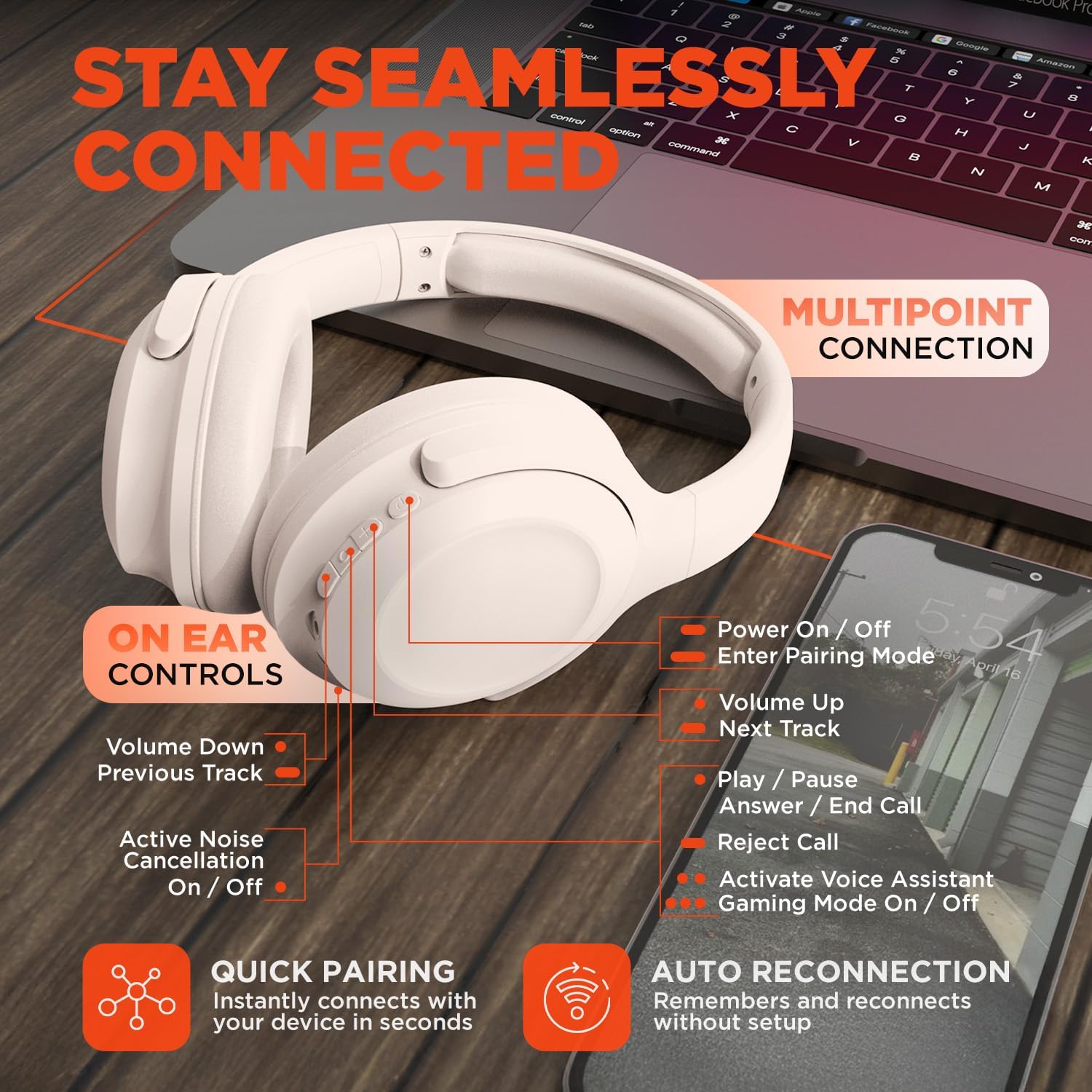
Image: HyperGear Stealth2 ANC Wireless Headphones highlighting "Pure Sound Anywhere" with Dual ANC Microphones for blocking unwanted noise and Adaptive Sound Control for real-time environment adjustment. Also shows compatibility with Siri and Google Assistant, and use cases for exercise, gaming, and travel.
Reproducció d'àudio i trucades
- Reproduir/pausa: Premeu el botó multifunció una vegada.
- Pista següent: Premeu i manteniu premut el botó de pujar el volum.
- Pista anterior: Manteniu premut el botó de baixar el volum.
- Control de volum: Premeu els botons de pujar o baixar el volum.
- Respondre/Finalitzar la trucada: Premeu el botó multifunció una vegada.
- Rebutja la trucada: Manteniu premut el botó multifunció.
Assistent de veu
- Double-press the Multi-function button to activate your device's voice assistant (Siri, Google Assistant, etc.).
Mode de joc
- Triple-press the Multi-function button to toggle the no-lag Gaming Mode. This mode optimizes audio synchronization for enhanced gameplay.
Connexió multipunt
The headphones support multipoint connection, allowing them to be connected to two Bluetooth devices simultaneously.
- Emparelleu els auriculars amb el primer dispositiu tal com es descriu a la secció "Emparellament amb Bluetooth".
- Desactiveu el Bluetooth al primer dispositiu.
- Torneu a posar els auriculars en mode d'emparellament i emparelleu-los amb el segon dispositiu.
- Torneu a activar el Bluetooth al primer dispositiu. Els auriculars ara haurien d'estar connectats a tots dos dispositius.
- Audio will play from the device that is actively playing content.

Image: HyperGear Stealth2 ANC Wireless Headphones positioned between a laptop and a smartphone, demonstrating the multipoint connection feature. This allows the headphones to stay seamlessly connected to multiple devices.
Manteniment
Una cura adequada garanteix la longevitat i el rendiment dels vostres auriculars.
- Keep the headphones dry. Do not expose them to water or excessive moisture. They are not water resistant.
- Clean the earcups and headband with a soft, dry cloth. Avoid using harsh chemicals or abrasive materials.
- Guarda els auriculars en un lloc fresc i sec quan no els facis servir. El disseny plegable permet un emmagatzematge compacte.
- Eviteu temperatures extremes.
- No intenteu desmuntar ni modificar els auriculars, ja que això anul·larà la garantia.
Resolució de problemes
If you encounter issues, refer to the following common solutions.
| Problema | Solució |
|---|---|
| Headphones will not power on. | Assegureu-vos que els auriculars estiguin completament carregats. Connecteu-los a una font d'alimentació amb el cable USB-C. |
| No es pot emparellar amb un dispositiu. |
|
| Sense so o amb un volum baix. |
|
| L'ANC no és eficaç. |
|
Especificacions
| Característica | Detall |
|---|---|
| Nom del model | HyperGear Stealth2 ANC Headphones |
| Número de model | 15860 |
| Tecnologia de connectivitat | Sense fil (Bluetooth) |
| Versió Bluetooth | 5.2 |
| Interval Bluetooth | 10 metres |
| Mida del controlador d'àudio | 40 mm |
| Interval de freqüència | 20 Hz - 20,000 Hz |
| Control de soroll | Cancel·lació activa del soroll |
| Durada de la bateria | Fins a 24 hores (ANC desactivat) |
| Temps de càrrega | 2 hores |
| Port de càrrega | USB-C |
| Material | Plàstic |
| Pes de l'article | 0.38 quilograms (13.3 unces) |
| Dimensions del producte | 7.88 x 2.25 x 10.51 polzades |
| Nivell de resistència a l'aigua | No resistent a l'aigua |
| UPC | 633755158605 |
Garantia i Suport
HyperGear products are designed for reliability and performance. For warranty information and customer support, please refer to the warranty card included with your purchase or visit the official HyperGear weblloc.
Política de devolució: This product typically includes a 30-day return policy for refunds or replacements. Please check your purchase details for specific terms.
Fabricant: HIPEREQUIPMENT


