1. Introducció
Thank you for choosing the FOREVER MATB-100 Wireless Power Bank. This device is designed to provide convenient and efficient charging for your mobile devices, featuring both wired and wireless charging capabilities. Please read this manual carefully before using the product to ensure safe and optimal performance.
2. Característiques clau
- Càrrega versàtil: Supports simultaneous charging of three devices via wireless induction, USB-A, and USB-C ports.
- Indicador LED: A practical LED display accurately shows the current battery level of the power bank.
- Smart Magnetic Grip: Features a special magnetic grip to stabilize your phone with the power bank, allowing hands-free use during charging.
- Alta capacitat: Equipped with a 10,000 mAh battery, providing multiple recharges for your devices.
- Càrrega ràpida: Supports Power Delivery (PD) and Quick Charge (QC) technologies for rapid charging.
- Suport integrat: Allows the power bank to function as a stand for your phone while charging.
3. Producte acabatview
Familiarize yourself with the components of your FOREVER MATB-100 Wireless Power Bank.

Imatge 3.1: Davant i darrere view of the FOREVER MATB-100 Wireless Power Bank, highlighting the wireless charging pad and the integrated kickstand.

Imatge 3.2: lateral view of the power bank, illustrating the USB-A output port, USB-C input/output port, and the LED battery level indicators.

Imatge 3.3: The power bank magnetically attached to the back of a smartphone, demonstrating the secure magnetic grip feature.

Imatge 3.4: Diagram showing the dimensions of the power bank: approximately 10.8 cm in length and 6.8 cm in width.
Components:
- Wireless Charging Pad (with magnetic alignment)
- Indicador de nivell de bateria LED
- Botó d'engegada
- Port de sortida USB-A
- Port d'entrada/sortida USB-C
- Suport de peu integrat
4. Configuració i càrrega inicial
4.1 Càrrega del banc d'energia extern
Before first use, fully charge your FOREVER MATB-100 Power Bank.
- Connecteu el cable USB-C proporcionat al port USB-C del banc d'alimentació.
- Connect the other end of the USB-C cable to a compatible USB wall adapter (not included). For optimal charging speed, use a Power Delivery (PD) compatible adapter.
- The LED indicators will illuminate to show the charging progress. When all LEDs are solid, the power bank is fully charged.
Nota: The power bank can be charged using the USB-C port. It is recommended to fully charge the power bank every three months if not in regular use to maintain battery health.
5. Instruccions de funcionament
5.1 Comprovació del nivell de la bateria
Premeu el botó d'engegada una vegada per comprovar el nivell restant de la bateria. Els indicadors LED s'encendran, i cada LED representa aproximadament el 25% de la capacitat de la bateria.
5.2 Càrrega sense fil
The MATB-100 supports wireless charging for compatible devices, including MagSafe-enabled iPhones and other Qi-compatible smartphones.
- Assegureu-vos que el banc d'energia estigui prou carregat.
- Place your wireless charging compatible device onto the wireless charging pad of the power bank. For MagSafe-enabled devices, the power bank will magnetically align.
- The device should begin charging automatically. If not, press the power button on the power bank to activate wireless charging.
- The LED indicators on the power bank may show charging status.
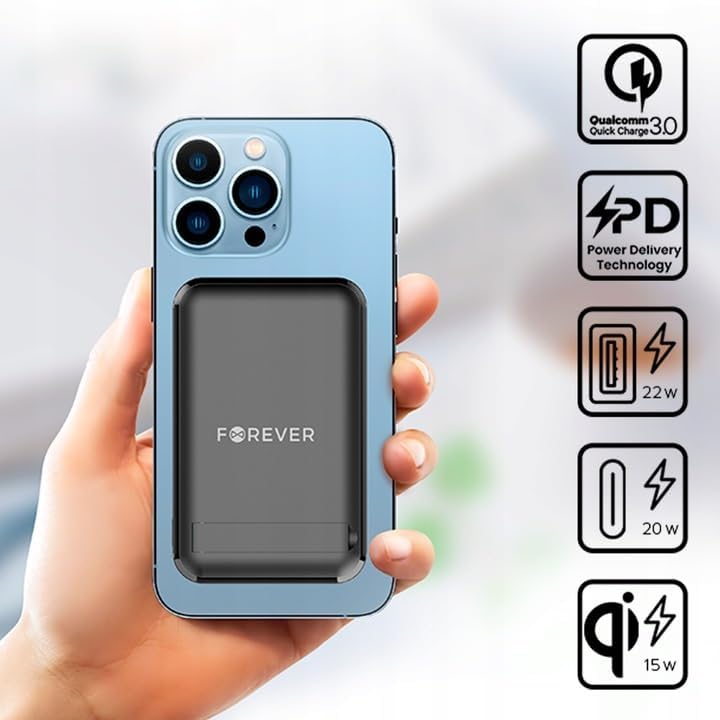
Imatge 5.1: A smartphone attached to the power bank, illustrating wireless charging in progress and icons representing Quick Charge, Power Delivery, and various wattage sortides.
Consell: Use the integrated kickstand to prop up your phone while it charges wirelessly, allowing for comfortable viewing.
5.3 Wired Charging (USB-A and USB-C)
The power bank can charge devices via its USB-A and USB-C ports.
- Assegureu-vos que el banc d'energia estigui prou carregat.
- Connect one end of a compatible charging cable to your device and the other end to either the USB-A or USB-C output port on the power bank.
- The device should begin charging automatically. If not, press the power button on the power bank.

Imatge 5.2: A smartphone connected to the power bank via a USB-C cable, demonstrating wired charging.
Nota: The USB-C port functions as both an input for charging the power bank and an output for charging other devices. The USB-A port is an output only.
5.4 Càrrega simultània
The FOREVER MATB-100 can charge up to three devices simultaneously (one wirelessly, one via USB-A, and one via USB-C). The total output power will be distributed among the connected devices.
6. Cura i Manteniment
- Keep the power bank dry. Moisture can damage the internal circuitry.
- No exposar a temperatures extremes (calent o fred).
- Eviteu deixar caure o sotmetre el banc d'energia a forts impactes.
- Clean the surface with a soft, dry cloth. Do not use harsh chemicals or abrasive cleaners.
- Emmagatzemar en un lloc fresc i sec, lluny de la llum solar directa.
- If not used for extended periods, charge the power bank at least once every three months to prolong battery life.
7. Solució De Problemes
7.1 El banc d'energia no es carrega
- Ensure the USB-C cable is securely connected to both the power bank and the wall adapter.
- Verifiqueu que l'adaptador de paret funciona correctament i que està connectat a una presa de corrent amb corrent.
- Try using a different USB-C cable and/or wall adapter.
7.2 El dispositiu no es carrega des del banc d'alimentació
- Check the power bank's battery level. If it's low, recharge the power bank.
- Premeu el botó d'engegada del banc d'energia per activar la càrrega.
- For wired charging, ensure the cable is securely connected to both the power bank and your device. Try a different cable or port.
- For wireless charging, ensure your device is properly aligned on the charging pad and is wireless charging compatible. Remove any thick cases that might interfere.
- Ensure there are no metallic objects between the power bank and your device during wireless charging.
7.3 Càrrega lenta
- Assegureu-vos que feu servir un cable de càrrega compatible i d'alta qualitat.
- For wired charging, ensure your device supports Quick Charge (QC) or Power Delivery (PD) if you expect fast charging speeds.
- For wireless charging, ensure your device supports fast wireless charging and is correctly aligned.
- Carregar diversos dispositius simultàniament pot reduir la velocitat de càrrega de cada dispositiu individual.
8. Especificacions
| Nom del model | MATB-100 |
| Marca | PER SEMPRE |
| Capacitat de la bateria | 10000 mAh (Milliampabans de l'hora) |
| Composició de la bateria | Ió de liti |
| Tipus de connector | USB tipus A, USB tipus C |
| Característica especial | Wireless Charging, Magnetic Grip, Integrated Kickstand |
| Voltage | 5 Volts (Output) |
| Nombre de Ports | 2 (USB-A, USB-C) + Wireless Charging |
| Dispositius compatibles | Smartphones (including MagSafe compatible), Tablets, Headphones, Smartwatches |
| Dimensions (L x A x A) | 10.8 cm x 6.8 cm x 2 cm (aproximadament) |
| Sortida sense fil màxima | 15W |
| Max USB-A Output | 22.5W (Quick Charge) |
| Sortida màxima d'USB-C | 20W (Lliurament de potència) |
9. Informació de seguretat
- No desmunteu, obriu ni esmicoleu la bateria.
- No exposeu el banc d'energia a la calor ni al foc. Eviteu emmagatzemar-lo sota la llum solar directa.
- Do not short-circuit the power bank. Do not store battery packs haphazardly in a box or drawer where they may short-circuit each other or be short-circuited by conductive materials.
- No sotmeti el banc d'energia a cops mecànics.
- En cas de fuita de la bateria, no permeteu que el líquid entri en contacte amb la pell o els ulls. Si hi ha hagut contacte, renteu la zona afectada amb aigua abundant i consulteu un metge.
- Mantingueu el banc d'energia fora de l'abast dels nens.
- Superviseu els nens quan utilitzin el banc d'energia extern.
- No utilitzeu cap carregador que no sigui el proporcionat específicament per al seu ús amb l'equip.
- Desfeu-vos del banc d'energia elèctrica correctament d'acord amb la normativa local. No el llenceu amb les escombraries domèstiques.
10. Garantia i Suport
For warranty information and technical support, please refer to the documentation provided with your purchase or contact the FOREVER customer service department. Keep your proof of purchase for warranty claims.
For further assistance, you may visit the official FOREVER weblloc o poseu-vos en contacte amb el vostre distribuïdor.


