Introducció
Thank you for choosing the Karlsson Alarm Clock with Wireless Charger. This device combines a stylish LED alarm clock with the convenience of wireless phone charging, all housed in an elegant dark wood veneer finish. This manual provides detailed instructions to help you set up, operate, and maintain your new alarm clock.

Davant view of the Karlsson Alarm Clock, displaying the time and temperature.
Configuració
Alimentació del dispositiu
The alarm clock can be powered via the included USB adapter or by 4 AAA batteries (not included). For continuous operation and wireless charging functionality, it is recommended to use the USB adapter.
- Potència USB: Connect the provided USB cable to the DC 5V input port on the back of the alarm clock. Plug the other end into a compatible USB power adapter (included) and then into a wall outlet.
- Energia de la bateria (reserva): Insert 4 AAA batteries (not included) into the battery compartment on the back of the unit. Batteries are primarily for backup during power outages or for temporary portability, and may not support continuous display or wireless charging.

posterior view of the alarm clock, showing the power input and control buttons.
Configuració inicial
Once powered on, the LED display will illuminate. The clock may display a default time or require immediate setting. Refer to the 'Operating' section for instructions on setting the time and alarm.
En funcionament
The control buttons (SET, UP, DOWN, RESET) are located on the back of the unit.
Establiment de l'hora
- Premeu el botó SET Premeu el botó una vegada per entrar al mode de configuració de l'hora. Els dígits de les hores parpellejaran.
- Utilitza el UP i ABAIX botons per ajustar l'hora.
- Premeu SET again to move to minute setting. The minute digits will flash.
- Utilitza el UP i ABAIX botons per ajustar els minuts.
- Premeu SET una tercera vegada per confirmar i sortir del mode de configuració de l'hora.
Configuració de l'Alarma
- Premeu el botó SET button repeatedly until the alarm icon (if present) or 'AL' appears, indicating alarm setting mode. The alarm hour digits will flash.
- Utilitza el UP i ABAIX botons per ajustar l'hora de l'alarma.
- Premeu SET again to move to alarm minute setting. The alarm minute digits will flash.
- Utilitza el UP i ABAIX botons per ajustar els minuts de l'alarma.
- Premeu SET a third time to confirm and exit alarm setting mode.
- Per activar o desactivar l'alarma, utilitzeu el botó UP or ABAIX button while in normal time display mode, or follow specific instructions in the alarm setting menu.
Ús de la funció de càrrega sense fil
The alarm clock features an integrated wireless charging pad on its top surface. This function is active when the clock is powered via the USB adapter.
- Ensure the alarm clock is connected to the USB power adapter.
- Place your Qi-compatible smartphone or device directly onto the center of the top surface of the alarm clock, aligning it with the wireless charging symbol.
- The device should begin charging automatically. A charging indicator (e.g., a light on the phone or clock, or a symbol on the clock's display) may appear.
- If charging does not begin, adjust the position of your device on the charging pad. Remove any thick phone cases that might interfere with charging.
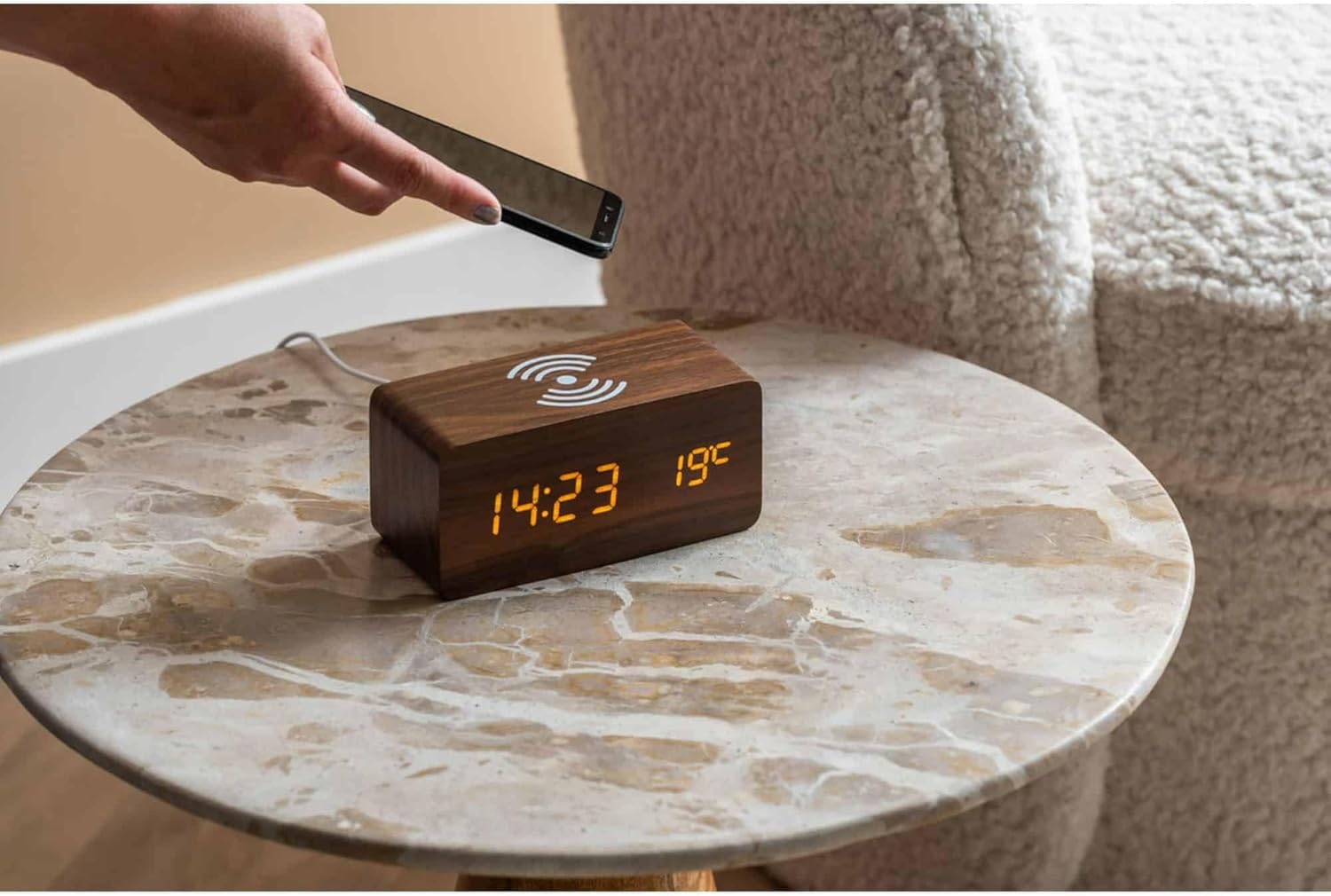
A smartphone being placed on the alarm clock for wireless charging.

A dalt view of the alarm clock, highlighting the wireless charging area.
Brillantor de la pantalla
Some models allow adjustment of display brightness. Typically, this is done by pressing the UP or ABAIX button in normal time display mode, or through a dedicated setting within the menu accessed by the SET botó.
Manteniment
Neteja
To clean the alarm clock, gently wipe the surface with a soft, dry, or slightly damp cloth. Do not use abrasive cleaners, solvents, or harsh chemicals, as these may damage the wood veneer or electronic components.
Canvi de bateria
If using AAA batteries for backup, replace all four batteries simultaneously when the display dims or the clock loses time during a power outage. Assegureu-vos de la polaritat correcta quan inseriu piles noves.
Resolució de problemes
- La pantalla està apagada o té poca llum:
- Ensure the USB power adapter is securely connected to both the clock and a working power outlet.
- If using batteries, check if they are depleted or inserted correctly. Replace if necessary.
- Adjust display brightness if applicable. - La càrrega sense fil no funciona:
- Confirm the clock is powered by the USB adapter, not just batteries.
- Ensure your phone is Qi-compatible.
- Reposition your phone on the charging pad, ensuring it is centered.
- Remove any thick phone cases that might obstruct charging.
- Check for any metal objects between the phone and the charging pad. - L'alarma no sona:
- Verify that the alarm time is set correctly.
- Ensure the alarm function is activated (check for an alarm icon on the display).
- Check the alarm volume setting if available. - Clock losing time:
- Ensure a stable power supply. If using batteries, replace them.
Especificacions
| Característica | Detall |
|---|---|
| Marca | Karlsson |
| Número de model | KA5933DW |
| Dimensions (L x A x A) | 15 x 3.81 x 7.1 cm |
| Material | MDF (tauler de fibra de densitat mitjana) |
| Font d'alimentació | USB Adapter (included), 4 x AAA Batteries (not included) |
| Característiques | LED Display, Alarm Function, Wireless Induction Charging |
Garantia i Suport
For warranty information and customer support, please refer to the documentation provided with your purchase or contact the retailer or manufacturer directly. Keep your proof of purchase for any warranty claims.


