Introducció
Gràcies per la compraasing the i-box Stylus N10 Record Player. This manual provides essential information for setting up, operating, and maintaining your new turntable. Please read it thoroughly before use to ensure optimal performance and longevity of your device. The i-box Stylus N10 combines vintage aesthetics with modern features, offering a high-quality audio experience for your vinyl collection and seamless Bluetooth connectivity for digital music.

Image: The i-box Stylus N10 Record Player, showcasing its elegant design in a home environment.
Informació important de seguretat
- Llegiu totes les instruccions abans d'utilitzar la unitat.
- Conserveu aquest manual com a referència futura.
- Do not expose the unit to rain, moisture, or direct sunlight.
- Assegureu-vos que la ventilació sigui adequada; no obstruïu cap obertura de ventilació.
- Utilitzeu només accessoris/accessoris especificats pel fabricant.
- Desendolleu la unitat durant les tempestes llamps o quan no l'utilitzeu durant llargs períodes.
- Demaneu tot el servei a personal de servei qualificat.
Contingut del paquet
Si us plau, comproveu que tots els elements que s'enumeren a continuació estiguin inclosos al vostre paquet:
- i-box Stylus N10 Record Player
- Cable d'alimentació i adaptador
- Manual d'usuari (aquest document)
- Slipmat (pre-installed on platter)
Producte acabatview
Familiarize yourself with the components of your i-box Stylus N10 Record Player:
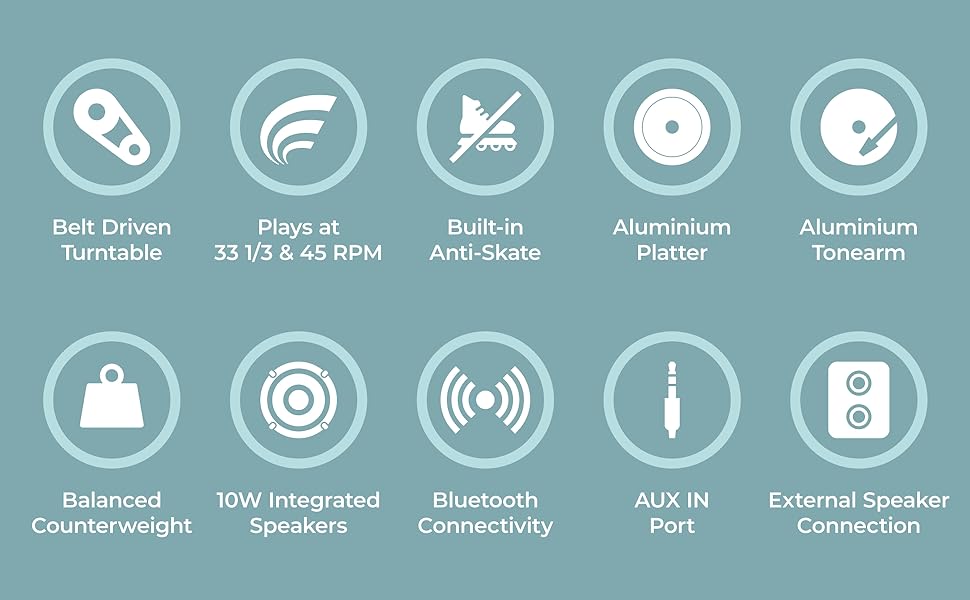
Image: Detailed diagram showing the various parts of the i-box Stylus N10, including the dust cover, spindle, counterweight, tonearm, lift lever, auto-off control, speed & Bluetooth selector, volume control, headshell, stylus & cartridge, slipmat, aluminum platter, power switch, line out ports, and AUX in port.
- 1. Dust Cover: Protects the platter and tonearm from dust.
- 2. Spindle: Manté el rècord al seu lloc.
- 3. Counterweight: Balances the tonearm and adjusts tracking force.
- 4. Lift Lever: Puja i baixa l’arma.
- 5. Tonearm: Holds the headshell and stylus.
- 6. Auto Off Control: Enables or disables automatic platter stop at the end of a record.
- 7. Speed & BT Selector: Selects playback speed (33/45 RPM) or Bluetooth mode.
- 8. Control de volum: Adjusts the output volume of the built-in speakers.
- 9. Headshell: Holds the stylus and cartridge.
- 10. Stylus & Cartridge: Reads the grooves of the record. (Audio-Technica integrated)
- 11. Slipmat: Provides a soft surface for records and reduces static.
- 12. Aluminum Platter: The rotating surface on which records are placed.
- 13. Interruptor d'alimentació: Encén/apaga la unitat.
- 14. Phono Line Out Switch: (Not explicitly labeled in diagram but implied by Line Out Ports) Switches between Phono and Line output levels if applicable.
- 15. Line Out Ports (RCA): Per connectar a dispositius externs ampelevadors o altaveus alimentats.
- 16. AUX In Port: Per connectar dispositius d'àudio externs mitjançant un cable de 3.5 mm.
- 17. 10W Integrated Speakers: Built-in stereo speakers for direct audio playback.
Configuració
1. Desembalatge i col·locació
- Traieu amb cura el tocadiscos del seu embalatge.
- Place the unit on a flat, stable surface away from direct sunlight, heat sources, or excessive dust.
- Assegureu-vos que hi hagi prou espai al voltant de la unitat per a la ventilació.
2. Instal·lació de la safata i la corretja
The aluminum platter and drive belt are typically pre-installed. If not, follow these steps:
- Gently place the aluminum platter onto the spindle.
- Locate the drive belt, usually found around the inner rim of the platter.
- Carefully stretch the belt around the motor pulley, which is a small brass cylinder located near the spindle.
- Col·loca el slipmat a sobre del plat.
3. Ajust del contrapès
Proper counterweight adjustment is crucial for optimal sound and to prevent damage to your records and stylus.

Image: The adjustable counterweight on the tonearm, used for precise pressure.
- Traieu el protector del llapis.
- Gently hold the tonearm and release the tonearm clamp.
- Rotate the counterweight at the rear of the tonearm until the tonearm is balanced horizontally and floats freely.
- Once balanced, hold the counterweight steady and rotate the numbered ring to '0'.
- Rotate the counterweight (including the numbered ring) counter-clockwise to the recommended tracking force, typically between 2.0 and 3.0 grams for the integrated Audio-Technica cartridge. Refer to the cartridge manufacturer's specifications for the exact recommended force.
4. Ajust antipatinatge
The i-box Stylus N10 features built-in anti-skating to minimize distortion and ensure optimal tracking accuracy. No manual adjustment is typically required for this feature.
5. Instal·lació de la coberta antipols
Insert the hinges of the dust cover into the slots at the back of the turntable. The dust cover protects the unit when not in use.
6. Connexió d'alimentació
- Connect the power adapter to the DC IN port on the back of the turntable.
- Connecteu l'adaptador de corrent a una presa de corrent adequada.
Instruccions de funcionament

Imatge: Un primer pla view of the control dials on the i-box Stylus N10, including volume, speed, and auto-off controls.
1. Reproducció d'un disc de vinil

Image: The i-box Stylus N10 Record Player with its dust cover open, ready for playing a record.
- Turn on the unit using the Power Switch.
- Posa un disc al plat.
- Select the appropriate speed (33 RPM or 45 RPM) using the Speed & BT Selector. For 45 RPM records, place the included 45 RPM adapter on the spindle if needed.
- Lift the tonearm using the Lift Lever.
- Manually move the tonearm over the desired starting groove of the record.
- Gently lower the tonearm using the Lift Lever. The stylus will descend onto the record and playback will begin.
- Adjust the volume using the Volume Control dial.
- At the end of the record, if Auto Off Control is enabled, the platter will stop spinning. You will need to manually return the tonearm to its rest. If Auto Off Control is disabled, the platter will continue to spin.
- When finished, lift the tonearm, return it to its rest, and secure it with the tonearm clamp. Turn off the unit.
2. Connectivitat Bluetooth

Image: A couple enjoying music, demonstrating the Bluetooth connectivity feature of the i-box Stylus N10, allowing wireless streaming from a smartphone.
The i-box Stylus N10 can receive audio wirelessly from your Bluetooth-enabled devices.
- Enceneu la unitat.
- Set the Speed & BT Selector to the 'BT' position. The unit will enter Bluetooth pairing mode, indicated by a flashing light (refer to indicator light section if available).
- Al dispositiu Bluetooth (per exemple, un telèfon intel·ligent o una tauleta), activeu el Bluetooth i cerqueu els dispositius disponibles.
- Select "i-box Stylus N10" from the list of devices.
- Once paired, the indicator light will become solid (refer to indicator light section if available), and you can play audio from your device through the turntable's speakers.
- Adjust volume using the Volume Control on the turntable or on your connected device.
3. Entrada auxiliar (AUX IN)
Connect external audio sources like MP3 players or CD players using the AUX IN port.
- Connect a 3.5mm audio cable (not included) from your external audio device's headphone or line-out jack to the AUX IN port on the turntable.
- The turntable will automatically switch to AUX IN mode when a cable is connected.
- Reprodueix àudio des del teu dispositiu extern.
- Adjust volume using the Volume Control on the turntable or on your connected device.
4. Connecting to External Speakers (Line Out)

Image: The i-box Stylus N10 Record Player connected to an external speaker, demonstrating its versatility for enhanced audio output.
For enhanced audio, you can connect the i-box Stylus N10 to external powered speakers or an amplifier using the RCA Line Out ports.
- Ensure both the turntable and your external audio system are turned off.
- Connect an RCA cable (not included) from the Line Out ports (red for right, white for left) on the turntable to the corresponding audio input jacks on your amplifier o altaveus alimentats.
- Turn on your external audio system, then turn on the turntable.
- Play a record. The audio will now be routed through your external speakers.
- Adjust the volume using the controls on your external audio system. The turntable's volume control will not affect the Line Out audio.
Manteniment
1. Neteja de la unitat
- Desconnecteu sempre la unitat de la presa de corrent abans de netejar-la.
- Feu servir un drap suau i sec per netejar les superfícies exteriors. No utilitzeu productes de neteja abrasius, ceres ni dissolvents.
- The dust cover can be cleaned with a soft, damp tela.
2. Neteja del llapis òptic

Imatge: Un primer pla view of the Audio-Technica stylus and cartridge, highlighting its precision component.
- Feu servir un raspall suau dissenyat per a la neteja del llapis òptic, raspallant suaument de darrere cap endavant.
- Eviteu tocar el llapis amb els dits.
3. Substitució del llapis òptic
The stylus has a limited lifespan (typically 300-500 hours of playback) and should be replaced when sound quality deteriorates or the stylus is visibly damaged. The i-box Stylus N10 uses an Audio-Technica cartridge, and replacement styli for this type are widely available.
- Gently pull the old stylus assembly downwards and forwards to remove it from the cartridge body.
- Align the new stylus assembly with the cartridge body and push it upwards and backwards until it clicks into place.
- Ensure the new stylus is securely seated before use.
Resolució de problemes
| Problema | Causa possible | Solució |
|---|---|---|
| Sense poder | Adaptador de corrent no connectat; presa de corrent no activa. | Assegureu-vos que l'adaptador de corrent estigui ben connectat. Proveu una altra presa de corrent. |
| No hi ha so dels altaveus | Volume too low; Incorrect mode selected (e.g., BT when playing record); Stylus protector still on; Stylus damaged. | Increase volume. Ensure correct mode is selected. Remove stylus protector. Inspect stylus for damage; replace if necessary. |
| So distorsionat o amb salts | Record is dirty or scratched; Stylus is dirty or worn; Tracking force incorrect; Turntable not level. | Clean record. Clean or replace stylus. Re-adjust counterweight. Place turntable on a level surface. |
| Bluetooth no connectat | Turntable not in BT mode; Device too far; Device already connected to another Bluetooth unit. | Ensure Speed & BT Selector is in 'BT' position. Move device closer to turntable. Disconnect device from other Bluetooth units. |
| El plat no gira | Drive belt dislodged or broken; Auto Off Control activated at end of record. | Check and re-seat the drive belt. If at end of record, this is normal behavior; manually return tonearm. |
Especificacions
- Nom del model: Stylus N10
- Número de model de l'article: 79339PI/1
- Marca: i-box
- Tecnologia de connectivitat: Bluetooth, auxiliar
- Components inclosos: Cable d'alimentació i adaptador
- Característiques especials: Built-in Bluetooth, Belt Driven Turntable, Precise Counterweight, Built-in Anti-Skating, RCA/Phono Sockets for External Speaker Connection
- Material: Wood (Walnut Veneer)
- Estil: Modern
- Color: Noguera
- Dispositius compatibles: Altaveu
- Tipus de motor: Motor de corrent continu
- Potència de sortida: 10W (Integrated Speakers)
- Velocitats de reproducció: 33 1/3 RPM, 45 RPM
- Material del plat: Alumini
- Tonearm Material: Alumini
- Tipus de cartutx: Audio-Technica (Moving Magnet)
- Consum d'energia (mode encès): 20 watts
- Pes de l'article: 14.62 lliures
- Dimensions del paquet: 20.4 x 19.2 x 11.6 polzades
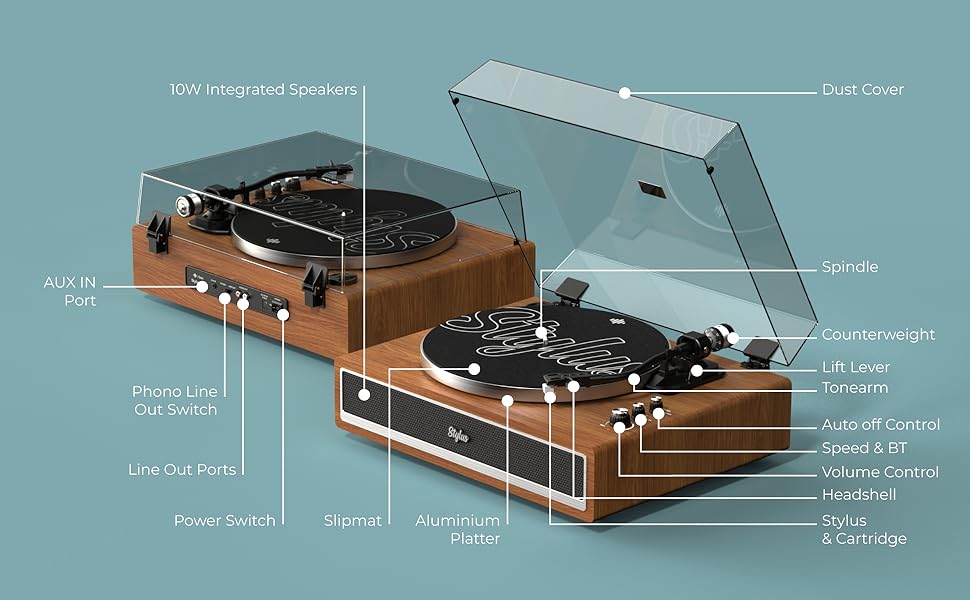
Image: Visual representation of key features including belt-driven, 33/45 RPM, built-in anti-skate, aluminum platter, aluminum tonearm, balanced counterweight, 10W integrated speakers, Bluetooth connectivity, AUX in port, and external speaker connection.
Garantia i Suport
i-box is a proud British brand committed to quality. This product comes with a 3 any de garantia. For any support inquiries, troubleshooting assistance, or warranty claims, please contact our friendly UK-based customer service team.
Please visit the official i-box weblloc web per obtenir la informació de contacte i els recursos d'assistència més actualitzats.Visit the i-box Store on Amazon


