Powerwave Wireless Controller Purple Rush
Manual d'usuari
1. Introducció
Gràcies per la compraasing the Powerwave Wireless Controller. This controller is designed to enhance your gaming experience on PlayStation 4 consoles, offering advanced features such as motion sensing, dual motor vibration, and a built-in speaker. Please read this manual carefully to ensure proper use and maintenance of your device.
This controller is compatible with PS4, PS4 Slim, and PS4 Pro models. Please note that PlayStation Lightbar, PSVR, turbo functionality, and PS5 compatibility are not supported.
2. Contingut del paquet
- 1 x Powerwave Wireless Controller (Purple Rush)
- 1 x cable de càrrega USB
- 1 x Manual d'usuari (aquest document)

Image: The Powerwave Wireless Controller shown within its retail packaging, highlighting the product and its box.
3. Controller Features
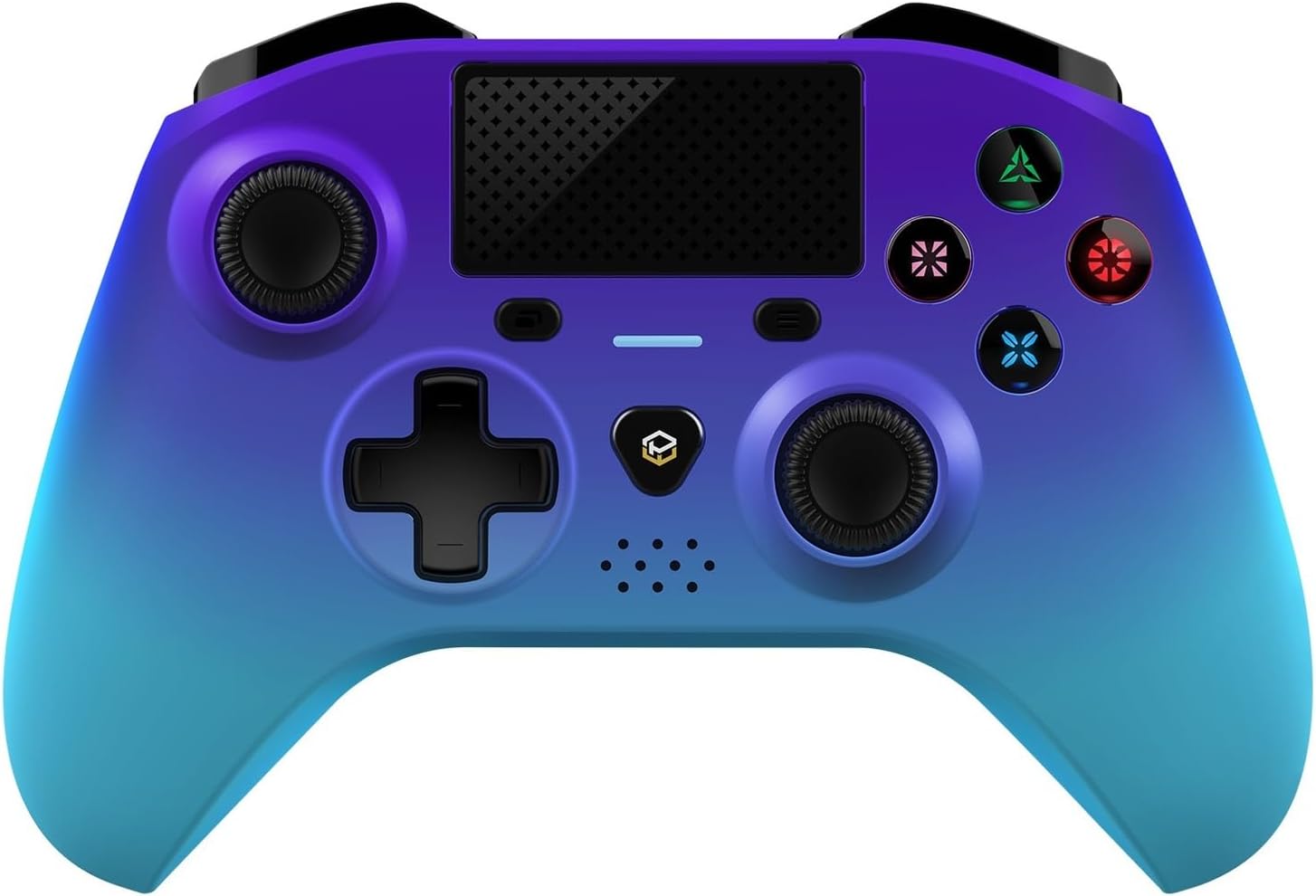
Imatge: Una part frontal detallada view of the Powerwave Wireless Controller in Purple Rush color, showcasing its buttons, joysticks, touchpad, and LED display.
- Connectivitat sense fil Bluetooth: For seamless gaming without cables.
- LED Display Buttons: Illuminated buttons for enhanced visibility.
- Bateria recarregable: Built-in lithium polymer battery for extended playtime.
- Tecnologia de detecció de moviment: Integrated sensors for intuitive control in compatible games.
- Vibració de doble motor: Proporciona una resposta hàptica immersiva durant el joc.
- Touchpad: Interactive surface for unique gameplay mechanics.
- Altaveu integrat: Enhances audio experience directly from the controller.
- 3.5mm Stereo Audio Jack: Per connectar auriculars o cascos.
4. Guia de configuració
4.1 Càrrega del controlador
- Connect the small end of the supplied USB charging cable to the micro-USB port on the front of the controller.
- Connect the larger end of the USB cable to an available USB port on your PlayStation 4 console or a compatible USB wall adapter (5V/1A recommended).
- The controller's LED indicator will show charging status. It will typically turn off or change color once fully charged.
4.2 Emparellament amb PlayStation 4
- Assegura't que la teva consola PlayStation 4 estigui engegada.
- Connect the controller to the PS4 console using the supplied USB charging cable.
- Premeu el botó Botó PS (the button with the PlayStation logo) in the center of the controller.
- The controller will automatically pair with the console. Once paired, you can disconnect the USB cable for wireless play.
- To pair additional controllers, repeat the steps above.
Note: If the controller does not pair, ensure it is fully charged and try connecting it to a different USB port on the console.
5. Funcionament del controlador
5.1 Controls bàsics
The Powerwave Wireless Controller features standard PlayStation layout buttons, including:
- Coixinet direccional (D-Pad): Per a entrada direccional.
- Botons d'acció (Triangle, Cercle, Creu, Quadrat): Per a accions dins del joc.
- Sticks analògics esquerre i dret: Per a un moviment precís i un control de la càmera.
- L1/R1 and L2/R2 Buttons: Botons d'espatlla i de gallet.
- Botó COMPARTIR: For sharing gameplay moments.
- Botó OPCIONS: For accessing in-game menus.
- Botó PS: For accessing the PS4 home screen and power options.
- Touchpad: Functions as a clickable button and multi-touch surface.
5.2 Funcions avançades
- Detecció de moviment: Tilt and move the controller to interact with games that support motion controls.
- Feedback de vibració: Experience realistic vibrations during gameplay, such as impacts or explosions.
- Sortida d'àudio: Connect a 3.5mm headset to the audio jack for in-game sound and voice chat. Adjust volume through the PS4 system settings.
6. Manteniment i cura
- Neteja: Feu servir un drap suau i sec per netejar el controlador. Per a la brutícia persistent, netegeu lleugerament.ampNetegeu el drap amb aigua. No utilitzeu productes químics agressius ni netejadors abrasius.
- Emmagatzematge: Guardeu el controlador en un lloc fresc i sec, allunyat de la llum solar directa i de temperatures extremes.
- Cura de la bateria: Per allargar la durada de la bateria, eviteu descarregar completament el controlador amb freqüència. Carregueu-lo regularment, fins i tot si no l'utilitzeu durant períodes prolongats.
- Eviteu les gotes: Protegiu el controlador de cops físics i caigudes, que poden danyar els components interns.
7. Solució De Problemes
| Problema | Possible solució |
|---|---|
| El controlador no s'encén. | Ensure the controller is fully charged. Connect it to the PS4 via USB cable and try pressing the PS button. |
| Controller does not pair with PS4. |
|
| Input lag or disconnection during wireless play. |
|
| Vibration or motion sensing not working. | Check in-game settings and PS4 system settings to ensure these features are enabled. Some games may not support these features. |
8. Especificacions
| Característica | Detall |
|---|---|
| Connectivitat | Bluetooth sense fil |
| Compatibilitat | PlayStation 4, PS4 Slim, PS4 Pro |
| Tipus de bateria | 1 bateria de polímer de liti (inclosa) |
| Dimensions (aprox.) | 17.5 x 15.6 x 6.9 cm |
| Pes (aprox.) | 987 grams |
| Port d'àudio | Jack d'àudio estèreo de 3.5 mm |
| Model Identifier (ASIN) | B0CKPF5X2N |
9. Garantia i Suport
For warranty information and customer support, please refer to the documentation provided with your purchase or visit the official Powerwave weblloc web. Conserveu el comprovant de compra per a reclamacions de garantia.
Per obtenir més ajuda, també podeu contactar amb el distribuïdor on vau comprar el producte.
No official seller videos were found for this product.


