1. Introducció
This manual provides essential instructions for setting up, operating, and maintaining your ZOTAC ZBOX-CI343-BE Intel N100 Mini PC. Please read this manual thoroughly before using the device to ensure proper functionality and longevity.
2. Contingut del paquet
Verifiqueu que tots els articles que s'enumeren a continuació s'inclouen al vostre paquet. Si falta algun article o està malmès, poseu-vos en contacte amb el vostre distribuïdor.

Imatge 2.1: Contents of the ZOTAC ZBOX-CI343-BE package, including the mini PC unit, power adapter, power cable, WiFi antenna, VESA mounting kit, and a quick start guide.
- ZOTAC ZBOX-CI343-BE Mini PC Unit
- Adaptador d'alimentació
- Power Cable (type may vary by region)
- Antena WiFi
- Kit de muntatge VESA
- Guia d'inici ràpid
3. Producte acabatview
Familiarize yourself with the various components and ports of your ZOTAC ZBOX-CI343-BE Mini PC.
3.1 Tauler frontal

Imatge 3.1: Davant view of the ZOTAC ZBOX-CI343-BE, showing the power button, USB 3.1 ports, USB-C port, SD card slot, and audio jack.
- Botó d'encesa: Press to power on or off the device.
- Ranura per a targeta SD: Per inserir targetes de memòria SD.
- Port USB 3.1 tipus C: Per connectar dispositius compatibles amb USB-C.
- Port USB 3.1 tipus A: Per connectar dispositius USB.
- Presa combinada per a auriculars/micròfon: Per a l'entrada i sortida d'àudio.
3.2 Panell posterior

Imatge 3.2: posterior view of the ZOTAC ZBOX-CI343-BE, displaying the WiFi antenna connector, dual LAN ports, USB 3.1 port, DisplayPort, HDMI port, and DC power input.
- Connector d'antena WiFi: For attaching the included WiFi antenna.
- Dual LAN Ports: Per a connexions de xarxa per cable.
- Port USB 3.1 tipus A: Per connectar dispositius USB.
- DisplayPort (DP): Per connectar-se a una pantalla.
- Port HDMI: Per connectar-se a una pantalla.
- DC IN: Per connectar l'adaptador de corrent.
3.3 Top and Side Views

Imatge 3.3: A dalt view of the ZOTAC ZBOX-CI343-BE, showing the ZOTAC logo and ribbed passive cooling design.
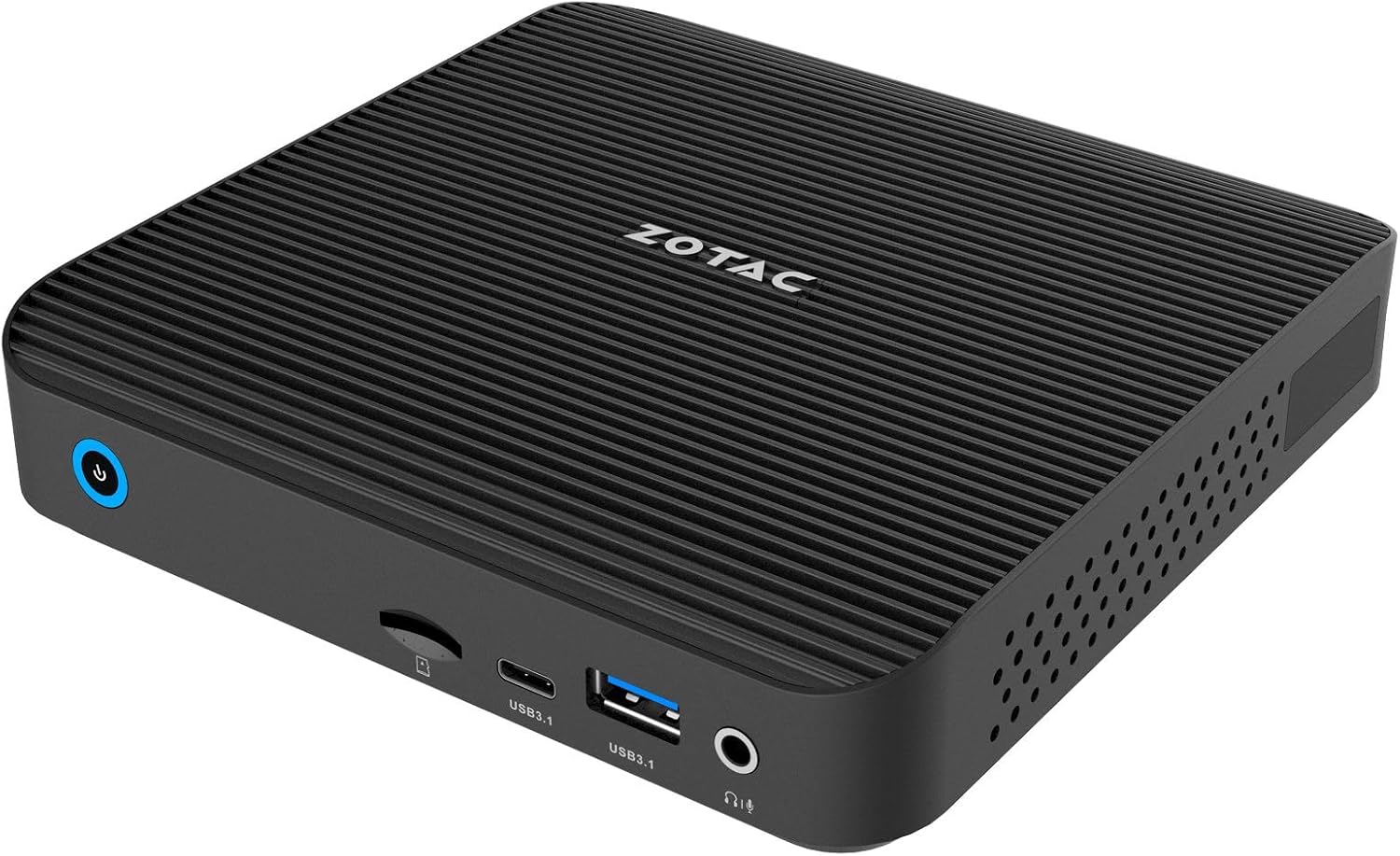
Imatge 3.4: Frontal inclinat view of the ZOTAC ZBOX-CI343-BE, highlighting the compact form factor and front panel ports.

Imatge 3.5: Part posterior inclinada view of the ZOTAC ZBOX-CI343-BE, showing the rear panel ports and side ventilation.
4. Instruccions de configuració
Follow these steps to set up your ZOTAC ZBOX-CI343-BE Mini PC.
- Install Memory and Storage (if not pre-installed): As a barebone system, you will need to install compatible DDR5 RAM and an SSD. Refer to the Quick Start Guide for detailed instructions on opening the chassis and installing components.
- Connecteu els perifèrics:
- Connect your monitor(s) to the HDMI or DisplayPort on the rear panel.
- Connect your keyboard and mouse to the available USB ports (front or rear).
- If using a wired network, connect an Ethernet cable to one of the LAN ports.
- Attach the included WiFi antenna to the connector on the rear panel for wireless connectivity.
- Connectar l'alimentació: Connect the power adapter to the DC IN port on the rear panel, then plug the power cable into an electrical outlet.
- Initial Boot and OS Installation:
- Press the power button on the front panel to turn on the Mini PC.
- Since this is a barebone system, you will need to install an operating system (e.g., Windows 10/11, Linux). Prepare a bootable USB drive with your preferred OS installer.
- Follow the on-screen prompts to install the operating system. You may need to enter the BIOS/UEFI settings (typically by pressing DEL or F2 during boot) to configure boot order.
- After OS installation, install necessary drivers, which can usually be found on the ZOTAC support weblloc.
5. Instruccions de funcionament
Once the operating system is installed and configured, your ZBOX-CI343-BE is ready for use.
- Encès/apagat: Press the power button once to turn on. To turn off, use the operating system's shutdown function. A short press of the power button can also put the system to sleep. A long press (approx. 5 seconds) will force a shutdown.
- Connectivitat: Utilize the various USB ports for external devices, HDMI/DisplayPort for displays, and LAN/WiFi for network access.
- Muntatge VESA: The included VESA mounting kit allows you to attach the Mini PC to the back of a compatible monitor or to a wall mount, saving desk space.
6. Manteniment
Regular maintenance helps ensure optimal performance and extends the lifespan of your Mini PC.
- Neteja:
- Netegeu suaument l'exterior amb un drap suau i sec.
- Use compressed air to clear dust from ventilation openings periodically. Ensure the device is powered off before cleaning.
- Avoid using liquid cleaners or solvents directly on the device.
- Actualitzacions de programari:
- Mantingueu el sistema operatiu i els controladors actualitzats a les versions més recents per millorar la seguretat i el rendiment.
- Check the ZOTAC website for updated drivers specific to the ZBOX-CI343-BE model.
- Condicions ambientals: Feu funcionar el dispositiu en una zona ben ventilada, allunyat de la llum solar directa, de fonts de calor i d'humitat excessiva.
7. Solució De Problemes
Aquesta secció tracta problemes comuns que podeu trobar.
- Sense energia:
- Assegureu-vos que l'adaptador de corrent estigui connectat correctament tant al Mini PC com a una presa de corrent que funcioni.
- Verify the power cable is not damaged.
- Sense sortida de pantalla:
- Check that the monitor is powered on and correctly connected to the HDMI or DisplayPort.
- Prova un cable de pantalla o monitor diferent si estàs disponible.
- Assegureu-vos que la font d'entrada correcta estigui seleccionada al monitor.
- El sistema operatiu no arrenca:
- Verify that an operating system has been successfully installed.
- Check BIOS/UEFI settings to ensure the correct boot device is selected.
- If recently installed, ensure all necessary drivers are present.
- Sense connexió a Internet:
- For wired connections, ensure the Ethernet cable is properly connected and router/modem is working.
- For wireless connections, ensure the WiFi antenna is attached, WiFi is enabled in the OS, and you are connected to the correct network with the correct password.
- Update network drivers if necessary.
For further assistance, refer to the ZOTAC support weblloc o contacteu amb el servei d'atenció al client.
8. Especificacions
Detailed technical specifications for the ZOTAC ZBOX-CI343-BE Mini PC.
| Característica | Especificació |
|---|---|
| Marca | ZOTAC |
| Nom del model | ZBOX-CI343-BE |
| Processador | Intel N100 (1.1 GHz) |
| Coprocessador gràfic | Gràfics Intel UHD |
| Tipus de memòria | DDR5 RAM (Barebone - user installable) |
| Tipus d'emmagatzematge | SSD (Barebone - user installable) |
| Resolució de pantalla màxima | 3840 x 2160 |
| Sortida de vídeo | HDMI, DisplayPort |
| Connectivitat sense fil | 802.11ax, Bluetooth |
| LAN | Dual Gigabit Ethernet |
| Ports USB | USB 3.1 Type-A, USB 3.1 Type-C |
| Lector de targetes | Ranura per a targeta SD |
| Àudio | Conector combinat d'auriculars/micròfon |
| Sistema operatiu | Barebone (Compatible with Windows 10/11, Linux) |
| Pes de l'article | 2.2 lliures |
| Dimensions del producte | 3.94 x 1.97 x 0.5 polzades |
9. Garantia i Suport
ZOTAC products are covered by a limited warranty. Please refer to the official ZOTAC weblloc web per obtenir informació detallada sobre els termes i condicions de garantia específics de la vostra regió.
For technical support, driver downloads, and frequently asked questions, visit the ZOTAC support portal:
When contacting support, please have your product model (ZBOX-CI343-BE) and serial number ready.


