Introducció
Thank you for choosing the Xiaomi Robot Vacuum E12. This intelligent robotic vacuum cleaner is designed to provide efficient and thorough cleaning for your home, featuring powerful suction, smart navigation, and app control. This manual provides essential information for the safe and effective operation, maintenance, and troubleshooting of your device. Please read this manual carefully before use and retain it for future reference.
Producte acabatview
Característiques clau
- Succió potent: Up to 4000 Pa suction power for effective cleaning on various surfaces.
- Control de l'aplicació: Manage and schedule cleaning tasks conveniently via the Xiaomi Home app.
- Efficient Cleaning Route: Intelligent navigation system ensures organized and comprehensive cleaning coverage.
- Dipòsit d'aigua intel·ligent: Automatically dispenses water for effective mopping.
- Sensors integrals: Equipped with multiple sensors for obstacle avoidance and complete area coverage.
Components
Familiarize yourself with the main components of your Xiaomi Robot Vacuum E12.

Figura 1: superior view of the Xiaomi Robot Vacuum E12, showing the main unit and an included mop pad.

Figura 2: Frontal view of the robot vacuum, highlighting the bumper and sensor area.
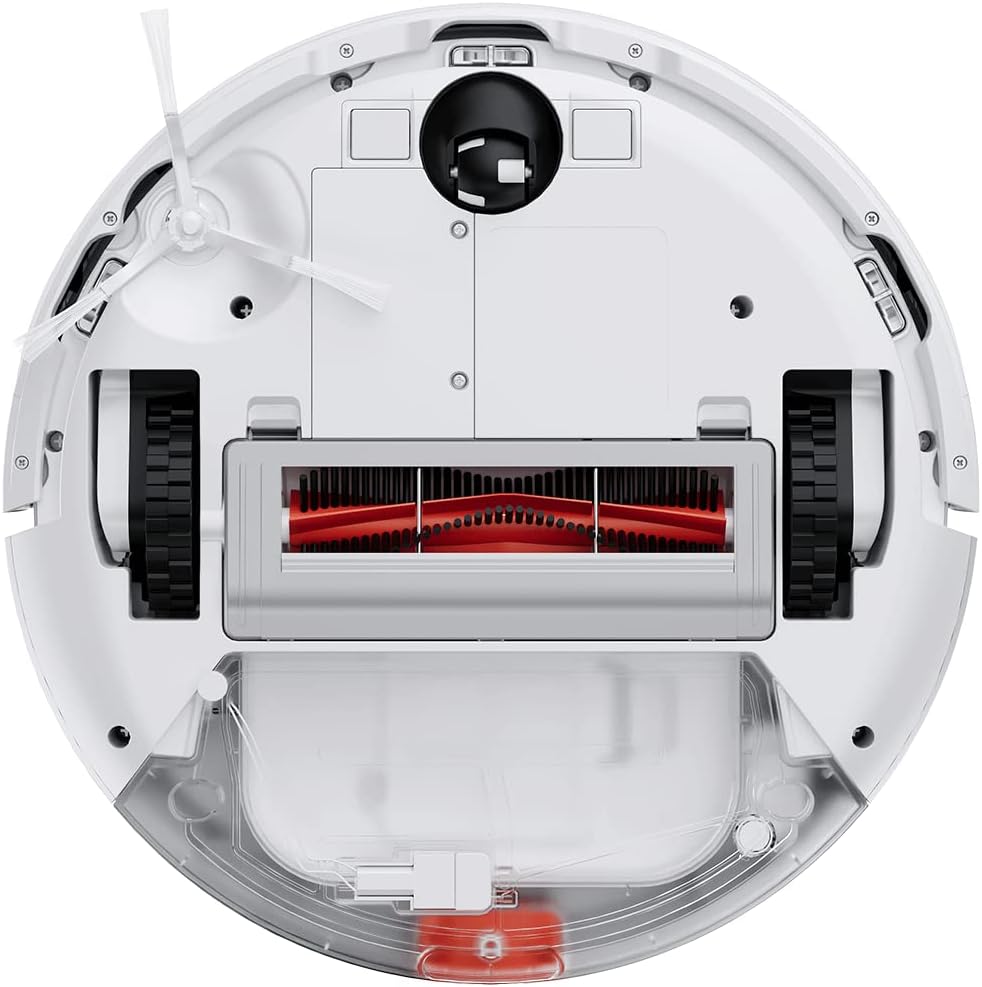
Figure 3: Underside of the robot vacuum, showing the main brush, side brushes, wheels, and dustbin/water tank compartment.

Figure 4: The robot vacuum with the mop attachment installed, ready for wet cleaning.
Configuració
1. Desembalatge
- Traieu amb cura tots els components de l'embalatge.
- Traieu totes les pel·lícules protectores i els materials d'embalatge del robot i de la base de càrrega.
- Ensure all accessories listed in the packing list are present.
2. Col·locació de la base de càrrega
- Col·loca la base de càrrega contra una paret sobre una superfície dura i anivellada.
- Assegureu-vos que hi hagi com a mínim 0.5 metres (1.6 peus) d'espai lliure a banda i banda del moll i 1.5 metres (4.9 peus) davant seu.
- Connecteu l'adaptador d'alimentació a la base de càrrega i connecteu-lo a una presa de corrent.
- Ensure the power cable is neatly tucked away to prevent entanglement.
3. Càrrec inicial
- Col·loca el robot aspirador a la base de càrrega, assegurant-te que els contactes de càrrega estiguin alineats.
- The robot will automatically power on and begin charging. Allow it to fully charge before first use (approximately 4-6 hours).
- El llum indicador del robot mostrarà l'estat de càrrega.
4. Xiaomi Home App Connection
- Download the "Xiaomi Home" app from your mobile device's app store (Google Play Store or Apple App Store).
- Obre l'aplicació i crea un compte Xiaomi o inicia la sessió si ja en tens un.
- Toqueu la icona "+" a la cantonada superior dreta per afegir un dispositiu.
- Follow the on-screen instructions to connect your robot vacuum to the app. This typically involves resetting the Wi-Fi on the robot and connecting your phone to the robot's temporary Wi-Fi network.
- Un cop connectat, podeu controlar el robot, view cleaning maps, set schedules, and access additional features.
Instruccions de funcionament
Inici d'un cicle de neteja
- Mitjançant botons de robot: Press the Power button once to start a general cleaning cycle. Press it again to pause. Press and hold to send the robot back to the charging dock.
- A través de l'aplicació Xiaomi Home: Open the app, select your robot vacuum, and tap the "Clean" button. You can also select specific cleaning modes (e.g., Spot Clean, Edge Clean) or adjust suction power.

Figure 5: Illustration of the robot vacuum following an efficient, organized cleaning path to cover the entire floor area.
Utilització de la funció de neteja
- Ompliu el dipòsit d'aigua amb aigua neta. No utilitzeu detergents ni líquids corrosius.
- Attach the mop pad securely to the water tank module.
- Install the water tank module into the robot vacuum according to the instructions.
- Start a cleaning cycle. The robot will automatically dispense water for mopping.
- Nota: The mopping function is best suited for hard floors. Avoid using it on carpets or rugs.
Programació de neteges
Use the Xiaomi Home app to set up cleaning schedules. You can specify cleaning times, days of the week, and even cleaning modes for automated cleaning.

Figure 6: The robot vacuum's low profile allows it to clean effectively under beds and other furniture.
Manteniment
Regular maintenance ensures optimal performance and extends the lifespan of your robot vacuum. Always power off the robot before performing any maintenance.
1. Buidar la paperera
- Premeu el botó d'alliberament del contenidor de pols i traieu-lo.
- Obriu la tapa de la paperera i buideu-ne el contingut en una paperera.
- Rinse the dustbin with water if necessary, ensuring it is completely dry before re-installing.
2. Neteja del filtre
- Traieu el filtre del contenidor de pols.
- Tap the filter gently to remove dust. You can also rinse it under running water.
- Allow the filter to air dry completely for at least 24 hours before re-installing. Do not use a dryer or direct sunlight.
- Canvieu el filtre cada 3-6 mesos, depenent de l'ús.
3. Neteja del raspall principal
- Gireu el robot i retireu la coberta del raspall principal.
- Aixequeu el raspall principal.
- Feu servir l'eina de neteja (si s'inclou) o unes tisores per tallar i eliminar els cabells o les restes enredades al voltant del raspall.
- Torneu a instal·lar el raspall principal i la coberta.
4. Neteja del raspall lateral
- Gently pull the side brush to remove it.
- Traieu qualsevol cabell o residu.
- Re-attach the side brush, ensuring it clicks into place.
5. Neteja dels sensors i dels contactes de càrrega
- Wipe the cliff sensors (located on the bottom of the robot) and wall sensors (on the side bumper) with a clean, dry cloth.
- Clean the charging contacts on both the robot and the charging dock with a dry cloth.

Figure 7: Diagram illustrating the function of the cliff sensors, which prevent the robot from falling down stairs or off ledges.
Resolució de problemes
If your robot vacuum encounters an issue, refer to the following common problems and solutions.
| Problema | Causa possible | Solució |
|---|---|---|
| El robot no s'encén. | Low battery; not properly charged. | Col·loca el robot a la base de càrrega i assegura't que estigui completament carregat. |
| El robot no pot tornar a la base de càrrega. | Charging dock is obstructed or out of reach; low battery. | Ensure the charging dock is in an open area. Manually place the robot on the dock if needed. |
| Mal rendiment de neteja. | Cubell de les escombraries ple; raspalls enredats; filtre obstruït. | Empty dustbin, clean main brush and side brushes, clean or replace filter. |
| El robot es queda encallat sovint. | Obstacles (cables, catifes); sensors bruts. | Clear the cleaning area of obstacles. Clean all sensors. |
| La funció de fregar no funciona. | Dipòsit d'aigua buit; la fregona no està ben fixada. | Fill the water tank. Ensure the mop pad is securely attached. |
| Problemes de connexió de l'aplicació. | Incorrect Wi-Fi password; robot too far from router; temporary network glitch. | Ensure correct Wi-Fi details. Move robot closer to router. Restart robot and router. Try re-pairing via the app. |
For persistent issues not covered here, please refer to the Xiaomi Home app's help section or contact Xiaomi customer support.
Especificacions
| Característica | Detall |
|---|---|
| Marca | XIAOMI |
| Número de model | BHR7331EU |
| Dimensions del producte | 12.6 cm de llargada x 3.15 cm d'amplada x 12.6 cm d'alçada |
| Pes de l'article | 10.14 lliures |
| Potència d'aspiració | Fins a 4000 Pa |
| Font d'alimentació | Funciona amb bateria (1 bateria d'ions de liti inclosa) |
| Mètode de control | App (Xiaomi Home) |
| Característica especial | Programable |
| Components inclosos | Robot Vacuum, Charging Dock, Power Adapter, Water Tank, Mop Pad, Side Brush, Cleaning Tool |
Informació de seguretat
Si us plau, llegiu i seguiu totes les instruccions de seguretat per evitar lesions o danys.
- Aquest aparell el poden utilitzar nens a partir de 8 anys i persones amb capacitats físiques, sensorials o mentals reduïdes o amb manca d'experiència i coneixements si han rebut supervisió o instruccions sobre l'ús de l'aparell d'una manera segura i entenen els perills que comporta. .
- Els nens no jugaran amb l'aparell. La neteja i el manteniment dels usuaris no els han de fer els nens sense supervisió.
- Do not use the robot vacuum on wet surfaces or in areas with standing water.
- No feu servir el robot per recollir objectes grans, objectes punxeguts o materials en flames/fum.
- Mantingueu els cabells, la roba solta, els dits i totes les parts del cos lluny de les obertures i les parts mòbils.
- Ensure the charging dock is placed in a stable location to prevent tipping.
- Només feu servir l'adaptador de corrent i la base de càrrega originals que s'inclouen amb el producte.
- No exposeu el robot a la llum solar directa ni a temperatures extremes.
- The product contains batteries that are only replaceable by skilled persons.
- Nota important: This robot vacuum is primarily designed for hard floors. It is not recommended for cleaning carpets, especially thick pile carpets, as stated in some product information.
Garantia i Suport
Per obtenir informació sobre la garantia, consulteu la targeta de garantia inclosa amb el producte o visiteu el lloc web oficial de Xiaomi. weblloc.
If you require technical support or have questions regarding your Xiaomi Robot Vacuum E12, please contact Xiaomi customer service through their official website or the Xiaomi Home app. Provide your model number (BHR7331EU) and purchase details when contacting support.
Xiaomi Oficial Weblloc: www.mi.com


