Introducció
This manual provides detailed instructions for the assembly, operation, and maintenance of your Vetroo AL800 Mid Tower ATX PC Computer Case. Please read this manual thoroughly before beginning installation to ensure proper setup and optimal performance.

Figure 1: Vetroo AL800 Mid Tower ATX PC Computer Case (Black)
Informació de seguretat
- Desconnecteu sempre l'alimentació de la presa de corrent abans d'instal·lar o treure qualsevol component.
- Handle components with care to avoid damage from electrostatic discharge. Consider using an anti-static wrist strap.
- Keep the case and components away from liquids and excessive humidity.
- Assegureu-vos una ventilació adequada per evitar el sobreescalfament.
- No intenteu modificar la carcassa ni els seus components, ja que això podria anul·lar la garantia i suposar riscos per a la seguretat.
Contingut del paquet
Verifiqueu que tots els elements siguin presents al paquet:
- Vetroo AL800 Mid Tower ATX PC Computer Case
- Caixa d'accessoris (cargols, separadors, brides per a cables)
- Pre-installed 1x 120mm PWM/ARGB Fan (rear)
- Manual d'usuari (aquest document)
Característiques clau
- ARGB LED Strip: Integrated LED lighting and ARGB case fans can be synchronized with compatible motherboards via a 5V 3-pin interface.
- Door Opening Design: Features a 4mm thick tempered glass side panel with a convenient door-opening mechanism for easy access to internal components.
- High Performance Airflow: A mesh front panel and strategically placed dust filters ensure optimal airflow and system cooling.
- Àmplia compatibilitat: Supports ATX, M-ATX, and ITX motherboards. Accommodates GPUs up to 340mm in length and CPU coolers up to 165mm in height.
- Suport de refrigeració líquida: Front panel supports up to a 360mm liquid cooling radiator.
- Suport dels fans: Supports up to 8 x 120mm fans.
- Gestió senzilla de cables: Includes two soft silicone cord grommets for organized cable routing.
- Powerful I/O Panel: Features 1x USB 3.2 Type-C port, 2x USB 3.0 ports, and a combined microphone/headphone jack.
Configuració i instal·lació
1. General Preparation
- Col·loqueu la caixa sobre una superfície plana i estable.
- Open the tempered glass side panel by gently pulling it open. It is hinged for easy access.
- Remove the tempered glass panel if necessary for easier installation by lifting it off its hinges once open.

Figure 2: Tempered Glass Door Opening Design
2. Instal·lació de la placa base
- Install the I/O shield (if applicable) into the rear opening of the case.
- Align your ATX, M-ATX, or ITX motherboard with the pre-installed standoffs.
- Secure the motherboard using the provided screws from the accessory box.
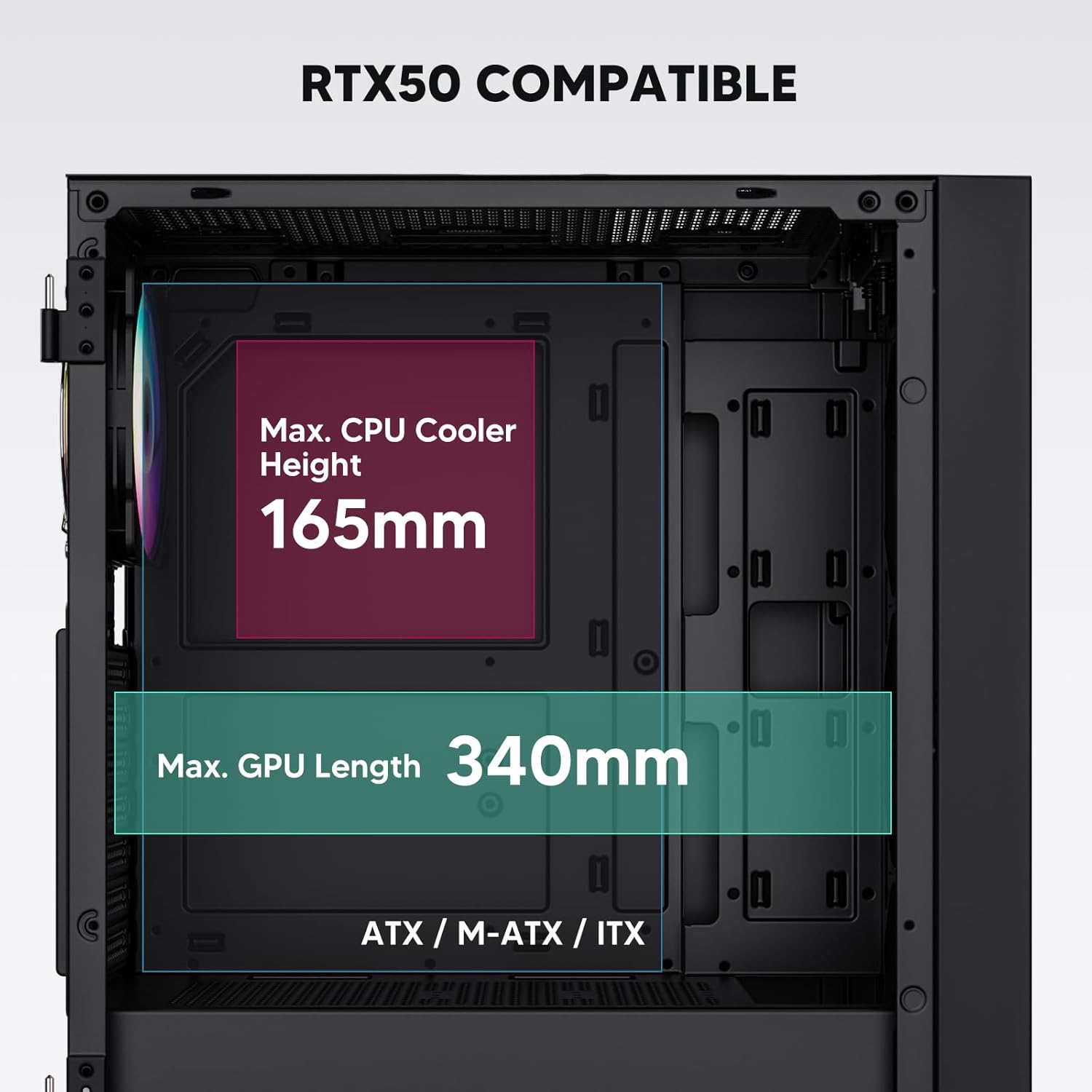
Figure 3: Motherboard and Component Clearance (Max CPU Cooler Height 165mm, Max GPU Length 340mm)
3. Storage Device Installation (HDD/SSD)
- Locate the dedicated mounting points for SSDs and HDDs.
- Install 2.5" SSDs onto the SSD trays or mounting brackets.
- Install 3.5" HDDs into the drive cage located at the bottom of the case.
- Fixeu totes les unitats amb els cargols adequats.

Figure 4: Internal Layout with Drive Bay Locations (SSD, HDD, Power Supply)
4. Instal·lació de la font d'alimentació
- Mount your power supply unit (PSU) in the dedicated compartment at the bottom rear of the case.
- Ensure the PSU fan faces downwards (if the case has a bottom vent) or upwards, depending on your cooling preference.
- Secure the PSU with screws from the rear of the case. The case supports PSUs up to 200mm in length.
5. Expansion Card (GPU) Installation
- Traieu les cobertes de les ranures PCI-E necessàries de la part posterior de la carcassa.
- Insert your graphics card or other expansion cards into the motherboard's PCI-E slots.
- Secure the cards with screws. The case supports GPUs up to 340mm in length.
6. Cooling System Installation (Fans/Radiators)
- The case comes with one pre-installed 120mm PWM/ARGB fan at the rear.
- Additional fans (120mm or 140mm) can be installed at the front, top, and bottom.
- Liquid cooling radiators up to 360mm can be installed at the front, and up to 240mm at the top.
- Refer to the diagram for supported fan and radiator configurations.

Figure 5: Fan and Liquid Radiator Support Diagram
7. Connexions del panell frontal
- Connect the front panel cables (Power, Reset, USB 3.0, USB Type-C, HD Audio) to the corresponding headers on your motherboard.
- Consult your motherboard manual for the exact pin layout of these headers.
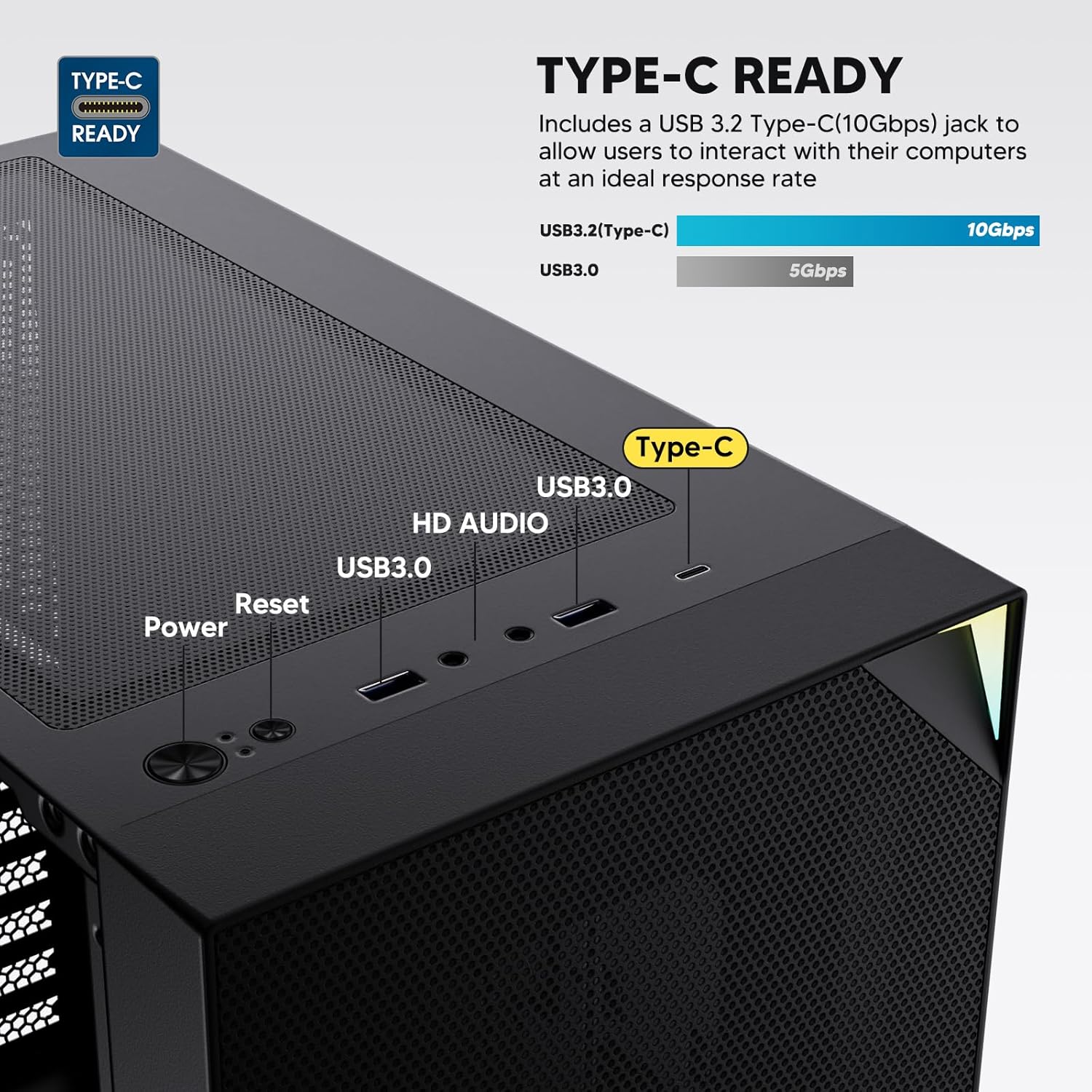
Figure 6: Top I/O Panel Connections
8. ARGB and PWM Connections
- The pre-installed fan and ARGB LED strip require connection to your motherboard.
- Connect the 4-pin PWM connector from the fan to a compatible fan header on your motherboard for speed control.
- Connect the 3-pin ARGB connector from the fan and LED strip to a 5V 3-pin ARGB header on your motherboard for lighting synchronization. No connecteu a un connector RGB de 12V, ja que això danyarà els LED.
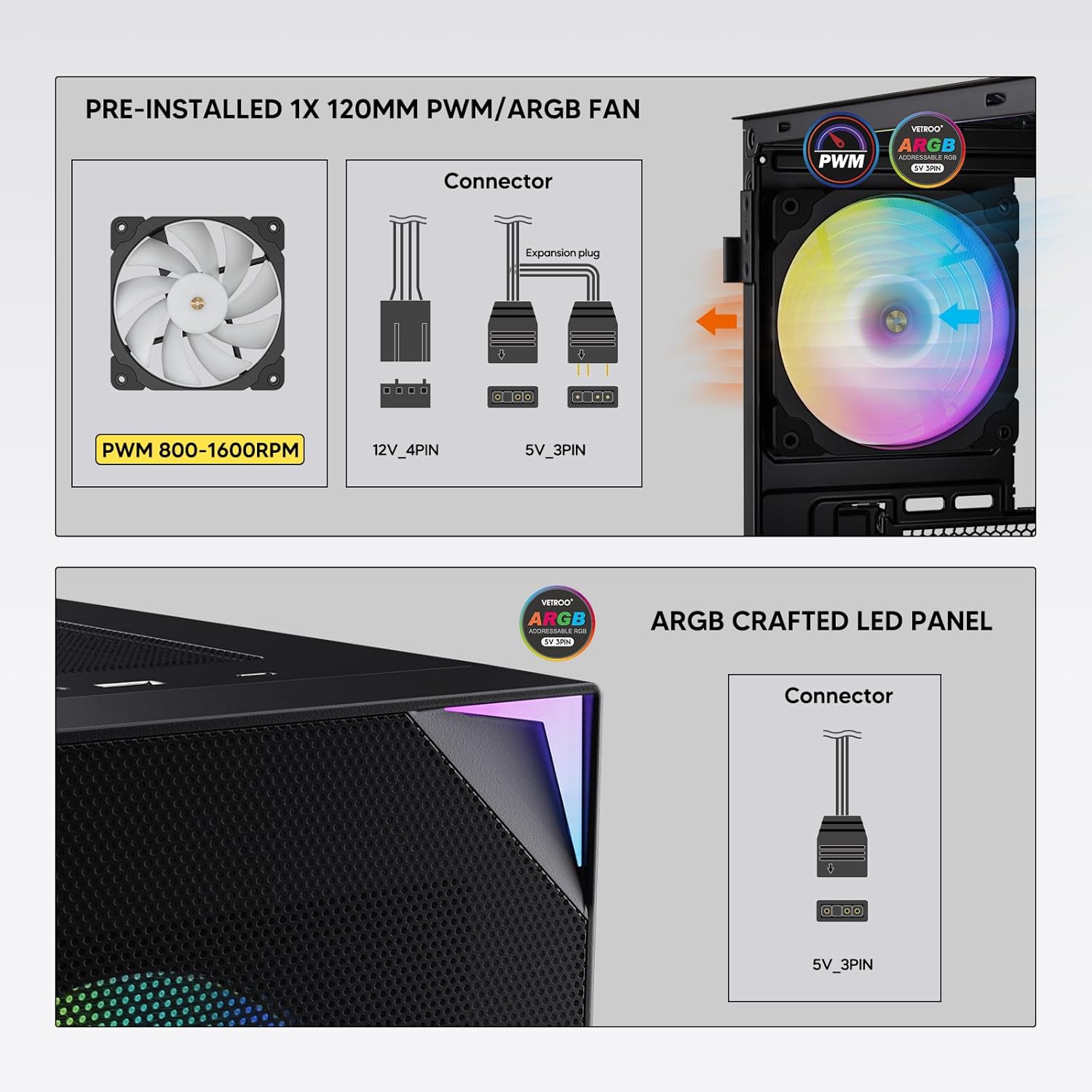
Figure 7: PWM and ARGB Connector Details
9. Gestió de cables
- Utilize the cable routing cutouts and tie-down points behind the motherboard tray to organize cables.
- The soft silicone grommets help protect cables and provide a clean look.
- Proper cable management improves airflow and aesthetics.
Funcionament
1. Engegada inicial
- After all components are securely installed and cables connected, close the tempered glass side panel.
- Connecteu el monitor, el teclat, el ratolí i el cable d'alimentació a l'ordinador.
- Flip the power switch on your PSU to the 'ON' position.
- Press the power button on the top I/O panel of the case to start your system.
2. Control d'il·luminació ARGB
- If connected to a compatible motherboard's 5V 3-pin ARGB header, the lighting of the pre-installed fan and LED strip can be controlled via your motherboard's RGB software (e.g., ASUS Aura Sync, MSI Mystic Light Sync, Gigabyte RGB Fusion, ASRock Polychrome Sync).
- Refer to your motherboard's manual for specific instructions on using its ARGB control software.
3. Airflow Management
- The mesh front panel is designed for optimal air intake.
- Ensure that intake fans (typically front and bottom) and exhaust fans (typically rear and top) are configured to create positive or neutral air pressure for efficient cooling and dust prevention.

Figure 8: Airflow Diagram with Dust Filters
Manteniment
1. Neteja del filtre de pols
- The case is equipped with dust filters on the top and bottom panels.
- Regularly check and clean these filters to maintain optimal airflow and prevent dust buildup inside the system.
- Gently remove the magnetic dust filters and clean them with compressed air or by rinsing with water (ensure they are completely dry before re-installation).
2. Tempered Glass Panel Care
- Clean the tempered glass panel with a soft, lint-free cloth and a non-abrasive glass cleaner.
- Avoid harsh chemicals or abrasive materials that could scratch or damage the glass.
Resolució de problemes
- El sistema no s'encén:
- Assegureu-vos que el cable d'alimentació estigui connectat correctament tant a la font d'alimentació com a la presa de corrent.
- Verifiqueu que l'interruptor de la font d'alimentació estigui en la posició "ON".
- Check that the front panel power button cable is correctly connected to the motherboard header.
- Confirm all power cables (24-pin ATX, CPU, GPU) are properly seated in the motherboard and components.
- Els ventiladors no giren / L'ARGB no s'il·lumina:
- Check that the fan's PWM connector is securely plugged into a motherboard fan header.
- Verify the ARGB 3-pin connector is correctly attached to a 5V 3-pin ARGB header on the motherboard (not 12V RGB).
- Assegureu-vos que el programari ARGB de la placa base estigui instal·lat i configurat correctament.
- Ports USB que no funcionen:
- Confirm the USB 3.0 and USB Type-C front panel cables are correctly connected to their respective motherboard headers.
- Check your motherboard manual for correct header locations.
- For other component-specific issues, refer to the instruction manuals for your motherboard, CPU, GPU, and other installed hardware.
Especificacions
| Marca | Vetroo |
| Nom del model | AL800 |
| Número de model de l'article | VT-CASE-AL800-BK (FBA) |
| Tipus de cas | Torre mitja |
| Compatibilitat amb la placa base | ATX, M-ATX, ITX |
| Color | Negre |
| Material | Metall, Vidre temperat |
| Pes de l'article | 12.37 lliures (aprox. 5.61 kg) |
| Dimensions del producte (LxWxH) | 18.4 x 8.6 x 17.9 polzades (aprox. 46.7 x 21.8 x 45.5 cm) |
| Longitud màxima de la GPU | 340 mm |
| Alçada màxima del refrigerador de la CPU | 165 mm |
| Longitud màxima de la PSU | 200 mm |
| Ports d'E / S frontals | 1x USB 3.2 Type-C, 2x USB 3.0, HD Audio (Mic/Headphone), Power, Reset |
| Suport dels fans | Front: 3x 120mm or 2x 140mm; Top: 2x 120mm or 2x 140mm; Rear: 1x 120mm; Bottom: 2x 120mm |
| Suport del radiador | Front: 120/140/240/280/360mm; Top: 120/140/240mm; Rear: 120mm |
| Ventiladors preinstal·lats | 1x 120mm PWM/ARGB (Rear) |
Garantia i Suport
For warranty information, technical support, or to inquire about replacement parts, please visit the official Vetroo weblloc web o contacteu directament amb el servei d'atenció al client. Conserveu el comprovant de compra per a reclamacions de garantia.
Official Vetroo Store: Vetroo Amazon Store
Documents relacionats - AL800
 |
Manual d'usuari de la caixa per a PC Vetroo AL800 Manual d'usuari per a la caixa de PC Vetroo AL800, que detalla els passos d'instal·lació de components com la placa base, la font d'alimentació, els ventiladors, els radiadors líquids, els discs durs, els discs SSD i les targetes gràfiques. Inclou una guia de connexió del panell d'E/S i una llista d'accessoris. |
 |
Manual d'instruccions de la caixa de jocs Vetroo AL800 de torre completa Manual d'instruccions complet per a la caixa de PC per a jocs Vetroo AL800 Full Tower. Apreneu a instal·lar la font d'alimentació, la placa base, les unitats d'emmagatzematge (SSD/HDD), la targeta gràfica i a entendre les opcions de compatibilitat amb el ventilador i el radiador. Inclou una llista d'accessoris i una guia detallada pas a pas. |
 |
Manual d'usuari de la caixa de PC Vetroo MESH-7C SÈRIE AL Manual d'usuari detallat per a la caixa de PC Vetroo MESH-7C AL SERIES, que cobreix les especificacions, les dimensions, els accessoris i els passos d'instal·lació del maquinari per muntar l'ordinador. |
 |
Manual d'instruccions de la caixa d'ordinador Vetroo M05 M-ATX Manual d'instruccions detallat per muntar la caixa de PC Vetroo M05 M-ATX, que cobreix la instal·lació de components, l'ús d'accessoris i les connexions del panell d'E/S. |
 |
Manual d'usuari de la caixa de PC Vetroo AL900 ATX Manual d'usuari de la caixa per a jocs Vetroo AL900 ATX per a PC, que detalla el muntatge i la instal·lació de components com la font d'alimentació i les connexions del panell d'E/S. |
 |
Manual d'usuari i guia d'instal·lació del refrigerador de CPU Vetroo U6 Manual d'usuari detallat i guia d'instal·lació per al refrigerador de CPU Vetroo U6, que cobreix la compatibilitat amb els sòcols Intel LGA 1700/1200/115X i AMD AM5/AM4/AM3(+)/AM2(+)/FM2(+)/FM1. Inclou una llista de peces i instruccions de muntatge pas a pas. |