1. Introducció
The ARCTIC Liquid Freezer III 240 A-RGB is an all-in-one liquid CPU cooler designed for efficient heat dissipation in high-performance computing systems. This manual provides detailed instructions for the installation, operation, and maintenance of your cooler, ensuring optimal performance and longevity.
Key features include a PWM-controlled pump, addressable RGB (A-RGB) fans, specialized mounting solutions for Intel and AMD processors, active VRM cooling, and integrated cable management for a clean build.

Image 1.1: The ARCTIC Liquid Freezer III 240 A-RGB cooler, highlighting its award-winning design and essential cooling capabilities.
2. Informació de seguretat
- Always disconnect power from your PC before installation or maintenance.
- Manipuleu els components amb cura per evitar danys.
- Mantenir fora de l'abast dels nens.
- Do not open the pump or radiator as this may void the warranty and cause leaks.
- Assegureu-vos d'una connexió a terra adequada per evitar danys per descàrrega electrostàtica (ESD) als components.
3. Contingut del paquet
Verifiqueu que tots els components siguin presents abans de començar la instal·lació:
- ARCTIC Liquid Freezer III 240 A-RGB All-in-One Cooler (Radiator, Pump/Cold Plate, Fans pre-installed)
- Intel Mounting Kit (LGA1851, LGA1700)
- AMD Mounting Kit (AM5, AM4)
- Pasta tèrmica
- Cargols i accessoris de muntatge
- User Manual (Digital via QR code on packaging)
4. Compatibilitat
4.1. CPU Socket Compatibility
- Intel: LGA1851, LGA1700
- AMD: AM5, AM4
4.2. Case and Motherboard Compatibility
The radiator dimensions are approximately 277mm (L) x 120mm (W) x 65.5mm (H, including fans). Ensure your PC case has sufficient clearance for a 240mm radiator with a thickness of 38mm, plus the fans.
Nota important: Oversized components, particularly coolers on the M.2_1 slot of certain motherboards, may interfere with the installation of the Liquid Freezer III. It is recommended to consult the ARCTIC official website for a detailed compatibility checker or refer to your motherboard's manual for clearance specifications.

Image 4.1: Radiator dimensions (38mm thickness) and various size options (420, 360, 280, 240mm) for case compatibility checks.
5. Configuració i instal·lació
Before starting, ensure your system is powered off and unplugged. It is highly recommended to watch the official ARCTIC installation video (accessible via QR code on the product packaging) for a visual guide.
5.1. Preparing the CPU
- Netegeu bé la superfície de la CPU amb alcohol isopropílic per eliminar qualsevol pasta tèrmica antiga o residus.
- Apply a small amount of the provided thermal paste to the center of the CPU. A pea-sized dot is generally sufficient.
5.2. Installing Mounting Brackets
Select the appropriate mounting hardware for your CPU socket (Intel or AMD).
5.2.1. Intel LGA1851 / LGA1700 Installation
- Install the Intel contact frame onto your motherboard. This frame improves contact pressure distribution for more efficient heat transfer.
- Secure the backplate and standoffs according to the instructions for your specific socket.

Image 5.1: Diagram illustrating the installation of the LGA1700 contact frame for improved CPU contact and heat transfer.
5.2.2. AMD AM5 / AM4 Installation
- Utilize the native AMD offset mounting. This design optimizes coverage of the CPU hotspot for Ryzen processors, enhancing heat transfer efficiency.
- Attach the AMD mounting clips to the pump unit and secure them to the motherboard's stock backplate.

Image 5.2: Diagram showing the native AMD offset mounting, positioning the cold plate to optimally cover the CPU hotspot.
5.3. Mounting the Pump/Cold Plate
- Carefully place the pump/cold plate assembly onto the CPU, aligning it with the mounting brackets.
- Secure the pump unit using the provided screws, tightening them in a cross pattern until snug. Do not overtighten.
5.4. Muntatge del radiador i dels ventiladors
- Position the radiator in your desired mounting location within the PC case (e.g., top, front).
- Secure the radiator to the case using the appropriate screws.
- The fans are pre-installed on the radiator. Ensure their orientation is correct for optimal airflow (intake or exhaust, depending on your case's cooling strategy).
5.5. Cable Management and Connections
The Liquid Freezer III features integrated cable management, where the PWM cables of the radiator fans are routed within the hoses. This results in a single visible cable connection to the motherboard.
- Connect the main PWM connector from the cooler to your motherboard's CPU_FAN header.
- For A-RGB lighting, connect the A-RGB cable to a compatible 3-pin 5V A-RGB header on your motherboard.
- The cooler also includes a PWM-controlled VRM fan. This fan's cable is integrated and will draw power from the main PWM connection, providing active cooling to voltage regulator modules.
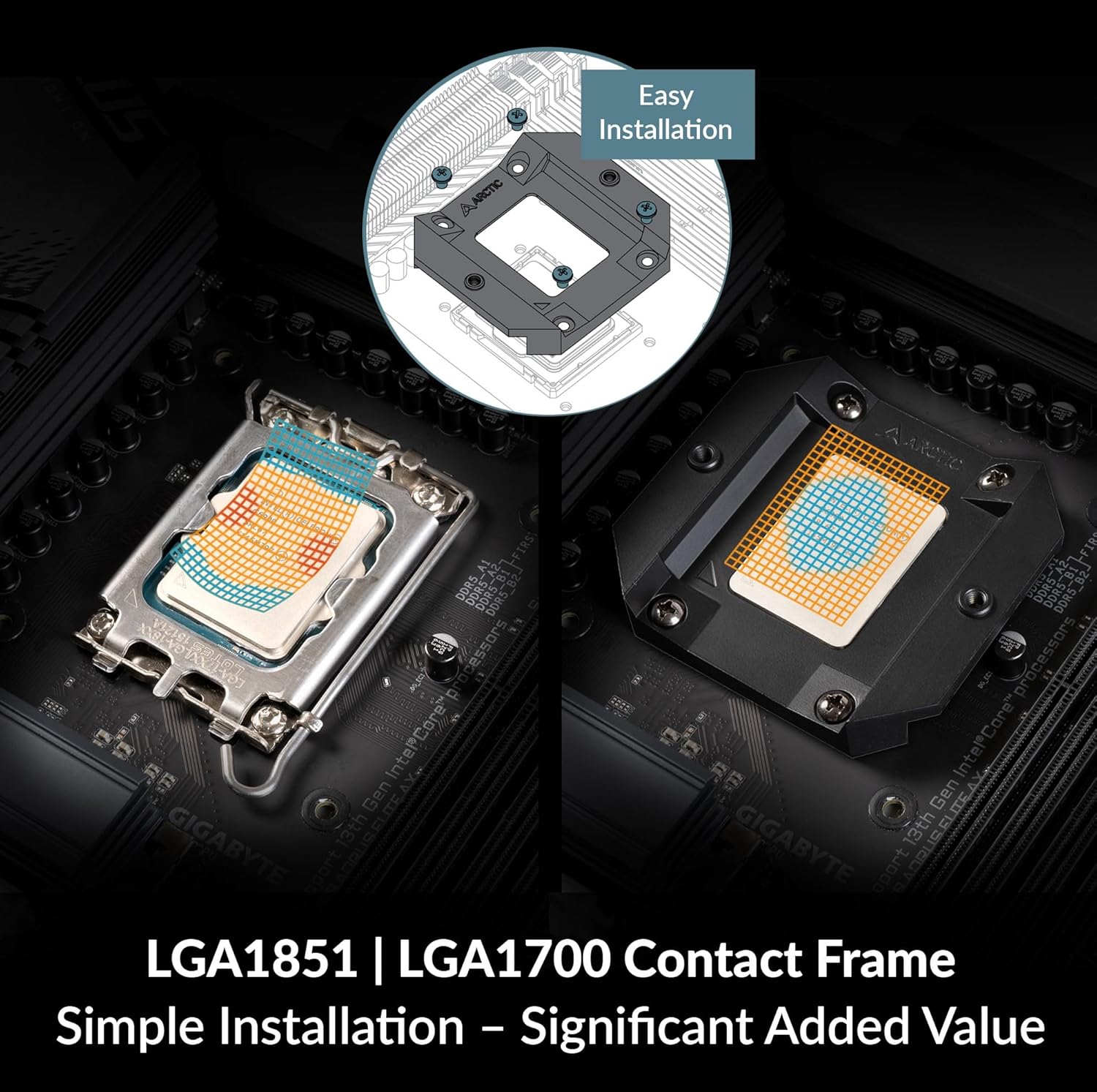
Image 5.3: Diagram illustrating the integrated cable management with a single PWM connector for pump, VRM fan, and radiator fans, and a separate A-RGB connector.

Imatge 5.4: Primer pla view of the PWM-controlled VRM fan, which actively cools motherboard components around the CPU socket.
6. Funcionament
6.1. Fan and Pump Control
The Liquid Freezer III's pump and fans are PWM-controlled, allowing for dynamic speed adjustments based on CPU temperature. This can be configured through your motherboard's BIOS/UEFI settings or dedicated software provided by your motherboard manufacturer.
- Recomanat: Set a custom fan curve in your motherboard's BIOS to balance cooling performance and noise levels. Aggressive fan curves can lead to higher noise, while a more relaxed curve can reduce noise at the cost of slightly higher temperatures.
- The integrated VRM fan operates automatically based on the PWM signal, contributing to overall system stability by cooling critical motherboard components.
6.2. A-RGB Lighting Control
The A-RGB lighting on the fans and pump can be controlled via your motherboard's A-RGB software (e.g., ASUS Aura Sync, MSI Mystic Light Sync, ASRock Polychrome Sync, Gigabyte RGB Fusion 2.0). Ensure the A-RGB cable is correctly connected to a compatible 3-pin 5V A-RGB header on your motherboard.

Image 6.1: The ARCTIC Liquid Freezer III 240 A-RGB installed in a PC, showcasing its individually addressable RGB LEDs.
7. Manteniment
Regular maintenance helps ensure optimal performance and extends the lifespan of your cooler.
- Eliminació de pols: Netegeu periòdicament les aletes del radiador i les aspes del ventilador per evitar l'acumulació de pols, que pot impedir el flux d'aire i reduir l'eficiència de la refrigeració. Feu servir aire comprimit o un raspall suau.
- Inspecció del cable: Check all cables for secure connections and signs of wear.
- Nivell de líquid: The AIO unit is a closed loop system and does not require refilling. If you suspect a leak or significant performance drop, contact support.
8. Solució De Problemes
| Problema | Causa possible | Solució |
|---|---|---|
| Temperatures altes de la CPU | Improper thermal paste application, loose cold plate, dust buildup on radiator, incorrect fan orientation, pump failure. | Reapply thermal paste, ensure cold plate is securely mounted, clean radiator/fans, verify fan direction, check pump connection. |
| Soroll del ventilador excessiu | Aggressive fan curve settings, fan obstruction, faulty fan. | Adjust fan curve in BIOS, ensure no cables are hitting fans, replace faulty fan if necessary. |
| A-RGB Lighting Not Working | Incorrect cable connection, incompatible motherboard header, software issue. | Verify A-RGB cable is connected to a 3-pin 5V A-RGB header, check motherboard software settings, ensure motherboard header is enabled. |
| La nevera no encaixa | Case clearance issues, motherboard component interference. | Double-check case and motherboard compatibility before purchase. Refer to ARCTIC's compatibility checker. |
9. Especificacions
- Model: ACFRE00150A
- Dimensions del producte: 10.91" de llargada x 4.72" d'amplada x 2.48" d'alçada (277 mm x 120 mm x 65.5 mm)
- Marca: ÀRTIC
- Tipus de connector d'alimentació: PWM de 4 pins
- Voltage: 12 Volts
- Wattage: 5 watts
- Mètode de refrigeració: Líquid (Aigua)
- Dispositius compatibles: Intel LGA1851, LGA1700; AMD AM5, AM4
- Material: Aluminium (Radiator), Copper, Micro Skived Fins (Cold Plate)
- Velocitat de rotació màxima: 2000 RPM (Ventiladors)
- Capacitat de flux d'aire: 48.8 peus cúbics per minut (ventiladors)
- Pes de l'article: 3.31 lliures (1.5 kg)
- Components inclosos: ARCTIC Liquid Freezer III 240 A-RGB (White)
10. Garantia i Suport
10.1. Informació de la garantia
The ARCTIC Liquid Freezer III 240 A-RGB comes with a Garantia del fabricant de 6 anysSi us plau, conserveu el comprovant de compra per a reclamacions de garantia. La garantia cobreix defectes de materials i fabricació en condicions d'ús normal.
10.2. Suport tècnic
For technical assistance, troubleshooting beyond this manual, or warranty inquiries, please visit the official ARCTIC support website or contact their customer service department. Contact details can typically be found on the ARCTIC weblloc.


