1. Producte acabatview
The ciciglow Fighting Box Keyboard is a high-performance gaming input device designed for fighting games. It is built around the RP2040 microcontroller, offering multi-compatibility, low latency, and a rich feature set. This device comes pre-installed with the latest stable GP2040 CEPicoFightingBoard firmware, ensuring optimal performance and a wide range of customizable options.
Key features include selectable input modes, emulation for left and right analog sticks via key inputs, a customizable startup boot screen, and easy image uploading through a web configuration interface. It also supports multiple SOCD (Simultaneous Opposing Cardinal Directions) cleaning modes and features a 128x64 Organic Light Emitting Diode (OLED) display for real-time status updates.

Figure 1: The ciciglow Fighting Box Keyboard, showcasinel seu disseny compacte i la disposició dels botons.
2. Instruccions de configuració
To begin using your ciciglow Fighting Box Keyboard, follow these simple steps:
- Desempaquetar el dispositiu: Carefully remove the keyboard and all accessories from its packaging.
- Connect Power/Data Cable: Locate the included USB-C power cable. The keyboard features two USB-C input ports: one on the left side and one on the top. Connect the USB-C cable to either of these ports and then to your PC, console, or compatible device.
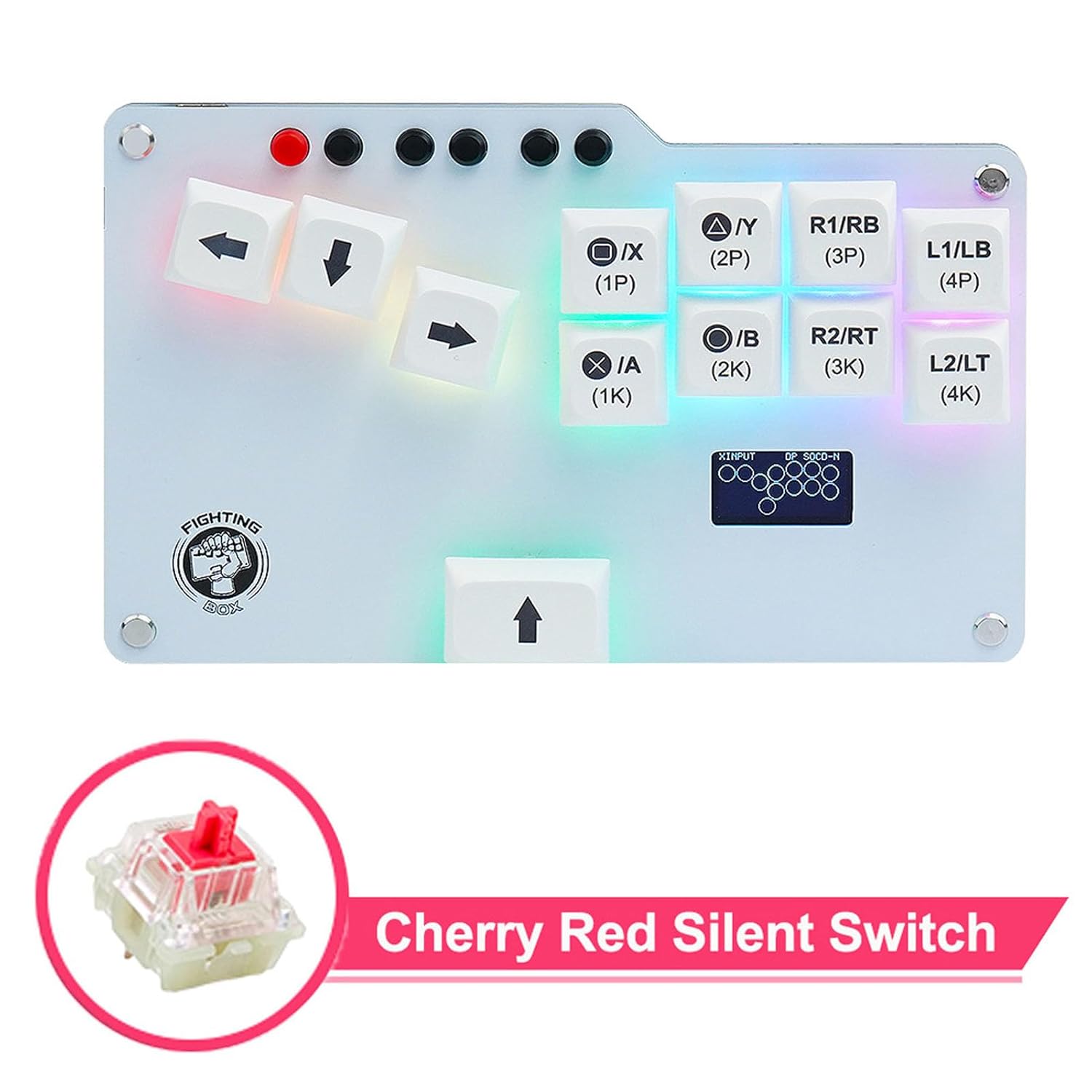
Figure 2: USB-C port options. Only one USB-C connection should be active at a time.
- Encesa inicial: Once connected, the device should power on automatically. The 128x64 OLED display will show the current input mode and other status information.
- Install Foot Pads (Optional): For enhanced stability during use, apply the included foot pads to the underside of the keyboard.

Figure 3: Package contents, including the USB-C cable, key puller, and foot pads.
3. Instruccions de funcionament
3.1 Input Modes
The Fighting Box Keyboard supports multiple input modes for broad compatibility:
- XInput: Standard input for PC games and Xbox controllers.
- PS3: Compatible with PlayStation 3 consoles.
- PS4: Compatible with PlayStation 4 consoles.
- Teclat: Functions as a standard keyboard input device.
The current input mode is displayed on the 128x64 OLED screen. Refer to the device's web configuration interface for instructions on how to switch between modes.
3.2 SOCD Cleaning Modes
SOCD cleaning prevents conflicting directional inputs, which is crucial for competitive play. The device offers the following modes:
- Neutre: Both opposing directions cancel each other out, resulting in no input.
- Up Priority: If Up and Down are pressed simultaneously, Up takes priority.
- Second Input Priority: The last directional input pressed takes priority.
The active SOCD mode is indicated on the OLED display. Configuration of SOCD modes is typically done via the web interfície de configuració.
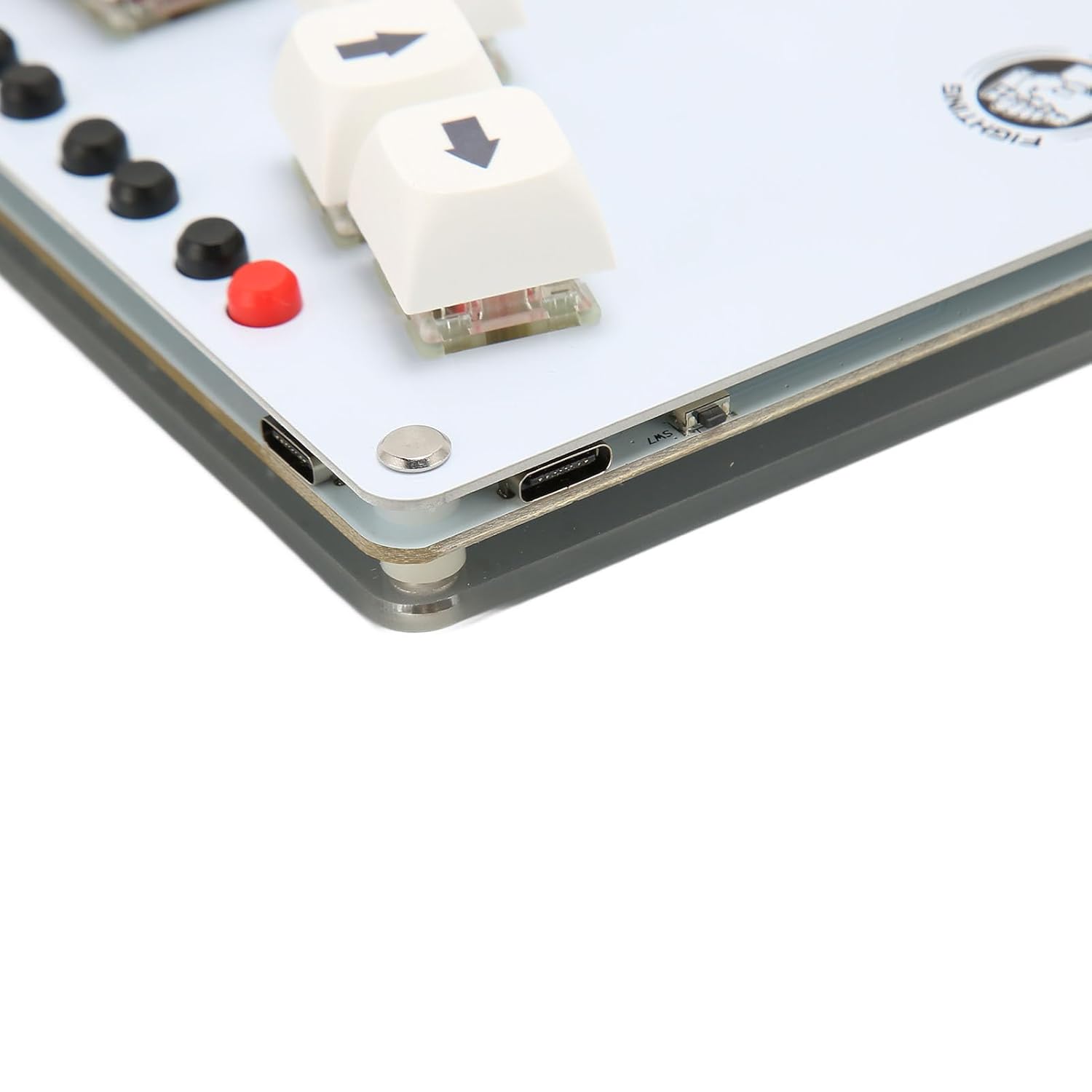
Figure 4: OLED display showing current input mode (XINPUT), continuous speed (T15), direction mode (DP), and SOCD mode (SOCD-N for Neutral).
3.3 Button Layout and Emulation
The keyboard features a standard fighting game button layout. Directional inputs are handled by the WASD-style keys. Action buttons are clearly labeled with their corresponding PlayStation and Xbox equivalents (e.g., ◯/X (1P), △/Y (2P), R1/RB (3P), L1/LB (4P), ●/B (2K), R2/RT (3K), L2/LT (4K)).

Figure 5: Button layout of the Fighting Box Keyboard.
The device allows for left and right analog stick emulation through specific key inputs. Consult the GP2040-CE firmware documentation or the web configuration for details on how to activate and use this feature.
4. Manteniment
Proper maintenance ensures the longevity and optimal performance of your Fighting Box Keyboard.
- Neteja: Use a soft, dry cloth to wipe down the surface of the keyboard. Avoid using harsh chemicals or abrasive materials. For cleaning between keycaps, a can of compressed air can be used.
- Key Switch Replacement: The keyboard uses mechanical key switches (e.g., Cherry Red Silent Switches). If a switch needs replacement, use the provided key puller tool to carefully remove the keycap and then the switch. Ensure the replacement switch is compatible.
- Emmagatzematge: Quan no l'utilitzeu, guardeu el teclat en un lloc net i sec, allunyat de la llum solar directa i de temperatures extremes.
Figura 6: Example of a Cherry Red Silent Switch, indicating the type of mechanical switch used.
5. Solució De Problemes
If you encounter issues with your ciciglow Fighting Box Keyboard, consider the following troubleshooting steps:
- El dispositiu no respon: Ensure the USB-C cable is securely connected to both the keyboard and your host device. Try using a different USB-C port or cable.
- Incorrect Inputs: Verify that the correct input mode (XInput, PS3, PS4, Keyboard) is selected for your gaming platform. This can usually be checked and changed via the web interfície de configuració.
- La pantalla no funciona: Check the USB connection. If the display remains blank, consult the GP2040-CE firmware documentation for display-specific troubleshooting.
- Problemes de firmware: If you suspect a firmware problem, refer to the official GP2040-CE documentation for instructions on how to reflash or update the firmware.
For further assistance, please refer to the manufacturer's support resources or the official GP2040-CE community forums.
6. Especificacions
| Tipus d'element | Fighting Box Keyboard |
| Material | ABS |
| Mida del producte | Aprox. 15.6 x 9.7 x 2.3 cm (6.1 x 3.8 x 0.9 polzades) |
| Controlador | RPi Pico GP2040 (RP2040) |
| Port d'entrada | 2x USB-C |
| Mostra | 128x64 Organic Light Emitting Diode (OLED) |
| Latència | Less Than 1 ms |
| Selectable Input Modes | XInput, PS3, PS4, Keyboard |
| SOCD Cleaning Modes | Neutral, Up Priority, Second Input Priority |
| Interruptors de clau mecànica | Red Silent Cherry (type) |
| Compatibilitat | PC, PS3, PS4, SteamDeck, MiSTerFPGA, Android |
| Número de model | ciciglowtzfxyvmruq |
| Pes de l'article | 10.6 unces |
| Dimensions del paquet | 8.74 x 5.59 x 1.97 polzades; 10.58 unces |
| Fabricant | ciciglow |
| Data de primera disponibilitat | 13 d'octubre de 2023 |
Note: All data are measured manually, and there may be minor variations in measurement results.
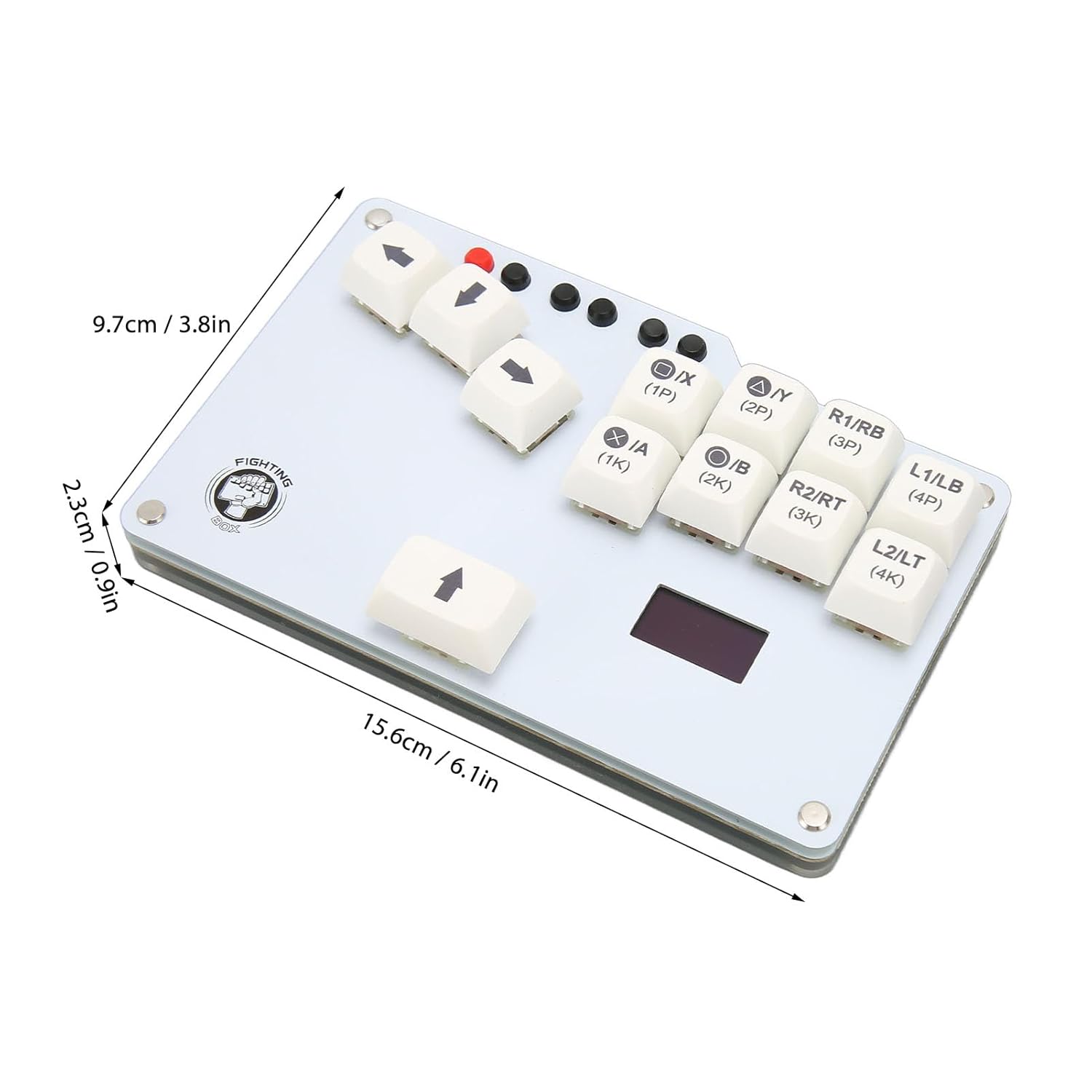
Figure 7: Product dimensions of the Fighting Box Keyboard.
7. Garantia i Suport
Information regarding product warranty and specific support contacts is not provided within this manual. For warranty details, technical support, or service inquiries, please refer to the official ciciglow website or contact the retailer from whom the product was purchased. You may also find community support and resources related to the GP2040-CE firmware online.