1. Introducció
The Axus 88 Note Folding Digital Piano is designed to provide a full-sized piano experience with the convenience of portability. Featuring 88 semi-weighted keys, this instrument is suitable for both aspiring musicians and seasoned players. Its compact and foldable design allows for easy transport and storage, making it an ideal musical companion for various settings.
2. Guia de configuració
Follow these steps to set up your Axus 88 Note Folding Digital Piano:
- Desembalatge: Carefully remove all components from the packaging, including the piano, power adapter, sustain pedal, and carry bag.
- Desplegant el piano: Place the piano on a flat, stable surface. Gently unfold the two halves of the piano until they lock securely into place. Ensure the hinge mechanism is fully extended and stable before use.
- Potència de connexió: Connect the included USB power cable to the piano's power input port and then to a suitable USB power adapter (not always included, check packaging) or a powered USB port. The piano can also operate on its internal battery.
- Connecting Sustain Pedal: Plug the sustain pedal into the designated sustain pedal input jack on the piano.
- Encesa inicial: Press the power button to turn on the piano. The display (if present) should illuminate.

Image 2.1: The Axus 88 Note Folding Digital Piano in its fully unfolded state, showing the music rest and connected sustain pedal.
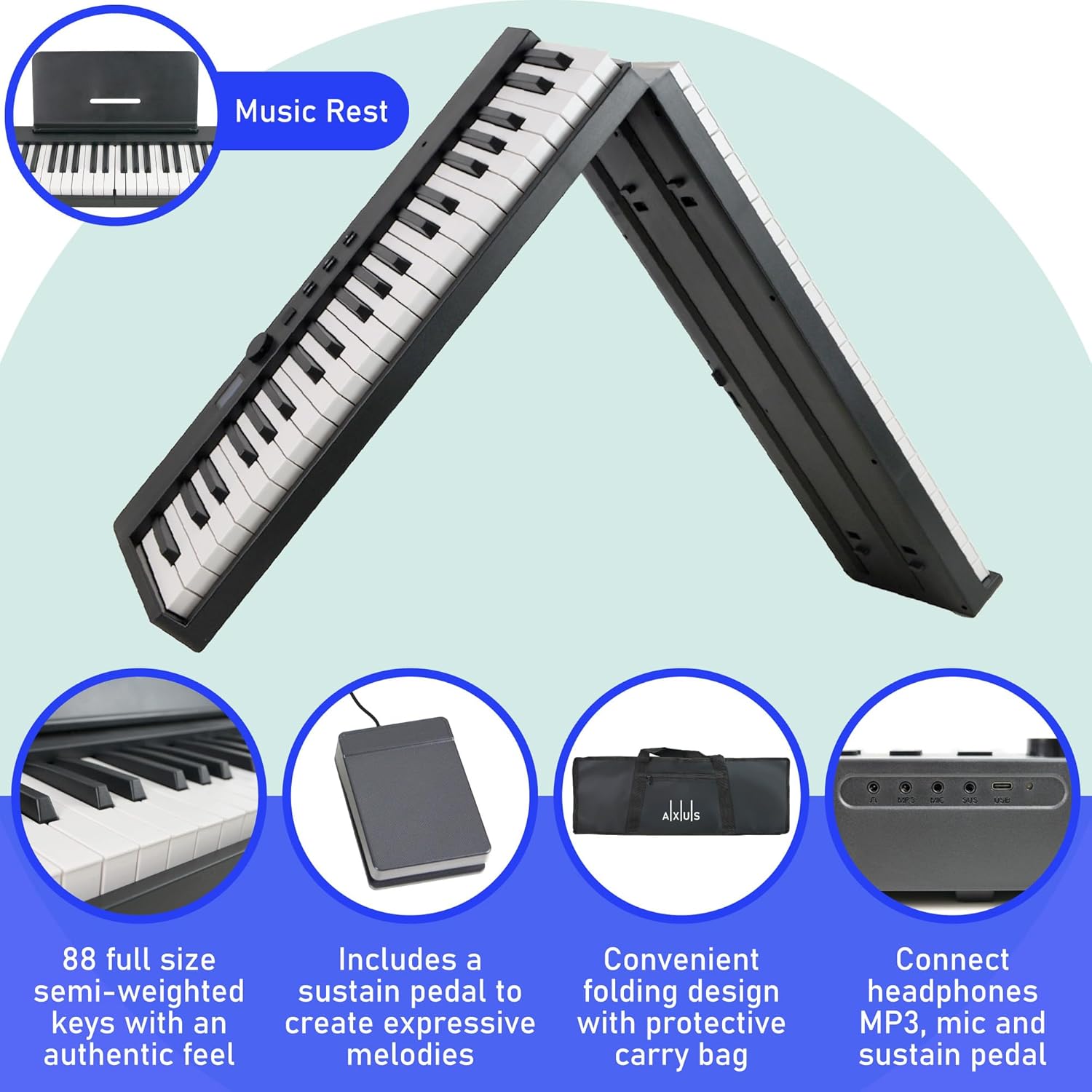
Imatge 2.2: Detallada view highlighting the piano's folding mechanism, semi-weighted keys, included sustain pedal, protective carry bag, and connectivity ports (headphone, mic, USB).
3. Instruccions de funcionament
3.1 Funcions bàsiques
- Encès/apagat: Press and hold the power button to turn the piano on or off.
- Control de volum: Use the dedicated volume knob or buttons to adjust the output volume of the speakers or headphones.
3.2 Funcions avançades
- Tones and Rhythms: Explore 128 different tones (instrument sounds) and 128 rhythms (backing tracks). Use the dedicated Tone and Rhythm buttons to cycle through options or enter specific numbers if available.
- Transposar: Adjust the pitch of the entire keyboard up or down in semitone steps. Refer to the piano's display or manual for specific transpose controls.
- Mantenir: The connected sustain pedal allows notes to ring out longer, mimicking an acoustic piano's sustain pedal.
- Gravació: Use the record function to capture your performances. Consult the piano's interface for starting, stopping, and playing back recordings.
- Dual/Layer: Combine two different tones to play simultaneously when a single key is pressed, creating richer sounds.
- Metrònom: Activate the built-in metronome to practice with a steady tempo. Adjust the tempo as needed.
- Connectivitat Bluetooth: Connect your smart device via Bluetooth to play along with your favorite songs or use educational apps.
- Sortida d'auriculars: For private practice, connect standard headphones to the headphone jack. This mutes the internal speakers.
- USB MIDI: Connect the piano to a computer or other MIDI-compatible device via USB for recording, music production, or using the piano as a MIDI controller.

Image 3.1: The control panel of the Axus piano, illustrating buttons for various functions such as Rhythm, Demo songs, Tone selection, Chord mode, and Record/Play.
4. Manteniment
- Neteja: Use a soft, dry cloth to wipe down the piano's surface. For stubborn marks, slightly dampRenta el drap amb aigua. Evita productes de neteja o dissolvents abrasius.
- Emmagatzematge: When not in use, fold the piano and store it in the included carry bag to protect it from dust and damage. Store in a cool, dry place away from direct sunlight or extreme temperatures.
- Cura de la bateria: To prolong battery life, avoid fully discharging the battery frequently. Charge the piano regularly, even if not in constant use. If storing for an extended period, charge the battery to about 50% before storage.
- Transport: Always use the provided carry bag when transporting the piano to prevent scratches and impacts.
5. Solució De Problemes
| Problema | Causa possible | Solució |
|---|---|---|
| No hi ha so dels altaveus/auriculars. | Volume too low; headphones connected; piano not powered on; faulty connection. | Increase volume. Disconnect headphones. Ensure piano is powered on. Check all cable connections. |
| Piano does not power on. | Low battery; power cable not connected properly; faulty power adapter. | Charge the battery. Ensure power cable is securely connected. Try a different USB power source/adapter. |
| Keys feel unresponsive or sticky. | Dust or debris under keys; environmental factors (humidity). | Gently clean around keys with a soft brush or compressed air. Store in a dry environment. If problem persists, contact support. |
| Problemes de connexió Bluetooth. | Bluetooth not enabled on device/piano; device too far; interference. | Ensure Bluetooth is active on both devices. Move device closer to piano. Restart both devices. |
6. Especificacions tècniques
| Característica | Especificació |
|---|---|
| Nombre de claus | 88 |
| Tipus de clau | Semi-ponderada |
| Tons | 128 |
| Ritmes | 128 |
| Connectivitat | USB MIDI, Headphone Output, Bluetooth |
| Font d'alimentació | Battery (up to 6 hours), USB Chargeable |
| Altaveus | 2 x 2.5W |
| Pes | 5.55 quilos |
| Dimensions desplegades (L x A x A) | 123 cm x 22 cm x 6.5 cm |
| Mides plegades (L x A x A) | 61 cm x 22 cm x 6.5 cm |

Image 6.1: Visual representation of the piano's dimensions when unfolded and folded, including length, width, and height.
7. Garantia i Suport
Specific warranty details for the Axus 88 Note Folding Digital Piano are not provided in the product information. For warranty claims or detailed support, please refer to the retailer's return policy or contact Axus customer support directly. As per Amazon's policy, a 30-day refund/replacement period may apply from the date of purchase.
For technical assistance, troubleshooting beyond this manual, or spare parts inquiries, please visit the official Axus weblloc o poseu-vos en contacte amb el seu departament d'atenció al client.


