1. Informació de seguretat
Prioritzeu sempre la seguretat quan feu servir equips de soldadura. Si no seguiu les pautes de seguretat, podeu patir lesions greus o la mort.
Precaucions generals de seguretat:
- Equips de protecció individual (EPI): Always wear appropriate welding helmet, gloves, protective clothing, and safety shoes.
- Ventilació: Ensure adequate ventilation to remove welding fumes and gases. Work in a well-ventilated area or use local exhaust ventilation.
- Perills d'incendi: Mantingueu els materials inflamables allunyats de la zona de soldadura. Tingueu a mà un extintor.
- Seguretat elèctrica: Ensure proper grounding and inspect cables for damage before each use. Do not operate in wet conditions.
- Raigs d'arc: Protegiu els ulls i la pell dels raigs d'arc, que poden causar cremades i lesions oculars.
Característiques de seguretat integrades:
The ARCCAPTAIN MIG200 is equipped with multiple safety features to enhance user protection:
- VRD (Voltage Dispositiu de reducció): Redueix el volum de circuit oberttage per a una major seguretat.
- Més del voltage Protecció: Automatically shuts down the machine if input voltage supera els límits de seguretat.
- Protecció sobre corrent: Evita danys per un consum excessiu de corrent.
- Protecció de sobrecàrrega: Protects the machine from overheating due to prolonged heavy use.
- Protecció contra el sobreescalfament: Activates the cooling fan only when needed, and shuts down if internal temperature becomes too high.

Figure 1: Internal components and safety features of the ARCCAPTAIN MIG200 welder.
2. Producte acabatview
The ARCCAPTAIN MIG200 is a versatile 6-in-1 multi-process welding machine designed for various welding requirements, from hobbyist to professional use. It supports multiple welding modes and comes with a dedicated spool gun for aluminum welding.
Característiques principals:
- Multi-Process Capabilities: Gas/Solid Wire MIG (GMAW), Gasless Flux Core MIG (FCAW), Stick/MMA, Spot welding, Lift TIG (TIG gun not included), and Spool Gun connector (spool gun included, TIG gun not included).
- Compatibilitat de cables: Supports .023”/.030”/.035” solid wire, .023”/.030”/.035” flux core wire, and .035”/.045” aluminum wire.
- MIG sinèrgic: Digital control automatically matches recommended current and wire feeding speed based on selected wire diameter and gas material. Manual adjustment is also possible.
- Funcions avançades: Includes adaptive crater, burn-back adjustment, and pre-flow/post-flow for improved welding efficiency.
- 2T/4T Welding Modes: Offers two welding trigger modes for different application needs.
- Configuració predeterminada: Ability to store up to 10 groups of parameter data for each welding mode for convenient recall.
- Sistema de refrigeració: Features a 'Fan on Demand' system, where the cooling fan operates only when necessary, reducing noise.
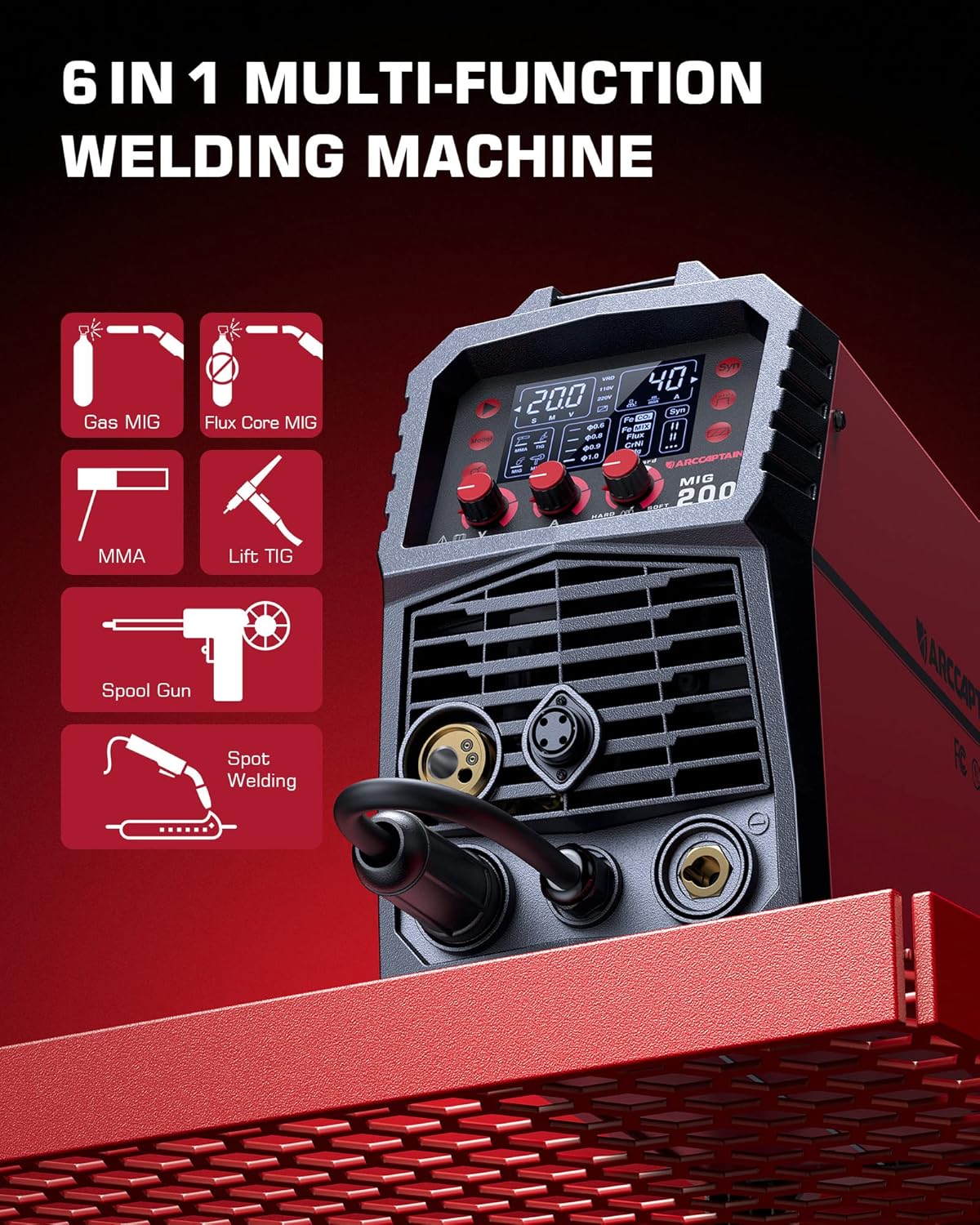
Figure 2: Visual representation of the 6-in-1 multi-function welding machine.
Spool Gun Features:
- Alimentació suau del filferro: Designed for consistent and uninterrupted aluminum welding.
- Longitud del cable: Equipped with a 10-foot (3m) cable for extended reach.
- Visible Cover: Transparent cover allows for easy visibility of the welding wire, ensuring cleanliness and preventing contamination.
- Disseny ergonòmic: Features a positive trigger and ergonomic design for comfortable handling.

Figure 3: The ARCCAPTAIN 150A Spool Gun.

Figure 4: Transparent cover and ergonomic design of the spool gun.
3. Configuració
Before operating the ARCCAPTAIN MIG200, ensure all connections are secure and correct.
3.1 Connexió d'alimentació:
The MIG200 welder is compatible with both 220V and 110V power sources. Use the appropriate adapter cable provided for your power outlet.
3.2 Gas Line Connection:
For Gas MIG (GMAW) or Lift TIG welding, connect your shielding gas cylinder to the machine using the provided gas line cable. Ensure all connections are tight to prevent leaks.
3.3 Welding Cable Connections:
Connect the appropriate welding cables (MIG torch, Stick electrode holder, Ground clamp) to their respective ports on the front panel of the welder. Ensure a secure connection for optimal performance and safety.

Figure 5: ARCCAPTAIN MIG200 welder and its accessories, including various cables.
3.4 Spool Gun Installation:
Follow these steps to install the welding wire in the spool gun:
- Obre la tapa: Carefully open the transparent cover lid of the spool gun.
- Install the Welding Wire: Place the welding wire spool into the designated compartment, ensuring it is seated correctly.
- Install Wire Feed Drive Roller: Position the wire feed drive roller and tighten the nut to secure it. Ensure the wire feeds smoothly through the guide.

Figure 6: Detailed steps for installing welding wire in the spool gun.
4. Instruccions de funcionament
The ARCCAPTAIN MIG200 is designed for ease of use, even for beginners, thanks to its intelligent control system.
4.1 Synergic Control:
Select the diameter of your welding wire and the type of gas material on the machine's digital interface. The synergic control will automatically recommend the optimal current and wire feeding speed. You can fine-tune these settings manually to suit your specific welding habits or project requirements.
4.2 Multi-functional Operation:
Utilize the various welding modes (MIG, Flux Core MIG, Stick/MMA, Spot, Lift TIG) by selecting them on the control panel. The machine's internal electronics are designed to recognize the connected accessories and adjust settings accordingly, providing a broad operational range.
4.3 2T/4T Modes:
Switch between 2T (two-touch) and 4T (four-touch) trigger modes based on your welding preference. 2T is suitable for short welds, while 4T allows for continuous welding without holding the trigger, ideal for longer passes.
4.4 Saving and Recalling Presets:
The machine allows you to save up to 10 sets of customized parameter data for each welding mode. This feature is convenient for quickly switching between frequently used settings for different materials or joint types.
5. Manteniment
Regular maintenance ensures the longevity and optimal performance of your ARCCAPTAIN MIG200 welder and spool gun.
- Keep Wire Clean: Utilize the transparent cover on the spool gun to keep the welding wire free from contaminants, which can affect weld quality.
- Ventilador de refrigeració: The 'Fan on Demand' system helps maintain optimal operating temperature. Ensure the air vents are clear of obstructions to allow proper airflow.
- Inspecció del cable: Regularly inspect all cables (power, welding, gas) for any signs of wear, cuts, or damage. Replace damaged cables immediately. The spool gun cable is designed to be sturdy and durable to prevent breaking during movement.
- Neteja general: Keep the machine and accessories clean and free of dust, debris, and spatter.

Figure 7: Sturdy and durable design of the spool gun cable.
6. Solució De Problemes
While the ARCCAPTAIN MIG200 is designed for intuitive operation, here are some common issues and their potential solutions:
| Problema | Causa possible | Solució |
|---|---|---|
| Sense poder | Power cable disconnected, circuit breaker tripped, machine fault. | Check power connections, reset breaker, contact support if fault persists. |
| Wire Sticking (Stick Welding) | Insufficient current, improper electrode angle. | Increase current setting, adjust electrode angle. The machine's intelligence should minimize this. |
| Mala qualitat de soldadura | Incorrect settings, contaminated material, improper technique. | Verify synergic settings or adjust manually, clean workpiece, review welding technique. |
| Wire Feed Issues (MIG/Spool Gun) | Tangled wire, clogged liner, incorrect drive roller tension. | Check wire spool, clean liner, adjust drive roller tension. |
| Overheat Indicator On | Prolonged use, blocked vents. | Allow machine to cool down, ensure vents are clear. |
7. Especificacions
Key technical specifications for the ARCCAPTAIN MIG200 & Spool Gun:
| Característica | Detall |
|---|---|
| Model | MIG200 & Spool Gun |
| Entrada Voltage Compatibilitat | 110V / 220V (Doble Volum)tage) |
| Max Output Current (Welder) | 200 Amp |
| Spool Gun Current Rating | 150 Amp |
| Spool Gun Cable Length | 10 peus (3 m) |
| Wire Feed Type | Smooth Wire Feeding (Spool Gun) |
| Tipus de connexió | Connexió a l'euro |
| ASIN | B0CL4TDB5T |
| Primera data disponible | 16 d'octubre de 2023 |

Figure 8: Dimensions of various accessories included with the welder.
8. Garantia i assistència
For warranty information, technical support, or service inquiries regarding your ARCCAPTAIN MIG200 welder and spool gun, please contact ARCCAPTAIN customer service directly. Refer to the product packaging or the official ARCCAPTAIN weblloc web per obtenir les dades de contacte i els termes de garantia més actualitzats.
Botiga oficial d'ARCCAPTAIN: Visit the ARCCAPTAIN Store on Amazon


