Introducció
This manual provides detailed instructions for the installation, operation, and maintenance of your Docooler Wi-Fi Smart Programmable Thermostat. Please read this manual thoroughly before installation and use to ensure proper function and safety.
Contingut del paquet
- 1 x Docooler Wi-Fi Smart Programmable Thermostat
- 2 x cargols de muntatge
- 1 x manual d'usuari en anglès
Informació important de seguretat
- Desconnecteu sempre l'alimentació a l'interruptor automàtic abans d'instal·lar o fer el manteniment del termòstat.
- La instal·lació l'ha de fer un electricista qualificat.
- Ensure all wiring complies with local electrical codes.
- No utilitzeu el termòstat amb les mans mullades.
- Mantingueu el dispositiu allunyat de l'aigua i d'ambients amb molta humitat.
Producte acabatview
Familiarize yourself with the thermostat's display and control buttons.

Descripció de la imatge: Un detallat view of the Docooler Wi-Fi Smart Programmable Thermostat's LCD screen, showing various icons and numerical displays. Numbered labels point to specific features: (1) Heating on indicator, (2) Periods display, (3) Monday to Sunday indicators, (4) External sensor indicator, (5) Down Button, (6) Up Button, (7) Clock icon, (8) Advanced options icon, (9) Mode button, (10) Power button, (11) Time display, (12) Set temperature, (13) Menu, (14) Room temperature, (15) Lock icon.
- Calefacció activada: Indicates when the heating system is active.
- Períodes: Displays the current programming period.
- De dilluns a diumenge: Indicador del dia de la setmana.
- Sensor extern: Indicates if an external sensor is connected and active.
- Botó avall: Decreases temperature or navigates menu options.
- Botó amunt: Increases temperature or navigates menu options.
- Rellotge: Mostra l'hora actual.
- Opcions avançades: Accesses advanced settings.
- Mode: Switches between different operating modes (e.g., Manual, Program).
- Potència: Encén o apaga el termòstat.
- Hora: Visualització de l'hora actual.
- Establir temperatura: The desired temperature setting.
- Menú: Accedeix al menú principal de configuració.
- Temp. de l'habitació: Temperatura ambient actual.
- Bloqueig: Indicates if the keypad is locked.
Configuració
1. Instal·lació
The thermostat is designed for installation in a standard 86x86mm square box or a European 60mm round box.
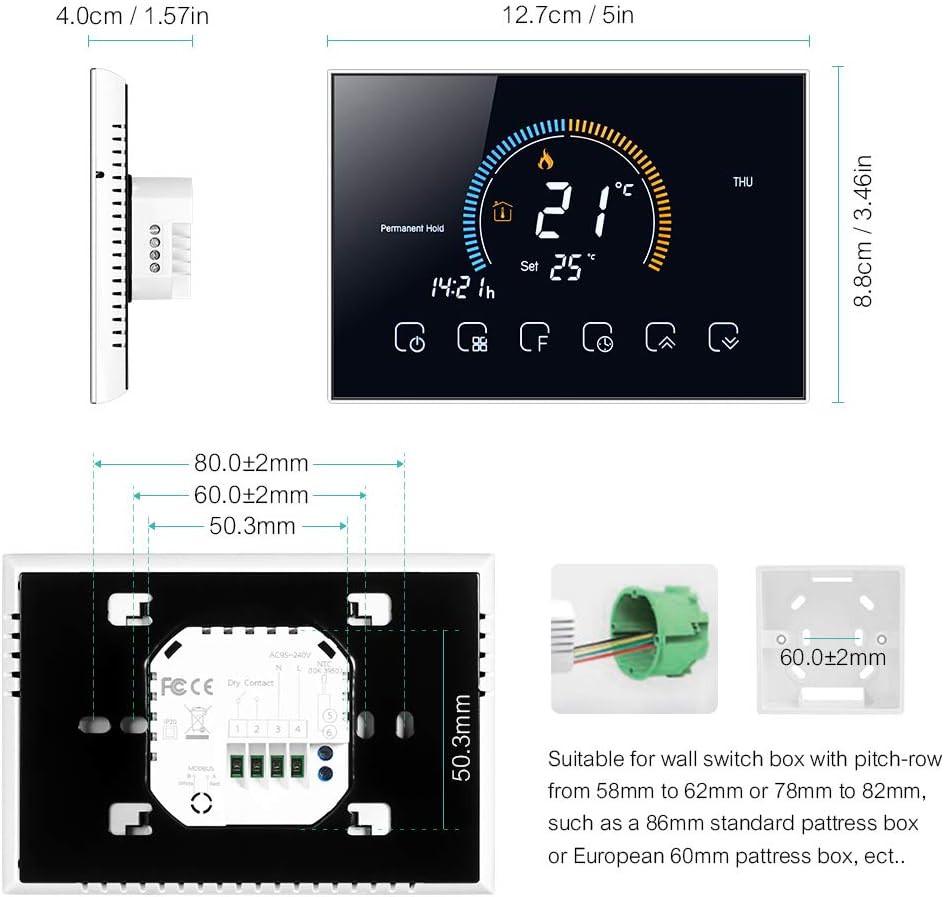
Descripció de la imatge: Technical drawing showing the dimensions of the Docooler thermostat (12.7cm width, 8.8cm height, 4.0cm depth) and its back panel. The back panel includes a wiring terminal block and mounting hole measurements (80mm, 60mm, 50.3mm). It also illustrates compatible wall switch boxes: an 86mm standard box and a European 60mm round box.
Wiring Diagram for Water/Gas Boiler Systems
Ensure correct wiring connections for your water or gas boiler system. Refer to the diagram below.
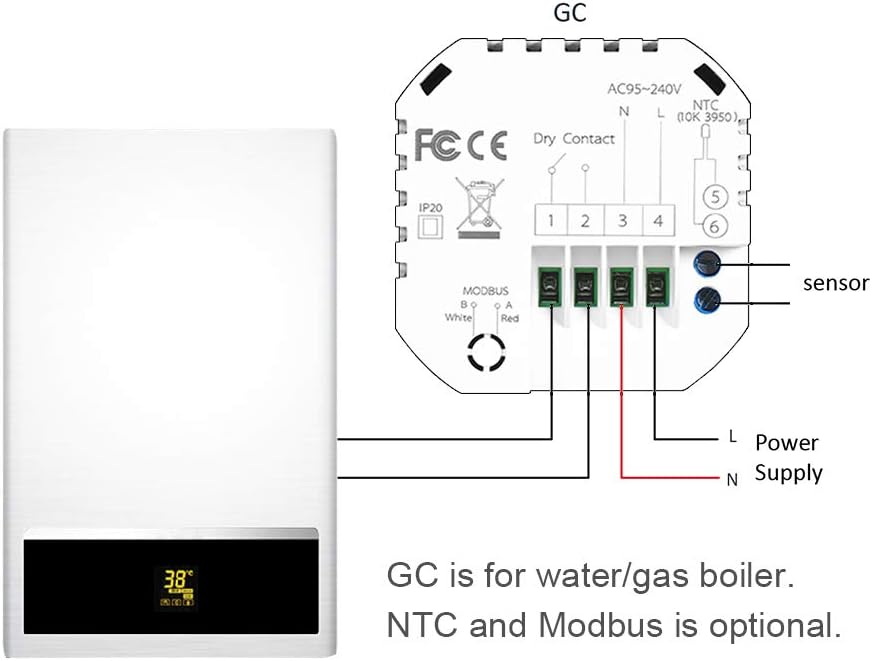
Descripció de la imatge: A simplified wiring diagram illustrating the connection of the Docooler thermostat to a water/gas boiler system. The thermostat's back panel shows terminals for AC95-240V (L and N for power supply), Dry Contact (terminals 1 and 2 for boiler control), and optional NTC sensor (terminals 5 and 6) and Modbus (terminals 3 and 4). The diagram shows the L and N wires from the power supply connected to the thermostat, and the Dry Contact terminals connected to the boiler. An external NTC sensor is also shown connected.
Terminals de cablejat:
- L & N: Power Supply (AC 95-240V, 50-60Hz)
- 1 & 2 (Dry Contact): Connect to your water/gas boiler control terminals.
- 3 & 4 (Modbus): Optional Modbus connection.
- 5 & 6 (NTC): Optional external NTC sensor connection.
Sistema general acabatview:

Descripció de la imatge: A schematic diagram illustrating how the Docooler thermostat integrates into a typical home heating system. It shows a central heater connected to radiators, a shower bath, and a wash basin. The thermostat is positioned to control the heater, which then distributes hot water to the various outlets.
2. App Connection (Wi-Fi Models Only)
For Wi-Fi models, download the "My BecaSmart" application to control your thermostat remotely.
- Descarregar l'aplicació: Cerca "My BecaSmart" in your smartphone's app store.
- Registra't/Inici de sessió: Creeu un compte o inicieu sessió.
- Afegeix un dispositiu: Follow the in-app instructions to add your thermostat. This typically involves putting the thermostat into pairing mode (refer to the thermostat's display for pairing indicators) and connecting to your home Wi-Fi network.
- Configuració: Once connected, you can configure settings, schedules, and control the thermostat from your phone.

Descripció de la imatge: A series of smartphone screen captures showing the "My BecaSmart" application interface. One screen shows a "Connecting Now" progress bar at 9%, indicating device pairing. Another screen displays the main thermostat control interface with a large temperature dial (20.0°C) and icons for various functions. A third screen shows the "Impostazione programma" (Schedule Setting) interface, detailing daily temperature schedules for Saturday and Sunday with six time periods and corresponding temperature settings.
Instruccions de funcionament
1. Funcionament bàsic
- Encès/apagat: Premeu el botó ⏻ (Power) button (labeled 10 in the diagram) to turn the thermostat on or off.
- Ajust de temperatura: Utilitza el ▲ (Amunt) i ▼ (Down) buttons (labeled 6 and 5) to adjust the desired temperature.
- Selecció del mode: Premeu el botó ⌛ (Mode) button (labeled 9) to switch between Manual mode and Program mode.
2. Programming (5+1+1 Six Periods)
The thermostat supports 5+1+1 day programming with six customizable periods per day (Monday-Friday, Saturday, Sunday).

Descripció de la imatge: A composite image showing the thermostat display and a smartphone app. The thermostat display shows current temperature, day of the week, and weather icons, along with humidity (57%RH) and UV index. The smartphone app screen, labeled "Impostazione programma" (Schedule Setting), displays a detailed daily schedule for Saturday and Sunday, with six time periods and corresponding temperature settings (e.g., 06:00 20°C, 08:00 20°C, 11:30 20°C, 13:30 20°C, 17:00 20°C, 22:00 15°C).
- Entra al mode de programa: Ensure the thermostat is in Program mode (indicated by a specific icon, usually a clock or calendar).
- Access Schedule Settings: Use the Menu button (labeled 13) or Advanced Options button (labeled 8) to navigate to the schedule settings.
- Establir períodes: For each day group (Mon-Fri, Sat, Sun), set the start time and desired temperature for each of the six periods.
- Desa la configuració: Confirm and save your programming.
3. Integració de la llar intel·ligent
The Docooler Wi-Fi thermostat is compatible with popular voice assistants for convenient control.
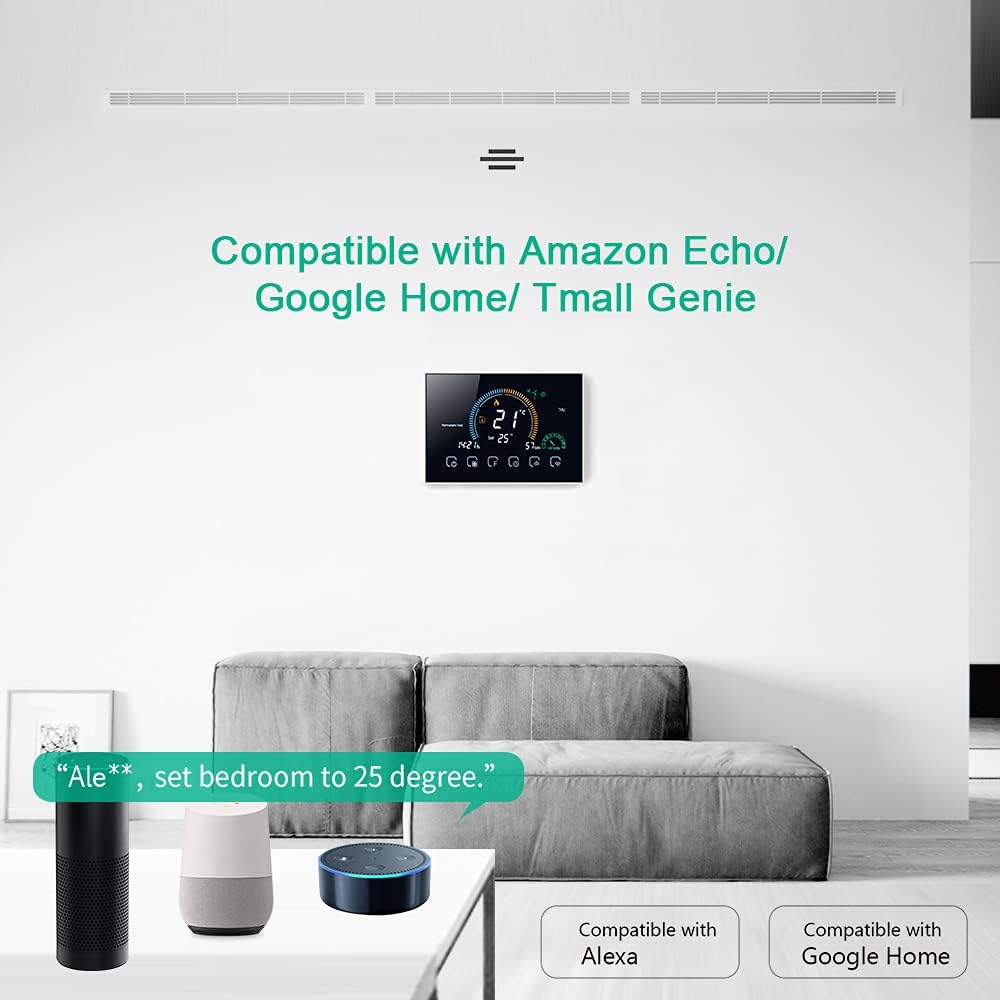
Descripció de la imatge: An image depicting the Docooler thermostat mounted on a wall, with Amazon Echo and Google Home devices on a table below. Text indicates "Compatible with Amazon Echo/Google Home/Tmall Genie" and shows an example voice command: "Ale**, set bedroom to 25 degree." This illustrates the thermostat's integration with smart home ecosystems.
Plataformes compatibles:
- Amazon Alexa (Echo devices)
- Google Assistant (Google Home devices)
- Tmall Genie
Per connectar:
- Ensure your thermostat is connected to the "My BecaSmart" app and your home Wi-Fi.
- Obre l'aplicació Amazon Alexa o Google Home.
- Cerca the "My BecaSmart" skill/service and enable it.
- Link your "My BecaSmart" account with your voice assistant account.
- Discover devices. Your thermostat should now be controllable via voice commands.
Example Voice Command: "Alexa, set the living room thermostat to 22 degrees."
4. Funció de bloqueig
The lock function prevents unauthorized changes to the thermostat settings.
- To activate/deactivate the lock, press and hold the 🔒 (Lock) icon (labeled 15) for several seconds until the lock symbol appears or disappears on the display.
5. UV Index and Humidity Display
The thermostat provides real-time display of UV Index and ambient humidity levels for environmental awareness.

Descripció de la imatge: The main display of the Docooler Wi-Fi Smart Programmable Thermostat. It shows a large current temperature of 21°C, a set temperature of 25°C, the current time (14:21), and the day (THU). Icons for heating, permanent hold, and various control functions are visible at the bottom. This image highlights the clear and comprehensive information presented on the screen.
Manteniment
Neteja
- Wipe the thermostat's screen and casing amb un suau, damp tela.
- No utilitzeu netejadors abrasius, dissolvents ni esprais químics.
- Ensure no liquid enters the device.
Canvi de bateria
This thermostat is typically hardwired and does not use user-replaceable batteries for primary operation. If your model includes a backup battery for settings retention, consult the specific instructions provided with your unit for replacement details.
Resolució de problemes
Problemes comuns i solucions
| Problema | Causa possible | Solució |
|---|---|---|
| El termòstat no s'encén | No hi ha subministrament elèctric; cablejat incorrecte; interruptor automàtic saltat. | Check circuit breaker. Verify wiring connections (L & N). Ensure power is supplied to the unit. |
| La calefacció no s'encén | Incorrect mode; set temperature too low; wiring issue to boiler. | Ensure thermostat is in heating mode. Increase set temperature above room temperature. Check boiler wiring (terminals 1 & 2). |
| Error de connexió Wi-Fi | Incorrect Wi-Fi password; weak signal; router issues; thermostat not in pairing mode. | Verify Wi-Fi password. Move thermostat closer to router. Restart router. Put thermostat into Wi-Fi pairing mode as per app instructions. |
| Lectura de temperatura inexacta | Thermostat located near heat source/draft; external sensor issue. | Relocate thermostat away from direct heat/cold sources. Check external sensor connection if used. |
| Teclat bloquejat | Child lock or keypad lock activated. | Press and hold the lock icon (labeled 15) for several seconds to unlock. |
Especificacions tècniques
| Característica | Detall |
|---|---|
| Model | IBY5665215869606MF |
| Materials | PC + ABS |
| Voltage | CA 95-240V, 50-60Hz |
| Càrrega actual | 5A |
| Consum d'energia | <1.5W |
| Sensor | NTC3950, 10K |
| Precisió | ± 1 ° C o ± 1 ° F |
| Estableix el rang de temperatura | 5-35°C |
| Rang de temperatura de visualització | 5-99°C |
| Temperatura ambient | 0-45°C |
| Humitat ambiental | 5-95% HR (sense condensació) |
| Temperatura d'emmagatzematge | -5 ~ 45 °C |
| Error de cronometratge | <1% |
| Caixa d'instal·lació | 86x86mm square box or European 60mm round box |
| Terminals de filferro | 2 x 1.5mm² or 1 x 2.5mm² wire |
| Classe de protecció | IP20 |
| Aplicació | My BecaSmart |
| Dimensions de l'article | 12.7 x 4.0 x 8.8 cm |
| Pes de l'article | 231 g |
Garantia i assistència al client
For warranty information and technical support, please refer to the documentation provided with your purchase or contact Docooler customer service through their official weblloc.


