1. Introducció
Welcome to the user manual for your Raddy WF-80C Weather Station. This device is designed to provide accurate and comprehensive weather data for your home or office, including indoor and outdoor temperature, humidity, barometric pressure, and weather forecasts. This manual will guide you through the setup, operation, and maintenance of your new weather station to ensure optimal performance.
2. Producte acabatview
2.1 Contingut del paquet
Si us plau, comproveu el contingut del paquet per assegurar-vos que hi hagi tots els elements:
- 1 x Raddy WF-80C Weather Station Main Unit
- 3 x R4 Outdoor Remote Sensors
- 6 x AAA Batteries (for sensors)
- 1 x Power Adapter (for main unit)
- 1 x Manual d'usuari

Image: All components included in the Raddy WF-80C weather station package.
2.2 Característiques clau
- Vibrant 7.5-inch Color Display: Large screen for clear readings from any angle, with conveniently placed front and top buttons.
- Multi-Sensor Precision: Three highly precise R4 sensors monitor temperature and humidity in up to 4 locations (including the main unit's indoor sensor).
- Rang de transmissió ampliat: Sensors offer a transmission range of up to 100 meters (330 feet).
- Health-Focused Monitoring: Features comfort level indicators and mold warnings to help maintain optimal indoor conditions.
- Adjustable Backlight & Night Mode: Five adjustable brightness levels and a dedicated night mode for comfortable viewing.
- Funcions versàtils: Includes a calendar, DCF atomic clock for accurate timekeeping, dual alarms, six types of weather forecasts, and moon phase monitoring.
- Potència Outage Protecció: Built-in CR2032 battery preserves settings during power interruptions.

Image: Raddy WF-80C Weather Station with its display, sensors, and batteries.
3. Configuració
3.1 Instal·lació de la bateria
- Unitat principal: Insert the included power adapter into the DC port on the back of the main unit and plug it into a power outlet. For backup, insert a CR2032 button cell battery (not included) into the battery compartment on the back. This battery will preserve time and settings during power outages.
- Sensors remots: Open the battery compartment on the back of each R4 remote sensor. Insert two AAA batteries (included) into each sensor, observing the correct polarity (+/-). Close the battery compartment securely.
3.2 Col·locació del sensor
For accurate readings and optimal transmission, consider the following:
- Place sensors within 100 meters (330 feet) of the main unit, minimizing obstructions like thick walls or large metal objects.
- For outdoor sensors, choose a shaded location to avoid direct sunlight, which can cause inaccurate temperature readings.
- Protect sensors from direct rain or excessive moisture.
- Avoid placing sensors near heat sources (e.g., vents, appliances) or cold sources (e.g., refrigerators).

Imatge: Examples of remote sensor placement in various environments.
3.3 Initial Power-On and Pairing
Once the main unit is powered and sensors have batteries, the main unit will automatically begin searching for the remote sensors. The sensor channels (1, 2, 3) will flash on the display. Once a sensor is found, its data will appear, and the flashing will stop for that channel. This process may take a few minutes. Ensure sensors are within range during initial pairing.
4. Instruccions de funcionament
4.1 Mostra finalview
The 7.5-inch color display is divided into several sections:
- Top Left (CH1), Middle Left (CH2), Top Right (CH3): Display temperature and humidity for remote sensors 1, 2, and 3 respectively.
- Bottom Right (INDOOR SENSOR): Displays indoor temperature and humidity from the main unit.
- Center Top: Weather forecast icons.
- Center Middle: Barometric pressure.
- Center Bottom: Time, date, day of the week, and moon phase.
Imatge: Detallada view of the Raddy WF-80C display layout.
4.2 Setting Time and Date (DCF Atomic Clock)
The WF-80C features a DCF atomic clock function, which automatically synchronizes the time and date with the atomic clock signal. This typically occurs overnight. If the signal is weak or unavailable, you can manually set the time and date using the buttons on the unit (refer to the specific button functions in your quick start guide for detailed steps).

Image: Close-up of the display showing the Atomic Clock with DCF feature.
4.3 Configuració d'alarma
The weather station supports dual alarms. To set an alarm, press the 'ALARM' button. Use the 'UP'/'DOWN' buttons to adjust the hour and minute, and press 'ALARM' again to confirm each setting. Press 'ALARM' repeatedly to cycle through Alarm 1, Alarm 2, and alarm ON/OFF settings.
4.4 Backlight Adjustment and Night Mode
The display offers five adjustable brightness levels. Press the 'LIGHT' button (usually on the top or front) to cycle through the brightness levels (OFF, LV1, LV2, LV3, LV4). To activate Night Mode, which dims the display automatically during set hours, refer to the specific instructions in your quick start guide for setting the night mode time range.
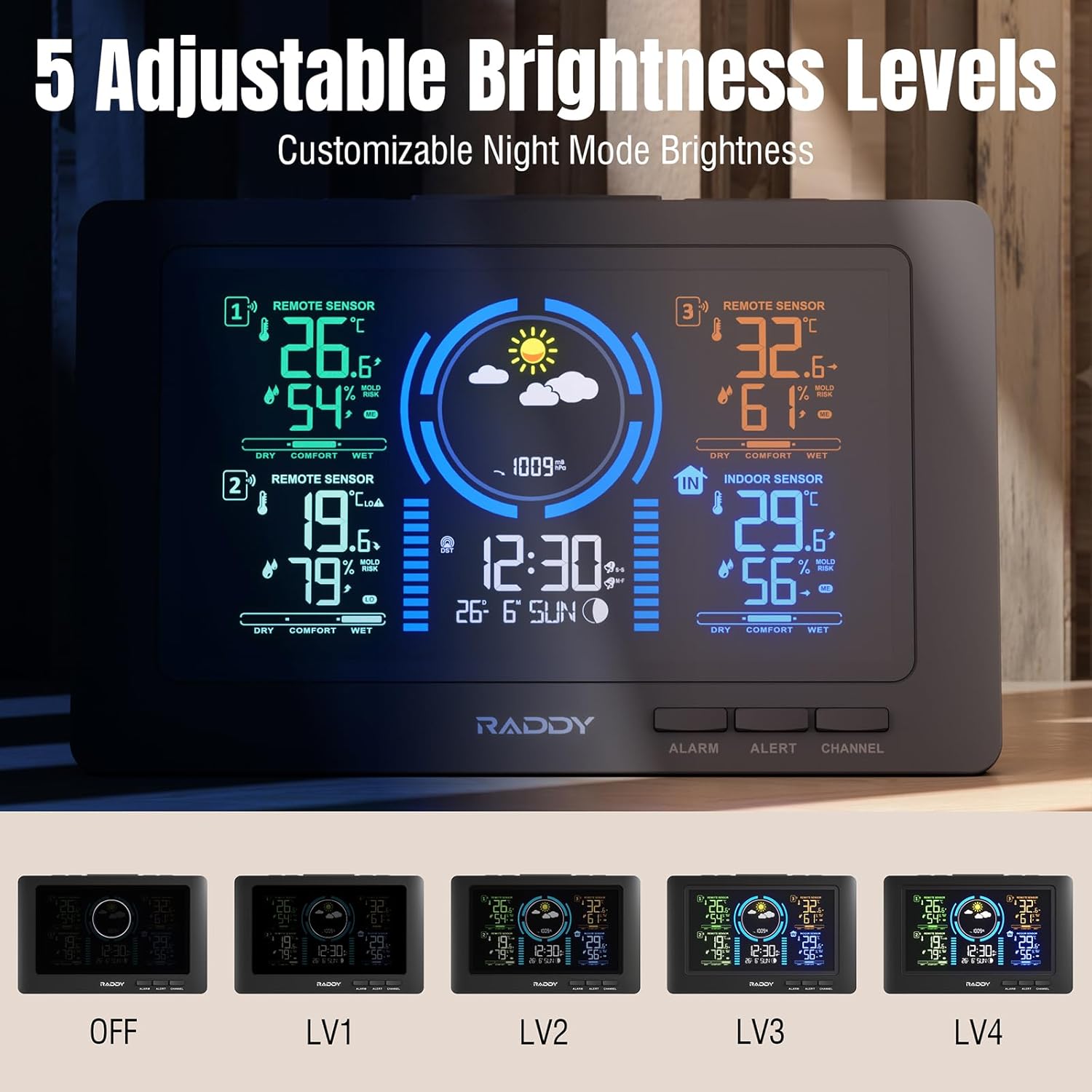
Image: Display showing different backlight brightness levels.
4.5 Weather Forecast and Moon Phase
The weather station predicts weather conditions for the next 12-24 hours based on barometric pressure changes. Icons on the display will indicate the forecast (e.g., sunny, cloudy, rainy, snowy). The moon phase icon will also update automatically based on the current date.

Image: Weather forecast icons and moon phase types.
4.6 Comfort Level and Mold Risk Indicators
The display provides comfort level indicators (DRY, COMFORT, WET) based on indoor humidity. It also features mold risk warnings (HI, ME, LO, NO) to help you maintain a healthy indoor environment. Adjusting ventilation or humidity levels can help optimize these conditions.

Image: Display showing comfort levels and mold risk indicators.
4.7 Selecció de canals
If you have multiple remote sensors, you can press the 'CHANNEL' button on the main unit to cycle through the display of each sensor's data (CH1, CH2, CH3) or to view them in a rotating sequence.

Image: Hand operating the weather station's top buttons.
5. Manteniment
5.1 Neteja
Wipe the main unit and sensors with a soft, damp cloth. Do not use abrasive cleaners or solvents, as they may damage the surfaces. Ensure no water enters the electronic components.
5.2 Substitució de la bateria
Replace the AAA batteries in the remote sensors annually or when the low battery indicator appears on the display. Replace the CR2032 backup battery in the main unit as needed to maintain settings during power outages.
6. Solució De Problemes
6.1 Problemes comuns i solucions
- No hi ha cap pantalla a la unitat principal: Ensure the power adapter is securely plugged in and the power outlet is functional. Check the CR2032 backup battery if applicable.
- El sensor remot no es connecta:
- Check if the sensor batteries are correctly inserted and not depleted.
- Ensure the sensor is within the 100-meter transmission range and there are no major obstructions.
- Try re-pairing the sensor by removing and reinserting its batteries, then initiating a sensor search on the main unit (refer to quick start guide for specific button sequence).
- Lectures de temperatura/humitat inexactes:
- Ensure sensors are not in direct sunlight, near heat sources, or in areas with extreme drafts.
- Allow the unit and sensors to stabilize for at least 30 minutes after setup.
- DCF Time Not Synchronizing:
- Place the main unit near a window or in an open area to improve signal reception.
- Ensure there are no electronic devices causing interference nearby.
- Manual time setting is available if automatic synchronization is consistently unsuccessful.
7. Especificacions
7.1 Dades tècniques
| Característica | Detall |
|---|---|
| Marca | Raddy |
| Model | WF-80C |
| Mida de la pantalla | 7.5 polzades |
| Font d'alimentació (unitat principal) | Power Adapter (DC) + CR2032 backup battery |
| Font d'alimentació (sensors) | 2 piles AAA per sensor |
| Tecnologia de connectivitat | Sense fil |
| Nombre de sensors | 3 Outdoor Sensors (R4 model) |
| Rang de transmissió | Fins a 100 metres (330 peus) a l'aire lliure |
| Característiques especials | Adjustable Brightness, Atomic Clock (DCF), Pre-calibrated, Large Display, Dual Alarms, Weather Forecast, Moon Phase, Comfort Level, Mold Warning |
| Color | Negre o Blanc |
8. Garantia i Suport
8.1 Informació de la garantia
Please refer to the warranty policy provided by Raddy or your retailer at the time of purchase. Typically, products come with a limited warranty covering manufacturing defects.
8.2 Atenció al client
For further assistance, technical support, or to inquire about replacement parts, please visit the official Raddy website or contact their customer service department using the contact information provided with your product or on their weblloc.


