1. Introducció
This manual provides detailed instructions for the installation, operation, and maintenance of your ENERMAX LIQMAXFLO 420mm A-RGB AIO CPU Liquid Cooler. This all-in-one liquid cooling system is designed to provide efficient thermal management for your CPU, featuring a high-performance pump, a thick radiator, and pressure-optimized fans with addressable RGB lighting. Please read this manual thoroughly before installation and use to ensure proper function and longevity of your product.
2. Contingut del paquet
Verifiqueu que tots els components que s'enumeren a continuació siguin presents al vostre paquet:
- LIQMAXFLO 420mm A-RGB AIO Cooler (Radiator, Pump/Water Block, Tubes, Fans pre-installed)
- Mounting Hardware for Intel LGA 1700/1200/115X/2066/2011-3/1366 sockets
- Mounting Hardware for AMD AM5/AM4/AM3+/FM2+/FM1 sockets
- 100ml Coolant Bottle for Refill
- Thermal Grease (Pre-applied Dow Corning TC-5888 and an extra tube)
- 3x Tube Clips
- Manual d'usuari
3. Especificacions
| Característica | Especificació |
|---|---|
| Número de model | ELC-LMF420T-ARGB |
| Mida del radiador | 420 mm |
| Radiator Thickness | 38 mm |
| Velocitat de la bomba | Fins a 3000 RPM |
| VRM Fan Size | 60 mm |
| Mida del ventilador | 140mm FDB PWM Fan |
| Nivell de soroll | 25.47 decibels (màxim) |
| Tipus de connector d'alimentació | 8-Pin + 3-Pin |
| Voltage | 12 Volts |
| Wattage | 6.1 watts |
| Mètode de refrigeració | Ventilador, Aigua |
| Dispositius compatibles | Desktops, Servers |
| Material | Metall |
| Pes de l'article | 11.92 lliures |
4. Instal·lació
Abans de començar la instal·lació, assegureu-vos que el sistema estigui apagat i desconnectat de la font d'alimentació. Consulteu el manual de la placa base per obtenir informació específica sobre el sòcol de la CPU.
4.1. Prepareu el sòcol de la CPU
Identify your CPU socket type (Intel or AMD) and select the appropriate mounting brackets from the package. Attach the chosen backplate to the motherboard if required by your socket type.

Image: Intel and AMD CPU mounting brackets for various socket types. Ensure you select the correct set for your motherboard.
4.2. Muntar el radiador i els ventiladors
Determine the optimal mounting location for the 420mm radiator within your PC case. Common locations include the top or front of the case. Secure the radiator using the provided screws. The three 140mm fans are pre-installed on the radiator and feature a daisy-chain cable design for simplified wiring.
4.3. Instal·leu el bloc/bomba d'aigua
The water block comes with premium Dow Corning TC-5888 thermal grease pre-applied. Carefully align the water block with the CPU and secure it using the appropriate mounting hardware for your socket. Ensure even pressure for optimal thermal contact. The pump cover is magnetic and can be rotated 90 degrees to align the Enermax logo correctly after installation.
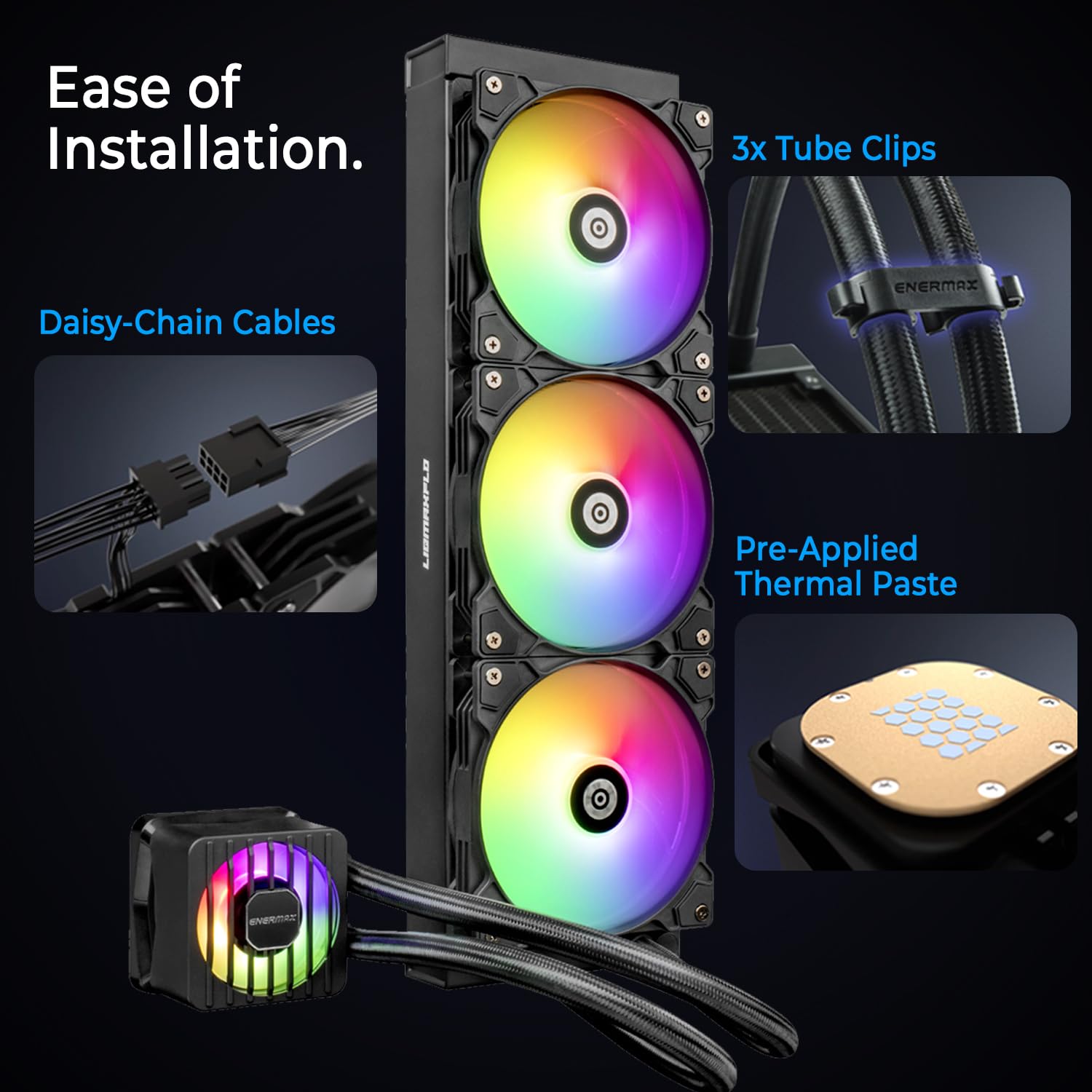
Image: Demonstrates the daisy-chain cable design for fans, pre-applied thermal paste on the cold plate, and the included tube clips for cable management.
4.4. Connecteu els cables
Connect the pump's 3-pin power connector to an available fan header on your motherboard (typically labeled 'AIO_PUMP' or 'CPU_FAN'). Connect the fan's PWM connector to a CPU fan header. Connect the A-RGB cables from the fans and pump to your motherboard's 5V A-RGB header or a compatible RGB controller. Use the included tube clips to manage the tubing and cables for a tidy build.
5. Funcionament
5.1. PWM Control
The LIQMAXFLO cooler features a fully PWM-controlled design, allowing automatic adjustment of the pump, VRM fan, and radiator fans based on CPU temperature. This ensures optimal balance between cooling performance and noise levels. Configure fan curves in your motherboard's BIOS/UEFI settings or through compatible software for personalized control.
5.2. VRM Fan Function
The integrated 60mm VRM fan on the water block actively cools the Voltage Regulator Modules (VRMs) and surrounding components on your motherboard. This helps maintain system stability and extends the lifespan of critical components, especially during heavy workloads.

Image: Illustrates how the VRM fan on the water block directs airflow to cool the motherboard's VRM area, reducing component temperatures.
5.3. A-RGB Lighting Synchronization
The A-RGB lighting on the fans and pump can be synchronized with compatible motherboard software (e.g., ASUS Aura Sync, MSI Mystic Light Sync, GIGABYTE RGB Fusion, ASRock Polychrome Sync) or an external A-RGB controller. Connect the A-RGB cables to the appropriate 5V 3-pin header on your motherboard to control lighting effects.

Imatge: Primer pla view of the pressure-optimized fan blades, designed to focus airflow and generate high static pressure for effective cooling through the radiator.
6. Manteniment
6.1. Radiator Refill
The LIQMAXFLO radiator features a refillable design, allowing for easy coolant top-off as needed over time. A 100ml bottle of coolant is included for this purpose. To refill, carefully unscrew the refill port on the radiator, add coolant, and securely close the port. Refer to the specific instructions provided with the coolant for best practices.

Image: Shows the 38mm thick radiator, highlighting its robust construction and the accessible refill port for coolant maintenance.
6.2. Neteja
Periodically clean the radiator fins and fan blades to prevent dust buildup, which can impede airflow and reduce cooling efficiency. Use compressed air or a soft brush to gently remove dust. Ensure the system is powered off before cleaning.
7. Solució De Problemes
- Sense alimentació/Els ventiladors no giren: Check all power connections to the pump and fans. Ensure they are securely plugged into the motherboard headers. Verify power supply functionality.
- Temperatures altes de la CPU: Confirm the water block is properly seated on the CPU with adequate thermal paste application. Check if the pump is operating (listen for a faint hum or feel for vibrations). Ensure radiator fans are spinning and not obstructed. Verify correct fan curve settings in BIOS.
- RGB no funciona: Ensure A-RGB cables are correctly connected to a 5V 3-pin header. Check motherboard software or external controller settings for proper configuration.
- Sorolls inusuals: A slight hum from the pump is normal. If you hear gurgling, it may indicate air in the loop; tilting the case gently while the system runs can help circulate air out. Excessive fan noise may require adjusting fan curves or checking for obstructions.
8. Garantia i Suport
For warranty information, technical support, or further assistance, please visit the official Enermax weblloc web o poseu-vos en contacte amb el servei d'atenció al client. Conserveu el comprovant de compra per a reclamacions de garantia.
9. Producte acabatview Vídeo
Watch the official product video for a visual guide to the ENERMAX LIQMAXFLO Series CPU Cooler's features and design.
Vídeo: Un funcionari ha acabatview of the ENERMAX LIQMAXFLO Series CPU Cooler, showcasing its advanced features, including the dual-chamber pump, VRM fan, and ARGB lighting.


