1. Introducció i finalview
The Imperial DABMAN i460 is a versatile multifunction radio designed to provide a wide range of audio entertainment and information. It supports reception via FM, digital DAB+, and Internet radio, offering access to countless stations worldwide. Additionally, the device supports music playback through various streaming providers and features Bluetooth 5.1 connectivity. Its flexible design allows for diverse installation options, including freestanding, under-cabinet, or wall-mounted use.

Figura 1.1: Frontal view of the Imperial DABMAN i460 multifunction radio, showing the display and control buttons.

Figure 1.2: The Imperial DABMAN i460 highlighting its key features: DAB+, FM, Internet Radio, USB Record, Wi-Fi, Hotel Mode, EWF, and Bluetooth 5.1 (Send & Receive).
2. Informació de seguretat
Si us plau, llegiu atentament totes les instruccions de seguretat abans d'utilitzar el dispositiu. Conserveu aquest manual per a futures consultes.
- No exposeu el dispositiu a la pluja ni a la humitat per evitar incendis o descàrregues elèctriques.
- No bloquegeu cap obertura de ventilació. Instal·leu-ho d'acord amb les instruccions del fabricant.
- Utilitzeu només accessoris/accessoris especificats pel fabricant.
- Desconnecteu el dispositiu durant les tempestes amb llamps o quan no l'utilitzeu durant llargs períodes.
- Demaneu tot el servei a personal de servei qualificat. El manteniment és necessari quan l'aparell s'ha fet malbé d'alguna manera, com ara el cable d'alimentació o l'endoll està danyat, s'ha vessat líquid o han caigut objectes a l'aparell, l'aparell ha estat exposat a la pluja o la humitat, no funciona amb normalitat. , o s'ha deixat caure.
3. Contingut del paquet
Carefully unpack the box and ensure all items are present and in good condition. The package should contain the following:
- Imperial DABMAN i460 Multifunction Radio
- Adaptador d'alimentació
- antena telescòpica
- Mounting Kit (for screwing or clamping)
- Control remot
- Manual d'usuari (aquest document)
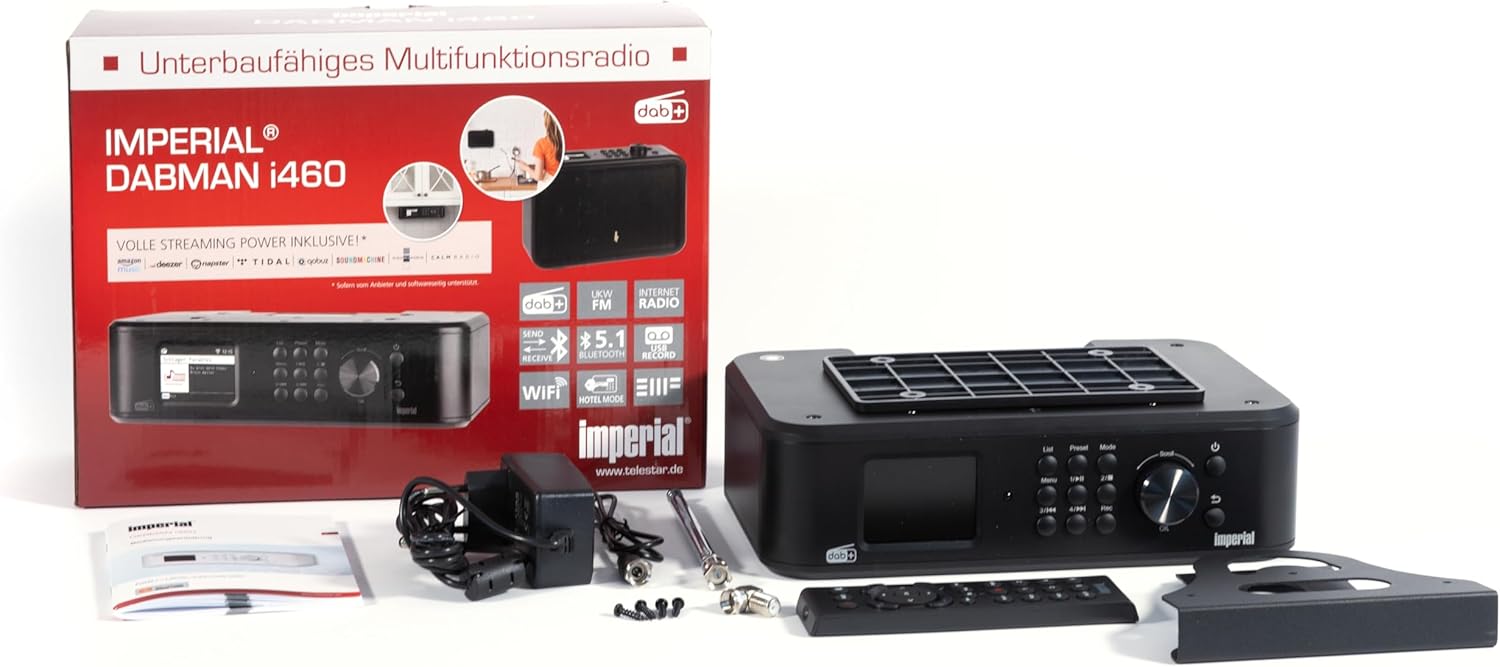
Figure 3.1: Contents of the Imperial DABMAN i460 package, including the radio, power adapter, antenna, remote control, and mounting accessories.
4. Configuració
4.1 Ubicació física i connexions
Choose a stable location for your radio. Ensure adequate ventilation around the unit. Connect the telescopic antenna to the FM/DAB+ antenna input on the back of the device. Connect the power adapter to the DC IN port and then to a power outlet.
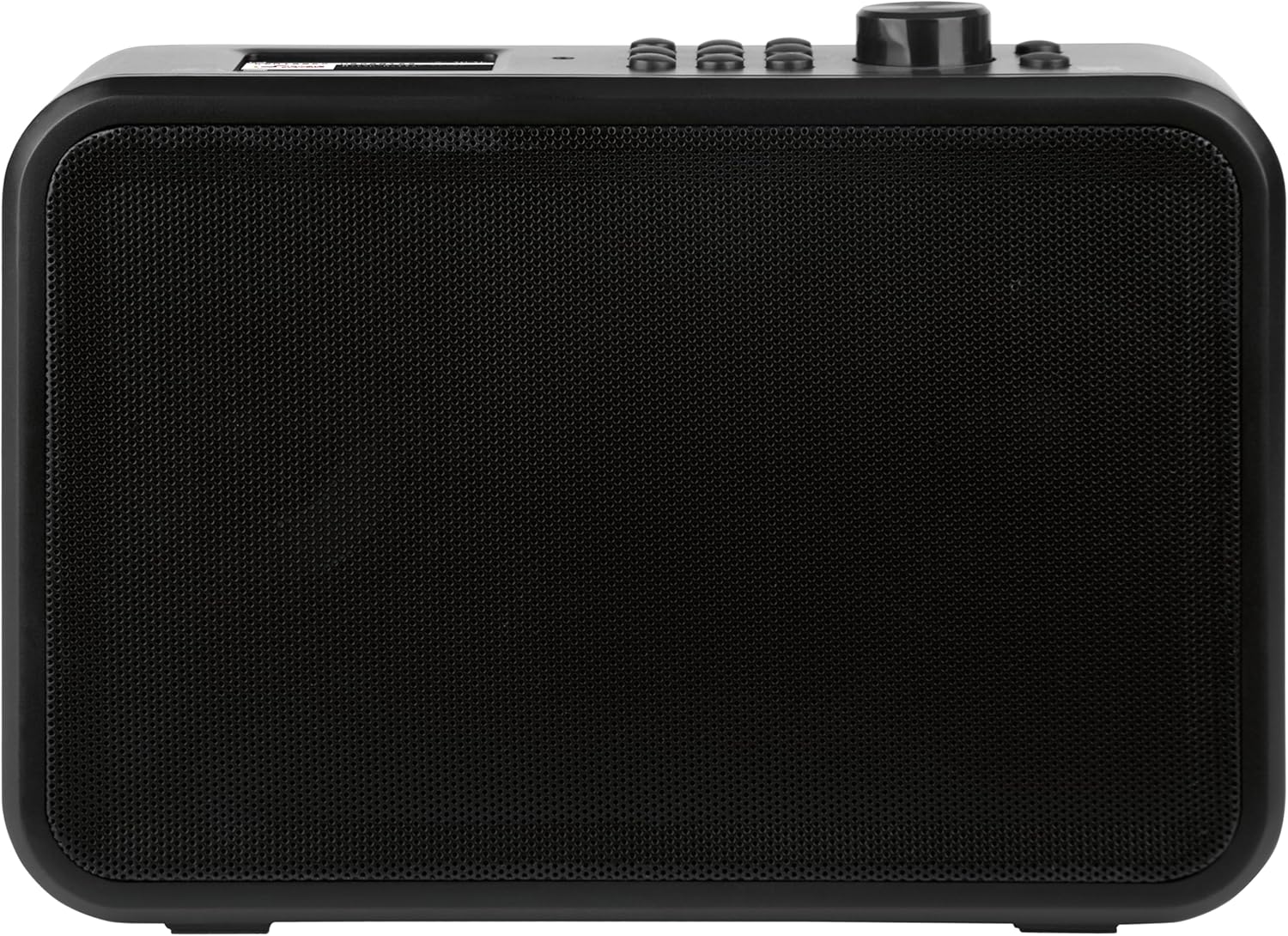
Figura 4.1: posterior view of the Imperial DABMAN i460, showing the USB, Line Out, Aux In, DC In, and On/Off switch.

Figure 4.2: Close-up of the Imperial DABMAN i460's connection ports (USB, Line Out, Aux In, DC In, On/Off switch) and the included telescopic antenna, USB stick, and audio cables.
4.2 Engegada inicial i selecció d'idioma
- After connecting the power, switch the device ON using the power switch on the back.
- The display will light up, and you will be prompted to select your preferred language. Use the navigation buttons or rotary knob to select and confirm.
4.3 Connexió de xarxa (Wi-Fi)
To access Internet radio and streaming services, connect your DABMAN i460 to your Wi-Fi network.
- Navigate to the 'Settings' menu on the radio's display.
- Select 'Network' or 'Wi-Fi Setup'.
- La ràdio buscarà les xarxes Wi-Fi disponibles. Seleccioneu la vostra xarxa de la llista.
- Enter your Wi-Fi password using the on-screen keyboard and navigation controls. Confirm to connect.
4.4 Opcions de muntatge
The DABMAN i460 offers flexible mounting solutions:
- Autònom: Use the integrated feet for stable placement on any flat surface.
- Muntatge sota l'armari: Use the included screw-on mounting plate to attach the radio securely under kitchen cabinets or shelves.
- Clamping Mounting: El cl inclòsamping bracket allows for attachment to shelves without drilling.
- Muntatge a la paret: The screw-on mounting kit can also be used for wall installation.
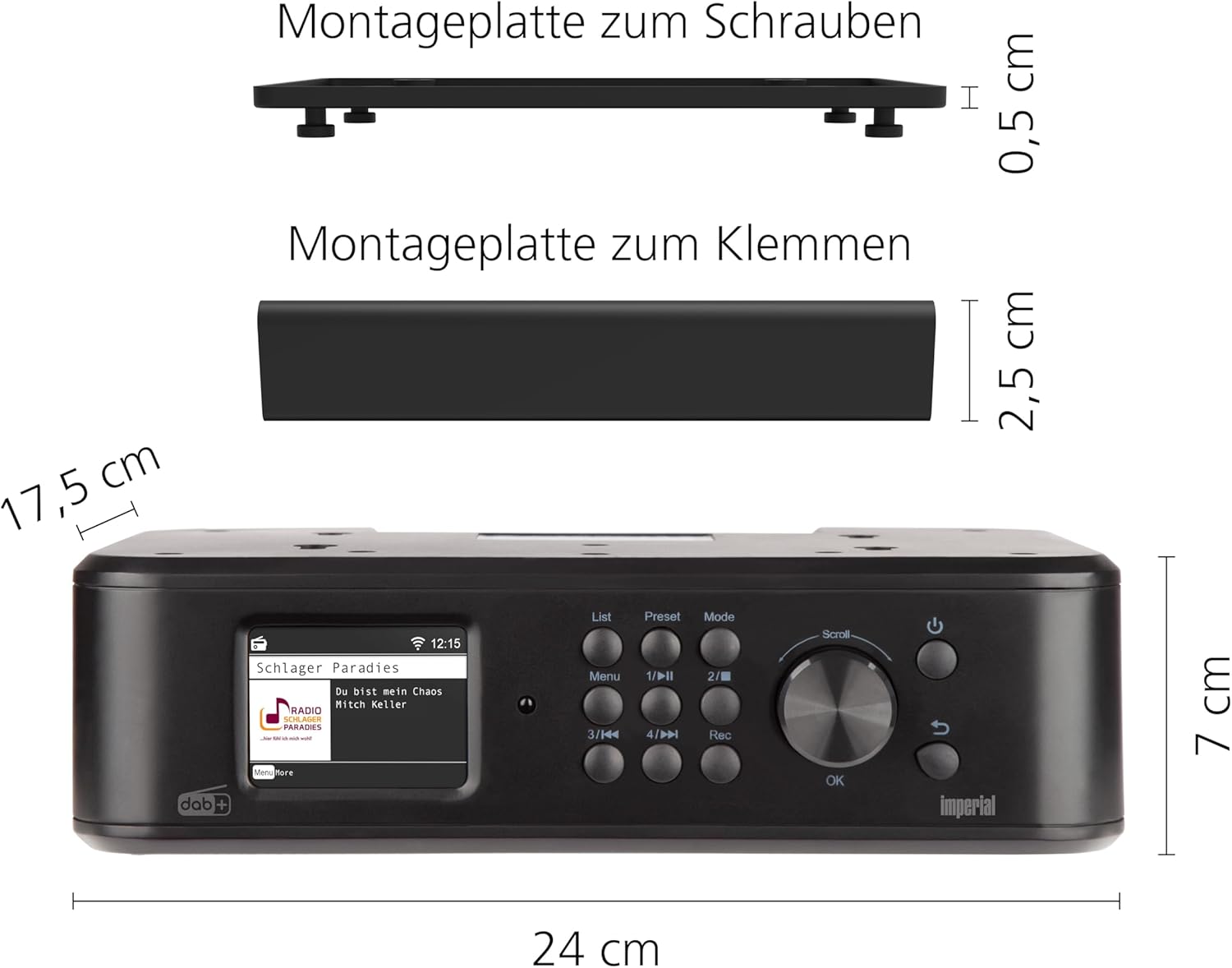
Figure 4.3: Dimensions of the Imperial DABMAN i460 and illustrations of the screw-on and clamping mounting plates.

Figure 4.4: The Imperial DABMAN i460 installed under a kitchen cabinet, demonstrating its space-saving design.

Figure 4.5: The Imperial DABMAN i460 placed on a kitchen counter, showcasing its versatility as a freestanding unit.
5. Instruccions de funcionament
5.1 Controls bàsics
The radio features a clear color display and intuitive controls:
- Pom giratori: Used for navigation through menus, adjusting volume, and selecting options. Press to confirm.
- Botó de menú: Accedeix al menú principal.
- Botó de llista: Displays lists (e.g., station lists, track lists).
- Botó predeterminat: Accesses saved favorite stations.
- Botó de mode: Switches between different operating modes (DAB+, FM, Internet Radio, Bluetooth, USB).
- Botons de control de reproducció: Play/Pause, Skip Forward/Backward, Record.
5.2 Radio Modes (DAB+, FM, Internet Radio)
Press the 'Mode' button to cycle through the available radio modes:
- Ràdio DAB+: For digital radio reception. The radio will automatically scan for available DAB+ stations upon first use or when entering this mode.
- Ràdio FM: For analog FM radio reception. Use the tuning function to find stations.
- Ràdio per Internet: Requires a Wi-Fi connection. Browse stations by genre, location, or search for specific stations.
5.3 Bluetooth Functionality (Send & Receive)
The DABMAN i460 supports both receiving audio from a Bluetooth device (e.g., smartphone) and sending audio to a Bluetooth speaker or headphones.
- Recepció d'àudio: Select Bluetooth mode on the radio. Enable Bluetooth on your smartphone/tablet and select 'DABMAN i460' from the list of available devices to pair.
- Sending Audio: In any radio or media playback mode, access the Bluetooth settings to search for and connect to a Bluetooth speaker or headphones.

Figure 5.1: Illustrates the Bluetooth connectivity of the Imperial DABMAN i460, allowing streaming from a smartphone to the radio.
5.4 Reproducció i gravació USB
Insert a USB storage device into the USB port on the back of the radio.
- Reproducció: Select USB mode. The radio will display the contents of the USB drive, allowing you to browse and play audio files.
- Gravació: While listening to a radio station (DAB+, FM, or Internet Radio), press the 'Rec' button to start recording the current broadcast to the connected USB device. Press 'Rec' again to stop.

Figure 5.2: A USB stick inserted into the USB port on the back of the Imperial DABMAN i460, enabling media playback and recording.
5.5 Streaming Services and UPnP
The DABMAN i460 comes with pre-installed applications for various streaming services (e.g., Amazon Music, Deezer, Napster, Highresaudio, TIDAL). You can also stream music from your home network via UPnP (Universal Plug and Play).
- Access streaming services through the main menu or 'Mode' button.
- For UPnP, ensure your media server is active on the same network.
5.6 Mode Hotel
The Hotel Mode feature allows for restricted functionality, ideal for public or guest environments. This mode can limit access to certain settings or functions.
- To activate/deactivate Hotel Mode, navigate to 'Settings' and locate the 'Hotel Mode' option.
- Follow the on-screen prompts to configure the desired restrictions.

Figure 5.3: The Imperial DABMAN i460's display showing the 'Hotel Modus' (Hotel Mode) option within the settings menu.
5.7 característiques addicionals
- Despertador: Set multiple alarms with customizable sounds and snooze functions.
- Temporitzador de son: Configura la ràdio perquè s'apagui automàticament després d'un període especificat.
- Equalitzador: Adjust audio settings to your preference.
- Dimmer Function & Night Mode: Adjust display brightness for comfortable viewen diferents condicions d'il·luminació.
- Favorite Memory: Save your preferred radio stations for quick access.
- Control de l'aplicació: Control the radio using the Soundmate application on your smartphone or tablet.
6. Manteniment
To ensure the longevity and optimal performance of your Imperial DABMAN i460, follow these maintenance guidelines:
- Neteja: Use a soft, dry cloth to clean the exterior of the radio. For stubborn marks, slightly dampRenta el drap amb aigua. No utilitzis productes de neteja abrasius, ceres ni dissolvents.
- Ventilació: Ensure that the ventilation openings are not blocked by dust or debris. Periodically clean them with a soft brush or compressed air.
- Emmagatzematge: If storing the device for an extended period, disconnect it from the power supply and store it in a cool, dry place.
7. Solució De Problemes
If you encounter issues with your DABMAN i460, refer to the following common problems and solutions:
| Problema | Causa possible | Solució |
|---|---|---|
| Sense poder | Power cable not connected; Power outlet faulty; Device switched off. | Check power cable connection; Try a different outlet; Ensure the ON/OFF switch on the back is in the ON position. |
| Sense so | Volume too low; Mute function active; Incorrect audio source selected. | Increase volume; Check if mute is active; Select the correct input mode (DAB+, FM, Internet Radio, Bluetooth, USB). |
| Poor radio reception (DAB+/FM) | Antena no estesa o posicionada correctament; Zona amb senyal feble. | Fully extend and adjust the telescopic antenna; Try relocating the radio to an area with better signal reception. |
| No es pot connectar a la Wi-Fi | Contrasenya incorrecta; Encaminador massa lluny; Problemes de xarxa. | Double-check Wi-Fi password; Move radio closer to router; Restart your Wi-Fi router. |
| Streaming services not working | No internet connection; Service outage. | Verify internet connection; Check the status of the streaming service. |
Si el problema persisteix després de provar aquestes solucions, poseu-vos en contacte amb l'atenció al client.
8. Especificacions
| Característica | Detall |
|---|---|
| Número de model | i460 |
| Marca | Imperial |
| Color | Negre |
| Tecnologia de connectivitat | Auxiliary, Bluetooth, USB, Wi-Fi |
| Tecnologia del sintonitzador | DAB, DAB+, FM, ràdio per Internet |
| Font d'alimentació | Elèctric amb cable |
| Dimensions (L x A x A) | 17.5 L x 24 W x 7 H centímetres |
| Característiques especials | Integrated clock, Under-cabinet/wall mounting possible (clamps or screws), App control, USB recording, Streaming services, Bluetooth transmitter and receiver, Hotel mode, Night mode |
| Dispositius compatibles | Headphones, Speaker, MP3 Player, Laptop, Smartphone, Tablet |
| Components inclosos | Power adapter, Telescopic antenna, Mounting kit for kitchen furniture (screw or clamp), User manual, Remote control |
| Composició de la bateria | Alkaline (for remote control, not included with main unit) |
| Disponibilitat de peces de recanvi | 1 any |
9. Garantia i Suport
Imperial provides a warranty for this product in accordance with local regulations. Please refer to the warranty card included in your package for specific terms and conditions.
For technical support, troubleshooting assistance beyond this manual, or warranty claims, please contact Imperial customer service. Contact information can typically be found on the manufacturer's weblloc web o a l'embalatge del producte.
Disponibilitat de peces de recanvi: 1 Year (as per product specifications).


