1. Introducció
This instruction manual provides comprehensive guidance for upgrading your existing Rain Bird ESP-ME irrigation controller to the advanced ESP-ME3 model, which includes the LNK WiFi Module for smart irrigation management. This kit is designed to simplify the upgrade process, allowing you to enhance your irrigation system's capabilities without extensive re-wiring.
The ESP-ME3 controller, when paired with the LNK WiFi module, offers enhanced features such as faster app speeds, advanced flow sensing, Cycle+Soak programming for efficient watering, and improved manual watering options. Its larger, backlit display and simplified dial-based control panel ensure ease of use and programming.
2. Configuració i instal·lació
2.1. Precaucions de seguretat
- Always disconnect power to the existing controller before beginning any installation or wiring.
- Ensure all wiring connections are secure to prevent electrical hazards.
- Consult a qualified electrician if you are unsure about any electrical connections.
2.2. Preparació per a la instal·lació
Before removing your old ESP-ME controller, it is crucial to document your existing wiring. Take a clear photograph of all wiring connections to the terminal block. This will serve as a reference for connecting the new ESP-ME3 backplane assembly.

Imatge: Example of a wiring diagram for a Rain Bird controller. Always photograph your specific wiring before disconnection.
2.3. Replacing the Controller Faceplate and Backplane
- Desconnecteu l'alimentació: Turn off the main power supply to your existing ESP-ME controller.
- Remove Old Faceplate: Carefully detach the old ESP-ME faceplate.
- Remove Old Backplane: The conversion kit includes a new larger ribbon cable and backplane assembly. The old panel will not plug into the new ribbon cable due to different pin configurations. Remove the existing backplane assembly by unscrewing the 4 screws that secure it.
- Install New Backplane: Position the new backplane assembly and secure it with the 4 screws. The station wiring does not need to be removed from the modules; simply unlock the modules and slide them downwards.
- Connecteu el cable de cinta: Connect the new larger ribbon cable from the new backplane to the ESP-ME3 faceplate.
- Connecteu el cablejat: Using your reference photo, connect the station wires to the corresponding terminals on the new ESP-ME3 backplane. Connect the common wire (usually white) to the terminal marked 'C'.
- Install LNK WiFi Module: Insert the LNK WiFi Module into the designated accessory port on the controller.
Video: Installation guide for Rain Bird ARC Series Smart Irrigation Controllers. This video demonstrates general wiring and mounting principles applicable to the ESP-ME3 conversion.
2.4. Initial Power-Up and WiFi Connection
- Restaura l'alimentació: Turn on the main power supply to the controller.
- Comprova l'estat: The controller's display should illuminate.
- Download Rain Bird App: Download the free Rain Bird mobile app from your device's app store.
- Connect LNK WiFi Module: Follow the in-app instructions to connect your ESP-ME3 controller to your local WiFi network using the LNK WiFi Module. Ensure your WiFi network is broadcasting in 2.4 GHz mode for compatibility.
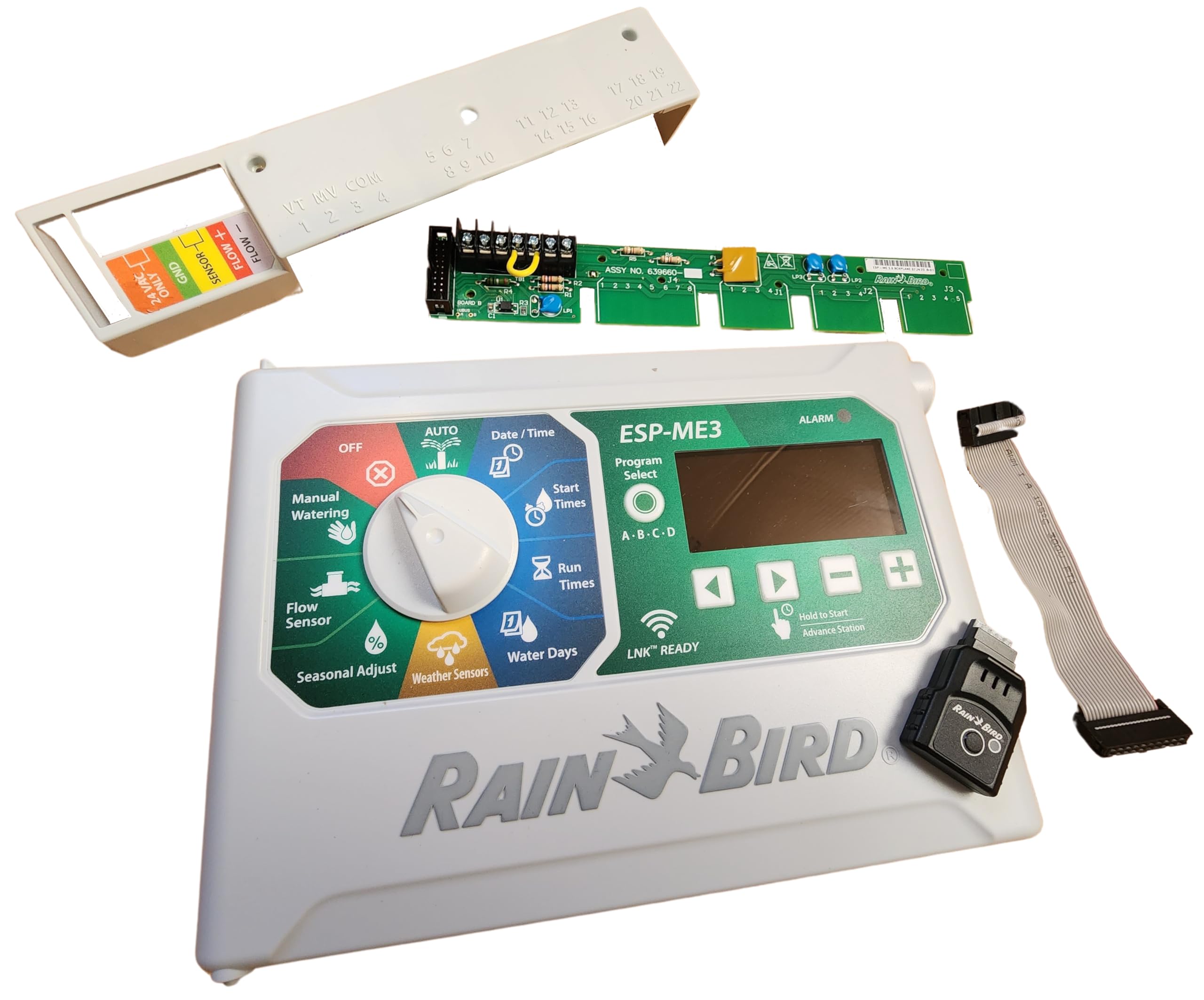
Image: The LNK WiFi Module, which enables smart control of your Rain Bird ESP-ME3 controller.
3. Instruccions de funcionament
The ESP-ME3 controller features a user-friendly dial-based control panel and a large, backlit display for easy programming. Additionally, the LNK WiFi Module allows for remote management via the Rain Bird mobile app.
3.1. Manual Control Panel Operation
Use the central dial to navigate through different programming options:
- Data/Hora: Estableix la data i l'hora actuals.
- Horaris d'inici: Program the desired start times for each irrigation program (A, B, C, D).
- Temps d'execució: Adjust the duration (in minutes) for each station within a program.
- Dies d'aigua: Select specific days of the week for irrigation or choose odd/even day watering.
- Ajust estacional: Modify watering durations by a percentage to account for seasonal changes without reprogramming each station individually.
- Reg manual: Initiate manual watering for all stations or a single station for a specified duration.
- DESACTIVAT: Suspend all automatic irrigation.
- AUTOMÀTIC: Enable automatic irrigation based on programmed schedules.
3.2. Rain Bird Mobile App Operation (with LNK WiFi Module)
The Rain Bird mobile app provides advanced control and monitoring capabilities:
- Gestió remota: Access and manage your irrigation system from anywhere in the world.
- Faster App Speeds: Experience improved responsiveness and performance.
- Advanced Flow Sensing: Monitor water flow and detect leaks or blockages.
- Cycle+Soak Programming: Optimize watering for slopes and compacted soils to prevent runoff and improve water absorption.
- Improved Manual Watering Options: Easily initiate and customize manual watering cycles.
- Ajustaments meteorològics: The app can integrate with local weather data to automatically adjust watering schedules, preventing unnecessary watering during rain or freezing conditions.

Image: The Rain Bird LNK WiFi Module integrated with the controller, showing the mobile app interface for remote management.

Imatge: Detallada view of the Rain Bird mobile app's scheduling interface, allowing users to customize watering programs.
4. Manteniment
- Inspecció periòdica: Periodically check the controller and wiring for any signs of damage or wear.
- Neteja: Keep the controller's display and buttons clean and free from dust or debris.
- Sprinkler Head Check: Occasionally run a manual watering cycle and visually inspect all sprinkler heads to ensure they are functioning correctly and irrigating as intended. This helps identify any damaged heads or areas not receiving adequate water.
- Actualitzacions de programari: Ensure your Rain Bird mobile app and controller firmware (if applicable) are up-to-date for optimal performance and access to new features.
5. Solució De Problemes
- El controlador no s'encén:
- Check the power connection to the outlet.
- Assegureu-vos que la presa de corrent funcioni.
- Problemes de connectivitat Wi-Fi:
- Verify your WiFi network is operating on the 2.4 GHz band. The LNK WiFi Module is not compatible with 5 GHz networks.
- Check the signal strength at the controller's location using a mobile device. If the signal is weak, consider moving your router or adding a WiFi signal booster.
- Ensure the LNK WiFi Module is properly inserted into the accessory port.
- Sprinklers Not Running:
- Check if the controller is set to 'OFF' or if a temporary rain delay is active.
- Verify that the watering schedule is correctly programmed (start times, run times, water days).
- Inspect wiring connections to ensure they are secure.
- If a rain/freeze sensor is installed, ensure it is not preventing irrigation.
- L'aplicació no respon:
- Restart the Rain Bird app.
- Comproveu la connexió a Internet del vostre dispositiu mòbil.
- Ensure the LNK WiFi Module has a stable connection to your home WiFi network.
6. Especificacions
- Número de model: ESPME-ESPME3
- Dimensions del producte: 9.5 x 6.5 x 0.75 polzades
- Pes de l'article: 1.61 lliures
- Compatibilitat: Designed for upgrading Rain Bird ESP-ME, ESP-MEi, ESP-4ME, ESP-4MEi controllers.
- Mòdul WiFi: Includes LNK WiFi Module (2.4 GHz compatible).
7. Suport i garantia
For technical assistance, troubleshooting beyond this manual, or warranty information, please refer to the documentation included with your original Rain Bird ESP-ME3 controller or contact Rain Bird customer support directly. Many customers have reported excellent support from the seller, SprinklerPartsWholesale, for installation questions.


