Introducció
The Linksys 5G AX1800 Mobile Hotspot is a portable device designed to provide high-speed 5G and WiFi 6 connectivity for multiple devices. With its ultra-thin design and long battery capacity, it allows you to stay connected on the go. This manual provides essential information for the proper setup, operation, maintenance, and troubleshooting of your mobile hotspot.
Les característiques clau inclouen:
- Portable 5G supersonic speed and bandwidth.
- WiFi 6 speeds up to 1.8 Gbps (AX1800).
- Supports connection for 15+ devices simultaneously.
- Ultra-thin and lightweight design for maximum convenience.
- Bateria de llarga durada per a un ús prolongat.
- Powered by leading-edge 5G technology by Qualcomm.
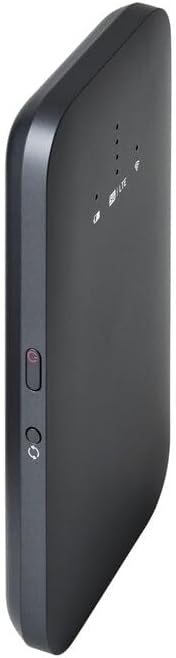
Figura 1: Frontal view of the Linksys 5G AX1800 Mobile Hotspot, showing LED indicators for battery, 5G/LTE, and Wi-Fi status.
Configuració
1. Instal·leu la targeta SIM
The Linksys 5G AX1800 Mobile Hotspot requires a Nano-SIM card for 5G/LTE connectivity. Ensure the device is powered off before inserting the SIM card.
- Locate the SIM card slot cover on the side of the device.
- Gently open the cover.
- Insert the Nano-SIM card into the slot with the gold contacts facing down and the notched corner aligned correctly.
- Tanqueu bé la tapa de la ranura de la targeta SIM.

Figura 2: lateral view of the mobile hotspot, highlighting the SIM card slot cover.
2. Carregueu el dispositiu
Before first use, fully charge the mobile hotspot. Use the provided charging cable and a compatible USB power adapter.
- Connect one end of the USB cable to the charging port on the device.
- Connect the other end to a USB power adapter or a computer's USB port.
- The battery indicator LED will show charging status. Allow several hours for a full charge.

Figura 3: A baix view of the mobile hotspot, showing the USB-C charging port.
3. Encendre/apagar
To power on the device, press and hold the power button located on the side until the LED indicators light up. To power off, press and hold the power button again until the indicators turn off.

Figura 4: lateral view of the mobile hotspot, indicating the location of the power button.
Instruccions de funcionament
1. Connexió de dispositius a la Wi-Fi
Once powered on, the mobile hotspot will broadcast a Wi-Fi network. You can connect up to 15+ devices simultaneously.
- Al dispositiu (telèfon intel·ligent, ordinador portàtil, tauleta), obriu la configuració del Wi-Fi.
- Cerca xarxes Wi-Fi disponibles.
- Select the network name (SSID) of your Linksys Mobile Hotspot. The default SSID and password are usually found on a sticker inside the device or on its packaging.
- Introduïu la contrasenya de Wi-Fi quan se us demani.
- Your device should now be connected to the internet via the mobile hotspot.
2. Comprensió dels indicadors LED
The LED indicators on the front of the device provide important status information:
- Indicador de bateria: Mostra el nivell actual de la bateria i l'estat de càrrega.
- 5G/LTE Indicator: Indicates the mobile network connection status (e.g., solid blue for 5G, solid green for LTE, blinking for searching).
- Indicador de Wi-Fi: Shows if the Wi-Fi network is active and broadcasting.
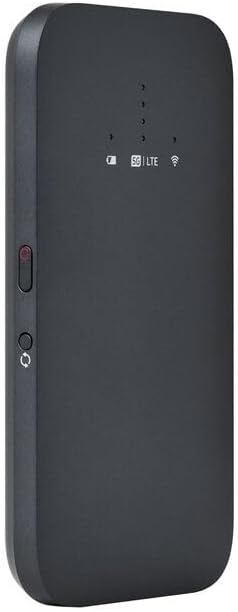
Figura 5: Front inclinat view of the mobile hotspot, clearly showing the LED indicators for battery, 5G/LTE, and Wi-Fi.
3. Accedint al Web Interfície de gestió
For advanced settings, such as changing the Wi-Fi name or password, managing connected devices, or checking data usage, you can access the device's web interfície de gestió.
- Ensure your device is connected to the mobile hotspot's Wi-Fi network.
- Obre a web navegador (per exemple, Chrome, Firefox, Safari).
- Enter the default IP address for the hotspot (usually
192.168.1.1or192.168.0.1, refer to the device's documentation or sticker for the exact address) into the address bar and press Enter. - Log in using the default username and password (also found on the device sticker or documentation). It is highly recommended to change the default password for security.
Manteniment
1. Cura de la bateria
- Eviteu exposar el dispositiu a temperatures extremes.
- No deixeu el dispositiu completament descarregat durant períodes prolongats.
- Use only the original or certified compatible charging accessories.
2. Neteja
Wipe the device with a soft, dry, lint-free cloth. Do not use liquid cleaners or aerosols directly on the device.
3. Actualitzacions de firmware
Comproveu periòdicament si hi ha actualitzacions de firmware a través de web interfície de gestió. Mantenir el firmware actualitzat garanteix un rendiment i una seguretat òptims.
Resolució de problemes
Sense connexió a Internet
- Assegureu-vos que la targeta SIM estigui correctament inserida i activada amb un pla de dades.
- Check the 5G/LTE indicator on the device. If it's blinking or off, the device may be searching for a network or have no signal.
- Restart the mobile hotspot and your connected device.
- Verifiqueu que el vostre pla de dades no s'ha esgotat.
Velocitat Wi-Fi lenta
- Move closer to the mobile hotspot to improve signal strength.
- Reduce the number of connected devices or data-intensive activities.
- Comproveu si hi ha congestió de la xarxa a la vostra zona.
Device Not Connecting to Hotspot
- Ensure the Wi-Fi indicator on the hotspot is active.
- Comproveu dues vegades la contrasenya del Wi-Fi.
- Restart both the hotspot and the device you are trying to connect.
Restabliment de fàbrica
If issues persist, you may perform a factory reset. This will revert all settings to their default values, including Wi-Fi name and password. Refer to the device's specific instructions for the reset procedure, usually involving a small reset button.
Especificacions
| Característica | Detall |
|---|---|
| Marca | Linksys |
| Nom del model | FGHSAX1800 |
| Número de model de l'article | FGHSAX1800-AH |
| Tecnologia de connectivitat | 5G |
| Wi-Fi estàndard | WiFi 6 (AX1800) |
| Velocitat de transferència de dades | Fins a 1.8 gigabits per segon |
| Classe de banda de freqüència | Doble banda |
| Tipus d'antena | Interna |
| Característiques especials | Mode de punt d'accés |
| Components inclosos | RANURA PER LA TARGETA SIM |
| Voltage | 12 Volts |
| Dimensions del paquet | 14 x 7.5 x 1.55 cm |
| Pes de l'article | 185 g |
Garantia i Suport
For warranty information and technical support, please refer to the warranty card included with your product or visit the official Linksys support website. You can typically find FAQs, driver downloads, and contact information for customer service there.
Linksys Official Support: https://www.linksys.com/support


