1. Introducció
Thank you for choosing the Hiwill HW210 Soundbar with Subwoofer. This 2.1 channel surround sound system is designed to enhance your audio experience for televisions, PCs, gaming consoles, and other compatible devices. This manual provides detailed instructions for setup, operation, and maintenance to ensure optimal performance and longevity of your product. Please read this manual thoroughly before use and retain it for future reference.

Image 1.1: The Hiwill HW210 Soundbar and Subwoofer system, shown with a television for illustrative purposes.
2. Informació de seguretat
Per reduir el risc de descàrrega elèctrica, incendi o danys a la unitat, observeu les següents precaucions de seguretat:
- No exposeu aquest aparell a la pluja o la humitat.
- No col·loqueu objectes plens de líquids, com ara gerros, sobre l'aparell.
- Assegureu-vos que hi hagi una ventilació adequada. No bloquegeu cap obertura de ventilació.
- No instal·leu a prop de cap font de calor com ara radiadors, registres de calor, estufes o altres aparells (inclosos amplificadors) que produeixen calor.
- Protegiu el cable d’alimentació perquè no es pugui caminar ni pessigar, sobretot als endolls, endolls i el punt on surten de l’aparell.
- Utilitzeu només accessoris/accessoris especificats pel fabricant.
- Desendolleu aquest aparell durant les tempestes amb llamps o quan no l'utilitzeu durant llargs períodes de temps.
- Demaneu tot el servei a personal de servei qualificat. El manteniment és necessari quan l'aparell s'ha fet malbé d'alguna manera, com ara el cable d'alimentació o l'endoll està danyat, s'ha vessat líquid o han caigut objectes a l'aparell, l'aparell ha estat exposat a la pluja o la humitat, no funciona amb normalitat. , o s'ha deixat caure.
3. Contingut del paquet
Si us plau, comproveu que tots els elements siguin presents i en bon estat:
- Hiwill Soundbar
- Subwoofer amb cable
- Control remot
- Adaptador d'alimentació
- Optical Cable (may vary by region)
- AUX Cable (may vary by region)
- Kit de muntatge a la paret (cargols, ancoratges)
- Manual d'usuari (aquest document)
4. Producte acabatview
4.1 Característiques de la barra de so
- Ultra-slim design (3.8 cm height)
- Integrated orbital aluminum diaphragm speakers
- Built-in HiFi and DSP technology for immersive 3D surround sound
- Maximum output power: 120 Watts
- Nivell de pressió sonora: 106 dB
- Bluetooth 5.3 for wireless streaming
- Multiple input options: HDMI ARC, Optical, AUX, USB
- 3 adjustable EQ modes: Game, Movie, Music
- Adjustable bass and treble levels
4.2 Subwoofer Features
- 9-liter capacity for deep, resonant bass
- Wired connection to the soundbar for stable audio transmission
4.3 Controls i indicadors
The soundbar features an integrated display and control buttons, typically located on the top or front panel. The remote control provides full functionality.
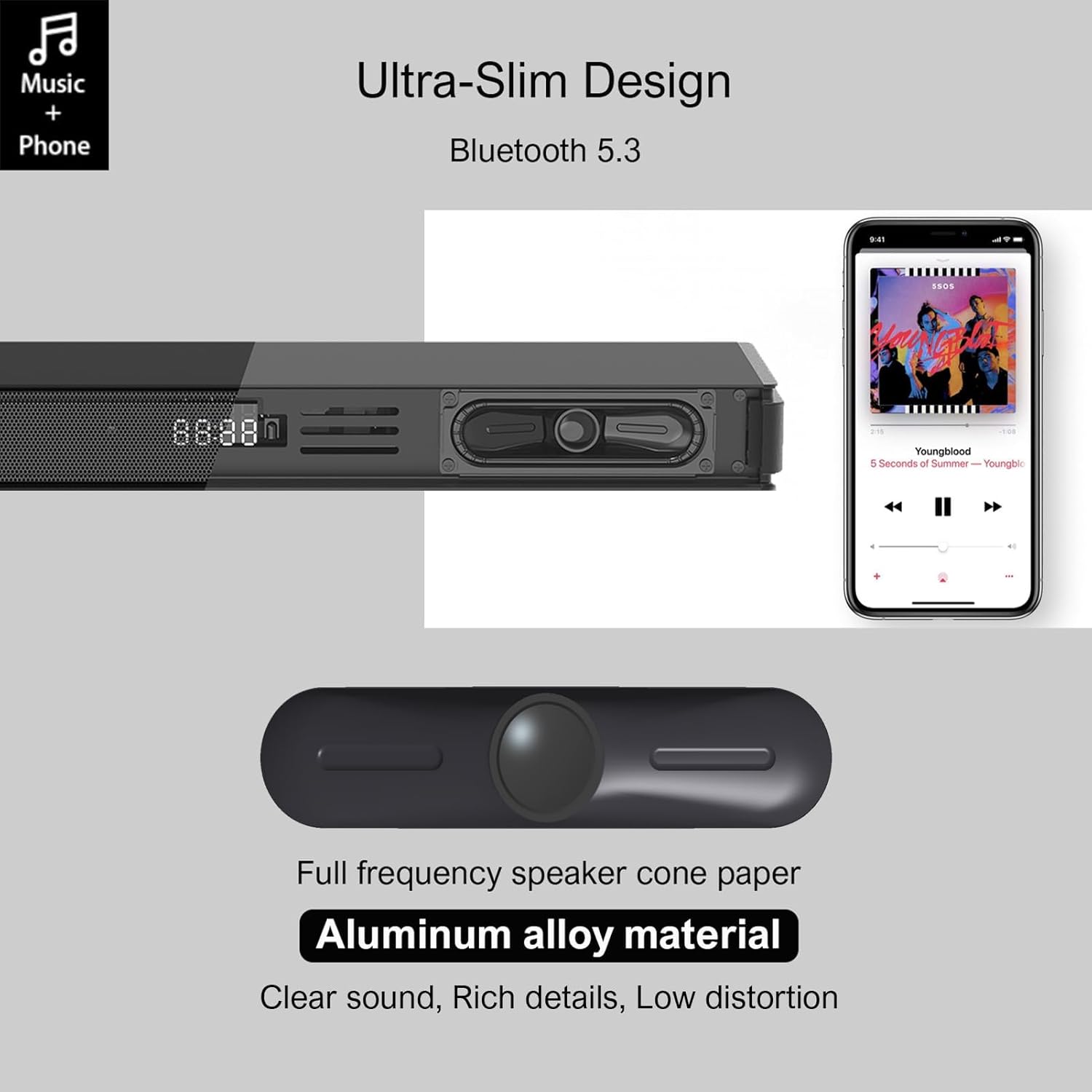
Image 4.1: Detail of the soundbar's ultra-slim design, showing the front display and integrated speakers.
4.4 Connexions del panell posterior
The rear panel of the soundbar provides various ports for connecting to your audio sources and power.

Imatge 4.2: posterior view of the soundbar showing input ports: AUX, HDMI ARC, USB, Optical, Subwoofer Out, and DC In.
- AUX (3.5 mm): For connecting devices with a 3.5mm audio output.
- ARC (HDMI): For connecting to a TV's HDMI ARC port. Supports CEC for unified control.
- USB: Per reproduir àudio files d'una unitat USB.
- TPTICA: For connecting to a TV or other device with an optical audio output.
- SORTIDA SUB: Per connectar el subwoofer amb cable.
- DC IN: Per connectar l'adaptador de corrent.
5. Configuració
5.1 Opcions de col·locació
The Hiwill HW210 soundbar offers flexible placement options to suit your home entertainment setup.

Image 5.1: Illustrates placing the soundbar on a tabletop in front of the TV or mounting it on the wall below the TV.
- Col·locació de la taula: Place the soundbar on a stable, flat surface directly in front of your TV. Ensure it does not obstruct the TV's remote sensor.
- Muntatge a la paret: The soundbar can be mounted on the wall below your TV. Use the provided wall mounting kit and follow these steps:
- Mark the desired mounting positions on the wall, ensuring the soundbar is centered with your TV.
- Perforeu forats pilot a les posicions marcades.
- Insert wall anchors (if necessary for your wall type).
- Secure the mounting brackets (if separate) or the soundbar directly using screws.
- Col·locació del subwoofer: Place the subwoofer on the floor near the soundbar. Experiment with placement to find the best bass response for your room.
5.2 Connexió a l'alimentació
- Connect the power adapter to the DC IN port on the soundbar's rear panel.
- Connecteu l'altre extrem de l'adaptador d'alimentació a una presa de corrent.
- Connect the wired subwoofer cable to the SUB OUT port on the soundbar.
5.3 Connexió a fonts d'àudio
Choose one of the following connection methods based on your device:
- HDMI ARC (recomanat per a televisors):
- Connect one end of an HDMI cable (not included) to the ARC port on the soundbar.
- Connect the other end to the HDMI ARC port on your TV.
- Ensure HDMI CEC is enabled in your TV's settings for unified control.
- Òptic:
- Connect the optical cable (included) to the OPTICAL port on the soundbar.
- Connect the other end to the optical audio output port on your TV or other device.
- Ensure your TV's audio output is set to "PCM" if you experience no sound.
- AUX (3.5 mm):
- Connect the 3.5mm AUX cable (included) to the AUX port on the soundbar.
- Connect the other end to the headphone jack or AUX output of your device.
- USB:
- Inseriu una unitat flash USB que contingui àudio files al port USB de la barra de so.
6. Instruccions de funcionament
6.1 Encès/Apagat
- Premeu el botó Poder botó de la barra de so o del comandament a distància per encendre o apagar la unitat.
6.2 Selecció de la font d'entrada
- Premeu el botó Entrada button on the remote control or the soundbar to cycle through available input sources (ARC, OPT, AUX, USB, BT). The selected input will be displayed on the soundbar's screen.
6.3 Vinculació Bluetooth
- Turn on the soundbar and select the "BT" input source. The soundbar will enter pairing mode, indicated by a flashing "BT" on the display.
- Al dispositiu mòbil, activeu el Bluetooth i cerqueu els dispositius disponibles.
- Select "Hiwill HW210" (or similar name) from the list of devices.
- Once paired, the soundbar will emit a confirmation tone, and "BT" will stop flashing.
- To disconnect, turn off Bluetooth on your device or select a different input source on the soundbar.
6.4 Control de volum
- Utilitza el Puja el volum (+) i Baixar el volum (-) botons de la barra de so o del comandament a distància per ajustar el volum principal.
- Premeu el botó Silenciar button on the remote control to mute or unmute the sound.
6.5 EQ Modes and Tone Adjustment
The soundbar features three preset equalizer modes and adjustable bass/treble settings.

Image 6.1: Visual representation of the three equalizer modes: Game, Movie, and Music, optimized for different audio content.
- Premeu el botó EQ button on the remote control to cycle through the preset modes: Joc, Pel·lícula, i Música.
- Utilitza el Baix +/- buttons on the remote control to adjust the bass level.
- Utilitza el Aguts +/- buttons on the remote control to adjust the treble level.
7. Manteniment
- Neteja: Use a soft, dry cloth to clean the surface of the soundbar and subwoofer. Do not use liquid cleaners or abrasive materials.
- Emmagatzematge: Si guardeu la unitat durant un període prolongat, desendolleu-la de la presa de corrent i guardeu-la en un lloc fresc i sec.
- Eviteu les obstruccions: Ensure that the speaker grilles and ventilation openings are not blocked by dust or other objects.
8. Solució De Problemes
| Problema | Causa possible | Solució |
|---|---|---|
| Sense poder | Cable d'alimentació no connectat; Presa de corrent no activa | Assegureu-vos que el cable d'alimentació estigui ben connectat; proveu una altra presa de corrent. |
| Sense so | Font d'entrada incorrecta seleccionada; Volum massa baix; Cables no connectats correctament; Configuració de sortida d'àudio del televisor incorrecta. | Select the correct input source; Increase volume; Check all audio cables are securely connected; For Optical/ARC, ensure TV audio output is set to PCM. |
| L'aparellament de Bluetooth falla | La barra de so no està en mode d'emparellament; Dispositiu massa lluny; Interferències. | Assegureu-vos que la barra de so estigui en mode BT i parpellegi; acosteu el dispositiu; desactiveu els altres dispositius Bluetooth. |
| El comandament a distància no funciona | Piles esgotades; Obstrucció entre el comandament a distància i la barra de so. | Replace remote control batteries; Ensure clear line of sight to the soundbar's sensor. |
| Mala qualitat del so | Incorrect EQ mode; Source audio quality; Cable issues. | Adjust EQ modes and bass/treble settings; Try a different audio source; Check/replace audio cables. |
9. Especificacions
| Nom del model | Hiwill HW210 Soundbar |
| Tipus d'altaveu | Barra de so amb subwoofer per cable |
| Configuració de so envoltant | Canal 2.1 |
| Potència màxima de sortida de l'altaveu | 120 watts |
| Tecnologia de connectivitat | Bluetooth 5.3, HDMI ARC, AUX (3.5mm), USB, Optical |
| Mode de sortida d'àudio | Envoltant |
| Característiques especials | High-resolution audio support, 3 EQ modes, Adjustable Bass/Treble, Wall-mountable |
| Usos recomanats | TV, Gaming Consoles, Computers, Smartphones, Tablets, Music Players, DVD Players, Home Theater |
10. Garantia i Suport
Hiwill products are designed and manufactured to the highest quality standards. For detailed warranty information, please refer to the warranty card included in your package or visit the official Hiwill website. If you encounter any issues or require technical assistance, please contact Hiwill customer support through the contact information provided on the product packaging or weblloc.
Please have your model number (HW210) and purchase date ready when contacting support.


