1. Introducció
Thank you for choosing the Baseus AeQur G10 TWS Earphones. This manual provides detailed instructions on how to set up, operate, maintain, and troubleshoot your new earphones. Please read this manual thoroughly before using the product to ensure optimal performance and longevity.
2. Contingut del paquet
Desembaleu la caixa amb cura i assegureu-vos que tots els elements que s'enumeren a continuació hi siguin presents i en bon estat. Si hi ha algun element que falti o que estigui malmès, poseu-vos en contacte amb el vostre distribuïdor.
- Baseus AeQur G10 TWS Earphones (Left and Right)
- Estoig de càrrega
- USB-A/USB-C Wireless Dongle
- Cable de càrrega USB-C
- Múltiples mides de puntes per a les orelles
- Manual d'usuari (aquest document)

Image 2.1: Complete package contents of the Baseus AeQur G10 TWS Earphones.
3. Producte acabatview
Familiarize yourself with the components of your Baseus AeQur G10 TWS Earphones.
Auriculars 3.1
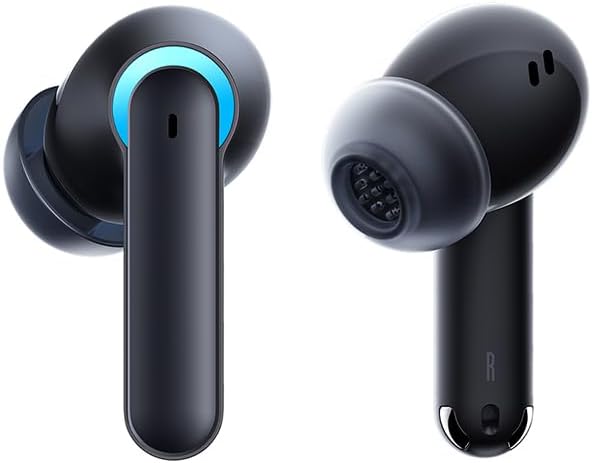
Image 3.1: Left and Right Baseus AeQur G10 Earphones. Each earphone features a touch control area, microphone, and charging contacts.
3.2 Estoig de càrrega

Image 3.2: Baseus AeQur G10 Earphones in their charging case with the lid open. The case has charging slots for each earphone and an LED indicator for battery status.
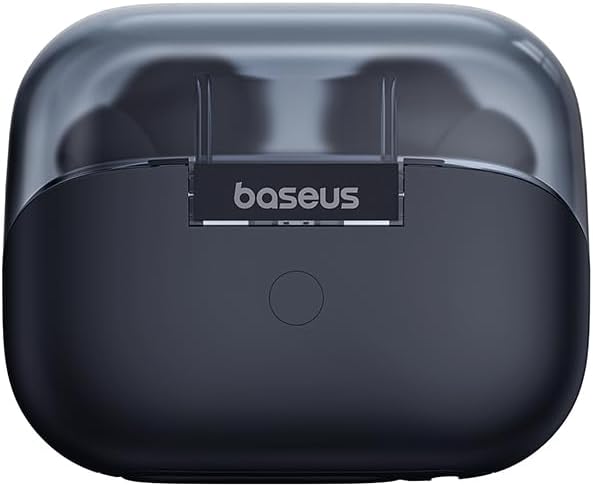
Imatge 3.3: posterior view of the Baseus AeQur G10 charging case, displaying the Baseus brand logo and a USB-C charging port (not explicitly visible but implied by common design).
3.3 USB-A/USB-C Wireless Dongle
The included wireless dongle allows for low-latency connection to various devices, including PCs, laptops, gaming consoles, and mobile devices.

Image 3.4: Compatibility diagram for the Baseus AeQur G10, illustrating connections to Type-C Androids & Tablets, Type-C/USB-A PCs & Laptops, PS5/PS4/Switch, Steam Deck, and VR devices.
4. Configuració
4.1 Càrrega inicial
- Col·loqueu els dos auriculars a la caixa de càrrega.
- Connect the USB-C charging cable to the charging port on the case and the other end to a USB power source (e.g., computer USB port, wall adapter).
- The LED indicator on the case will show charging status. A full charge typically takes approximately 1.5 hours for the earphones and 2 hours for the case.
4.2 Pairing with Bluetooth Devices
- Ensure the earphones are in the charging case and the case has sufficient charge.
- Open the charging case lid. The earphones will automatically enter pairing mode (indicated by a flashing LED on the earphones or case).
- Al dispositiu (telèfon intel·ligent, tauleta, ordinador portàtil), activeu el Bluetooth i cerqueu dispositius nous.
- Select "Baseus AeQur G10" from the list of available devices.
- Once connected, the LED indicator will stop flashing, and you will hear a confirmation tone.
4.3 Connecting via USB Wireless Dongle
- Insert the USB-A or USB-C end of the wireless dongle into the corresponding port on your device (PC, laptop, gaming console).
- Ensure the earphones are in the charging case and the lid is open.
- The earphones will automatically attempt to connect to the dongle. The dongle's LED indicator will show connection status.
- Once connected, the LED on the dongle will become solid, and you will hear a confirmation tone from the earphones.
5. Instruccions de funcionament
5.1 Encès/Apagat
- Encès: Obriu la tapa de la funda de càrrega o traieu els auriculars de la funda. S'encendran automàticament.
- Apagar: Place the earphones back into the charging case and close the lid. They will power off automatically and begin charging.
5.2 Com posar-se els auriculars
- Identify the 'L' (left) and 'R' (right) markings on each earphone.
- Gently insert the earphones into your ear canals.
- Rotate them slightly to find a comfortable and secure fit. Choose the appropriate ear tip size for optimal sound quality and comfort.
5.3 Controls tàctils
The Baseus AeQur G10 earphones feature touch-sensitive controls on each earbud. The specific functions may vary slightly depending on the device and application.
| Acció | Funció |
|---|---|
| Toc únic (E/D) | Reproduir / Pausar música, Respondre / Finalitzar trucada |
| Doble Toc (L) | Pista anterior |
| Doble toc (R) | Pista següent |
| Triple Toc (E/D) | Activa l'Assistent de veu |
| Premda llarga (E/D, 2 s) | Rebutja la trucada |
| Premda llarga (E/D, 3 s) | Toggle Gaming/Music Mode (if applicable) |
6. Manteniment
6.1 Neteja
- Use a soft, dry, lint-free cloth to clean the earphones and charging case.
- For earwax or debris in the ear tips, gently remove the ear tips and clean them with a cotton swab lightly dampened with rubbing alcohol. Ensure they are completely dry before reattaching.
- No utilitzeu netejadors abrasius, dissolvents ni aerosols.
6.2 Emmagatzematge
- Guarda sempre els auriculars a la seva funda de càrrega quan no els facis servir per protegir-los i mantenir-los carregats.
- Emmagatzemar en un lloc fresc i sec, allunyat de temperatures extremes i de la llum solar directa.
6.3 Cura de la bateria
- Charge the earphones and case regularly, even if not used frequently, to maintain battery health.
- Eviteu descarregar completament les bateries durant períodes prolongats.
7. Solució De Problemes
If you encounter issues with your Baseus AeQur G10 earphones, refer to the following common solutions:
7.1 Sense so o connexió intermitent
- Ensure earphones are charged and properly connected to your device (Bluetooth or dongle).
- Comproveu el nivell de volum tant dels auriculars com del dispositiu connectat.
- Move closer to your device to avoid interference or range issues.
- Try disconnecting and re-connecting the earphones.
- For Bluetooth, forget the device on your phone and re-pair.
- For dongle, unplug and re-plug the dongle.
7.2 Els auriculars no es carreguen
- Assegureu-vos que el cable de càrrega estigui connectat correctament tant a la carcassa com a la font d'alimentació.
- Verifiqueu que la font d'alimentació estigui activa.
- Netegeu els contactes de càrrega tant dels auriculars com de l'interior de la funda amb un bastonet de cotó sec.
- Prova un cable de càrrega o un adaptador de corrent diferent.
7.3 Only One Earphone Working
- Torneu a col·locar els dos auriculars a l'estoig de càrrega, tanqueu la tapa, espereu uns segons i, a continuació, obriu la tapa i torneu-los a treure.
- Assegureu-vos que tots dos auriculars estiguin carregats.
- Prova de reiniciar els auriculars (consulta les instruccions del fabricant) weblloc web per obtenir instruccions específiques de restabliment si cal).
8. Especificacions
Key technical specifications for the Baseus AeQur G10 TWS Earphones:
| Característica | Especificació |
|---|---|
| Nom del model | A00055400111-00 |
| Marca | Baseus |
| Color | Negre |
| Col·locació de l'orella | A l'orella |
| Factor de forma | A l'orella |
| Tecnologia de connectivitat | Sense fil (Bluetooth) |
| Tecnologia de comunicació sense fils | Bluetooth |
| Bateries | Necessites 1 piles de ions de liti (incloses) |
| Dimensions del producte | 10 x 5 x 1.27 cm |
| Pes de l'article | 220 g |
| Fabricant | Baseus |
| Usos específics | Viatjar |
9. Garantia i Suport
Baseus products are designed and manufactured to the highest quality standards. For information regarding warranty coverage, technical support, or service, please refer to the warranty card included with your product or visit the official Baseus weblloc web. Conserveu el comprovant de compra per a reclamacions de garantia.
Per a més ajuda, podeu contactar amb el servei d'atenció al client de Baseus a través dels seus canals oficials.


