Producte acabatview
The R-Volution Player ONE 8k is an advanced media player and server designed to deliver a revolutionary home cinema experience. It supports impressive image quality with Dolby Vision and HDR10+, powered by a robust Realtek RTD1619DR chipset. This device allows streaming content to other R_volution devices within your network using the exclusive R_share Advanced Streaming Protocol.
Les característiques clau inclouen:
- Support for Dolby Vision and HDR10+ for superior image quality.
- Internal storage capacity for up to 32 TB (expandable via USB).
- Two HDMI outputs for versatile connectivity.
- UHD 4K content support and upscaling to 4K Ultra HD (3840 x 2160).
- Automatic volume leveling.
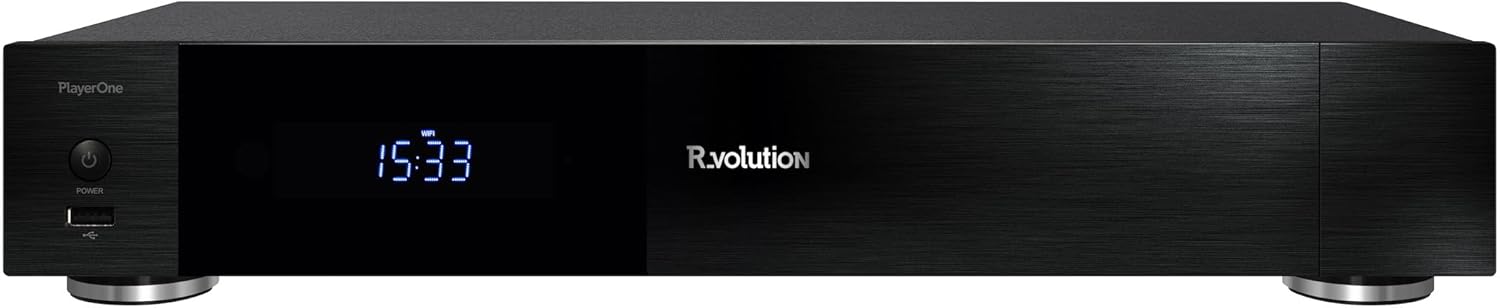
Figura 1: Frontal view of the R-Volution Player ONE 8k. This image displays the sleek black design of the media player, featuring a power button on the left, a front USB port, and a central digital display showing the time.
Configuració
Connecting Your Player ONE 8k
Before operating your R-Volution Player ONE 8k, ensure all necessary connections are made. Refer to the rear panel diagram for port identification.

Figure 2: Rear panel connections of the R-Volution Player ONE 8k. This image shows the comprehensive array of ports on the back of the device, including HDMI outputs, USB ports, Ethernet, optical, coaxial, and analog audio outputs, along with Wi-Fi and Bluetooth antennas.
Descripcions del port:
- HDMI OUT (Audio Only): Connects to an audio receiver for dedicated audio output.
- HDMI OUT (Main): Connects to your TV, monitor, or projector for video and audio.
- Ports USB 3.0: Per connectar dispositius d'emmagatzematge externs o altres perifèrics USB.
- USB tipus C: Additional high-speed connectivity.
- Ethernet (LAN): Per a la connexió de xarxa amb cable.
- Antenes Wi-Fi: Per a la connectivitat de xarxa sense fil.
- Antena Bluetooth: For connecting Bluetooth devices.
- Optical (SPDIF) & Coaxial Audio Outputs: For digital audio connections to compatible audio systems.
- RCA Audio Outputs (L/R): For analog stereo audio connections.
- AC IN: Entrada d'alimentació per al dispositiu.
Initial Connection Steps:
- Connect the Player ONE 8k to your display (TV, monitor, or projector) using an HDMI cable from the SORTIDA HDMI (Principal) port.
- If using a separate audio receiver, connect it via the SORTIDA HDMI (només àudio) port or digital/analog audio outputs.
- For network access, connect an Ethernet cable to the LAN port or ensure Wi-Fi antennas are attached for wireless setup.
- Connecteu el cable d'alimentació al AC IN port i connecteu-lo a una presa de corrent.
- Premeu el botó d'engegada del panell frontal o del comandament a distància per encendre el dispositiu.
Instruccions de funcionament
Funcions de control remot
The included remote control provides full command over your Player ONE 8k. Familiarize yourself with its layout and button functions.

Figure 3: Remote control for the R-Volution Player ONE 8k. This image displays the ergonomic design of the remote, with clearly labeled buttons for power, volume, navigation, media playback controls, and dedicated R.video and Explorer buttons.
Key Remote Buttons:
- Botó d'encesa: Encén o apaga el dispositiu.
- Teclat de navegació (Amunt/Avall/Esquerra/Dreta/D'acord): Per a la navegació i selecció de menús.
- Volum +/-: Ajusta el volum de l'àudio.
- Playback Controls (Play, Pause, Stop, Fast Forward, Rewind, Skip): Standard media playback functions.
- R.video: Accesses the R.video media library interface.
- Explorador: Accessos file browser for local or network storage.
- Teclat numèric: For direct input or specific functions.
Media Playback and Interface
The Player ONE 8k features an intuitive interface for managing and playing your media content. The R.video application provides a rich visual experience for your movie and TV show collection.

Figure 4: R.video user interface in action. This image illustrates the Player ONE 8k connected to a display, showcasing the R.video media management system with movie details, cover art, and playback options.
To play media:
- Assegureu-vos els vostres mitjans files are accessible, either on an internal hard drive, connected USB storage, or a network share.
- Navegueu fins a R.video application for an organized library view, or use Explorador navegar files directament.
- Select your desired movie, TV show, or music file i premeu OK per començar la reproducció.
- Utilize the playback controls on the remote for pause, fast forward, rewind, and chapter navigation.
Funcions avançades
- Dolby Vision i HDR10+: The Player ONE 8k supports these advanced HDR formats, providing deeper blacks, brighter highlights, and a wider color gamut. Ensure your display is compatible to fully experience these features. The player supports direct playback of Blu-ray Disc Images in Dolby Vision and various other formats.
- 4K Ultra HD Upscaling: Even if your content is not native 4K, the player can upscale videos to a resolution of 4K Ultra HD (3840 x 2160) for enhanced visual clarity on compatible displays.
- Emmagatzematge intern: The device accommodates an internal hard drive of up to 32 TB, allowing for a vast local media library. Additional storage can be connected via USB.
- R_share Advanced Streaming Protocol: Stream content seamlessly to other R_volution devices within your home network.
Manteniment
To ensure the longevity and optimal performance of your R-Volution Player ONE 8k, follow these maintenance guidelines:
- Neteja: Feu servir un drap suau i sec per netejar l'exterior del dispositiu. Eviteu utilitzar netejadors líquids o materials abrasius.
- Ventilació: Ensure the player is placed in a well-ventilated area. Do not block any ventilation openings.
- Medi ambient: Mantingueu el dispositiu allunyat de la llum solar directa, de fonts de calor i d'humitat excessiva.
- Actualitzacions de firmware: Periodically check for firmware updates from the R_volution official weblloc web per assegurar-vos que disposeu de les darreres funcions i correccions d'errors.
Resolució de problemes
If you encounter issues with your Player ONE 8k, refer to the following common troubleshooting steps:
| Problema | Possible causa/solució |
|---|---|
| No hi ha alimentació / El dispositiu no s'encén. |
|
| Sense sortida de vídeo. |
|
| Sense sortida d'àudio. |
|
| El comandament a distància no respon. |
|
| Problemes de connexió de xarxa. |
|
Especificacions
| Característica | Detall |
|---|---|
| Nom del model | Player ONE 8k |
| Marca | R_volution |
| ASIN | B0CM2JRBR6 |
| Dimensions del producte | 16L x 43B x 8H cm (16 x 43 x 8 cm) |
| Color | Schwarz (negre) |
| Tecnologia de connectivitat | Bluetooth, USB, HDMI, WLAN (Wi-Fi) |
| Tipus de connector | HDMI |
| Resolució | 3840 x 2160 (4K Ultra HD) |
| Característica especial | Automatische Volumennivellierung (Automatic Volume Leveling) |
| Compatibilitat amb tipus de suport | DVD, Blu-Ray-Disc (playback of images/files) |
| Mode de sortida d'àudio | Stereo (supports various multi-channel formats via HDMI passthrough) |
| Emmagatzematge intern | Supports up to 32 TB internal hard drive (not included) |
Garantia i Suport
For warranty information and technical support, please refer to the official R_volution weblloc web o contacteu directament amb el servei d'atenció al client. Conserveu el rebut de compra com a comprovant de compra per a reclamacions de garantia.
Note: Specific warranty terms and support channels may vary by region.


