Introducció
The Posturite Penguin 3-in-1 Ambidextrous Vertical Mouse is designed to provide ergonomic support and versatile connectivity. This model integrates Wired, Wireless (2.4GHz), and Bluetooth technologies, offering flexibility for various computing environments. Its vertical design promotes a neutral wrist posture, aiming to reduce strain associated with repetitive strain injury (RSI) and carpal tunnel syndrome (CTS). The ambidextrous design allows for effortless switching between left and right-handed use, distributing workload and preventing static muscle strain. Additionally, the mouse is equipped with BioCote® antimicrobial technology to inhibit bacterial growth, making it suitable for shared workspaces.
Característiques clau
- Connectivitat 3 en 1: Supports Wired, 2.4GHz Wireless (USB dongle), and Bluetooth connections.
- Disseny ambidextre: Easily switch between right and left-handed use to distribute workload and reduce strain.
- Ergonomic Vertical Posture: Promotes a natural handshake position, minimizing wrist pronation and pressure on the carpal tunnel.
- DPI ajustable: Optical tracking with multiple DPI settings (up to 2400 dpi) for precise cursor control.
- BioCote® Antimicrobial Technology: Inhibits bacterial and mold growth for enhanced hygiene.
- Precision Scroll Wheel: Ensures accurate document scrolling.
- Múltiples mides: Available in various sizes to accommodate different hand dimensions for a personalized fit.
Contingut del paquet
- Posturite The Penguin 3-in-1 Vertical Mouse
- Cable de càrrega USB-C a USB-A
- 2.4GHz USB-A Wireless Dongle (stored in mouse base)
- Manual d'usuari / Instruccions
Configuració
1. Guia de talles
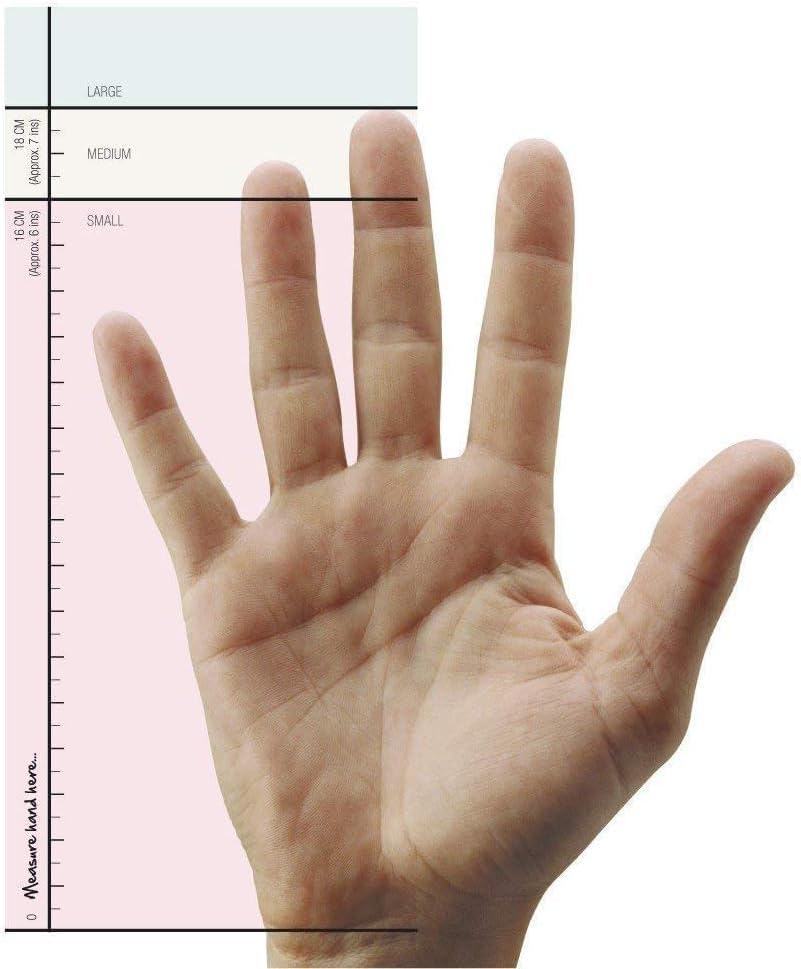
To ensure optimal comfort and ergonomic benefits, select the correct mouse size. Measure your hand from the first crease of your wrist to the tip of your middle finger.
- Petit: 0-16 cm (0-6 polzades)
- Mitjà: (Size not specified in input, typically for average hands)
- Gran: (Size not specified in input, typically for larger hands)
2. Càrrec inicial
Before first use, it is recommended to fully charge your Penguin Mouse. Connect the provided USB-C cable to the mouse's charging port and the USB-A end to a power source (e.g., computer USB port, USB wall adapter).
3. Connectar el ratolí
The Penguin Mouse offers three connectivity options:
3.1. Connexió sense fil de 2.4 GHz (adaptador USB)
- Locate the USB-A wireless dongle stored in the compartment at the bottom of the mouse.
- Plug the USB-A dongle into an available USB-A port on your computer.
- Engegueu el ratolí amb l'interruptor ON/OFF que es troba a la part inferior.
- El ratolí s'hauria de connectar automàticament a l'ordinador.
3.2. Connexió Bluetooth
- Engegueu el ratolí amb l'interruptor ON/OFF que es troba a la part inferior.
- Press the connectivity mode button (usually a small circular button near the ON/OFF switch) to switch to Bluetooth mode. An indicator light will flash.
- On your computer, open Bluetooth settings and search for "Penguin Mouse" or a similar device name.
- Select the mouse to pair. The indicator light on the mouse will stop flashing once connected.
3.3. Connexió per cable
- Connecteu el cable USB-C proporcionat al port de càrrega del ratolí.
- Connecteu l'extrem USB-A del cable a un port USB-A disponible de l'ordinador.
- El ratolí funcionarà com un ratolí amb cable i es carregarà simultàniament.
Instruccions de funcionament
1. Empunyadura ergonòmica
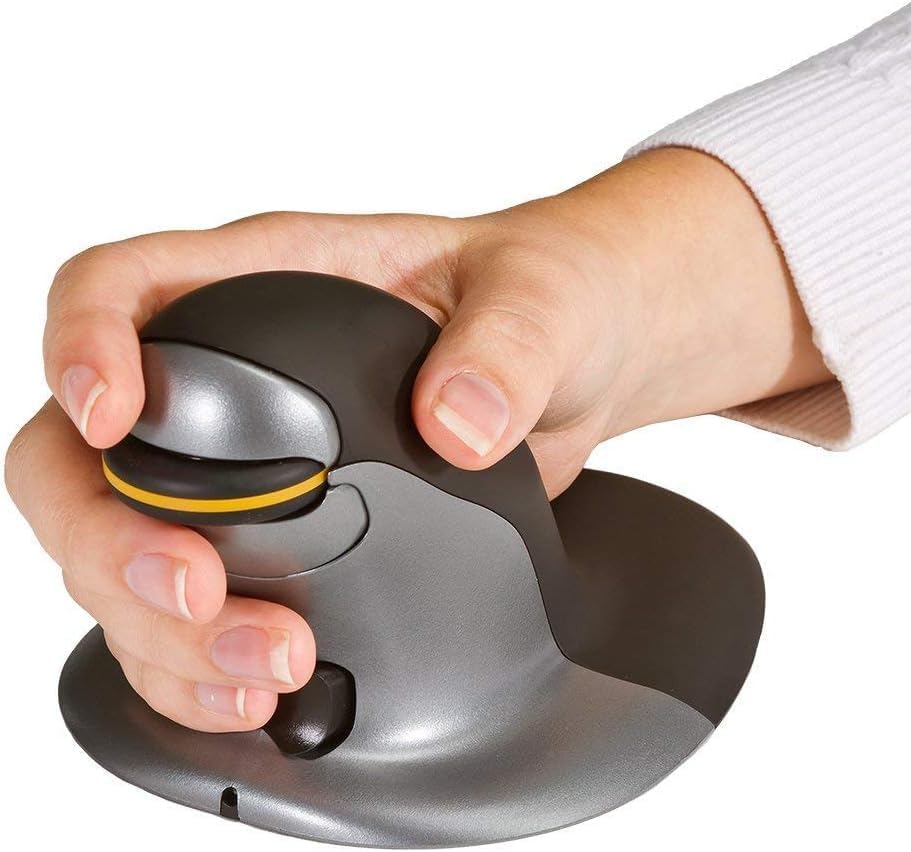
Hold the Penguin Mouse with your hand in a natural handshake position. Your thumb should rest comfortably on the side, and your fingers should drape over the buttons and scroll wheel. This vertical orientation helps maintain a neutral wrist posture.

2. Ambidextrous Use
The symmetrical design allows for easy switching between left and right-handed use. Simply rotate the mouse 180 degrees to use it with your other hand. This feature is crucial for distributing mouse-related workload and preventing static muscle strain.
3. Funcions del botó
- Botó esquerre de clic: Funció de clic principal estàndard.
- Botó dret: Funció de clic secundari estàndard.
- Roda de desplaçament: Desplaça't amunt/avall pels documents i web pàgines. També es pot fer clic amb el botó central per a la funcionalitat de clic.
- Botó d'ajust de DPI: Located near the scroll wheel. Press to cycle through available DPI settings (e.g., 800, 1200, 1600, 2400 DPI). The current DPI level may be indicated by an LED or screen on some models.
- Botons Endavant/Enrere: Located on the side of the mouse (typically for thumb operation). These buttons allow for quick navigation in web navegadors o file exploradors.
Manteniment
- Neteja: Regularly wipe the mouse surface with a soft, damp cloth. Avoid harsh chemicals. The BioCote® antimicrobial coating helps maintain hygiene.
- Neteja del sensor: Occasionally clean the optical sensor at the bottom of the mouse with a soft, dry cloth to ensure accurate tracking.
- Cura de la bateria: For rechargeable models, avoid fully discharging the battery frequently to prolong its lifespan.
Resolució de problemes
- El ratolí no respon:
- Comproveu si el ratolí està encès.
- Assegureu-vos que la bateria estigui carregada.
- For 2.4GHz wireless, ensure the USB dongle is securely plugged in and the mouse is in 2.4GHz mode.
- For Bluetooth, ensure the mouse is in Bluetooth mode and successfully paired in your device's Bluetooth settings. Try re-pairing if necessary.
- Per a una connexió amb cable, assegureu-vos que el cable USB estigui connectat correctament tant al ratolí com a l'ordinador.
- Cursor Lag/Jumping:
- Clean the optical sensor at the bottom of the mouse.
- Ensure you are using the mouse on a suitable surface (non-reflective, non-glass). A mouse pad is recommended.
- Check for interference from other wireless devices if using wireless modes.
- Adjust DPI settings to a lower value if the cursor is too sensitive.
- Els botons no funcionen:
- Assegureu-vos que el ratolí estigui encès i connectat.
- If using custom button assignments, check your mouse software settings.
Especificacions
| Número de model | 100016307 |
| Tecnologia de connectivitat | Cable/Wireless (2.4GHz USB), Bluetooth |
| Detecció de moviment | Òptic |
| Resolució de moviment (DPI) | Fins a 2400 (ajustable) |
| Tipus de desplaçador | Roda de desplaçament |
| Característica especial | Ergonomic Design, Ambidextrous, BioCote® Antimicrobial |
| Dimensions del producte | 1 x 7.5 x 0.1 polzades |
| Pes de l'article | 13.6 unces |
| Bateries | Rechargeable (Note: Product specifications also list "2 AA batteries required", which may be a discrepancy or refer to an older model/variant. This manual assumes a rechargeable battery based on product description and reviews.) |
| Fabricant | Posturite |
Garantia i suport
The Posturite Penguin 3-in-1 Vertical Mouse comes with an extended 2-year warranty. For support, troubleshooting, or warranty claims, please refer to the contact information provided in your product packaging or visit the official Posturite weblloc.


