Introducció
This manual provides essential information for the safe and efficient operation of your ZTE CYMBAL 2 Z2335ca flip phone. Please read it thoroughly before using the device.
Configuració
1. Unboxing
Traieu amb cura tots els components de l'embalatge. Assegureu-vos que hi hagi els elements següents:
- ZTE CYMBAL 2 Z2335ca Flip Phone
- Bateria
- Adaptador d'alimentació
2. Instal·lació de la bateria
Localitza el compartiment de la bateria a la part posterior del telèfon. Treu la tapa posterior amb cura. Alinea els contactes de la bateria amb els terminals de l'interior del compartiment i prem fins que encaixin al seu lloc. Torna a col·locar la tapa posterior.

Image: ZTE CYMBAL 2 Z2335ca flip phone in closed position, displaying the external screen with time and signal indicators, and the camera lens.
3. Carregant el telèfon
Connect the power adapter to the charging port on the phone. Plug the adapter into a wall outlet. The battery indicator on the screen will show charging status. Fully charge the phone before first use.
4. Inserció de la targeta SIM
(If applicable) Open the battery compartment. Locate the SIM card slot. Insert your SIM card with the gold contacts facing down and the notched corner aligned correctly.
Instruccions de funcionament
1. Encès / apagat
Per engegar, manteniu premut el botó d'engegada/finalització de trucada fins que la pantalla s'il·lumini. Per apagar, manteniu premut el botó d'engegada/finalització de trucada i, a continuació, seleccioneu "Apagar" de les opcions.
2. Realització de trucades
Open the flip. Use the keypad to dial the desired number. Press the Call button (green) to initiate the call. To end a call, press the End Call button (red).
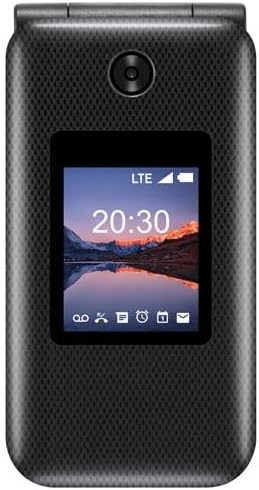
Image: ZTE CYMBAL 2 Z2335ca flip phone in open position, revealing the internal display and the full numeric keypad with navigation buttons.
3. Recepció de trucades
When the phone rings, open the flip or press the Call button to answer.
4. Enviament i recepció de missatges
Navigate to the "Messages" menu. Select "New Message" to compose. Enter the recipient's number and type your message using the keypad. Press "Send".
5. Navegació
Use the directional pad and center select button to navigate through menus and select options.
Manteniment
1. Neteja
Use a soft, dry cloth to clean the phone's exterior. Avoid using liquid cleaners or abrasive materials.
2. Cura de la bateria
Per allargar la durada de la bateria, eviteu exposar el telèfon a temperatures extremes. No deixeu el telèfon carregant-se durant períodes prolongats després que estigui completament carregat.
3. Emmagatzematge
Store the phone in a cool, dry place when not in use.
Resolució de problemes
| Problema | Solució |
|---|---|
| El telèfon no s'encén | Assegureu-vos que la bateria estigui correctament instal·lada i carregada. Connecteu el carregador i torneu-ho a provar. |
| No puc fer ni rebre trucades | Check SIM card installation. Verify network signal strength. Contact your service provider if issues persist. |
| Mala qualitat d'àudio | Ensure the speaker and microphone are not obstructed. Adjust volume settings. |
Especificacions
- Model: ZTE CYMBAL 2 Z2335ca
- Marca: ZTE
- Sistema operatiu: FunTouch OS 10
- RAM: 4 GB
- Capacitat d'emmagatzematge digital: 4 GB
- Tipus de processador: Snapdragon
- Velocitat del processador: 2.1 GHz
- Tipus de visualització: LCD
- Tipus de bateria: Ió de liti
- Tecnologia cel·lular: 4G
- Connectivitat: Bluetooth, WiFi
- Factor de forma: Estoig plegable
- Color: Negre
Garantia i Suport
Per obtenir informació sobre la garantia i assistència tècnica, consulteu la documentació que s'inclou amb la compra o visiteu el lloc web oficial de ZTE. weblloc.
Online resources may be available at the Botiga oficial de ZTE a Amazon.


