Introducció
The KEFEYA 15.6" Triple Screen Laptop Monitor Extender is designed to significantly enhance your productivity by providing two additional 1080P FHD IPS portable displays for your laptop. This innovative device allows for a 300% improvement in work efficiency by expanding your workspace, making multitasking seamless and convenient.
Its versatile design supports various display modes including extend, mirror, landscape, and portrait, adapting to diverse work environments. With a durable metal frame and a lightweight, foldable structure, it's an ideal companion for travel, remote work, video conferencing, and creative tasks.
Experience crisp, vivid visuals with a 178° ultra-wide viewing angle, 300 nits of brightness, and 100% sRGB color gamut. The monitor also features a 90° adjustable kickstand and VESA mounting compatibility for optimal ergonomic comfort.
Contingut del paquet
Upon opening your KEFEYA Triple Screen Laptop Monitor Extender package, you will find the following items:
- Folding Monitor Extender x 1
- Cable USB-C a USB-C x 2
- HDMI to Mini HDMI Cable x 1
- Adaptador d'alimentació x 1
- HUB x 1 (for MacOS driver installation)
- Manual d'usuari x 1
- Guia d'usuari x 1

Image: KEFEYA Triple Screen Laptop Monitor Extender with labeled ports including Mini HDMI, Type-C, Power/Menu, and Shift Key.

Image: A visual representation of all components included in the KEFEYA M2 package, such as the monitor extender, USB-C cables, HDMI cable, power adapter, and user manuals.
Configuració
The KEFEYA Triple Screen Monitor Extender is designed for easy setup, but specific steps vary depending on your operating system and laptop's port capabilities. Ensure your laptop has a Thunderbolt / full-featured USB-C port for optimal dual-screen functionality.
Connexió general
For all connections, it is recommended to use the supplied power adapter to power the monitor, especially if your laptop's USB-C port does not provide sufficient power or full functionality.

Image: Diagram showing connection options: single USB-C for full functionality, or HDMI + USB-C for single screen if USB-C is not full-featured.
Configuració de Windows
For Windows laptops, the KEFEYA monitor extender is typically plug and play, requiring no additional driver installation. Simply connect the monitor using the appropriate USB-C cable.
Configuració de MacOS
For MacOS, a hub and driver installation are needed. After installing the driver, you will need to restart both your laptop and the monitor for the changes to take effect.
Instal·lació del controlador per a MacOS
The necessary driver for MacOS is typically found on the included hub. Follow these steps to install:
- Connect the hub to your MacBook.
- Locate and run the driver installer from the hub (e.g., a .pkg file).
- Seguiu les indicacions a la pantalla per completar la instal·lació.
- Després de la instal·lació, restart your MacBook and the M2 Monitor Extender.
Video: This video demonstrates the step-by-step process of installing the necessary driver for MacOS to enable full functionality of the KEFEYA M2 Monitor Extender.
Video: A quick guide on how to easily set up the KEFEYA M2 Monitor Extender with a MacOS device, highlighting the simplicity of the connection process.
Modes de funcionament
The KEFEYA Triple Screen Monitor Extender offers multiple display modes to suit your workflow and sharing needs:
- Mode estès: Expand your desktop across all three screens for maximum workspace.
- Duplicated Mode (Mirror Mode): Display the same content on all screens.
- Mode de retrat: Rotate the screens to a vertical orientation, ideal for reading documents or coding.
- 2-in-1 Screen Mode: Combine the two external screens into one large vertical display.
The upper screen can be rotated 360° and flipped 180° for face-to-face conversations or easy sharing with colleagues. Use the dedicated "Key" button on the monitor to switch between these display modes.

Imatge: Visual examples of the monitor's different display modes: Extended, Duplicated, Portrait, and a combined 2-in-1 Screen Mode.

Image: A user demonstrating the screen's ability to rotate 360° and flip 180° for easy data sharing in meetings.
Vídeo: Un overview of the KEFEYA 15.6 Inch FHD Full Metal Triple Screen Laptop Monitor, showcasing its design and multi-screen capabilities.
Qualitat de visualització
The KEFEYA Triple Screen Monitor Extender is equipped with two 15.6-inch IPS LCD panels, providing a high-quality visual experience:
- Resolució: 1920x1080P Full HD (FHD)
- Viewangle: 178° ultra ample
- Brillantor: 300 nits (280 Candela)
- Gamma de colors: 100% sRGB
- Relació de contrast: 1:1000
These specifications ensure accurate colors and crisp visuals, making it ideal for creative design, gaming, and efficient office work.

Image: A diagram detailing the display features such as 2x15.6 inch, 100% sRGB, 1080P FHD, Low Blue Light, and compatibility with Windows/MacOS.
Portabilitat i disseny
The KEFEYA Triple Screen Monitor Extender is built with portability and user-friendliness in mind:
- Dimensions: 8.69 x 14.17 x 0.82 polzades
- Pes: Aproximadament 3.5 lliures
- Marc: 3.1-inch metal frame for durability and protection.
- Disseny plegable: Folds up compactly, similar to a laptop, for easy transport.
- Suport de peu: Integrated 90° adjustable kickstand for stable positioning.
- Muntatge VESA: Compatible with VESA mounts (50x50mm, 75x75mm, 100x100mm screw size M4x6mm) for improved space utilization on a desk or wall.

Image: The KEFEYA Portable Folding Monitor emphasizing its lightweight (3.57lb) and slim (0.82inch) design for on-the-go use.
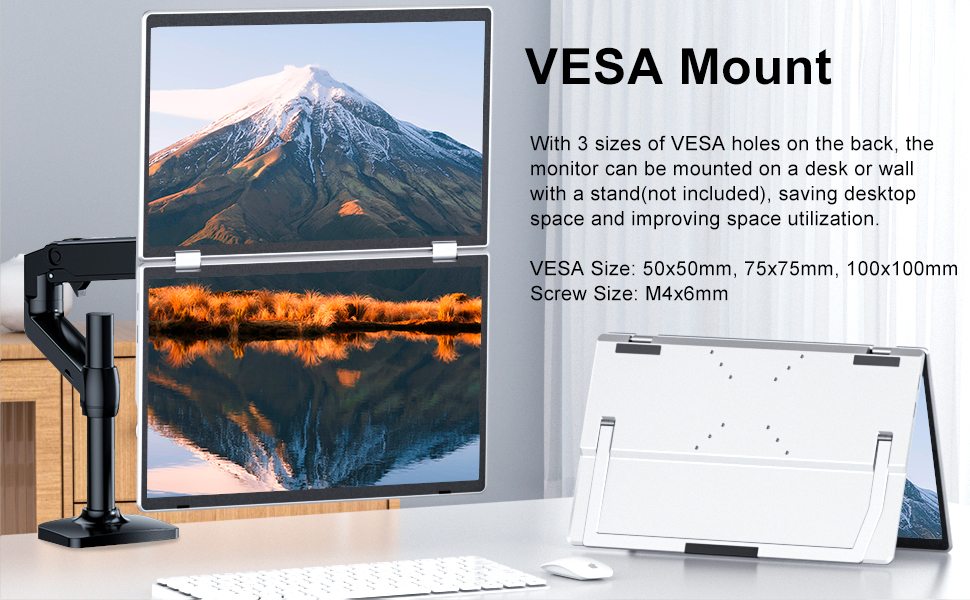
Image: A diagram showing the VESA mounting points on the back of the monitor, indicating compatibility with 50x50mm, 75x75mm, and 100x100mm VESA sizes.
Especificacions
| Característica | Especificació |
|---|---|
| Dimensions del producte | 8.69 x 14.17 x 0.82 polzades |
| Pes de l'article | 3.58 lliures |
| Número de model de l'article | KF-XZJ-M2 |
| Mida de la pantalla de peu | 15.6 polzades |
| Relació d'aspecte | 16:9 |
| Resolució | 1920 x 1080 píxels (FHD 1080p) |
| Brillantor de la imatge | 280 Candela |
| Ports USB totals | 2 |
| Descripció de la superfície de la pantalla | Mat |
| Fabricant | Shenzhen Baijiayoupu Technology Co., Ltd |
| País d'origen | Xina |
Resolució de problemes
If you encounter issues with your KEFEYA Triple Screen Monitor Extender, consider the following common troubleshooting steps:
- Screen Not Displaying All Pages (MacOS): Ensure you have installed the correct driver for MacOS using the included hub and restarted both your MacBook and the monitor extender. Without the driver, MacOS may only mirror or extend to one screen, not allowing for independent displays.
- Dispositiu no reconegut: Double-check all cable connections. Ensure your laptop's USB-C port is full-featured (supports video signal and power). If issues persist, try reinstalling the drivers (for MacOS) or restarting your laptop and the monitor.
- Potència insuficient: If screens flicker or do not power on reliably, ensure you are using the supplied power adapter to provide adequate power to the monitor.
- Danys físics: Handle the monitor gently. Avoid squeezing the screens or applying excessive force, as this can cause damage.
Garantia i suport
KEFEYA stands behind its products with a comprehensive warranty and dedicated customer support:
- Política de devolució: Política de devolució de 30 dies.
- Garantia: Garantia de 12 mesos a partir de la data de compra.
- Atenció al client: Accessible customer service is available to assist with any inquiries or issues. Messages are typically replied to within 24 hours.
Please message KEFEYA directly if you need any help or have questions regarding your product.