1. Introducció
Thank you for choosing the FiiO/JadeAudio JH5 In-Ear Monitors. These hybrid earphones are designed to deliver high-fidelity audio performance for audiophiles and musicians. This manual provides essential information for proper setup, operation, maintenance, and troubleshooting to ensure optimal use of your device.

Figure 1: FiiO JH5 In-Ear Monitors. The FiiO JH5 In-Ear Monitors, featuring a black housing and a silver-plated copper detachable cable.
2. Contingut del paquet
Si us plau, verifiqueu que tots els elements que s'enumeren a continuació estiguin inclosos al vostre paquet:
- FiiO/JadeAudio JH5 In-Ear Monitors (1 pair)
- Detachable 0.78mm 2-Pin Cable (1)
- Assorted Ear Tips (various sizes and types)
- Manual d'usuari (aquest document)

Figure 2: Included Accessories. Contents of the FiiO JH5 package, including the in-ear monitors, detachable cable, various ear tips, and user documentation.
3. Instruccions de configuració
3.1 Connexió del cable desmuntable
- Identify the left (L) and right (R) earphone units and the corresponding connectors on the cable. The cable connectors are 0.78mm 2-pin type.
- Align the 2-pin connector on the cable with the receptacle on the earphone unit. Ensure the pins are correctly oriented.
- Gently push the connector into the earphone unit until it is securely seated. Do not force the connection.
- Repeat for the other earphone unit.

Figure 3: Cable Connection Detail. Detailed view of the high-quality 392-wire silver-plated copper cable and the 0.78mm 2-pin detachable connector, designed for durability and signal integrity.
3.2 Selecting and Attaching Ear Tips
La selecció adequada de les puntes per a les orelles és crucial per a la qualitat del so i la comoditat. Experimenta amb les puntes incloses per trobar la que millor s'adapti a les teves orelles.
- Gently remove the pre-installed ear tips (if any) by twisting and pulling.
- Select an ear tip size that creates a good seal in your ear canal without causing discomfort.
- Push the new ear tip onto the nozzle of the earphone unit until it is firmly attached.
3.3 Wearing the In-Ear Monitors
The JH5 earphones are designed to be worn with the cable looping over your ear for a secure and comfortable fit.
- Insert the earphone unit into your ear canal.
- Guide the cable over the top and behind your ear. The cable is ergonomically designed to wrap around your ear.
- Adjust the earphone's position until it feels secure and comfortable, and you achieve a good acoustic seal.
4. Instruccions de funcionament
4.1 Connexió a una font d'àudio
The FiiO JH5 connects to audio devices via a standard 3.5mm audio jack.
- Locate the 3.5mm audio output port on your audio player, smartphone, computer, or other compatible device.
- Insert the 3.5mm plug of the JH5 cable firmly into the audio output port.
- Ensure the volume on your audio source is set to a low level before playing audio to prevent sudden loud sounds.
4.2 Using Media Controls
The JH5 cable may include an in-line remote for media control, depending on the specific cable version. Refer to your cable's specific features for detailed instructions on play/pause, track skipping, and volume adjustment.
5. Manteniment i cura
5.1 Neteja
- Earphone Units: Gently wipe the earphone shells with a soft, dry, lint-free cloth. Avoid using harsh chemicals or abrasive materials.
- Consells per a les orelles: Remove ear tips from the earphones. They can be washed with mild soap and water, then rinsed thoroughly and allowed to air dry completely before reattaching.
- Broquets: Use a small, soft brush or a cotton swab to carefully remove any earwax or debris from the earphone nozzles. Ensure no moisture enters the earphone unit.
5.2 Emmagatzematge
When not in use, store your JH5 In-Ear Monitors in a clean, dry place, preferably in the included carrying case, to protect them from dust, moisture, and physical damage.
5.3 Cura del cable
The detachable cable is durable but should be handled with care. Avoid sharp bends, excessive pulling, or twisting, which can damage the internal wires or connectors. When disconnecting, always grasp the connector housing, not the cable itself.
6. Solució De Problemes
6.1 Sense so o so intermitent
- Comproveu les connexions: Ensure the 2-pin cable connectors are fully and securely inserted into the earphone units. Also, verify the 3.5mm plug is firmly connected to your audio source.
- Font d'àudio: Test with a different audio source to rule out issues with your device.
- Nivell de volum: Confirm that the volume on your audio source is turned up and not muted.
- Integritat del cable: Inspect the cable for any visible damage. If possible, test with a different compatible cable.
6.2 Poor Sound Quality (Distortion, Lack of Bass)
- Ear Tip Seal: Ensure you have a proper seal with the ear tips. A poor seal can significantly impact bass response and overall sound quality. Try different ear tip sizes or materials.
- Qualitat de la font d'àudio: The sound quality is dependent on the source material and device. Try playing high-quality audio files from a reliable source.
- Neteja: Check if the earphone nozzles or ear tips are obstructed by earwax or debris. Clean as described in Section 5.1.
6.3 Discomfort or Poor Fit
- Selecció de puntes d'orella: Re-evaluate your ear tip choice. A size that is too large or too small can cause discomfort or an unstable fit.
- Mètode d'ús: Ensure you are wearing the earphones correctly with the cable looped over your ear. Adjust the position for optimal comfort.
7. Especificacions del producte
The FiiO JH5 In-Ear Monitors feature a sophisticated hybrid driver design and robust construction.

Figure 4: 10mm Carbon-Based Dynamic Driver. An illustration highlighting the 10mm carbon-based dynamic driver, responsible for robust low-frequency reproduction.

Figure 5: Four Custom Balanced Armature Drivers. An illustration showing the four custom balanced armature drivers per ear, designed for precise mid and high-frequency sound reproduction.
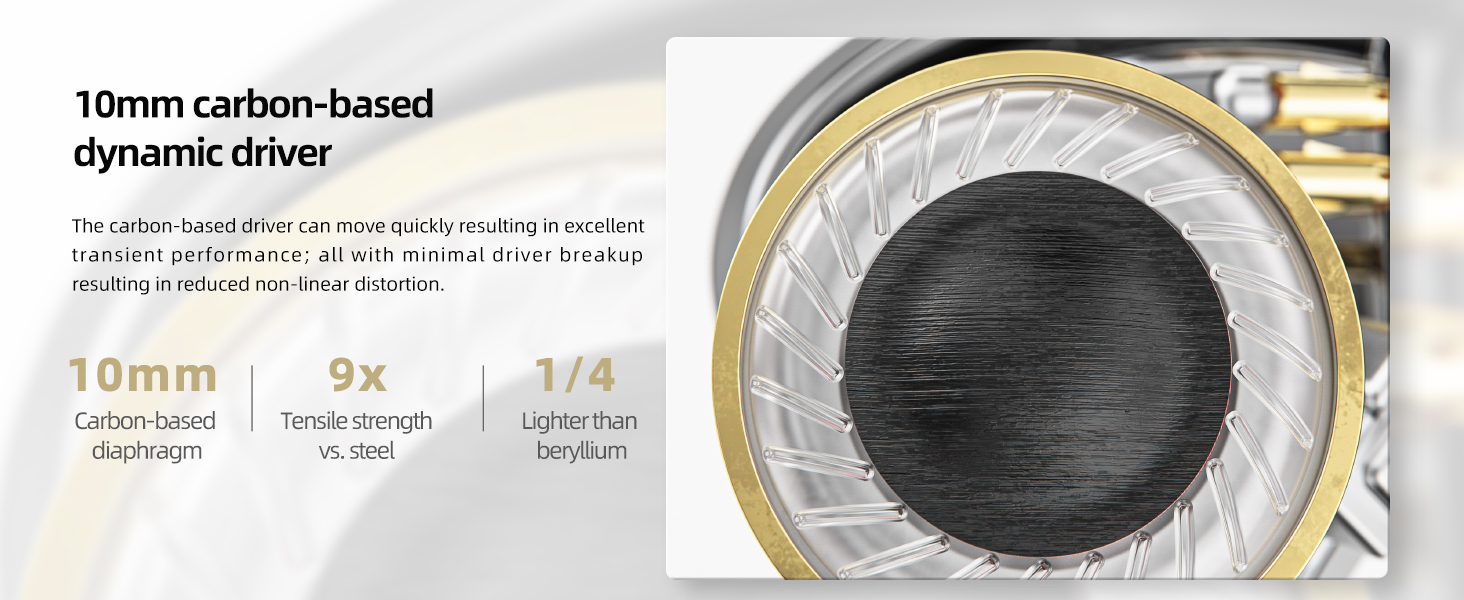
Figure 6: Three Independent Driver Chambers. A cutaway view illustrating the three independent acoustic chambers within the FiiO JH5, which minimize sound wave interference between different driver types.

Figure 7: High-Precision 3D Printed Construction. An image depicting the high-precision 3D printing technology used to create the ergonomic and acoustically optimized shells of the FiiO JH5.

Figure 8: Negative Feedback Bass Enhancement. An internal diagram illustrating the negative feedback bass enhancement system, designed to provide deep and controlled bass response.

Figure 9: Liquid Die-Cast Zinc Alloy Faceplate. A detailed view of the durable and aesthetically refined liquid die-cast zinc alloy faceplate of the FiiO JH5.
| Característica | Especificació |
|---|---|
| Nom del model | JH5 |
| Configuració del controlador | 1 Dynamic Driver + 4 Balanced Armature Drivers (Hybrid) |
| Mida del controlador dinàmic | 10mm Carbon-based |
| Interval de freqüència | 10Hz-40kHz |
| Impedància | 13 ohms |
| Connectivitat | Cablejat, Jack de 3.5 mm |
| Característica del cable | Detachable 0.78mm 2-Pin, 392-wire silver-plated copper |
| Tipus de control | Control multimèdia (comandament a distància) |
| Material | Plastic (shell), Zinc Alloy (faceplate) |
| Col·locació de l'orella | A l'orella |
| Pes de l'article | 0.37 quilograms (aproximadament 13.1 unces) |
8. Informació de la garantia
Els productes FiiO estan coberts per una garantia limitada. Per conèixer els termes i condicions específics de la garantia, consulteu la targeta de garantia inclosa amb el producte o visiteu el lloc web oficial de FiiO. weblloc web. Si us plau, conserveu el comprovant de compra per a reclamacions de garantia.
9. Atenció al client
If you encounter any issues not covered in this manual or require further assistance, please contact FiiO customer support through their official website or the retailer from whom you purchased the product. Please have your product model and purchase details ready when contacting support.


