1. Introducció
The Yahboom Muto-RS Ultimate is an advanced 18-degree-of-freedom bionic hexapod robot designed for programming and robotics enthusiasts. It operates on the ROS2 operating system and integrates high-performance hardware such as intelligent bus servos, lidar, depth cameras, and voice interaction modules. This robot is capable of complex functions including motion control, AI visual interaction, mapping navigation, and obstacle avoidance, making it an ideal platform for learning and development in robotics.
2. Informació de seguretat
Avís:
- This product is suitable for users with basic programming skills.
- Ensure all connections are secure before powering on the robot.
- Keep the robot away from water and extreme temperatures.
- Manipuleu els components amb cura per evitar danys.
- The robot contains a 12V battery. Follow all battery safety guidelines during charging and operation.
3. Estructura i components del producte
The Muto-RS Ultimate Hexapod Robot features a robust all-aluminum alloy body and is equipped with various sensors and modules for advanced functionality.

Els components clau inclouen:
- Lidar (SLAM A1 / YDLIDAR 4ROS): For real-time environment sensing and mapping.
- Astra Pro Plus Depth Camera: Enables high-definition AI vision, depth data processing, and 3D navigation.
- Pantalla OLED: For displaying status information.
- Voice Interaction Module: Allows for voice command control.
- JETSON NANO SUB / Raspberry Pi Board: Main controllers (optional, depending on kit version).
- Hexapod Robot Control Board: Manages robot movements and functions.
- USB HUB Expansion Board: For connecting additional peripherals.
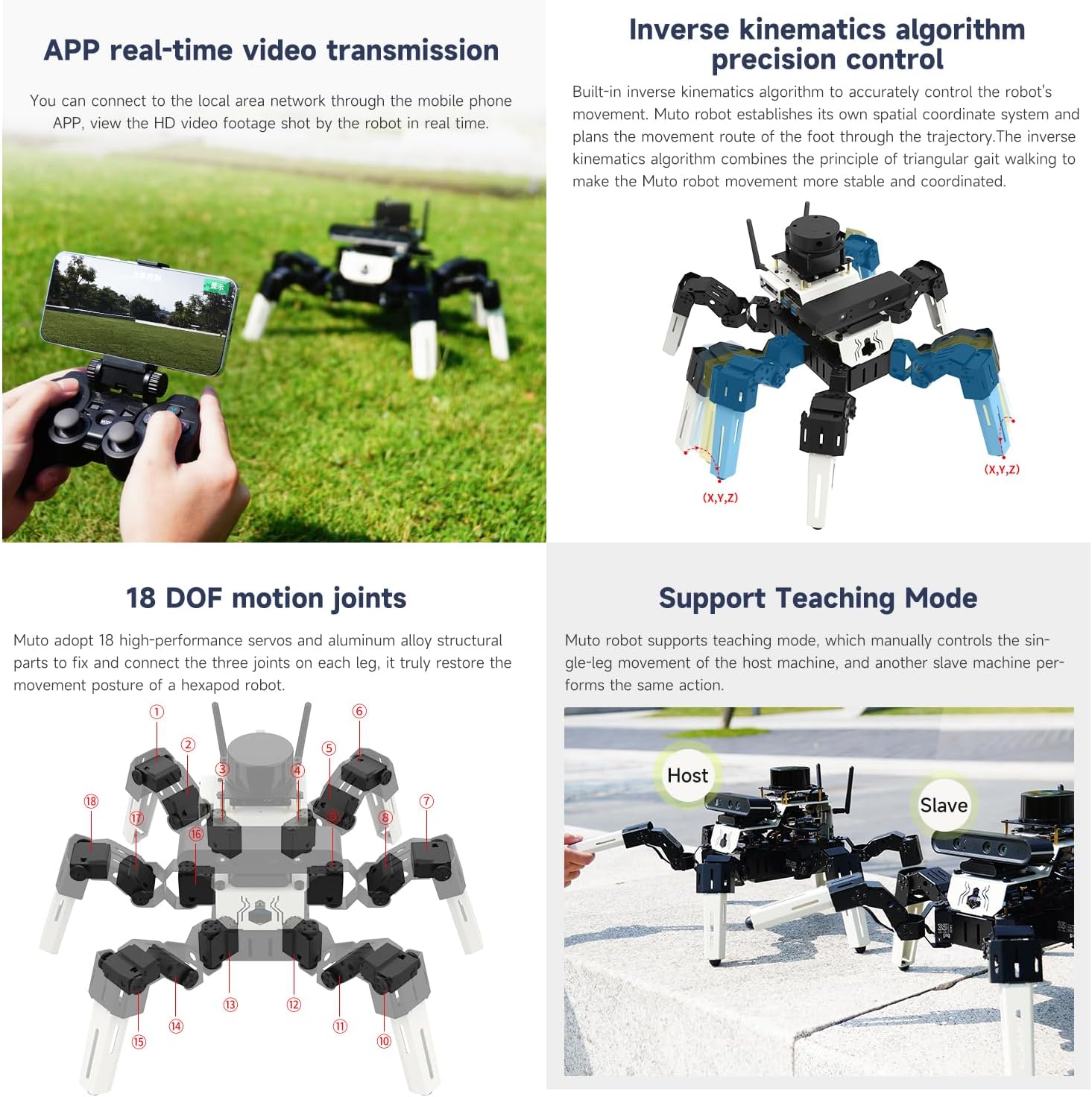
- Bus Serial Port Servo: 18 high-torque servos for precise leg movement.
- Large Capacity Lithium Battery: Provides power for extended operation.
- All-Aluminum Alloy Body: Durable and lightweight chassis with built-in IMU.

4. Especificacions
Detailed technical specifications for the Muto-RS Ultimate Hexapod Robot:

| Especificació | Valor |
|---|---|
| Dimensions del producte | 9.84 x 5.91 x 5.91 polzades |
| Pes de l'article | 12.18 lliures |
| Número de model de l'article | Ultimate Ver without Nano |
| Bateries | 1 bateria de 12 V (inclosa) |
| Fabricant | Yahboom |
| Degrees of Freedom (DOF) | 18 (3 per leg) |
| Servos | 35KG Intelligent Bus Servos |
| Sistema operatiu | ROS2 (Ubuntu based) |
| Llenguatge de programació | Python, C++ |
5. Configuració
The Muto-RS Ultimate is a DIY kit requiring assembly. Refer to the detailed online tutorials provided by Yahboom for step-by-step assembly instructions. Ensure all components are correctly identified and connected as per the guides.
- Desembalatge: Desembaleu amb cura tots els components i verifiqueu-los amb la llista d'embalatge.
- Mechanical Assembly: Assemble the hexapod body and legs, ensuring all 18 intelligent bus servos are correctly installed and aligned.
- Electronic Connections: Connect the main control board, lidar, depth camera, voice interaction module, and battery. Pay close attention to polarity and correct port usage.
- Instal·lació del controlador: Install either the Jetson Nano or Raspberry Pi board (if not pre-installed or included in your specific kit version).
- Configuració del programari: Follow the instructions to flash the appropriate ROS2 operating system (Ubuntu) onto your controller board and install necessary drivers and libraries.
- Calibració inicial: Perform initial servo calibration and system checks as guided by the online tutorials to ensure proper movement and sensor functionality.
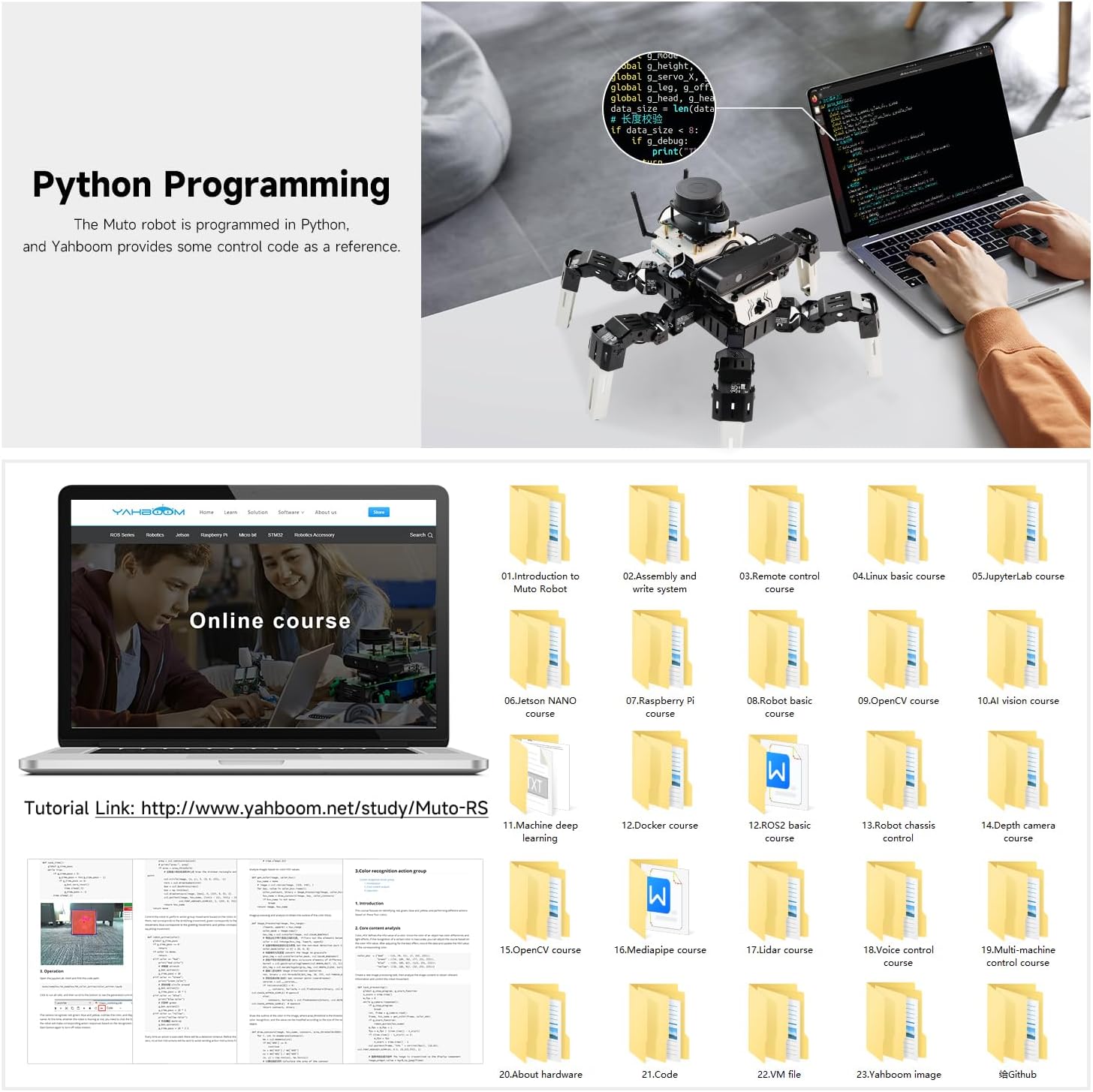
For detailed assembly and software setup, please visit the official Yahboom Muto-RS tutorial link: http://www.yahboom.net/study/Muto-RS

6. Instruccions de funcionament
The Muto-RS Ultimate offers a wide range of operational capabilities, from basic movement to advanced AI interactions. The following sections detail its primary functions.
Vídeo 6.1: Acabatview of the Yahboom Muto-RS Hexapod Robot's features and capabilities, including movement, sensing, mapping, and AI interactions.
6.1 Basic Movement and Posture Control
The robot's 18 intelligent bus servos provide 18 degrees of freedom, allowing for flexible posture changes and bionic actions. This enables the robot to navigate various terrains and overcome obstacles.
- Alçada ajustable: The robot's body posture can be adjusted to cross different obstacles (refer to Video 6.1, 1:51-1:56).
- Múltiples mètodes de control: Control the robot using a mobile APP, wireless controller, or host computer.
6.2 Control de veu
The integrated voice interaction module allows the Muto-RS to recognize and respond to voice commands, enabling intuitive control over its movements and actions.
- Reconeixement d'ordres de veu: Accurately recognizes commands for movement (e.g., "Go ahead") and object interaction (e.g., "OK, I found the red"). (Refer to Video 6.1, 1:04-1:22).
- Multi-point Navigation: Guide the robot to specific points using voice commands.

6.3 Cartografia i navegació
Equipped with high-precision lidar and a depth camera, the Muto-RS can perform real-time mapping and navigation tasks.
- Lidar SLAM Mapping: Senses the external environment in real-time to construct 2D and 3D maps. (Refer to Video 6.1, 0:33-0:42, 1:22-1:36).
- Evitació d'obstacles: Plans routes and avoids obstacles autonomously. (Refer to Video 6.1, 0:52-1:04).
- Mapping Navigation APP: Use a dedicated mobile application to control mapping and navigation, including real-time video transmission. (Refer to Video 6.1, 0:42-0:52).
- 3D Real-life Mapping Navigation: Utilizes depth camera data for advanced 3D environment understanding.

6.4 Object Tracking and AI Visual Interaction
The Muto-RS can perform various AI visual tasks, including object following, detection, and gesture control.
- KCF Following: Select and follow any object within the robot's field of view using the KCF algorithm. (Refer to Video 6.1, 1:36-1:42).
- Seguiment visual: Tracks lines and other visual cues. (Refer to Video 6.1, 2:16-2:20).
- Object Detection and Gesture Control: Utilizes the MediaPipe development framework for deep learning on target objects, enabling object detection, gesture control, and human skeleton detection. (Refer to Video 6.1, 2:20-2:38).
- Reconeixement de codis QR: Recognizes QR codes to execute complex functions. (Refer to Video 6.1, 2:09-2:13).
- Seguiment facial: Identifies and tracks human faces. (Refer to Video 6.1, 2:13-2:16).
6.5 Multi-Machine Synchronization Control
With multi-machine communication technology, multiple Muto-RS robots can be controlled simultaneously from a single wireless handle. (Refer to Video 6.1, 2:01-2:09).
6.6 Python Programming and Simulation
The Muto-RS is an open-source development platform that supports Python and C++ programming. Yahboom provides extensive resources for learning and development.
- Python Source Code: Access to open Python source code for customization and development. (Refer to Video 6.1, 0:23-0:29).
- RVIZ Simulation: Utilize RVIZ simulation models for testing and learning. (Refer to Video 6.1, 2:38-2:42).
- Online Tutorials and Codes: Comprehensive electronic tutorials and code examples are available for various applications, including robot motion control, AI visual interaction, mapping navigation, Docker container development, and more.
7. Manteniment
Proper maintenance ensures the longevity and optimal performance of your Muto-RS robot.
- Neteja: Regularly clean the robot's body and sensors (lidar, camera) with a soft, dry cloth. Avoid using liquids directly on electronic components.
- Cura de la bateria: Charge the 12V battery using the provided charger. Do not overcharge or completely drain the battery. Store the battery in a cool, dry place when not in use.
- Servo Inspection: Periodically check the intelligent bus servos for any signs of wear or loose connections. Ensure they move freely without obstruction.
- Actualitzacions de programari: Keep the ROS2 operating system and all related software packages updated to the latest versions for improved performance and security.
- Inspecció física: Inspect the aluminum alloy body and leg joints for any damage or loose screws. Tighten as necessary.
8. Solució De Problemes
This section provides solutions to common issues you might encounter with your Muto-RS robot.
- El robot no s'encén:
- Check if the battery is fully charged and properly connected.
- Ensure the power switch is in the 'ON' position. - Servos Not Responding:
- Verify all servo connections to the control board.
- Check for any physical obstructions preventing servo movement.
- Ensure the control software is running and communicating correctly with the servos. - Navigation or Mapping Issues:
- Ensure the lidar and depth camera are clean and unobstructed.
- Verify that the ROS2 nodes for lidar and camera are active and publishing data.
- Check the environment for sufficient features for SLAM algorithms to work effectively. - El control per veu no funciona:
- Ensure the voice interaction module is correctly connected and enabled in the software.
- Speak clearly and at a reasonable distance from the microphone.
- Check software logs for voice recognition errors. - Connectivity Problems (APP/Wireless Controller):
- Ensure the robot's Wi-Fi module is active and connected to the same network as your control device.
- Check the IP address configuration.
- For wireless controllers, ensure it is properly paired with the robot. - Errors de programari:
- Consult the Yahboom online tutorials and forums for specific error codes or issues.
- Ensure all dependencies and libraries are correctly installed and updated.
9. Assistència i garantia
For further assistance, technical support, and detailed tutorials, please refer to the official Yahboom resources:
- Tutorials en línia: http://www.yahboom.net/study/Muto-RS
- Suport tècnic: Yahboom provides online help and technical support services. Refer to the weblloc per obtenir informació de contacte.
Informació de la garantia: Si us plau, consulteu el document oficial del fabricant website or your purchase documentation for specific warranty terms and conditions for the Yahboom Muto-RS Ultimate Hexapod Robot.


