1. Introducció i finalview
The Soundmaster SCD1980SI is a versatile portable audio system designed to combine classic audio formats with modern connectivity. This boombox features DAB+ and FM radio, CD player (CD-R/RW, MP3-CD compatible), a cassette recorder with built-in microphone, USB and Micro-SD playback for MP3 files, and Bluetooth connectivity for wireless streaming. Its robust design and multiple power options (AC or battery) make it ideal for both home and portable use.
This manual provides detailed instructions for setting up, operating, and maintaining your Soundmaster SCD1980SI to ensure optimal performance and longevity.
2. Instruccions de seguretat importants
Please read these safety instructions carefully before operating the unit and retain them for future reference. Failure to follow these instructions may result in electric shock, fire, or damage to the unit.
- Font d'alimentació: Feu servir només l'adaptador de corrent o les piles especificades. Assegureu-vos que el volumtage matches the requirements of the unit.
- Aigua i humitat: No exposeu la unitat a la pluja, la humitat, les goteges o les esquitxades. No col·loqueu objectes plens de líquids, com ara gerros, a sobre de la unitat.
- Calor: No col·loqueu la unitat a prop de fonts de calor com ara radiadors, registres de calor, estufes o altres aparells (inclosos amplificadors) que produeixen calor.
- Ventilació: Assegureu-vos que la ventilació sigui adequada. No bloquegeu cap obertura de ventilació. Instal·leu-ho d'acord amb les instruccions del fabricant.
- Neteja: Unplug the unit from the wall outlet before cleaning. Clean only with a dry cloth.
- Manteniment: No intenteu reparar aquest producte vosaltres mateixos, ja que obrir o treure les cobertes us pot exposar a un risc perillós de voltage o altres perills. Demaneu tot el servei a personal de servei qualificat.
- Bateries: Do not mix old and new batteries. Do not mix alkaline, standard (carbon-zinc), or rechargeable (nickel-cadmium) batteries. Dispose of used batteries properly.
- Antena: Position the telescopic antenna carefully to avoid injury or damage.
3. Contingut del paquet
Si us plau, comproveu que tots els elements estiguin presents a l'embalatge:
- Soundmaster SCD1980SI Boombox
- Cable d'alimentació de CA.
- Manual d'usuari (aquest document)
Si falta algun article o està malmès, poseu-vos en contacte amb el vostre distribuïdor.
4. Producte acabatview
Familiarize yourself with the various parts and controls of your Soundmaster SCD1980SI Boombox.

Figura 4.1: Frontal inclinat view of the Soundmaster SCD1980SI Boombox, showing the CD player, cassette deck, radio display, and various controls.

Figura 4.2: Davant view of the Soundmaster SCD1980SI Boombox, highlighting the central control panel, dual speakers, and telescopic antenna.
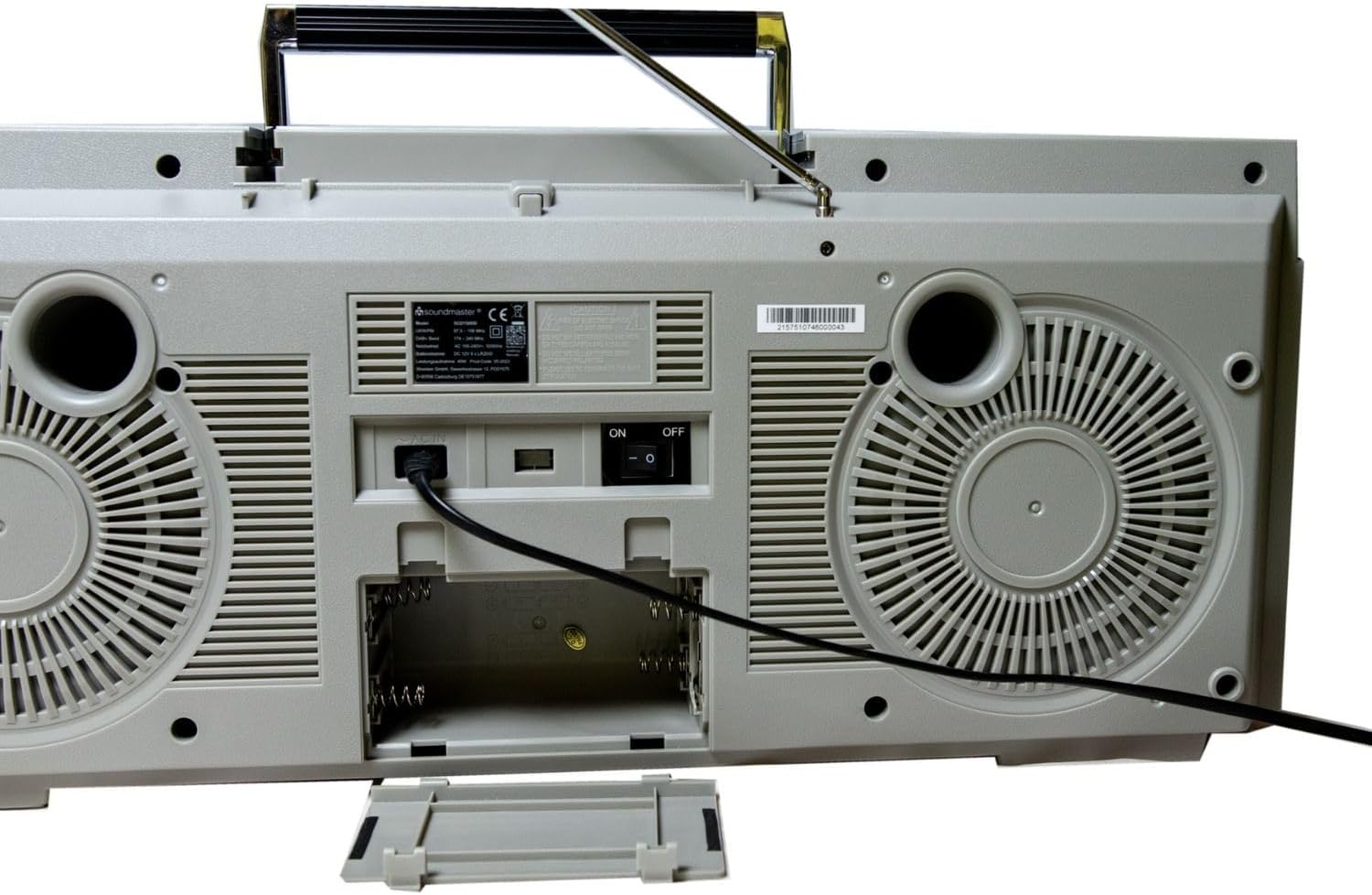
Figura 4.3: posterior view of the Soundmaster SCD1980SI Boombox, displaying the power input, battery compartment, and bass reflex ports.
Característiques principals:
- Ràdio digital DAB+: Enjoy crystal-clear digital radio with 30 preset station memory.
- Ràdio FM: Traditional analog FM radio reception.
- Reproductor de CD: Supports CD-R/RW and MP3-CD playback.
- Gravador de casset: Play and record audio cassettes, featuring a built-in microphone for voice recording.
- USB/Micro-SD Playback: Reprodueix àudio MP3 files directly from USB sticks or Micro-SD cards.
- Connectivitat Bluetooth: Reprodueix àudio sense fil des del teu telèfon intel·ligent, tauleta o altres dispositius amb Bluetooth.
- Entrada auxiliar: Connecteu dispositius d'àudio externs mitjançant un cable d'àudio de 3.5 mm.
- Entrada de micròfon: For karaoke or voice amplificació.
- Disseny portàtil: Integrated handle and battery compartment for on-the-go use.
5. Configuració
5.1 Connexió d'alimentació
Your Soundmaster SCD1980SI can be powered by AC mains or batteries.
Alimentació CA:
- Assegureu-vos que l'interruptor d'alimentació de la unitat estigui en la posició OFF.
- Insert the AC power cable into the AC IN jack on the rear of the unit.
- Plug the other end of the AC power cable into a standard wall outlet (230V ~ 50Hz).
Potència de la bateria:
For portable use, the unit requires 8 x 'D' size (UM-1) batteries (not included).
- Obriu la tapa del compartiment de les piles a la part posterior de la unitat.
- Insert 8 'D' size batteries, ensuring the correct polarity (+/-) as indicated inside the compartment.
- Tanqueu bé la tapa del compartiment de la bateria.
- When operating on batteries, disconnect the AC power cable.
5.2 Ajust de l'antena
For optimal radio reception, extend the telescopic antenna fully. For FM and DAB+ reception, try adjusting the angle and direction of the antenna to achieve the best signal quality.
5.3 Encès inicial
After connecting power, press the POWER button to turn on the unit. The display will illuminate, and the unit will typically default to the last used mode or DAB+ radio.
6. Instruccions de funcionament
6.1 Funcionament general
- Encès/apagat: Premeu el botó POWER per encendre o apagar la unitat.
- Control de volum: Gireu el botó VOLUME per ajustar el nivell de so.
- Selecció del mode: Use the MODE button to switch between DAB+, FM, CD, USB/SD, Bluetooth, and AUX modes.
- Control de graves/aguts: Adjust the BASS and TREBLE knobs to fine-tune the audio output.
6.2 Funcionament de la ràdio DAB+
- Switch the unit to DAB+ mode using the MODE button.
- The unit will automatically scan for available DAB+ stations on first use or if no stations are found.
- Use the TUNING knob or PRESET buttons to navigate through the list of available stations.
- To store a station as a preset, press and hold the PRESET button until the display shows 'Preset Store'. Use the TUNING knob to select a preset number (1-30) and press PRESET again to confirm.
- To recall a preset station, briefly press the PRESET button and use the TUNING knob to select the desired preset number, then press PRESET again.
6.3 Funcionament de la ràdio FM
- Switch the unit to FM mode using the MODE button.
- Rotate the TUNING knob to manually tune to a desired FM frequency.
- To auto-scan for the next available station, press and hold the TUNING knob or a dedicated scan button if available.
- Storing and recalling FM presets follows the same procedure as DAB+ presets.
6.4 Reproducció de CD
- Switch the unit to CD mode.
- Obriu la porta del compartiment del CD.
- Place a CD (audio CD, CD-R/RW, or MP3-CD) onto the spindle with the label side facing up.
- Close the CD compartment door. The unit will read the disc.
- Premeu el botó PLAY/PAUSE per iniciar o pausar la reproducció.
- Use the SKIP FORWARD/BACKWARD buttons to skip tracks.
- Premeu el botó STOP per aturar la reproducció.
- Use the REPEAT button to repeat the current track or the entire disc.
6.5 Reproducció i gravació de cassets
- Switch the unit to TAPE mode.
- Obriu la porta del compartiment del casset.
- Insert a cassette tape with the open edge facing down.
- Tanqueu la porta del compartiment del casset.
- Reproducció: Press the PLAY button to start playback. Use FAST FORWARD and REWIND buttons to navigate. Press STOP/EJECT to stop playback and eject the tape.
- Gravació: To record from radio, CD, or the built-in microphone, ensure the desired source is playing. Press the RECORD button (usually red) simultaneously with the PLAY button. The unit will begin recording onto the cassette. Press STOP to end recording.
6.6 USB/Micro-SD Playback
- Switch the unit to USB/SD mode.
- Insert a USB flash drive into the USB port or a Micro-SD card into the Micro-SD slot.
- The unit will automatically detect and begin playing MP3 files.
- Use the PLAY/PAUSE, SKIP FORWARD/BACKWARD, and STOP buttons as you would for CD playback.
6.7 Connexió Bluetooth
- Switch the unit to Bluetooth mode. The display will show 'BT' or 'PAIRING', indicating it's ready to pair.
- Al telèfon intel·ligent o al dispositiu Bluetooth, activeu Bluetooth i cerqueu els dispositius disponibles.
- Select 'SCD1980SI' (or similar name) from the list of devices.
- Once paired, the unit will confirm the connection, and you can now stream audio from your device to the boombox.
- Control playback (play/pause, skip) either from your connected device or using the boombox's controls.
6.8 Entrada auxiliar (AUX)
- Canvieu la unitat al mode AUX.
- Connect an external audio device (e.g., MP3 player, smartphone) to the AUX IN jack using a 3.5mm audio cable (not included).
- L'àudio del dispositiu connectat ara es reproduirà pels altaveus del boombox. Controla la reproducció des del dispositiu extern.
6.9 Microphone Input / Karaoke
- Connect a microphone (not included) to the MIC jack on the unit.
- Adjust the microphone volume using the dedicated MIC VOLUME knob, if available, or the main volume control.
- You can sing along to music playing from CD, USB/SD, Bluetooth, or AUX.
7. Manteniment
Proper care and maintenance will ensure the longevity of your Soundmaster SCD1980SI.
- Neteja de la unitat: Desconnecteu l'alimentació abans de netejar-la. Feu servir un drap suau i sec per netejar l'exterior de la unitat. No utilitzeu productes de neteja abrasius, ceres ni dissolvents.
- Cura de les lents de CD: If the CD player experiences reading errors, use a commercially available CD lens cleaner disc to clean the lens. Do not touch the lens directly.
- Cassette Deck Care: Periodically clean the tape heads, capstan, and pinch roller with a cotton swab lightly dampened with isopropyl alcohol. Demagnetize the tape heads regularly with a tape head demagnetizer.
- Cura de la bateria: If the unit will not be used for an extended period, remove the batteries to prevent leakage and corrosion.
- Emmagatzematge: Guardeu la unitat en un lloc fresc i sec, allunyat de la llum solar directa i de temperatures extremes.
8. Solució De Problemes
If you encounter problems with your unit, please refer to the following table for common issues and solutions.
| Problema | Causa possible | Solució |
|---|---|---|
| Sense poder | Cable d'alimentació no connectat; piles esgotades o inserides incorrectament. | Comproveu la connexió de CA; canvieu les piles o assegureu-vos que la polaritat sigui correcta. |
| Sense so | Volum massa baix; Mode incorrecte seleccionat; Auriculars connectats. | Increase volume; Select correct mode (CD, Radio, BT, etc.); Disconnect headphones. |
| Mala recepció de ràdio | Antenna not extended or poorly positioned; Weak signal area. | Extend and adjust the telescopic antenna; Try moving the unit to a different location. |
| El CD no es reprodueix / Error de disc | Disc is dirty or scratched; Disc inserted incorrectly; Unsupported disc format. | Clean the disc with a soft cloth; Insert disc with label side up; Ensure it's an audio CD, CD-R/RW, or MP3-CD. |
| Bluetooth no connectat | Unit not in Bluetooth mode; Device too far; Bluetooth not enabled on external device. | Switch unit to Bluetooth mode; Move device closer; Enable Bluetooth on your device and re-scan. |
| Problemes de reproducció de cassets | Tape is tangled or damaged; Tape heads are dirty. | Inspect tape for damage; Clean tape heads and pinch roller. |
9. Especificacions
| Característica | Descripció |
|---|---|
| Model | SCD1980SI |
| Marca | Mestre de so |
| Tecnologia de connectivitat | Bluetooth, Auxiliar, USB |
| Tipus d'altaveu | estèreo |
| Font d'alimentació | AC (230V ~ 50Hz) / Battery (8 x 'D' size UM-1) |
| Dispositius compatibles | MP3 Player, Personal Computer, Smartphone |
| Sintonitzador de ràdio | DAB+, FM |
| Compatibilitat amb CD | CD, CD-R/RW, MP3-CD |
| Plata de cassets | Playback and Recording (with built-in microphone) |
| Reproducció USB/SD | Format MP3 |
10. Garantia i Suport
Your Soundmaster SCD1980SI Boombox comes with a manufacturer's warranty. Please refer to the warranty card included in your packaging for specific terms and conditions, including the warranty period and coverage details.
For technical support, service, or further inquiries, please visit the official Soundmaster weblloc web o poseu-vos en contacte amb el seu departament d'atenció al client. Normalment, podeu trobar la informació de contacte al fabricant weblloc web o a l'embalatge del producte.
Conserveu el vostre comprovant de compra per a reclamacions de garantia.


