Introducció
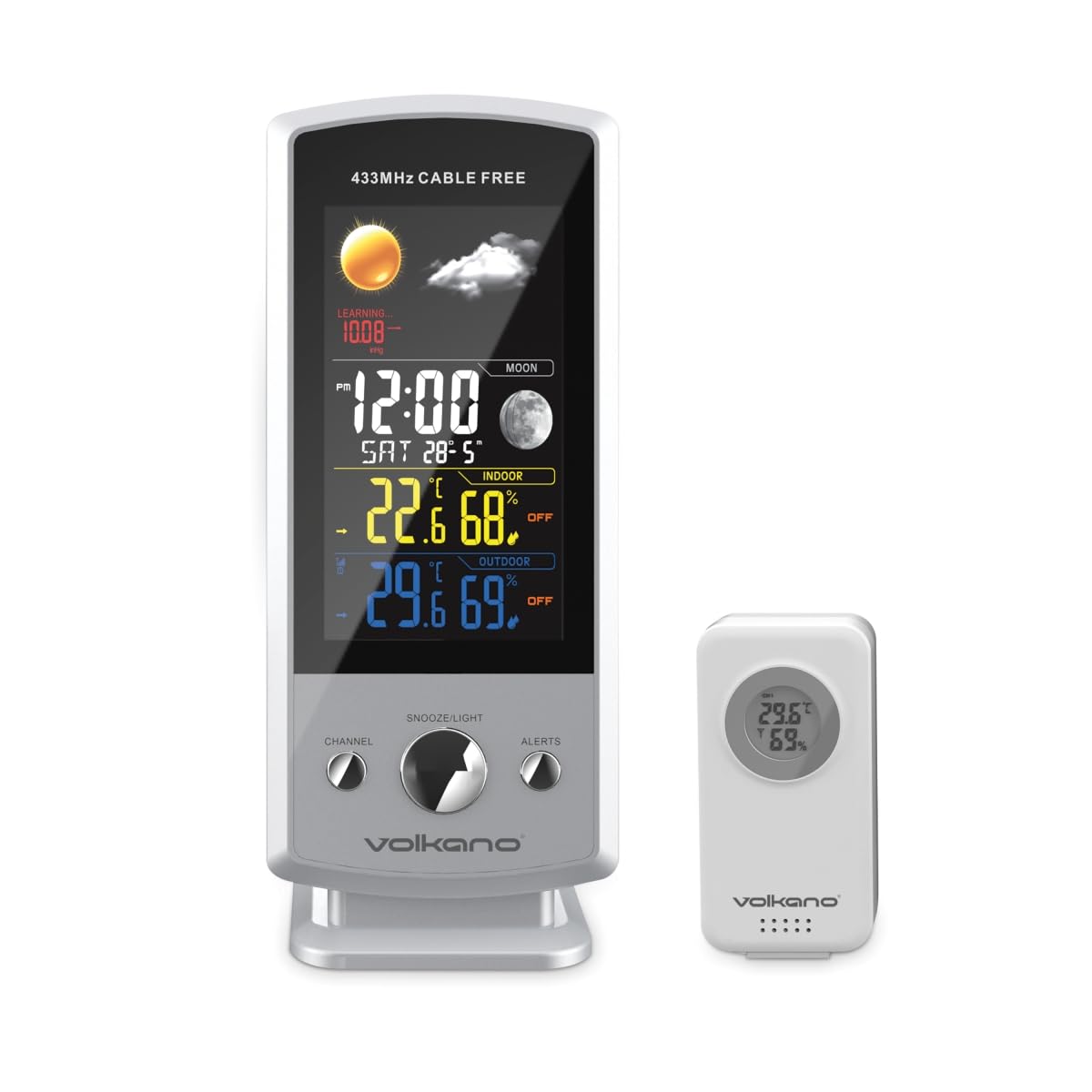
The Volkano VK-6301 Drizzle Series Weather Station is a wireless device designed to provide accurate and up-to-date weather information. It features a large, easy-to-read display that shows indoor and outdoor temperature, humidity, and atmospheric pressure. Additionally, it provides a weather forecast, current time, and date. The system includes an outdoor sensor unit that wirelessly transmits environmental data to the main indoor display unit.
Contingut del paquet
- Volkano Drizzle Series Main Display Unit
- Wireless Outdoor Sensor Unit
- Cable d'alimentació USB
- Manual d'usuari
Característiques clau
- Wireless weather station with an outdoor sensor unit.
- Large, easy-to-read display showing indoor and outdoor temperature, humidity, and pressure.
- Displays weather forecast, current time, and date.
- Outdoor sensor unit can be placed up to 100 meters away from the indoor display unit.
Instruccions de configuració
1. Main Display Unit Setup
- Connexió d'alimentació: Connect the provided USB power cable to the main display unit and plug the other end into a suitable USB power adapter (not included) or a powered USB port. The unit will power on and the display will illuminate.
- Configuració inicial: Upon first power-up, the unit may prompt you to set the time, date, and measurement units (Celsius/Fahrenheit). Use the control buttons (typically located on the back or side) to adjust these settings. Refer to the 'Operating Instructions' section for detailed button functions.
2. Wireless Outdoor Sensor Unit Setup
- Instal·lació de la bateria: Open the battery compartment on the back of the outdoor sensor unit. Insert 2x AAA batteries (not included), ensuring correct polarity (+/-). Close the compartment securely.
- Col·locació: Position the outdoor sensor in a shaded area, protected from direct sunlight and rain, to ensure accurate temperature and humidity readings. Ensure it is within 100 meters of the main display unit and free from major obstructions that could interfere with the wireless signal.
- Maridatge: The outdoor sensor should automatically pair with the main display unit within a few minutes. If the outdoor readings do not appear, press the 'SYNC' or 'CHANNEL' button on the main unit (refer to specific button layout) to initiate a manual search for the sensor.

Instruccions de funcionament
Visualització finalitzadaview
La unitat de visualització principal ofereix una visió completaview de les condicions meteorològiques actuals i la informació horària:
- Hora i data: Displays the current time (12/24-hour format) and date.
- Temperatura i humitat interiors: Shows the temperature and relative humidity measured by the main unit.
- Temperatura i humitat exteriors: Shows the temperature and relative humidity transmitted from the wireless outdoor sensor.
- Pressió atmosfèrica: Displays the current barometric pressure.
- Pronòstic del temps: An icon-based forecast (e.g., sunny, cloudy, rainy) predicts upcoming weather conditions based on pressure changes.
- Fase de la Lluna: Indica la fase actual de la lluna.
Funcions dels botons (generals)
While specific button labels may vary, most weather stations include the following common functions:
- MODE/SET: Used to enter settings mode and confirm selections.
- UP/DOWN (or +/-): Used to adjust values during settings or to toggle between display modes (e.g., min/max temperature).
- ALARMA: To set or activate/deactivate alarms.
- SNOOZE/LLUM: To temporarily silence an alarm or activate the backlight.
- CANAL/SINCRONITZACIÓ: To switch between multiple outdoor sensors (if supported) or manually initiate sensor pairing.
- C/F: To switch between Celsius and Fahrenheit temperature units.
Refer to the specific button layout on your device for exact functions and sequences.
Manteniment
- Neteja: Wipe the display unit and outdoor sensor with a soft, damp drap. No utilitzeu productes de neteja abrasius ni dissolvents, ja que poden danyar les superfícies.
- Battery Replacement (Outdoor Sensor): When the battery indicator on the main display shows low battery for the outdoor sensor, replace the batteries promptly to ensure continuous data transmission. Use fresh AAA batteries.
- Comprovació de col·locació: Periodically check the outdoor sensor's placement to ensure it remains protected from extreme weather and maintains a clear signal path to the main unit.
Resolució de problemes
| Problema | Causa possible | Solució |
|---|---|---|
| No hi ha cap pantalla a la unitat principal. | Cable d'alimentació no connectat o defectuós. | Ensure USB power cable is securely connected and power adapter is working. |
| No es mostra la temperatura/humitat exterior. | Outdoor sensor batteries low or dead; sensor out of range; interference; sensor not paired. | Replace sensor batteries. Move sensor closer to main unit. Reduce interference sources. Manually re-pair sensor (refer to 'Setup Instructions'). |
| Lectures exteriors inexactes. | Sensor exposed to direct sunlight or rain. | Traslladeu el sensor a una zona ombrejada i protegida. |
| Weather forecast seems incorrect. | Forecast is based on local atmospheric pressure changes, not satellite data. | Understand that the forecast is a local prediction and may not always match official forecasts. Allow time for the unit to calibrate. |
Especificacions
- Model: VK-6301-WT
- Marca: Volcà
- Interval sense fil: Up to 100 meters (open air)
- Alimentació (unitat principal): Cable d'alimentació USB
- Potència (Sensor exterior): 2x piles AAA (no incloses)
- Visualització: Large, easy-to-read color display
- Funcions: Indoor/Outdoor Temperature, Indoor/Outdoor Humidity, Atmospheric Pressure, Weather Forecast, Time, Date, Moon Phase
- Dimensions (paquet): Aproximadament 24.2 x 20.4 x 12.2 cm
- Pes de l'article: Aproximadament 540 g
Garantia i Suport
All Volkano products are covered by a Cobertura limitada de 1 anys and lifetime customer support. You can extend your coverage by registering your product to receive an additional 12-month extension, totaling 24 months of coverage by Volkano.
For support with products or services, please message us via the official Volkano Page or visit the Volkano weblloc per obtenir informació de contacte.


